ERP adoption delivers a single source of truth, measurable efficiency gains, real-time visibility, lower operating costs, and a scalable foundation for growth — but only when your organization retires legacy systems and achieves genuine user adoption.
The core ERP adoption benefits your stakeholders need to know:
- Single source of truth — one consolidated data record across all functions
- Improved efficiency and productivity — automated transactions, fewer manual steps
- Real-time visibility and reporting — live dashboards replacing end-of-month spreadsheets
- Cost savings — decommissioned software, reduced reconciliation labor, lower IT overhead
- Scalability and business agility — add entities, geographies, or modules without re-platforming
- Better customer service — CRM-integrated order and service history in one view
- Security and compliance — role-based access, audit trails, and regulatory reporting built in
- Standardized workflows — consistent processes across departments and locations
- Integration with third-party tools — APIs connecting logistics, payroll, e-commerce, and more
One honest caveat: benefits are frequently back-loaded. Early disruption at go-live is normal, and measurable gains for process standardization and reporting typically appear months after launch once legacy systems are retired and adoption stabilizes.
Key takeaways
ERP adoption benefits are real and well-documented, but they materialize only when organizations retire legacy systems, redesign processes, and sustain user adoption through the first year of operations.
| Point | Details |
|---|---|
| Benefits are back-loaded | Measurable gains typically appear 3–12 months post go-live, not at cutover. |
| Legacy retirement is the trigger | Cost savings, data accuracy, and efficiency gains require decommissioning the systems the ERP replaces. |
| Culture determines outcome | User adoption and organizational governance are the leading risk factors, per Investopedia’s analysis. |
| Baseline before go-live | Measure DSO, close time, labor hours, and license costs before launch to make attribution credible. |
| Singleclic accelerates realization | Singleclic’s Dynamics 365 and Cortex integration approach connects ERP, approvals, and legacy systems to reduce adoption friction in KSA and UAE deployments. |
Table of Contents
- What each ERP adoption benefit actually means in practice
- How ERP actually delivers those benefits
- KPIs and ROI measurement: what to track and when
- Costs, timelines, and the red flags that predict poor outcomes
- Selection and rollout best practices that maximize benefit realization
- Evidence and industry statistics that support the business case
- How to measure ROI and which KPIs to track
- Common implementation challenges and risks
- Typical timeline and cost considerations
- Industry-specific benefits of ERP adoption
- How ERP adoption changes employee roles and why change management determines the outcome
- Where ERP delivers fastest and what most buyers get wrong
- Singleclic helps you close the gap between ERP investment and measurable results
- Sources
What each ERP adoption benefit actually means in practice
Understanding the list is one thing. Knowing which KPI moves and what the day-to-day change looks like is what makes a business case credible.
1. Single source of truth / centralized data
Every department — finance, supply chain, HR, sales — reads from the same database. Reconciliation meetings shrink because the numbers no longer differ between systems. The KPI to watch is the time your team spends on manual data reconciliation each month; most organizations see that figure drop sharply within the first quarter after go-live. ERP integrates core business functions into a single system, and that integration is what makes every downstream benefit possible.
2. Improved efficiency and productivity
Automated transaction processing replaces manual data entry for purchase orders, invoices, and payroll runs. A procurement team that previously re-keyed supplier invoices into three separate systems now approves them in one queue. The KPI here is labor hours per core process cycle — order-to-cash, procure-to-pay, and record-to-report are the three most commonly tracked. AI-assisted automation reduces manual work and errors while consolidating financial data in real time, compressing the monthly close from days to hours in well-run implementations.

3. Real-time visibility and reporting
Live dashboards replace the weekly spreadsheet pack. A CFO can see cash position, outstanding receivables, and inventory value without waiting for the finance team to compile a report. The KPI is reporting cycle time — how long it takes to produce a management pack. Connecting ERP and CRM integration for operational visibility extends that real-time view across sales pipelines and customer service queues, not just the back office.
4. Cost savings and lower operating costs
Cost savings come from two places: decommissioning the software licenses and support contracts the ERP replaces, and reducing the labor cost of reconciliation and manual reporting. A single platform lowers IT maintenance overhead compared to managing five or six point solutions. The KPI is total cost of ownership per process, measured against the pre-ERP baseline.
5. Scalability and business agility
Adding a new legal entity, warehouse, or product line in a well-configured ERP is a configuration task, not a re-implementation. That agility matters most during acquisitions or rapid geographic expansion. The KPI is time-to-activate for a new business unit — a figure that can shrink from months to weeks once the template is established.
6. Better customer service and CRM integration
When the ERP and CRM share a data layer, a customer service agent can see order status, invoice history, and open support tickets in one screen. Response times fall and first-call resolution rates rise. ERP and CRM integration is one of the fastest paths to measurable customer-experience improvement, particularly for manufacturers and distributors whose customers ask about delivery dates and billing simultaneously.
7. Security and compliance
Role-based access controls mean a warehouse clerk cannot edit a supplier bank account. Audit trails record every change with a timestamp and user ID, which satisfies SOX, GDPR, and sector-specific regulatory requirements. The KPI is audit findings per cycle — organizations consistently report fewer findings after ERP consolidation because access is governed centrally rather than managed across disparate spreadsheets and legacy apps.
8. Collaboration and standardized workflows
When every team follows the same process template, handoffs between departments become predictable. A purchase requisition approved in one country follows the same approval chain as one raised in another. The KPI is process cycle time variance — the gap between your fastest and slowest completion of the same process. Standardization narrows that gap.
9. Integration capabilities with existing systems and third-party tools
Modern ERP platforms expose APIs and pre-built connectors for logistics providers, payroll bureaus, e-commerce platforms, and banking portals. AI/ML features — demand forecasting, automated alerts, route optimization — deliver additional value, but only when the underlying data is clean and the integrations are maintained. The KPI is the number of manual data-transfer steps eliminated post-go-live.
Statistic callout: Datix research cited by the US Chamber of Commerce found that roughly 95% of businesses reported major operational improvements after ERP implementation, specifically reduced process times, increased cross-department collaboration, and centralized enterprise data.
How ERP actually delivers those benefits
Software features do not produce benefits on their own. The mechanics that convert a license into measurable value are organizational as much as technical.
The core mechanisms are:
- Single database architecture — all modules write to and read from one data store, eliminating the synchronization errors that plague multi-system environments
- Process standardization — the ERP enforces a defined workflow; users cannot skip steps or route around controls
- Automated transaction processing — rules-based automation handles repetitive tasks (matching, posting, alerting) without human intervention
- Integrated analytics — reports pull live data rather than exports, so the numbers are always current
- Master data management — a single customer record, supplier record, and item master governs every transaction
The buyer decisions that determine whether those mechanisms actually fire are just as important. Benefit realization depends on retiring legacy systems, process redesign, and buyer-side decisions — identical implementations can produce widely different returns. Cost savings require decommissioning the systems the ERP replaces. Better inventory accuracy requires trusting the ERP’s real-time stock data and stopping parallel spreadsheet tracking. A faster monthly close requires a single consolidated ledger, which means migrating all entities onto it.
Pro Tip: The most common trap is replicating old processes inside the new system. Before go-live, map every workaround your teams use today and ask whether the ERP’s standard process makes it unnecessary. If the answer is yes, retire the workaround — do not configure it back in.
KPIs and ROI measurement: what to track and when
Measuring ERP value requires a baseline taken before go-live, a clear attribution method, and a realistic reporting cadence. The table below maps the most important KPIs to what they indicate and when you can realistically expect movement.
| KPI | What it measures | When to expect change |
|---|---|---|
| Time to close (days) | Finance efficiency, data consolidation | 3–6 months post go-live |
| Days sales outstanding (DSO) | Cash collection speed | 3–9 months |
| Inventory turns | Stock accuracy and demand planning | 6–12 months |
| Order-to-cash cycle time | End-to-end sales process efficiency | 3–6 months |
| Labor hours per process cycle | Automation and productivity gains | Immediate to 3 months |
| Software/license consolidation savings | Cost of decommissioned systems | Immediate (at contract end) |
| Customer response time | CRM and service integration quality | 3–6 months |
| Audit findings per cycle | Compliance and access governance | 12+ months |
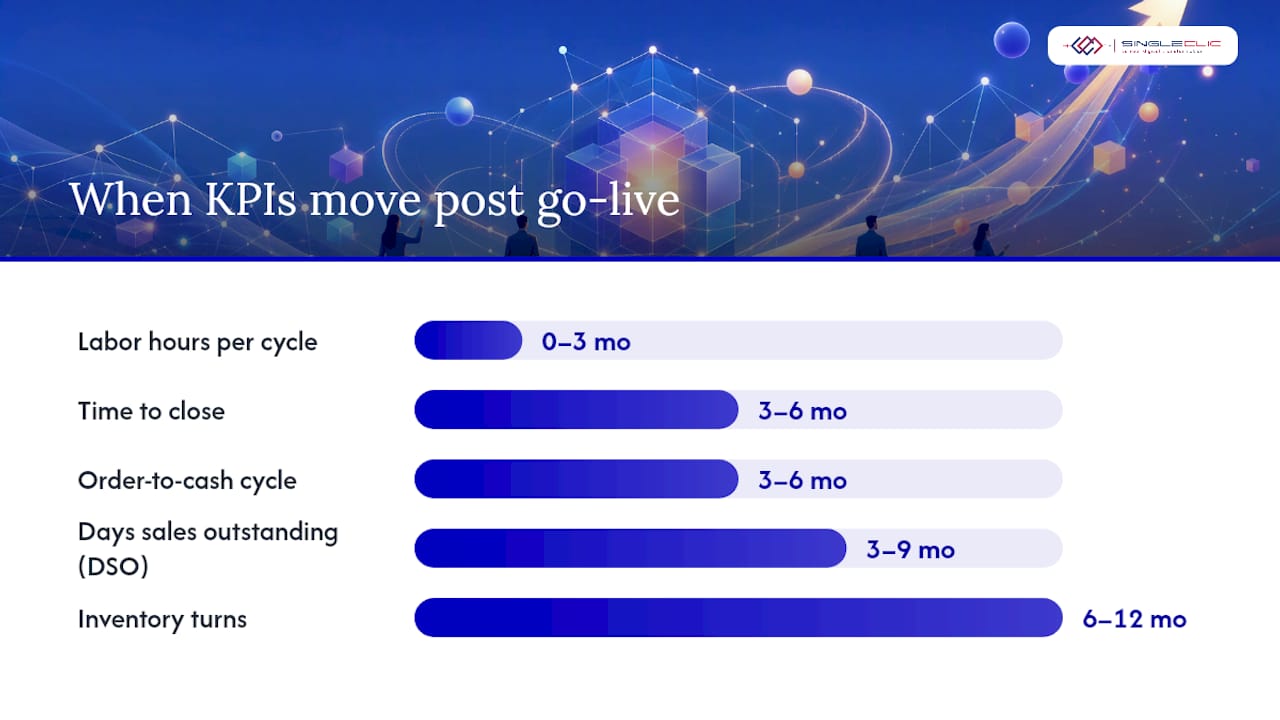
Establish your baseline for each KPI in the three months before go-live. Attribution is straightforward for cost savings (decommissioned licenses are a direct line item) but requires judgment for productivity metrics, where other factors also change. A quarterly review cadence works well for the first year; monthly for the first 90 days when disruption is highest.
Investing in ERP for business growth is most defensible when the business case is built against specific systems being retired and specific process costs being reduced, not against industry-average percentage improvements.
Statistic callout: ERP Research notes that average ROI figures from vendor materials are unreliable without business-specific baselines — the same implementation can produce dramatically different returns depending on which legacy systems are retired and how thoroughly processes are redesigned.
Costs, timelines, and the red flags that predict poor outcomes
Typical cost components
Every ERP project budget should account for:
- Software licensing or SaaS subscription fees
- Implementation consultancy (design, configuration, testing, training)
- Integration development for third-party systems
- Data cleansing and migration
- Change management and training programs
- Ongoing support and maintenance contracts
Third Stage Consulting’s balanced analysis consistently highlights that implementation cost and duration are the most common sources of stakeholder disappointment — not the software itself.
Timeline by approach
A phased cloud rollout typically delivers the first productive modules in 4–6 months, with full benefit realization at 12–18 months. A big-bang implementation compresses the go-live date but concentrates risk; organizations that choose this path often see a sharper productivity dip in the first 90 days. A hybrid approach — cloud for new processes, phased retirement of legacy systems — is common in mid-market and enterprise projects and usually lands benefit realization at 12–24 months.
Red flags that correlate with poor benefit realization
- Keeping legacy systems live in parallel beyond the agreed cutover date — users revert to the familiar tool and adoption stalls
- Scope creep driven by “nice to have” customizations that delay go-live and inflate cost
- Poor master data — duplicate customer records, inconsistent item codes, and unreconciled opening balances corrupt the single source of truth from day one
- Low user adoption — the most common cause of benefit shortfall, per Investopedia’s ERP risk analysis
- Excessive customization — modifying core ERP logic to match legacy processes defeats the purpose of standardization and creates upgrade debt
Selection and rollout best practices that maximize benefit realization
Selection checklist
- Define the systems the ERP will retire — list every application being decommissioned and confirm the ERP covers its functions before signing
- Confirm the reporting model — validate that your standard management reports can be produced natively, without custom development
- Require upgradeable configuration — distinguish between configuration (survives upgrades) and customization (requires rework at every release)
- Insist on a master-data plan — the vendor or partner must present a data-cleansing and migration methodology before project kickoff
- Budget for adoption — change management, training, and a hypercare period are not optional line items; they are where benefits are won or lost
For a feature-level checklist, 7 essential ERP system features for business leaders provides a practical procurement reference.
Rollout best practices
- Pilot the highest-impact process first — the one where manual effort is greatest or data errors are most costly
- Set a hard retirement date for legacy systems and communicate it early; ambiguity about the cutover date is the single biggest adoption risk
- Align governance and KPIs before go-live so every department head owns a metric
- Sequence modules for fastest impact: finance and procurement first (fastest ROI), then supply chain and manufacturing, then HR and advanced analytics
Questions to ask implementation partners
- Which specific legacy systems have you replaced with this ERP in a comparable organization?
- What is your master-data methodology and who owns data quality on the client side?
- How do you measure benefit realization at 6 and 12 months post go-live?
- What does your hypercare model look like after cutover?
- How do you handle scope change requests without delaying go-live?
Evidence and industry statistics that support the business case
The business case for ERP is well-supported, but the evidence is most useful when framed honestly.
Statistic callout: Datix, cited by the US Chamber of Commerce, found that 95% of businesses reported major operational improvements post-ERP — reduced process times, increased collaboration, and centralized data. That figure is a useful ceiling; your actual outcome depends on the buyer decisions discussed above.
Vendor case materials (reported by Microsoft and similar enterprise vendors) document outcomes such as significant reductions in payroll processing time and improvements in order conversion rates following ERP adoption. These are single-organization examples and should be treated as directional rather than universal benchmarks.
Panorama Consulting Group’s annual surveys consistently show that most organizations see measurable benefits post-ERP, but a meaningful share realize less than their original business case predicted. The most common causes are scope growth and legacy systems kept in parallel — the same red flags listed above.
Third Stage Consulting’s balanced view frames this well: ERP systems genuinely improve efficiency and reporting, but the implementation cost and duration are real, and over-customization is a recurring trap. The organizations that outperform their business cases are those that treat the ERP as a process-redesign project with software support, not a software project with some process implications.
How to measure ROI and which KPIs to track
ROI measurement starts before go-live, not after. Document your current cost per process cycle, your monthly close duration, your DSO, and your software license spend.
Post go-live, track KPIs in two horizons. The first 90 days should focus on adoption metrics: active users, transactions processed in the ERP versus legacy workarounds, and help-desk ticket volume (a leading indicator of friction). From month 3 onward, shift to operational KPIs: time to close, DSO, inventory turns, and order-to-cash cycle time.
Attribution discipline matters. When DSO improves, confirm whether the ERP’s automated dunning notices drove the change or whether a credit policy change coincided. Honest attribution builds stakeholder trust and makes the next investment case easier to approve.
Common implementation challenges and risks
The most frequently cited challenges are not technical. They are organizational.
User resistance is the leading cause of benefit shortfall. People protect familiar tools, especially when the new system initially feels slower. Mitigation requires visible executive sponsorship, early wins communicated broadly, and a clear message that the legacy system has a retirement date.
Scope creep inflates budgets and delays go-live. Every “small addition” requested during implementation carries configuration, testing, and training costs that compound. A formal change-control process with a named decision-maker is non-negotiable.
Data quality is consistently underestimated. Organizations that spend adequately on data cleansing before migration go live with a trustworthy system. Those that defer it go live with a fast, integrated system full of bad data — which erodes user confidence and stalls adoption.
Over-customization is the long-term trap. Modifying core ERP logic to replicate legacy processes locks you into expensive upgrade cycles and defeats the standardization benefit. The discipline of accepting standard processes, even when they feel unfamiliar, is what separates high-ROI implementations from expensive ones.
Typical timeline and cost considerations
Implementation timelines vary by scope and approach, but a realistic range for a mid-market organization is 6–18 months from contract to full go-live. Enterprise-scale projects with multiple legal entities and complex integrations can run 18–36 months.
Cost components scale with scope. Software licensing for a cloud ERP typically runs on a per-user, per-month model. Implementation consultancy often equals or exceeds the first year of software cost for mid-market projects. Data migration, integration development, and change management each add meaningful budget lines that are frequently underestimated in early business cases.
The most reliable cost-control lever is scope discipline at the selection stage. Organizations that define the systems being retired and the processes being standardized before signing a contract consistently come in closer to budget than those that define scope during implementation.
Industry-specific benefits of ERP adoption
The benefits listed above apply broadly, but the highest-impact use cases vary by sector.

Construction and real estate gain the most from project-cost tracking and subcontractor management in a single system. When project budgets, procurement, and billing share one data layer, cost overruns are visible in real time rather than discovered at project close.
Healthcare organizations benefit most from compliance and audit-trail capabilities. Regulatory reporting, credentialing, and supply-chain traceability are all strengthened when data is centralized and access is governed by role.
Banking and financial services prioritize the general ledger consolidation and regulatory reporting benefits. A single chart of accounts across entities reduces close time and simplifies external audit.
Telecom operators use ERP to manage complex service catalogs, billing integrations, and workforce scheduling. The integration capability between ERP and operational support systems is where the most significant efficiency gains appear.
Manufacturing and distribution see the clearest inventory and supply-chain benefits: accurate stock levels, demand-driven replenishment, and supplier performance tracking in one system.
How ERP adoption changes employee roles and why change management determines the outcome
ERP adoption does not eliminate jobs in most organizations. It changes them. A finance analyst who spent 60% of their time compiling reports now spends that time interpreting them. A procurement officer who manually matched invoices now manages exceptions flagged by the system. The work shifts from data assembly to data use.
That shift is genuinely positive for most employees over time, but it feels threatening at first. People who built expertise in a legacy system lose their advantage when the system changes. That anxiety is the root of resistance, and it is invisible in most business cases.
Organizational culture and user adoption are the principal risks to realizing ERP value, according to Investopedia’s analysis — not the software’s technical capabilities. Practical mitigation includes tying department-head KPIs to adoption metrics, setting mandatory retirement dates for legacy applications, and running rapid pilot wins that demonstrate improved daily workflows before the full rollout.
Change management is not a training program. It is a sustained communication and accountability effort that starts at project kickoff and runs through the first year of steady-state operations. Organizations that treat it as a one-week training event consistently underperform their business cases.
Where ERP delivers fastest and what most buyers get wrong
The conventional wisdom on ERP ROI focuses on the technology: which platform, which modules, which integrations. That framing misses the actual determinant of value.
The organizations that realize the fastest ROI are not the ones that chose the best software. They are the ones that made the hardest organizational decisions: retiring legacy systems on day one, redesigning processes rather than replicating them, and holding department heads accountable for adoption metrics. In construction and banking projects across KSA and UAE, the pattern is consistent — the technical implementation is rarely where projects stall. The stall points are master data, legacy system retirement, and the cultural work of getting senior managers to stop running parallel spreadsheets.
Cortex, Singleclic’s low-code and BPM platform, addresses a specific gap that standard ERP implementations often leave open: the approval workflows, exception-handling processes, and legacy system integrations that sit between the ERP and the people who use it. When those connective processes are automated and governed through Cortex, adoption accelerates because the ERP stops feeling like an obstacle and starts feeling like the path of least resistance.
The change management point deserves more attention than it gets. Cultural resistance is often invisible in early business cases because it does not appear on a Gantt chart. The organizations that budget for it — stakeholder workshops, executive sponsorship programs, visible quick wins — consistently outperform those that treat go-live as the finish line. Go-live is the starting line.

Singleclic helps you close the gap between ERP investment and measurable results
Most ERP projects deliver less than their business case promised — not because the software failed, but because the organizational decisions were deferred. Singleclic’s approach starts with the business case, not the software catalog.

As a Microsoft Dynamics 365 integrator and Odoo Silver Partner with 10+ years of delivery across KSA and UAE, Singleclic brings the implementation depth and industry experience to help you realize the benefits, not just deploy the platform. Specific ways Singleclic helps:
- Baseline assessment and ROI modeling — quantifying the value of systems being retired before the project starts
- Master-data planning and cleansing — the foundation that makes every other benefit possible
- ERP and Cortex integration — connecting approvals, legacy systems, CRM, and workflows so adoption is frictionless
- Industry-specific configuration — construction, healthcare, banking, and telecom templates built from live project experience
- Adoption programs — structured change management that ties department KPIs to go-live metrics
If you are building a business case or evaluating implementation partners, Singleclic’s connected ERP and CRM guide is the right starting point. Reach out to schedule a scoping conversation and get a realistic picture of what your ERP investment can return.
Sources
- 10 Benefits of Effective ERP Systems | CO- by US Chamber of Commerce
- Benefits of ERP (2026): The Real Gains, and the Gap | ERP Research