Every digital project that delivers real value moves through six stages: Discovery (baseline assessment), Strategy and business case (prioritized roadmap), Design and prototyping (validated MVP), Build and implementation (integrated platform), Test, train, and deploy (go-live readiness), and Operate and optimize (KPI-backed improvement loop). Miss any one of them and you are not skipping a formality — you are removing the structural support that keeps scope, cost, and adoption from collapsing. The five-phase project management lifecycle (initiate, plan, execute, monitor, close) and the U.S. Digital Service playbook’s 13 practical plays both converge on the same truth: structure is what separates digital projects that deliver from those that drift. Organizations in Saudi Arabia and the UAE running enterprise ERP, CRM, or process automation programs face the same lifecycle pressures as any US counterpart — the stages do not change, but the governance intensity and localization requirements do.
- Stage 1 — Discovery: technology inventory, process map, digital maturity score
- Stage 2 — Strategy: objectives, ROI case, prioritized roadmap
- Stage 3 — Design: user journeys, wireframes, MVP definition, architecture sketch
- Stage 4 — Build: iterative development, integrations, data migration
- Stage 5 — Test, train, deploy: UAT, change management, go-live cutover
- Stage 6 — Operate and optimize: KPI monitoring, continuous improvement backlog
Key takeaways
The six stages of a digital project — Discovery, Strategy, Design, Build, Test/Train/Deploy, and Operate — form a structured lifecycle where each stage produces a specific deliverable that gates the next.
| Point | Details |
|---|---|
| Discovery is non-negotiable | A baseline assessment of people, process, and technology is the foundation every other stage depends on. |
| Gate every stage transition | Formal go/no-go decisions at each boundary keep scope, budget, and accountability intact. |
| One product owner, real authority | A single accountable leader with decision power cuts the decision latency that derails most programs. |
| Stage funding in tranches | Release budget at each gate approval to reduce financial exposure and maintain steering committee engagement. |
| Singleclic covers the full lifecycle | From discovery sprint to Dynamics 365 or Odoo go-live and Cortex-powered optimization, Singleclic delivers end-to-end. |
Table of Contents
- The six stages of digital projects at a glance
- Stage 1: What does a solid discovery phase actually produce?
- Stage 2: How do you turn discovery findings into a fundable business case?
- Stage 3: What should you validate before committing to a full build?
- Stage 4: What keeps a build phase predictable and low on technical debt?
- Stage 5: How do you get to a go-live you can actually sign off on.
- Stage 6: What does a healthy operate-and-optimize model look like?
- What timelines and budgets should you realistically plan for?
- 13 practical plays and the most common pitfalls that derail digital programs
- Governance structures and the KPIs that keep programs on track
- Your 30-60-90 day action checklist
- Quality assurance goes well beyond UAT
- Communication plans and the tools that keep teams aligned
- Post-launch support keeps the investment from eroding
- Documentation and knowledge transfer protect long-term value
- What experienced delivery teams actually see on the ground
- How Singleclic helps you move from plan to delivery
- Sources
The six stages of digital projects at a glance
The table below maps each stage to its primary deliverable, the role that owns it, and a realistic timeline band. These ranges reflect typical enterprise programs; simpler projects compress, and large-scale transformations stretch.
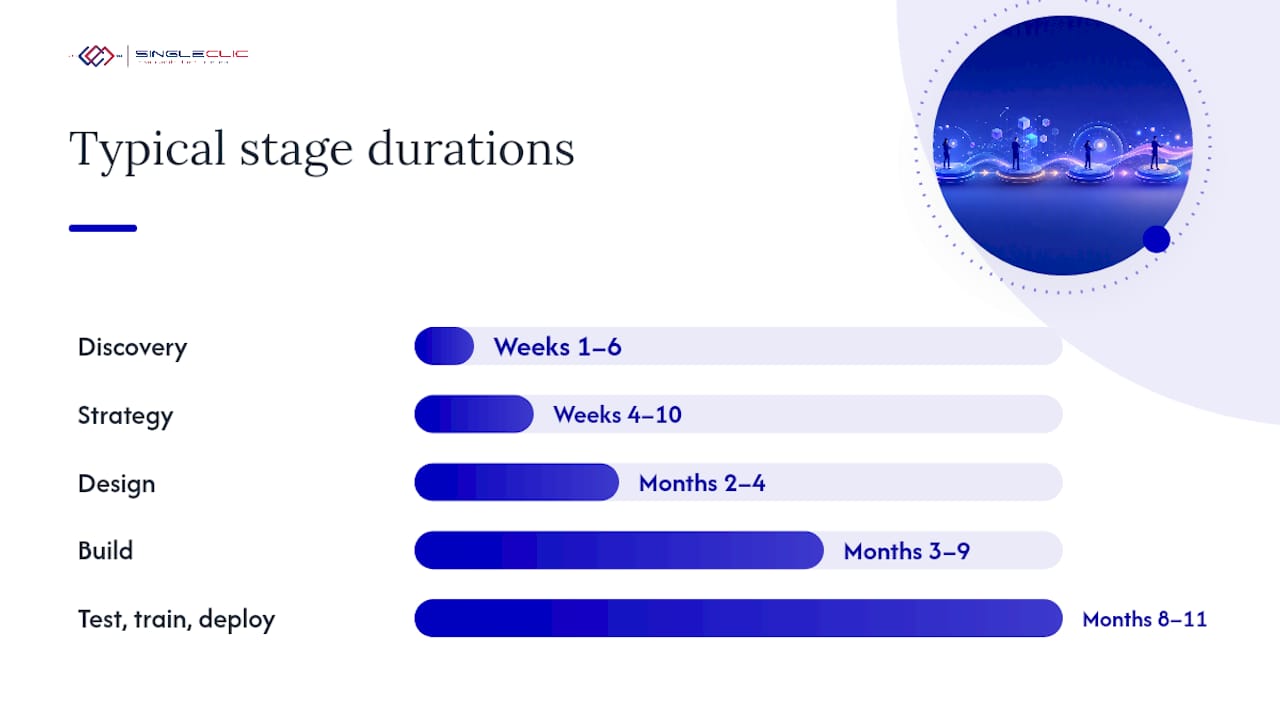
| Stage | Primary deliverable | Owner | Typical timeline |
|---|---|---|---|
| 1. Discovery | Digital maturity assessment + baseline report | Executive sponsor | Weeks 1–6 |
| 2. Strategy | Business case + prioritized roadmap | Product owner + sponsor | Weeks 4–10 |
| 3. Design | Validated prototype + architecture blueprint | Delivery lead | Months 2–4 |
| 4. Build | Integrated, tested platform increment | Delivery lead + vendor | Months 3–9 |
| 5. Test, train, deploy | Go-live sign-off + trained user base | Product owner + PMO | Months 8–11 |
| 6. Operate and optimize | KPI dashboard + improvement backlog | Product owner + operations | Ongoing |
Three gating decisions move a project forward: a signed-off baseline (Stage 1 → 2), an approved business case with budget (Stage 2 → 3), and a passed go/no-go checklist (Stage 5 → 6). Without explicit gates, projects drift between stages and accountability blurs. Gartner’s digital transformation framing reinforces this: treat the program as a maturity journey, not a list of point projects, and govern it accordingly.
Meaningful digital change typically requires a substantial duration for foundation-level transformation. Quick-win projects (a single workflow automation, a CRM module) can close in 3–4 months. Strategic bets — a full ERP migration or an enterprise data platform — sit at the longer end. Set that expectation with your steering committee before Stage 2 closes.
Stage 1: What does a solid discovery phase actually produce?
Discovery is the stage most organizations rush, and it is the one that determines whether everything else is built on solid ground. The Coursera project management lifecycle guide describes initiation as the phase where goals are defined and feasibility confirmed — but in practice, a rigorous discovery goes further.
Core deliverables from Stage 1:
- Technology inventory: every system in use, its age, integration points, and licensing status
- People and process map: who does what, where handoffs break down, and which manual steps carry the most risk
- Digital maturity score: a structured self-assessment (people, process, data, technology) that gives you a defensible baseline
- User research summaries: interviews or surveys with at least two user segments per process area
- Data quality snapshot: completeness, duplication rate, and governance gaps in the data you plan to migrate or rely on
A simple RACI for discovery: the executive sponsor approves scope and access; the product owner conducts stakeholder interviews and owns the maturity scoring; the delivery lead runs the technology inventory and data audit; department heads provide process walk-throughs and validate findings.
Pro Tip: Run a time-boxed discovery sprint of four to six weeks with a fixed output list. Resist the pull toward exhaustive documentation. A 20-page baseline report with clear findings beats a 200-page inventory that no one reads before Stage 2 begins.
Skipping this stage is the single biggest strategic error in the digital project lifecycle. Without a baseline, your roadmap is built on assumptions, your cost estimates are guesses, and your change management plan has no anchor.

Stage 2: How do you turn discovery findings into a fundable business case?
A business case is not a slide deck — it is a decision document. It answers three questions your CFO and board will ask: What are we trying to achieve? What will it cost? What will we get back, and when?
Elements of a strong business case:
- SMART objectives tied directly to discovery findings (e.g., reduce invoice processing time from 14 days to 3 days within 12 months)
- Success metrics with baseline values from Stage 1 and target values with a timeframe
- High-level cost drivers: licensing, implementation services, data migration, change management, training, and ongoing support
- Expected ROI expressed as a range, not a single number, with assumptions stated explicitly
- Risk register with at least five entries: data readiness, legacy system constraints, integration dependencies, vendor capacity, and regulatory compliance
The DGA Digital Project Management Guideline recommends SMART objectives and formal gating checkpoints — both belong in your Stage 2 output.
Prioritization: impact vs. effort
Use a 2×2 matrix to sort initiatives from your discovery findings. Score each initiative on business impact (revenue, cost, risk, compliance) and implementation effort (time, complexity, dependency count). Quick wins land in the high-impact, low-effort quadrant and should go first. Strategic bets (high impact, high effort) need phased funding. Low-impact, high-effort items get dropped or deferred.

| Quadrant | Action |
|---|---|
| High impact, low effort | Execute in first 90 days |
| High impact, high effort | Phase into foundation build |
| Low impact, low effort | Batch or automate |
| Low impact, high effort | Defer or eliminate |
Stage 3: What should you validate before committing to a full build?
Design and prototyping is where assumptions meet reality. The goal is to validate user needs, technical feasibility, and integration complexity before you spend the bulk of your budget. Experienced teams often run design and architecture as parallel tracks rather than sequential steps — a practice that dxw’s rethink of service standard phases supports for lower-risk work.
Stage 3 deliverables:
- User journeys for each primary persona (mapped from Stage 1 research)
- Wireframes or clickable prototypes for the two or three highest-priority flows
- Acceptance criteria written in plain language for each user story
- Architecture sketch showing data flows, integration points, and hosting model
- Integration map listing every system the new platform must connect to, with data ownership and API availability noted
Prototype test plan essentials: recruit five to eight participants per user segment, define a clear success criterion for each task (e.g., “user completes purchase order in under four minutes without assistance”), run two iteration cycles before locking the design, and document every failure point. An MVP is not a stripped-down product — it is the minimum set of features that delivers the core value proposition to real users under real conditions.
When design and architecture run in parallel, set a clear sync point at the end of each sprint so that UX decisions do not outpace technical feasibility checks. A prototype that cannot be built on your chosen stack is a liability, not an asset.
Stage 4: What keeps a build phase predictable and low on technical debt?
The build stage is where most cost overruns originate — not because development is inherently unpredictable, but because the controls that contain it are often absent. An ERP implementation playbook built on field experience shows that iterative delivery and a disciplined environment strategy are the two levers that matter most.
Build best practices:
- Maintain a prioritized feature backlog, reviewed and re-ranked at the start of every sprint
- Use a three-environment strategy: development, test, and production — with no direct deployments to production outside a formal release window
- Implement CI/CD pipelines so that code integration and automated tests run on every commit, not just before release
- Set a rollback procedure for every release: define the trigger conditions, the responsible role, and the maximum acceptable rollback window
- Automate regression tests for all critical paths before any release reaches the test environment
Data migration checklist:
- Map every source field to its target field, with transformation rules documented
- Run a trial migration in the test environment at least twice before cutover
- Reconcile record counts and key financial totals after each trial run
- Define a fallback plan: what happens if migration fails during the cutover window?
Pro Tip: Treat data migration as a parallel workstream, not a final-week task. The teams that run three or four trial migrations before go-live consistently report fewer cutover delays than those that treat it as a one-time event.
Data security controls belong in the build stage too — not as an afterthought at go-live. Encryption standards, access controls, and audit logging should be part of your definition of done for every sprint.
Stage 5: How do you get to a go-live you can actually sign off on.
Go-live is a decision, not a date. The U.S. Digital Service playbook is explicit: automate testing, validate with real users, and assign one accountable leader who can make the call. Here is what that looks like in practice.
Go-live checklist:
- Data readiness confirmed: trial migration reconciled, no open data quality issues above threshold
- Cutover runbook reviewed and rehearsed by the delivery team
- Rollback triggers defined: specific conditions (error rate, transaction failure rate) that automatically initiate a rollback
- Performance validation: load test results reviewed against agreed SLAs
- Security checks completed: penetration test findings resolved or risk-accepted by the executive sponsor
- User acceptance testing (UAT) signed off by business representatives, not just the IT team
Training plan outline:
- Segment your audience: power users, standard users, managers, and system administrators each need different content
- Choose delivery formats by segment: instructor-led for complex workflows, self-paced e-learning for standard tasks, job aids for reference
- Define adoption success measures: login rate at 30 days, task completion rate at 60 days, support ticket volume trend at 90 days
Sample UAT cases leaders should insist on:
- End-to-end critical business scenarios (e.g., full order-to-cash cycle, full procure-to-pay cycle)
- Disaster recovery test: simulate a system failure and validate recovery time against the agreed RTO
- Compliance flows: confirm that regulated processes produce the required audit trail and approvals
Change management is not a training event — it is a program that starts in Stage 1 and runs through Stage 6. Resistance that surfaces at go-live is almost always a symptom of insufficient engagement during discovery and design.
Stage 6: What does a healthy operate-and-optimize model look like?
Delivery does not end at go-live. The operate-and-optimize stage is where the investment either compounds or stagnates. Monitoring and controlling runs concurrently with execution throughout the lifecycle, as the Coursera project management lifecycle describes — and that concurrency becomes the operating model after go-live.
KPIs to track from day one:
| KPI | Definition | Reporting frequency |
|---|---|---|
| User adoption rate | Active users / licensed users | Weekly (first 90 days) |
| Process cycle time | Average time to complete a key end-to-end process | Monthly |
| Automated process rate | Transactions handled without manual intervention / total | Monthly |
| Cost per transaction | Total process cost / transaction volume | Quarterly |
| System uptime | Availability against agreed SLA | Weekly |
| Support ticket volume | Open tickets by severity | Weekly |
Dashboard and reporting cadence:
- Weekly: delivery team reviews adoption rate and ticket volume; escalates blockers
- Monthly: steering committee reviews cycle time, automated process rate, and open risks
- Quarterly: executive review covers cost per transaction, ROI progress against business case, and strategic backlog prioritization
Your improvement backlog should separate operating enhancements (bug fixes, minor UX improvements, performance tuning) from strategic enhancements (new modules, AI augmentation, additional integrations). Prioritize operating items by user impact; prioritize strategic items using the same impact-vs-effort matrix from Stage 2. Business process automation becomes the primary lever in this stage — once the foundation is stable, automation and AI augmentation compound the returns.
What timelines and budgets should you realistically plan for?
Timeline and budget expectations set in Stage 2 either protect the program or haunt it. Here is a realistic frame for three program types:
Primary cost drivers to budget explicitly:
- Data migration (often underestimated by 30–50% when legacy data quality is poor)
- System integrations (each integration point adds design, build, test, and maintenance cost)
- Software licensing (per-user, per-module, or consumption-based — model all three scenarios)
- Change management and training (typically 15–20% of total project cost in well-run programs)
- External contractors and specialist consultants
- Security, compliance, and audit readiness
Pro Tip: Stage your funding in tranches tied to gate approvals. Release Stage 3 and 4 budget only after the Stage 2 business case is approved. This reduces financial exposure and keeps the steering committee engaged at every decision point. For detailed CRM cost modeling, the CRM implementation cost guide provides a practical TCO framework.
13 practical plays and the most common pitfalls that derail digital programs
The U.S. Digital Service playbook distills 13 plays that materially increase the odds of delivering effective digital services. Below, each play is mapped to the stage where it has the most impact.
Most common pitfalls:
- Skipping the baseline assessment (Stage 1) and building on assumptions
- Weak or absent product ownership — no single person with authority to make trade-offs
- Contracts that lock teams into waterfall delivery when the problem requires iteration
- Missing user research, replaced by internal opinion about what users need
- Treating go-live as the finish line rather than the start of the operate stage
The 13 plays mapped to stages:
| Play | Stage where it matters most |
|---|---|
| 1. Understand what people need | Stage 1 (Discovery) |
| 2. Address the whole experience | Stage 1–2 |
| 3. Make it simple and intuitive | Stage 3 (Design) |
| 4. Build the service using agile/iterative practices | Stage 4 (Build) |
| 5. Structure budgets and contracts to support delivery | Stage 2 (Strategy) |
| 6. Assign one leader and hold that person accountable | All stages |
| 7. Bring in experienced teams | Stage 2–3 |
| 8. Choose a modern technology stack | Stage 3 (Architecture) |
| 9. Deploy in a flexible hosting environment | Stage 4 |
| 10. Automate testing and deployments | Stage 4–5 |
| 11. Manage security and privacy through reusable processes | Stage 4–6 |
| 12. Use data to drive decisions | Stage 6 (Operate) |
| 13. Default to open | Stage 3–4 |
Pro Tip: Print the plays matrix and assign an owner to each play at your Stage 2 kickoff. A play without an owner is a play that will not happen. The common digital transformation challenges guide maps these failure patterns to practical remedies.
The single most underestimated play is Play 6: one accountable leader. Decision latency — the time between a question arising and a decision being made — is the hidden tax on every digital program. A product owner with real authority cuts that tax dramatically.
Governance structures and the KPIs that keep programs on track
Gartner’s digital transformation guidance is clear: program-level governance, not project-level governance, is what sustains transformation. That means a steering committee with real authority, a product owner with real accountability, and a PMO that facilitates rather than controls.
RACI for major roles:
- Executive sponsor: Accountable for business case, budget approval, and escalation resolution
- Product owner: Responsible for backlog, acceptance criteria, and go/no-go decisions
- Delivery lead: Responsible for sprint execution, technical quality, and vendor management
- PMO: Responsible for reporting, risk tracking, and governance process adherence
- Security and privacy lead: Consulted on architecture decisions; accountable for compliance sign-off
- Vendor lead: Responsible for contracted deliverables and resource availability
KPI table with target ranges:
The DGA Digital Project Management Guideline recommends formal checkpoints (gates) at each stage boundary — a practice that keeps the steering committee engaged without requiring them to attend every sprint review.
Your 30-60-90 day action checklist
This checklist gives you a concrete starting point. Items marked (E) require executive sign-off; items marked (D) are for the delivery team.
Days 1–30:
- Appoint the executive sponsor and product owner (E)
- Commission the discovery sprint with a fixed scope and output list (E)
- Identify and brief key stakeholders across business units (D)
- Establish the steering committee meeting cadence (E)
- Confirm budget envelope for discovery and strategy phases (E)
Days 31–60:
6. Complete the baseline assessment and digital maturity score (D)
7. Draft the business case with SMART objectives and cost drivers (D)
8. Run the impact-vs-effort prioritization workshop with business leads (E + D)
9. Select the delivery methodology (Agile, Waterfall, or hybrid) based on project characteristics (E)
10. Begin vendor or partner evaluation if external resources are needed (E)
Days 61–90:
11. Approve the business case and release Stage 3 budget (E)
12. Kick off design sprints with user research participants confirmed (D)
13. Establish the risk register and assign owners to top five risks (D)
14. Finalize the MVP definition and acceptance criteria (D)
15. Schedule the first steering committee review with the Stage 2 roadmap as the agenda (E)
Use this checklist alongside your prioritized roadmap from Stage 2. The roadmap sets the strategic direction; the checklist sets the operational rhythm for the first quarter.
Quality assurance goes well beyond UAT
Quality assurance in digital projects is not a phase — it is a discipline that runs from Stage 1 through Stage 6. Most leaders think of QA as user acceptance testing before go-live. That framing misses the majority of where quality is actually created or destroyed.
Shift-left testing means writing test cases during design (Stage 3), not after build. When acceptance criteria are defined before a single line of code is written, developers build to a clear standard and testers validate against an agreed outcome rather than an assumption. Automated regression testing in the CI/CD pipeline catches regressions within minutes of a code commit, not days before a release.
Beyond functional testing, a complete QA program covers performance testing (does the system hold under peak load?), security testing (penetration tests and vulnerability scans), accessibility testing (does the interface meet WCAG 2.1 AA standards?), and data integrity testing (do migrated records match source totals?). Each of these requires a test plan, a responsible owner, and a pass/fail criterion agreed before testing begins.
Code reviews and architecture reviews are QA activities too. A peer review process that catches design flaws before they reach the test environment is far cheaper than a defect found in production. Set a definition of done that includes peer review, automated test coverage above a defined threshold, and security scan clearance — and enforce it at every sprint boundary.
Communication plans and the tools that keep teams aligned
A communication plan is not a distribution list. It is a structured answer to four questions: who needs to know what, how often, in what format, and who is responsible for sending it.
For a digital program, you need at least three communication tracks running in parallel. The delivery track covers sprint reviews, daily standups, and technical decisions — owned by the delivery lead, consumed by the delivery team and product owner. The stakeholder track covers progress updates, risk escalations, and milestone confirmations — owned by the PMO, consumed by department heads and the steering committee. The change management track covers user communications, training announcements, and adoption updates — owned by the change lead, consumed by end users and their managers.
Tools matter less than the discipline to use them consistently. Microsoft Teams or Slack for daily delivery communication, a project management platform such as Azure DevOps, Jira, or Microsoft Project for backlog and sprint tracking, and a shared document repository (SharePoint or Confluence) for decisions and documentation. The risk is not choosing the wrong tool — it is using five tools inconsistently so that critical decisions are scattered across email threads, chat messages, and meeting notes with no single source of truth.
Pro Tip: Establish a decision log from day one. Every significant decision (architecture choice, scope change, vendor selection) gets recorded with the date, the decision maker, and the rationale. Six months into a build, that log is worth more than any status report.
Post-launch support keeps the investment from eroding
The operate stage requires a defined support model, not an informal arrangement where the delivery team fields calls indefinitely. Without a structured handover, institutional knowledge walks out the door when the project team disbands, and the platform degrades faster than it improves.
A post-launch support model has three tiers. Tier 1 is the internal help desk or super-user network — the first point of contact for standard user questions and minor issues. Tier 2 is the internal IT team or a managed service provider handling configuration changes, access management, and non-critical bug fixes. Tier 3 is the implementation partner or software vendor, engaged for defects, major enhancements, and platform upgrades.
Define SLAs for each tier before go-live: response time, resolution time, and escalation path. A critical system failure (Tier 3) should have a four-hour response SLA; a standard user question (Tier 1) can wait until the next business day. Without written SLAs, every issue feels like a crisis and the support team has no defensible basis for prioritization.
Maintenance planning covers scheduled platform upgrades, security patches, license renewals, and annual performance reviews. Build these into your operating budget from Stage 2 — they are not optional costs that appear later, they are predictable obligations that belong in the business case.
Documentation and knowledge transfer protect long-term value
Documentation is the insurance policy for your digital investment. When a key team member leaves, when a vendor contract ends, or when a new leader inherits the program, documentation determines whether the organization retains its capability or starts over.
Minimum documentation set for any digital project: system architecture diagram (current state, updated after every major change), data dictionary (field definitions, transformation rules, data owners), process guides (step-by-step instructions for each key workflow), integration specifications (API contracts, data flows, error handling), and a runbook for operations (how to restart services, how to escalate incidents, how to execute a rollback).
Knowledge transfer is not a document handover — it is a structured program. Plan at least four weeks of overlap between the delivery team and the internal operations team before the delivery team exits. Use that period for shadowing, paired working, and Q&A sessions, not just document reviews. The internal team should be able to handle Tier 2 issues independently before the delivery team’s engagement formally closes.
For organizations running Microsoft Dynamics 365 or Odoo, platform-specific documentation (configuration guides, customization logs, and upgrade notes) is especially critical. Undocumented customizations are the leading cause of failed platform upgrades — and failed upgrades are expensive.
What experienced delivery teams actually see on the ground
Most digital programs do not fail because the technology is wrong. They fail because the organizational conditions for delivery were never established. That is the pattern that repeats across sectors and geographies.
The two most common soft failures are a product owner who lacks authority and a discovery phase that was compressed to save time. The product owner problem creates decision latency — every trade-off escalates, every sprint slows, and the delivery team fills the vacuum with technical decisions that should have been business decisions. The compressed discovery problem creates a roadmap built on assumptions that unravel during build, producing scope changes that erode both budget and trust.
Leaders who unblock programs fastest share three behaviors: they appoint a single product owner with real decision authority before Stage 1 begins, they protect the discovery budget even when pressure mounts to “just start building,” and they treat iterative failure during design and build as evidence of a healthy process rather than a sign of trouble. A prototype that fails a user test in Stage 3 is a cheap lesson. The same failure discovered in Stage 5 UAT is a costly one.
Singleclic’s delivery teams across KSA, UAE, and Egypt have worked through all six stages on programs ranging from healthcare ERP rollouts to government process automation. The consistent finding: governance quality in Stages 1 and 2 predicts delivery quality in Stages 4 and 5 more reliably than any technical factor. Get the foundation right, and the build becomes manageable. Skip it, and no amount of technical skill recovers the lost ground.
How Singleclic helps you move from plan to delivery
Singleclic brings 10+ years of enterprise delivery across KSA, UAE, and Egypt to every stage of your digital program. Where most engagements stall in the gap between strategy and execution, Singleclic’s structured approach covers the full lifecycle: from a time-boxed discovery sprint that produces a defensible baseline, through Microsoft Dynamics 365 and Odoo implementation, to post-go-live optimization powered by Cortex, Singleclic’s Arabic-enabled low-code platform for connecting approvals, ERP, CRM, legacy systems, and workflows without writing code.

For leaders evaluating a connected ERP and CRM platform or planning their first enterprise automation program, Singleclic offers a structured discovery engagement that produces a baseline assessment, a prioritized roadmap, and a fundable business case — the three outputs that determine whether a program succeeds or stalls. With 70+ consultants and engineers and 100+ enterprise clients including Emirates Health Services, QNB, and Emaar Misr, the team has the depth to match your sector and your scale. Reach out to Singleclic to commission your discovery sprint and get a roadmap you can act on.
Sources
- Understanding the 5 project management phases – Atlassian
- The Digital Services Playbook — U.S. Digital Service
- Digital transformation – Gartner
- The project management lifecycle – Coursera
- Guideline of Digital Project Management – v1.0 (DGA)
Recommended
- Singleclic: Download the 7-step digital transformation checklist for leaders to drive growth, align stakeholders, and optimize operations—start today.
- Step by Step Digital Roadmap for Operational Excellence
- Digital Transformation Roadmap for Business Growth Success
- 7 Key Digital Transformation Success Factors for Leaders