Yes, Odoo can control construction costs by building budgets from the bill of quantities, linking procurement directly to each project, and surfacing earned value KPIs like CPI in real time. These mechanisms close the gap between what a job was supposed to cost and what it actually costs. This kind of setup can be implemented, and the results depend entirely on how well the configuration mirrors how your site teams actually work.
TL;DR:
- Properly setting and locking the initial BOQ baseline ensures accurate cost comparisons and prevents overrun errors caused by early setup mistakes.
- Linking each purchase order and vendor bill directly to project and BOQ line items allows real-time visibility of spend against the project budget.
- Tracking the cost performance index below 1.0 helps identify and address budget overruns early, preventing large cost escalations.
- Updating the baseline with authorized variations and attaching supporting documents ensures traceability and avoids unapproved scope changes.
- Regular use of job cost sheets and weekly dashboards supports immediate project control and aligns site and finance teams on project progress.
Table of Contents
- How Odoo supports BOQ-led estimation and budget setup
- Linking procurement and purchase orders to projects for real-time cost visibility
- Tracking actuals vs estimates with EVM and CPI
- Managing variations and change orders inside Odoo
- Job cost sheets and a realistic reporting cadence
- Implementation checklist: configuring Odoo for construction cost control
- What actually breaks construction cost control, and what fixes it
- How Singleclic helps you put this into practice
- FAQ
- Sources
How Odoo supports BOQ-led estimation and budget setup
A bill of quantities in Odoo breaks a project into line items: materials, labor hours, plant and equipment, each with its own unit of measure and rate. Once the BOQ is finalized, you convert it into a project budget and lock that version as your baseline. Every later comparison, actual spend against plan, runs off that locked number, which is why the baseline has to be right before work starts.
Most budget overruns we see trace back to setup mistakes made in week one, not site problems made in month three.
- Match units of measure exactly between the BOQ and purchasing so a cubic meter of concrete never gets priced as a ton by mistake.
- Include labor and plant costs as separate BOQ lines rather than folding them into material rates, since that hides where money actually goes.
- Lock the baseline only after a quantity surveyor or estimator has reviewed it, because a baseline is nearly impossible to correct once procurement starts drawing against it.
Our cost estimation workflow guide walks through this BOQ-to-budget conversion in more detail for teams setting this up for the first time.
Linking procurement and purchase orders to projects for real-time cost visibility
Cost control breaks down the moment a purchase happens outside the system. Odoo closes that gap by tying every purchase order and vendor bill to a specific project and, ideally, to a specific BOQ line, so spend shows up against the budget the moment it is committed, not weeks later when the invoice arrives.
- Tag each purchase order to its project and map it to the relevant BOQ item before approval.
- Route POs above a set value through a manager approval step so unplanned purchases get flagged early rather than discovered in a monthly review.
- Reconcile goods receipt against the vendor bill before payment to catch quantity or price discrepancies while they are still correctable.
This structure is what stops materials and subcontractor buys from slipping off-ledger. In tighter markets, where materials can represent a large share of baseline costs, that discipline matters more than most project managers assume, a point the Turner & Townsend UAE construction cost performance report makes clear when it flags 2025 tender price inflation forecast at around 3.3%.
Tracking actuals vs estimates with EVM and CPI
Earned value management compares three numbers: planned value (what you expected to have spent by now), earned value (the budgeted cost of work actually completed), and actual cost (what you really spent). The Cost Performance Index, earned value divided by actual cost, is the single number that tells you whether a job is running efficiently.
A CPI below 1.0 signals a cost overrun and calls for management action, according to research on EVM in construction, which frames EVM and CPI as essential tools for linking scope, schedule and cost on a live project.
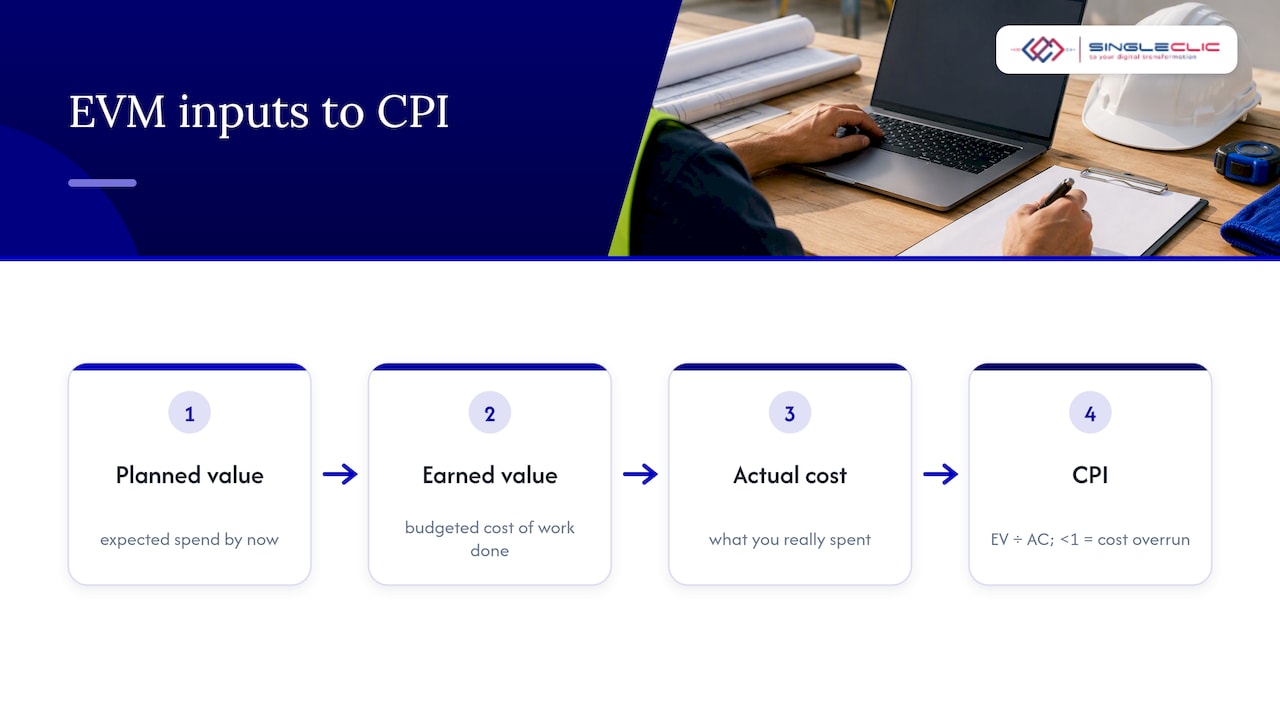
Odoo’s project reporting views can be mapped to these three EVM inputs once your BOQ and timesheets are structured correctly, giving project controllers a live CPI rather than one calculated by hand at month end. We cover the exact report configuration in our Odoo project accounting guide.
Managing variations and change orders inside Odoo
Every variation should attach directly to the BOQ line it affects so the cost baseline updates with full traceability instead of a disconnected spreadsheet note. The process matters more than the tool: a variation needs a clear origin, a priced impact, and a documented approval before it touches the budget.
- Record the instruction or trigger event first, then price the labor, material and time impact against current rates.
- Route the priced variation through the same approval chain as the original budget, so nothing bypasses sign-off.
- Keep supporting documents, site instructions, correspondence, photos, attached to the variation record for audit and claim purposes.
Meeting contractual notice periods is often the difference between a recoverable claim and a lost one. Guidance on contract notification requirements points out that typical FIDIC-based clauses require notice within a set window, commonly 28 days, and missing that window can forfeit entitlement entirely. Automated reminders tied to the variation record reduce that risk considerably.
Job cost sheets and a realistic reporting cadence
A job cost sheet pulls together every cost category for a project: materials, labor, plant, and subcontractor lines, against the budgeted figure for each. It is the document a project manager and a finance controller can both read and agree on, because it uses the same numbers from the same source.
- Generate interim payment certificates (IPCs) directly from the job cost sheet so billed amounts tie back to actual progress.
- Apply retention percentages automatically within Odoo’s invoicing rules rather than tracking them in a separate ledger.
- Circulate a weekly dashboard to site and project managers, and reserve a full EVM review, CPI, variance by line item, open variations, for a monthly meeting with finance and executives.
That split matters: weekly dashboards catch drift early, while the monthly review is where budget decisions actually get made.
Implementation checklist: configuring Odoo for construction cost control
Getting this right is a configuration project, not a software purchase. Based on the implementations we run across construction and real estate clients, here is the realistic path.
- Enable Project, Purchase, Inventory, and Accounting modules first, adding a construction-specific BOQ app only once core costing works cleanly.
- Prepare master data before go-live: cost codes, units of measure, labor and plant rate cards, and subcontractor profiles, since messy master data is the most common cause of post-launch rework.
- Pilot on one or two live jobs before rolling out company-wide, keeping legacy spreadsheets read-only during the transition so you can catch mapping errors without losing your safety net.
- Train site engineers and QS staff on BOQ entry and PO tagging specifically, since budget accuracy depends on their discipline more than any system feature.
Pro Tip: Run your first full EVM report before go-live using historical data from a closed project. If the CPI calculation doesn’t match what you already know happened on that job, your mapping is wrong, not the job.
A realistic timeline runs three to six months from kickoff to stable reporting, covering configuration, master data cleanup, pilot rollout, and training. Where teams need approvals, notifications, or legacy system links beyond Odoo’s native workflow, we connect those through Cortex, our low-code and BPM platform, without custom code. Our Odoo for construction page outlines what that delivery model looks like in practice.
What actually breaks construction cost control, and what fixes it
The most common failure we see is not a software gap, it is a habit: teams keep a parallel spreadsheet “just in case” and the spreadsheet quietly becomes the real source of truth, while Odoo data goes stale. The implementations that hold up share two traits: procurement rules enforced from day one, and automated notifications that remove the need for anyone to remember a deadline. Executive-level KPI visibility, not just site-level tracking, is what keeps the discipline in place past month three.
— Tamer Badr
How Singleclic helps you put this into practice
Odoo for construction teams can support BOQ-based budgets, procurement linkage, and live CPI reporting working together, not as separate spreadsheets. Delivery models typically run three to six months, and where approvals or legacy systems need to connect into the workflow, Cortex can handle that without custom development.

Before a scoping call, it helps to have your project scope, a sample BOQ, and your preferred procurement approval routes ready so we can map them directly to Odoo’s structure. You can review our full services or reach out to discuss what an Odoo construction setup would look like for your projects.
FAQ
How do you do cost control in construction?
Cost control in construction means setting a budget from the BOQ, tracking actual spend against that budget line by line, and reviewing KPIs like CPI regularly enough to catch overruns while they are still correctable. The discipline comes from linking procurement, job costing, and reporting into one system rather than three disconnected ones.
What is the best ERP for construction?
The right ERP depends on whether you need BOQ-led costing, multi-entity support, and procurement linkage out of the box or through configuration. Odoo is a strong fit for mid-size construction and real estate firms because its project, purchase, and accounting modules can be mapped directly to job costing and EVM reporting.
What is the best software for controlling construction costs?
Effective construction cost control software links your BOQ, procurement, and job cost reporting in one place rather than relying on spreadsheets passed between teams. An independent review of construction management software features highlights BOQ handling, procurement linkage, and job costing as the core capabilities to look for, which Odoo supports when configured with that structure in mind.
How much does Odoo cost in the UAE?
Odoo’s own licensing varies by the number of applications and users selected, and implementation cost depends on project scope, data migration, and configuration complexity. We do not publish a flat price for construction implementations because scope varies project to project; pricing is discussed during a scoping call based on your specific requirements.
What is CPI in construction cost control?
CPI, or Cost Performance Index, measures how efficiently a project is spending against the value of work completed, calculated as earned value divided by actual cost. A CPI below 1.0 signals a cost overrun that needs management attention before it compounds further.
Sources
- MDPI — research on EVM in construction
- Turner & Townsend — UAE construction cost performance 2025
- TenderScanAI — contract notification and defects guidance for UAE