Odoo is a practical, cost-effective ERP for small and mid-market construction firms and it scales into enterprise use when paired with the right customization. It fits contractors who run project-based work and need modular workflows across estimating, procurement, and accounting. The caveat: bill of quantities (BOQ) tracking and progress billing rarely work out of the box, so plan on partner-led configuration before go-live.
TL;DR:
- Customization of bill of quantities and progress billing modules is essential, as they rarely function out of the box for construction workflows.
- Implementation typically takes several months, with the most significant costs driven by custom BOQ/RA extensions, integrations, and localization.
- Core modules to prioritize include project management, procurement, accounting, and field tools, which deliver the fastest operational gains.
- Strong partner support is crucial to ensure proper configuration, especially for regional needs like Arabic localization and multi-system integrations.
- Field teams require offline-capable mobile tools; neglecting this aspect often leads to workflow and change management failures.
Table of Contents
- How Odoo maps to construction workflows
- Core Odoo modules and extensions construction teams should prioritize
- Implementation timeline, cost drivers, and common pitfalls
- Integration and customization: APIs, field apps, and reporting
- Decision-maker checklist: how to evaluate Odoo for your construction business
- Singleclic’s perspective: regional experience deploying Odoo for construction
- Where Odoo makes the biggest operational difference for construction firms
- How Singleclic helps you deploy Odoo for construction
- Sources
- FAQ
How Odoo maps to construction workflows
Every construction job moves through the same arc: estimate, procure, build, bill, close. Odoo for construction works because its modules line up against that arc instead of forcing a generic workflow onto a site-driven business.
- Estimation and BOQ: the Sales and Project apps handle line-item quoting, though production-grade BOQ tracking usually needs a custom module or a marketplace add-on, since Odoo’s core codebase treats quantity takeoffs as a specialized extension rather than a native feature.
- Procurement and delivery: Purchase and Inventory manage vendor POs, material receipts, and stock movement across sites.
- Site execution: Project tasks and timesheets track labor and progress against milestones.
- Progress billing: Accounting handles retention and staged invoicing, again often extended for RA (running account) billing formats common in construction contracts.
- Closeout: final invoicing and job costing reports close the loop back into the general ledger.
Mobile access matters here. Field crews log hours, material use, and site photos from a tablet, and that data syncs to the office in real time instead of arriving on paper at week’s end.
Core Odoo modules and extensions construction teams should prioritize
Not every module deserves day-one attention. Sequencing implementation around the modules that create the fastest operational payoff keeps the project focused and the budget under control.
Project management comes first. Odoo’s Gantt views, milestone tracking, task dependencies, and timesheets give site supervisors and PMOs a shared view of schedule risk, which is usually the first thing a construction firm loses visibility into as job count grows.
Procurement and inventory come next. Purchase order flows, goods receipts, and material tracking by site or warehouse cut the material waste and duplicate ordering that plague multi-site contractors. A materials tracking dashboard alone often justifies the module for firms running more than a handful of concurrent jobs.
Accounting needs the most deliberate configuration. Job costing by project, retention percentages, progress invoicing schedules, and work-in-progress (WIP) reporting all have to be mapped to how your finance team already recognizes revenue, since construction accounting rarely matches standard ERP defaults.
Field capabilities round out the core set: mobile daily logs, RFIs (requests for information), punch lists, and a client-facing portal for approvals. These are the features that most directly separate an ERP that works for construction from one that merely works for generic project tracking.
Beyond the core four, most firms add:
- Marketplace modules for BOQ-to-invoice automation
- Custom-built RA billing extensions matched to local contract formats
- Third-party field apps for site photo capture and offline sync
- Reporting extensions for cost variance and WIP visibility
Implementation timeline, cost drivers, and common pitfalls
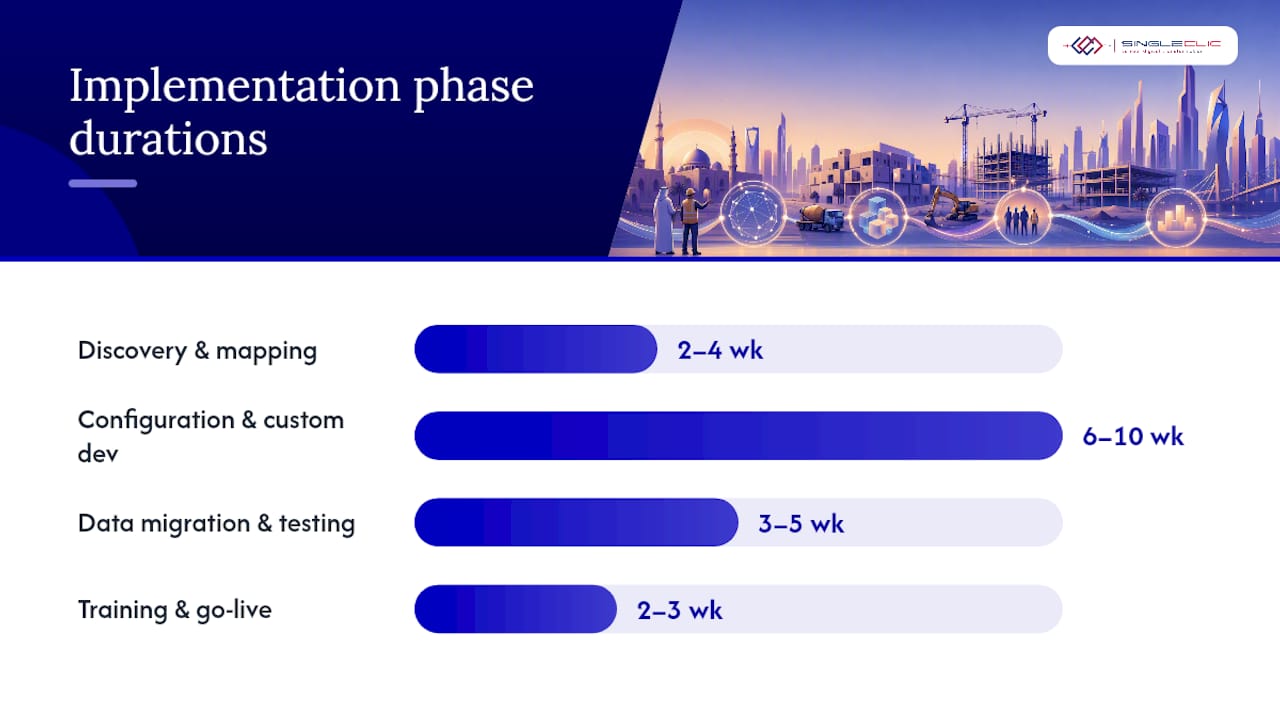
A mid-market construction Odoo rollout typically runs several months from kickoff to go-live, depending on how much of the BOQ and progress billing workflow needs custom build versus configuration.
- Discovery and process mapping (two to four weeks): document current estimating, procurement, and billing workflows.
- Configuration and custom development (six to ten weeks): set up core modules, build BOQ/RA extensions, connect field apps.
- Data migration and testing (three to five weeks): move historical project and vendor data, test progress billing against real contracts.
- Training and go-live (two to three weeks): roll out to site and office teams in parallel.
Cost scales with three factors: custom BOQ/RA modules, integration count (payroll, supplier portals, banking), and localization needs like Arabic invoice formats. Data migration from legacy spreadsheets is consistently underestimated.
The most common pitfall is treating field workflow as an afterthought. Site teams need offline-capable mobile tools, not a desktop interface shrunk onto a phone screen. Weak change management is the second failure mode, and insufficient user acceptance testing on real BOQ scenarios is the third.
Pro Tip: Run your three most complex historical progress invoices through the configured system before go-live. If it can handle your worst-case retention and variance scenario, it can handle the rest.
Integration and customization: APIs, field apps, and reporting
Odoo offers three integration paths, and the right one depends on how much custom logic your construction workflows need. Direct API calls work for simple, low-volume data exchange. Middleware or a low-code layer like Singleclic’s Cortex platform handles more complex, multi-system integrations, connecting Odoo to regional payroll, supplier portals, and legacy systems without a lengthy custom build. Odoo provides hosted deployment and build management, which simplifies infrastructure but does not replace the process design work of an implementation partner.
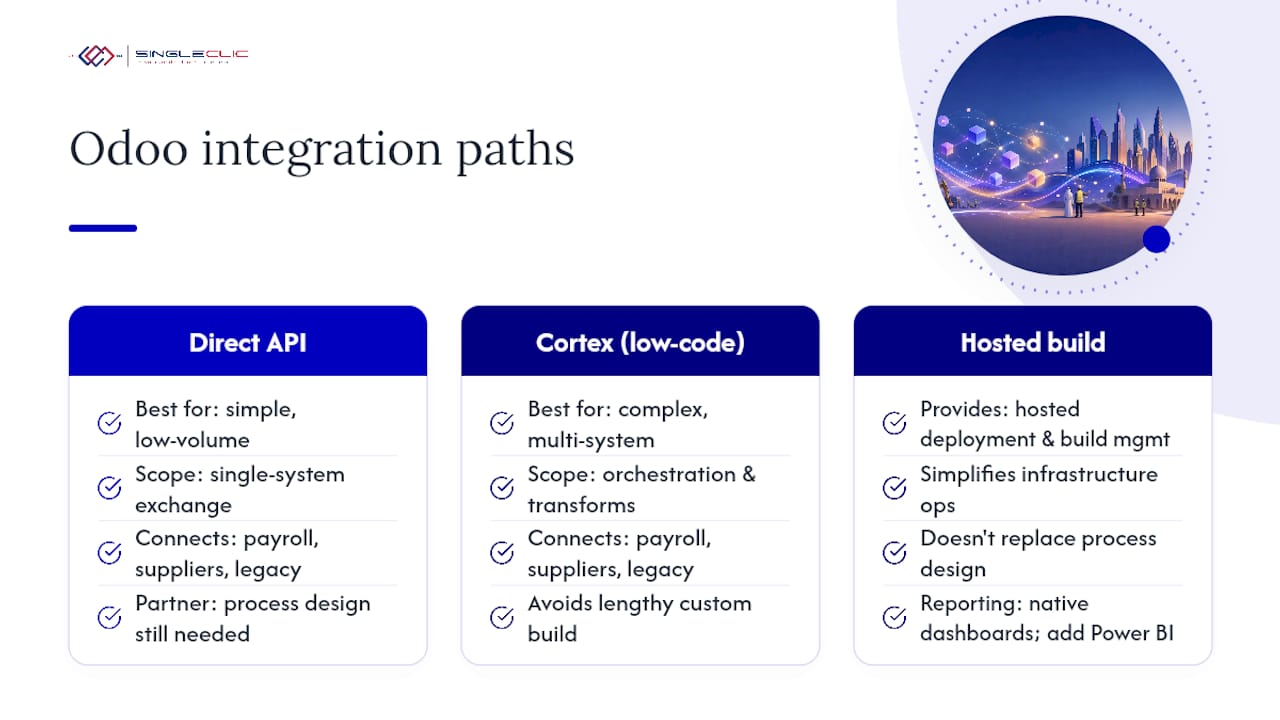
For reporting, Odoo’s built-in dashboards cover standard project and financial views. Enterprise construction suites frequently pair their ERP with Microsoft Power BI for deeper cost variance and cross-project analytics. That same pattern applies to Odoo deployments that outgrow native reporting.
Localization is where regional deployments succeed or stall. Arabic UI, right-to-left invoice formats, and local tax fields all draw on community translation resources, but getting them production-ready still takes partner-led testing.
Decision-maker checklist: how to evaluate Odoo for your construction business
Before signing a statement of work, run the evaluation through three lenses.
- Fit test: confirm the platform handles your specific BOQ format, progress billing schedule, and field data capture needs in a live demo, not a generic sales deck.
- Partner test: ask for construction-specific case studies, Arabic-language support if you operate regionally, and at least one example of a BOQ-to-RA billing implementation they’ve delivered.
- KPI test: build success criteria directly into the SOW, including invoice cycle time, BOQ variance percentage, and material delivery accuracy.
Firms that skip the partner test tend to discover mid-project that their implementer has never actually configured progress billing for a construction contract. That gap surfaces expensively, usually around month four. For firms also managing competitive bid pipelines, tools like construction-focused digital marketing services can feed won-project data straight into the same Odoo CRM pipeline you’re evaluating.
Singleclic’s perspective: regional experience deploying Odoo for construction
Singleclic is an Odoo Silver Partner delivering implementations across KSA, UAE, and Egypt, and construction is one of the sectors where the gap between Odoo’s out-of-box modules and what a contractor actually needs shows up fastest.
BOQ structures and progress billing formats differ by contract type and region, so Singleclic builds these as configured extensions rather than forcing generic invoicing templates. Arabic UI and localization run alongside core setup, not as a bolt-on afterthought. For integrations, Singleclic uses its Cortex low-code platform to connect Odoo with legacy systems, supplier portals, and approval chains without a multi-month custom build. A typical engagement moves from process assessment through configuration to a phased go-live, with field and office teams trained in parallel rather than sequentially.
Where Odoo makes the biggest operational difference for construction firms
The biggest wins I’ve seen argued for Odoo in construction aren’t the flashy ones. They’re the boring, compounding gains: approvals that used to take three days now clear in hours because a supervisor can approve from a site tablet, and BOQ variance that used to surface at project closeout now shows up in week three, when it’s still fixable.
Odoo makes sense when your business is genuinely project-based and modular, not when you need a deeply specialized vertical tool built only for heavy civil or infrastructure mega-projects. If your firm runs mid-size builds with standard procurement and billing cycles, a configurable platform beats a rigid specialist product on cost and flexibility almost every time. Low-code integration layers like Cortex are what make that flexibility affordable instead of a years-long custom project.
— Tamer Badr
How Singleclic helps you deploy Odoo for construction
There is a practical alternative to a generic ERP rollout for construction firms: fixed-scope BOQ and progress billing configuration instead of an open-ended custom build. Services can cover process assessment, module configuration, BOQ/RA customization, low-code platform-based integrations for legacy and supplier systems, and go-live support with a defined training plan for site and office teams.

We work with contractors and PMOs who need job costing, procurement, and field data capture running on one platform instead of three disconnected tools. If you’re weighing Odoo against Microsoft Dynamics 365 or another enterprise path, our pragmatic guide for CIOs breaks down the tradeoffs by firm size and complexity. Ready to scope your implementation? Reach out to Singleclic for an assessment of your BOQ, billing, and field workflows before you commit to a build timeline.
Sources
Odoo’s hosting and deployment tooling is documented at odoo.sh, and the core codebase along with community modules lives on GitHub. Enterprise integration patterns for construction, including Power BI and Teams connections, are outlined in the DynamicsSmartz Construction Suite overview. For platform comparisons and implementation depth, see Singleclic’s guide on ERP system meaning and deployment and its overview of Odoo’s modular ERP and CRM capabilities.
FAQ
Which software is best for construction management?
There’s no single best platform; the right choice depends on firm size and complexity. Odoo suits project-based contractors needing modular, cost-effective workflows, while larger enterprises with heavy field-to-office BI needs sometimes lean toward Dynamics 365 construction suites.
What are the disadvantages of Odoo?
Core BOQ and progress billing features typically need customization rather than working out of the box, and complex multi-site integrations often require a partner or low-code layer to connect cleanly with legacy systems.
How much does Odoo cost monthly?
Odoo publishes standard subscription pricing per user on its own site, but total construction implementation cost depends heavily on custom BOQ/RA modules, integrations, and localization work, not just the license fee.
Is Odoo a CRM or ERP?
Odoo is a full ERP suite that includes a native CRM module alongside project management, accounting, inventory, and procurement, all built on one shared database.
How long does an Odoo implementation take for a construction firm?
A mid-market construction rollout typically takes three to six months from discovery to go-live, depending on how much custom BOQ and progress billing work is required.