Dynamics 365 Field Service for telecom gives operators and network service providers one platform to plan, dispatch and complete onsite work: installations, maintenance and repairs. Microsoft describes it as a business application that combines workflow automation, scheduling algorithms and mobility so mobile workers are set up for success at the customer site. For a UAE telecom team, the real question is how that maps to your tower crews, fiber installers and enterprise support engineers, and what to settle before go-live. This guide answers both.
TL;DR
- Field Service covers work orders, scheduling and dispatch, a mobile app, asset management, preventive maintenance, inventory and analytics, which are the building blocks of field service for telecom.
- It supports reactive, preventive, predictive and project-based service, so one platform can serve break-fix tickets, scheduled tower maintenance and multistage rollouts.
- It connects to Dynamics 365 Supply Chain Management, Project Operations, Business Central and SAP, so parts, projects and finance stay aligned with field work.
- In the UAE, plan early for personal data protection, sector-regulator obligations, connectivity gaps and licensing.
- Measure success with first-time fix rate, calls per technician, travel time and arrival-time accuracy.
Table of Contents
- What Dynamics 365 Field Service does for a telecom operation
- Four service models, mapped to telecom work
- From ticket to closed job: dispatch and mobile execution
- Customer communication and self-service
- Assets, parts and inventory
- Integrations that matter for telecom
- UAE considerations before you implement
- A practical rollout path
- Measuring results
- Our perspective
- How Singleclic helps
- Topic cluster and keywords
- FAQ
- Sources
What Dynamics 365 Field Service does for a telecom operation
Telecom field work has a recognizable shape. A customer reports an outage, a network alarm fires, or a new enterprise circuit needs installing. Someone must find the right technician with the right skills and parts, get them there, record what was done, and close the loop with the customer and the billing system.
Field Service is built around that loop. According to the Microsoft Learn overview, its capabilities include:
- work orders and service agreements
- scheduling and dispatch tools
- communication tools for customers
- a mobile application for iOS, Android and Windows
- Copilot in Field Service
- asset management and preventive maintenance
- inventory and purchasing
- billing and time tracking
- analytics for KPI reporting
Microsoft also positions the product as an agentic service solution that uses AI agents, the Internet of Things (IoT) and mixed reality to improve customer experience. For telecom, that matters most in three places: assigning the right engineer, guiding the engineer on site, and spotting faults before customers call.
Four service models, mapped to telecom work
Microsoft Learn lists four service delivery models that organizations run in Field Service. Each lines up with something a telecom team already does.
| Service model | How Microsoft describes it | Telecom example |
|---|---|---|
| Reactive | Break-fix | Restoring a customer’s broadband after a fault ticket, replacing a failed router or cable |
| Preventive | Agreement-based | Scheduled site visits under an enterprise SLA, periodic inspection of power and cooling at cell sites |
| Predictive | IoT-driven through Connected Field Service | Dispatching a crew when a device or tower sensor reports a degrading component |
| Project-based | Multistage | Fiber rollout to a new development, a multi-site enterprise connectivity program |
Most operators run all four at once. The advantage of a single platform is that a technician’s skills, availability and truck stock are visible in one place, whichever model generated the job.
From ticket to closed job: dispatch and mobile execution
What the dispatcher sees
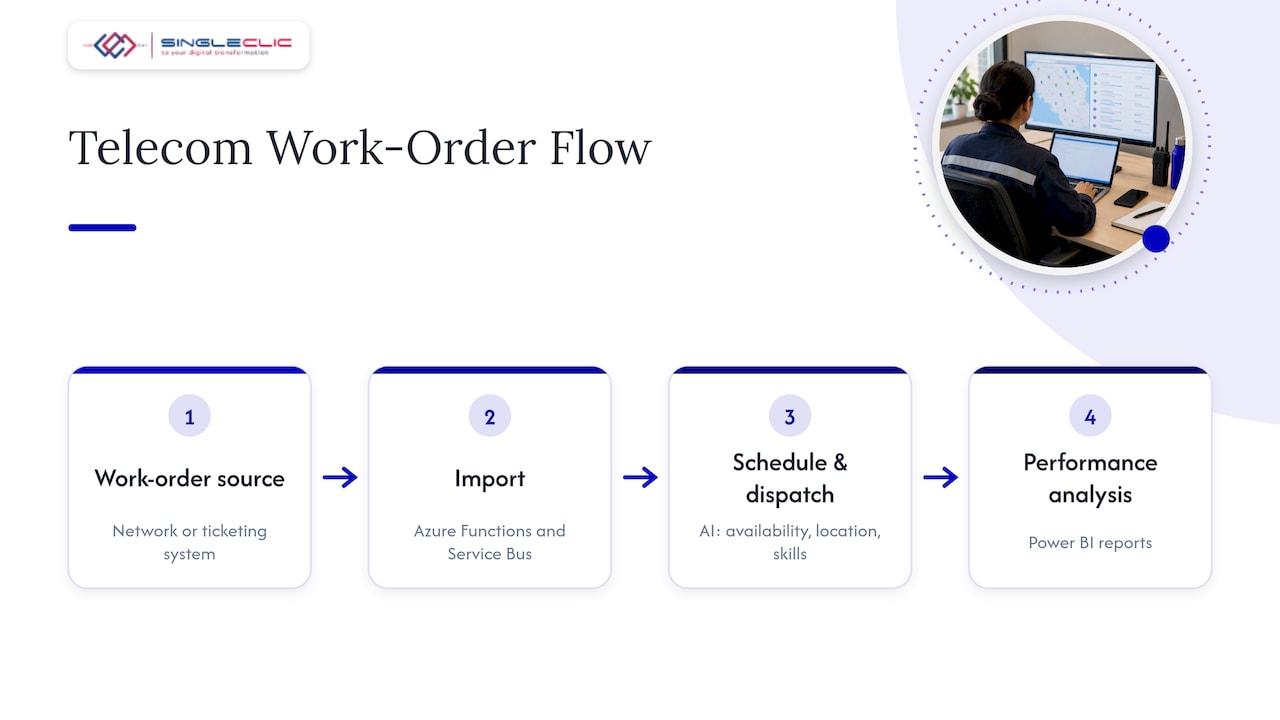
Dispatchers work from a schedule board, where bookings are assigned to resources. Microsoft’s utility reference architecture describes technicians being scheduled and dispatched automatically using AI-driven scheduling that considers availability, location and skills. Work orders can be imported from other systems with Azure Functions and Azure Service Bus, and performance data is analyzed in Power BI reports. Telecom work orders often originate in a network operations tool or a ticketing platform, so this import pattern is directly relevant.
Manual and automated dispatch each have a place. Emergency outages often need a human decision, while routine installation batches suit automation. We cover the trade-offs in our guide to D365 field service scheduling.
What the technician does
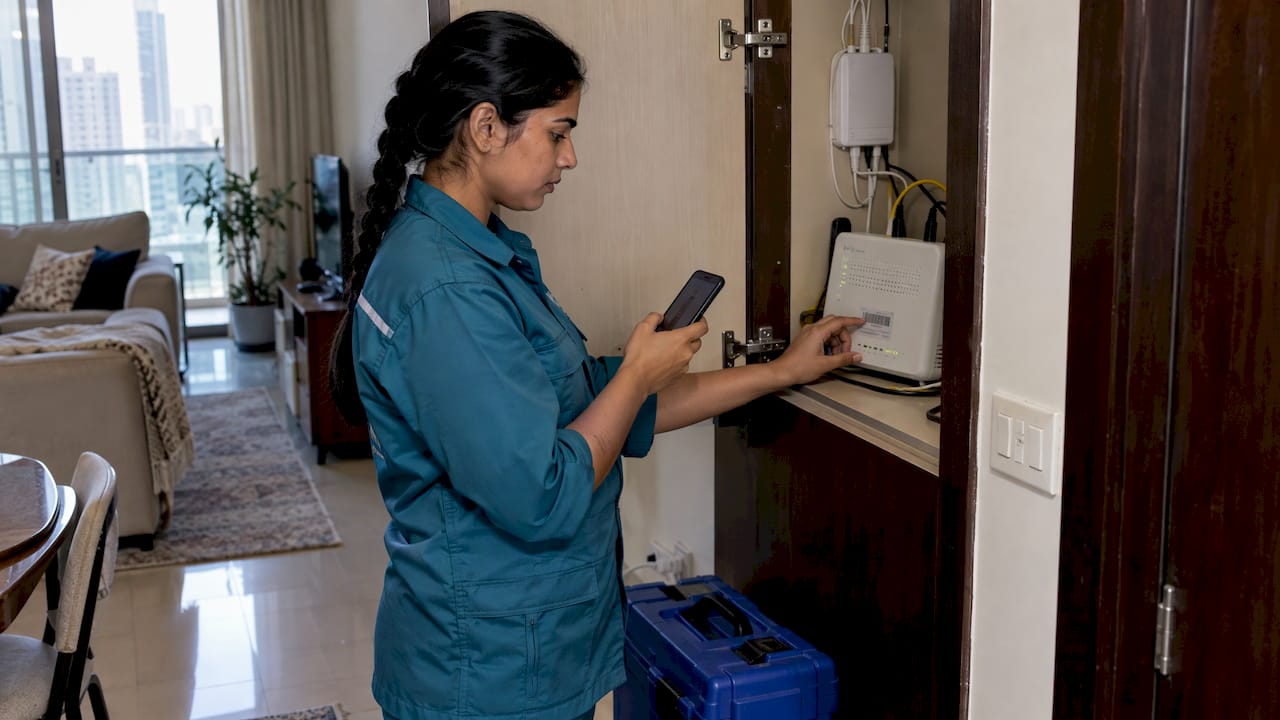
On site, the technician uses the mobile app. Microsoft’s guidance on delivering services says frontline workers can scan images, videos and asset barcodes, follow guides during tasks and update booking statuses. The same page notes the app works offline and synchronizes data later when there is no internet connection.
Offline mode is not a footnote for telecom. Basements, rooftops, remote desert sites and riser shafts are exactly where signal is poor. A technician who can complete the checklist, scan the modem serial number and capture photos without coverage, then sync on the way out, keeps the day on schedule.
Booking stages you can report on
Microsoft’s Project Operations integration architecture lists booking stages of Acknowledgment, Travel, Onsite, In Progress, and Complete or Incomplete. Each stage is a timestamp you can analyze. Time spent traveling versus onsite is the starting point for most telecom productivity reviews.
Customer communication and self-service
Telecom customers expect to know when someone is coming and what happened after they leave. The utility reference architecture recommends a self-service portal built with Power Pages where customers schedule appointments, track request status and see past maintenance and repair records, combined with Power BI dashboards for monitoring and trend analysis.
The same logic applies to a residential or enterprise telecom customer. The Field Service application also lets you communicate an accurate arrival time to customers, which cuts “where is the engineer?” calls.
Many operators also handle appointment requests across WhatsApp, web chat and email. An AI customer service chatbot can collect the details of a request, offer appointment slots and route the case to the right queue before a dispatcher ever touches it, feeding clean information into the work order.
Assets, parts and inventory
A failed job because the van lacked a part is the most avoidable kind of failure. Field Service includes asset management, preventive maintenance, inventory and purchasing, so the equipment installed at each customer or site has a history, and stock levels travel with the technician’s vehicle or warehouse.
For larger operators, parts planning belongs in the ERP. Field Service integrates with Dynamics 365 Supply Chain Management, which lets purchasing and warehouse teams see demand from the field. Clean item and supplier data is the foundation, which is why we wrote about fixing master data first for MENA supply chains.
Integrations that matter for telecom
Field Service rarely runs alone. Microsoft’s integrations overview lists connections to Dynamics 365 Project Operations, Business Central, Supply Chain Management, SAP C-4Hana and SAP S-4Hana. Beyond those, telecom teams typically need to link to:
- the CRM that holds customer and contract records (see our four questions for choosing a Dynamics 365 CRM integration)
- billing and finance
- network and ticketing tools
- document storage, for example SharePoint integration for site survey files and method statements
For rollout programs, Microsoft documents a pattern where project coordinators create programs and tasks, Power Automate triggers an Azure Function that creates work orders through the Dataverse API, and dispatchers then assign resources on the schedule board. It is a sound template for a fiber or 5G site rollout.
One change to plan around: Microsoft states that Field Service integrations with the Outlook add-in, Teams app, Viva Connections and Planner were deprecated after October 30, 2025. Design your collaboration workflows around the current mobile app and portal rather than those older connectors.
For the wider picture of how ERP, CRM and analytics fit together, see our piece on a connected digital architecture with Dynamics 365 and Power BI.
UAE considerations before you implement
Personal data
Field technicians handle customer names, addresses, phone numbers and sometimes photos taken inside homes and offices. The UAE’s Federal Decree by Law No. 45 of 2021 on the Protection of Personal Data requires personal data to be kept securely through appropriate technical and organizational measures, and it also applies to controllers or processors outside the country that process data of people inside it. Treat job photos, signatures and location trails as personal data from the start of your design.
Sector regulation and data location
The UAE Cyber Security Council’s critical information infrastructure and national cloud security policies apply to government entities and to businesses their sector regulators instruct to comply, including TDRA-regulated entities. The same source notes they do not expressly require data to stay in the UAE, but they offer best-practice guidance. Confirm with your compliance and regulatory team which obligations apply to you.
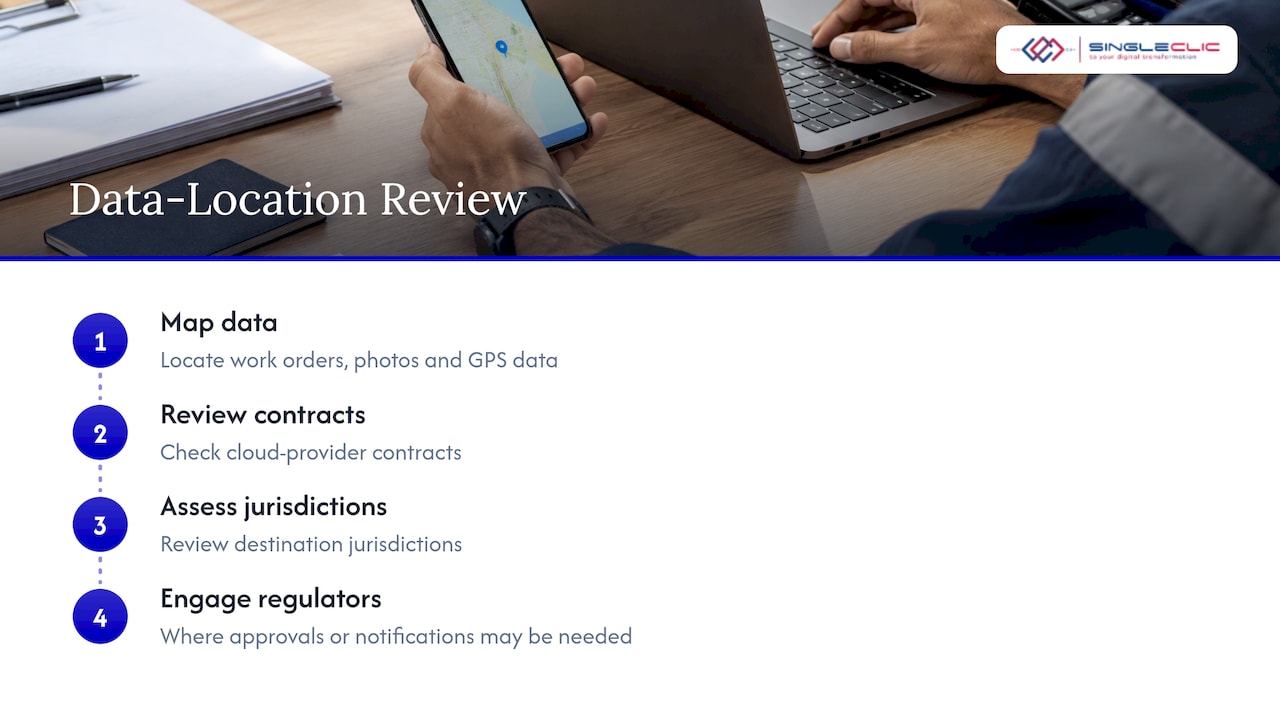
Before migrating any data, the GCC Board Directors Institute advises a thorough data mapping exercise, a review of contracts with cloud providers, an assessment of destination jurisdictions and engagement with regulators where approvals or notifications may be needed. For a field service rollout, that means mapping where work-order data, photos and GPS data live before you load a single record. Our Dynamics 365 migration guide and our note on UAE localization before go-live go deeper on this.
Licensing
Licensing depends on who uses the system. Microsoft’s product page lists a Field Service Contractor license at $50.00 for assigning and managing external frontline technicians, which is relevant if you rely on subcontracted installation crews. Confirm current prices and terms with Microsoft or your licensing partner, since they change.
Connectivity and design timing
Offline capability handles weak coverage in the field. The other half is architecture: Microsoft advises defining the integration architecture during planning and design so automation matches business objectives from the start, with smoother transitions and fewer disruptions. Retrofitting integrations after go-live is slower and costlier than designing them in.
A practical rollout path
- Define the work types. List installation, repair, maintenance and project jobs, and decide which service model each follows.
- Map your data. Customers, sites, assets, parts, skills, territories and contracts. Note where each lives today and what the UAE data rules mean for it.
- Design integrations first. CRM, ERP, billing, ticketing and network tools. Decide which system is the source of truth for each record.
- Configure scheduling rules. Skills, working hours, service territories, priorities and SLAs. Decide what is automated and what stays with the dispatcher.
- Pilot with one region or team. A single emirate or one service line gives you real data on travel time and first-time fixes.
- Train technicians on the mobile app. Include offline use and device management.
- Scale and tune. Use dashboards to adjust rules and extend to further teams.
For timelines and phase planning, our CRM implementation timeline shows how a Dynamics 365 program moves from vision to go-live, and our Dynamics 365 implementation guide for the UAE covers the leadership decisions.
Measuring results
Microsoft says the application lets organizations improve first-time fix rate, complete more calls per technician per week, reduce travel time and mileage, avoid downtime through preventive maintenance and give customers an accurate arrival time. Turn those into a baseline before go-live:
| KPI | What it tells you | Where the data comes from |
|---|---|---|
| First-time fix rate | Whether the right skills and parts reached the job | Work order outcomes, repeat visits |
| Jobs per technician per week | Capacity and scheduling efficiency | Bookings and completion status |
| Travel time and mileage | Quality of routing and territory design | Booking stage timestamps |
| Preventive vs reactive ratio | Whether maintenance is reducing faults | Agreements and work order types |
| Arrival-time accuracy | Customer experience | Scheduled vs actual onsite time |
Power BI dashboards, as the Microsoft architecture suggests, centralize these for trend analysis. Record the baseline for each KPI before the pilot so you can compare like for like.
Our perspective
Telecom field operations fail in the handoffs: between the ticket and the dispatcher, the dispatcher and the engineer, the engineer and the stockroom. When we implement Dynamics 365 Field Service for operators and service providers in the region, we start with those handoffs rather than with screens.
Our approach is to treat Field Service as part of a connected stack. Dynamics 365 handles scheduling, work orders and assets, and our teams integrate it with ERP, CRM, billing and data analytics so every record has one owner. Where approvals, exceptions or legacy systems sit around the field process, we use Cortex, our Arabic-enabled low-code and BPM platform, to connect those workflows without rebuilding them.
For banks, government bodies and regulated operators, we can also deploy on premise where policy demands it. Start with one service line, one region and a clear KPI baseline, and expand once the numbers prove the model.
Tamer Badr
How Singleclic helps
Singleclic is a Microsoft Dynamics 365 integrator with more than 10 years of delivery across the region and 70+ consultants and engineers across KSA, UAE and Egypt. For a telecom field service program, we can support:
- D365 implementation, customization and integration for scheduling, work orders and assets, through our Dynamics 365 services
- D365 consultancy and support and maintenance after go-live
- Business process automation around approvals and exceptions, with Cortex and IBM BAW, through our automation and low-code services
- AI and data analytics for reporting on field performance
If you are comparing options, our overview of what Microsoft Dynamics 365 is explains how ERP, CRM and automation fit together.
Ready to scope a field service program? Talk to our team about your service lines, systems and compliance requirements, and we will outline a phased plan for your operation in the UAE.
Topic cluster and keywords
- SEO title: Dynamics 365 Field Service for telecom: a UAE guide
- Slug: dynamics-365-field-service-telecom
- Primary keyword: dynamics 365 field service telecom
- Secondary keywords: field service for telecom, telecom work order management, field technician scheduling, Dynamics 365 integration
- Pillar cluster: Microsoft Dynamics 365 implementation in MENA, with this article as a vertical use case beside scheduling, CRM integration and supply chain
- Use cases: fiber and 5G rollout projects, enterprise SLA maintenance, break-fix repair, tower and site preventive maintenance, subcontractor management
FAQ
Can Dynamics 365 Field Service handle telecom installations and repairs?
Yes. It manages work orders, scheduling, dispatch and a mobile app for onsite work, and supports reactive, preventive, predictive and project-based service. That covers customer installations, fault repair and scheduled maintenance. The configuration, such as skills, territories and SLAs, is set to your operation.
Does the mobile app work without internet?
Yes. Microsoft’s guidance says the Field Service mobile app works offline and synchronizes data later when there is no connection. Technicians can keep recording work, scanning barcodes and updating statuses in low-coverage locations. Your IT team should still plan device management and training.
What systems can it integrate with?
Microsoft documents integration with Dynamics 365 Project Operations, Business Central and Supply Chain Management, plus SAP C-4Hana and SAP S-4Hana. Telecom teams usually also connect CRM, billing and ticketing tools. We design these integrations during the planning phase.
What UAE rules affect a telecom field service deployment?
The Federal Decree by Law No. 45 of 2021 on personal data protection applies to customer data your technicians handle. TDRA-regulated entities may also face cybersecurity and cloud policy obligations through their sector regulator. Confirm the specifics with your legal and compliance teams before migrating data.
How do we measure whether it is working?
Track first-time fix rate, jobs per technician per week, travel time and mileage, preventive versus reactive work, and arrival-time accuracy. Capture a baseline before the pilot. Power BI dashboards make trends visible across teams and regions.
Sources
- Overview of Dynamics 365 Field Service, Microsoft Learn
- Field Service management software, Microsoft Dynamics 365
- Overview of Deliver Services, Microsoft Learn
- Scalable field service management for utility projects, Microsoft Learn
- Overview of Field Service integrations, Microsoft Learn
- Project Operations and Field Service integration, Microsoft Learn
- Frontline worker overview, Microsoft Learn
- Federal Decree by Law No. 45 of 2021 on the Protection of Personal Data, UAE Legislation
- The Digital Frontline: Legal Risks for Businesses (United Arab Emirates), GCC Board Directors Institute