Pick RabbitMQ when you need to dispatch a task, get it acknowledged, and move on. Pick Kafka when you need a durable, replayable record of everything that happened. That’s the whole decision in one sentence, and almost every edge case in the kafka vs rabbitmq debate traces back to it.
Here’s how that verdict breaks down by job:
- Background workers and job queues: RabbitMQ. Push delivery and per-queue ordering fit short-lived tasks.
- RPC / request-reply between services: RabbitMQ. Its routing and reply-queue patterns were built for this.
- Event sourcing and audit trails: Kafka. The log retains history instead of deleting on acknowledgment.
- Telemetry, metrics, and analytics pipelines: Kafka. Built for sustained, high-volume ingestion.
- Stream processing (joins, aggregations over time): Kafka, usually paired with a stream-processing layer.
A few exceptions flip the default. RabbitMQ Streams adds log-like replay to RabbitMQ, closing some of the gap for moderate-volume event use cases. Kafka’s newer “Queues for Kafka” work targets classic per-message queue semantics, so the two platforms are creeping toward each other at the edges even as their core designs stay distinct.
Key Takeaways
Choosing between Kafka and RabbitMQ comes down to one question: do you need durable replay, or do you need fast, flexible task dispatch?
| Point | Details |
|---|---|
| Match tool to job | Use RabbitMQ for task queues and RPC; use Kafka for event streams, replay, and analytics. |
| Durability drives design | Kafka retains messages after consumption; RabbitMQ deletes on acknowledgment by default. |
| Ordering scope differs | RabbitMQ orders per queue; Kafka orders per partition, not across a whole topic. |
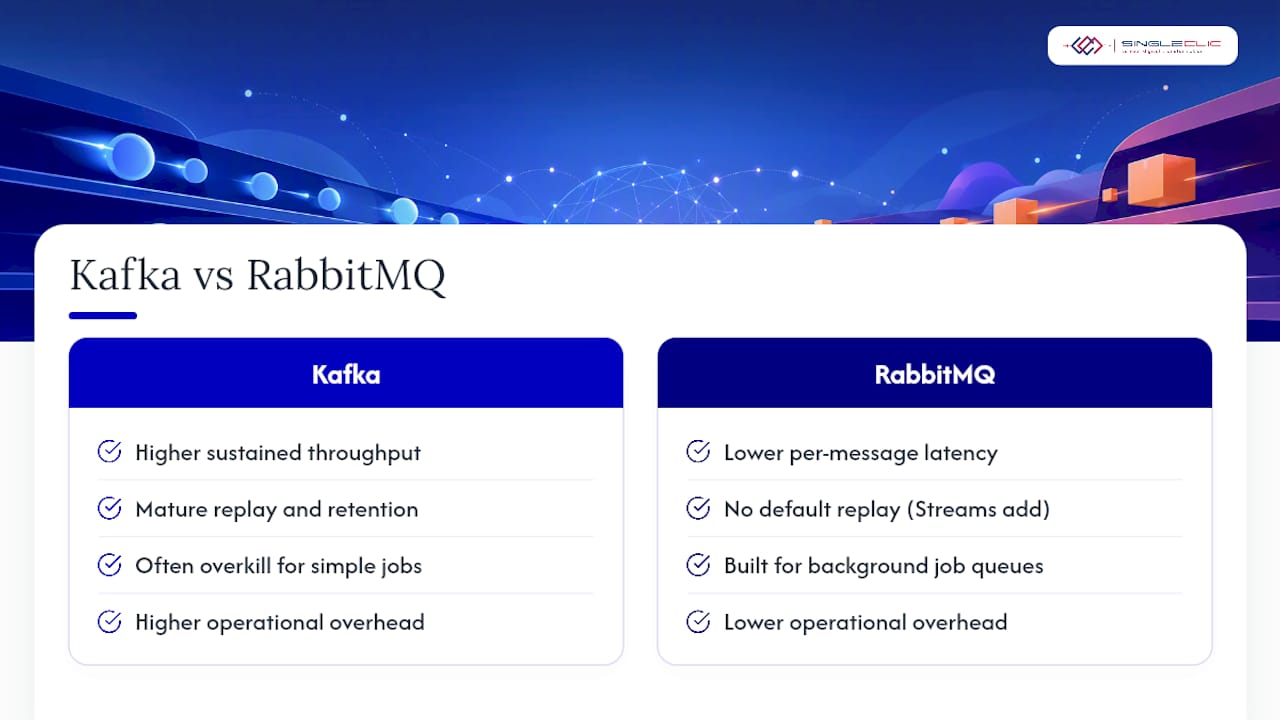
| Benchmarks are directional | Kafka leads on sustained throughput; RabbitMQ often wins on p50 latency, so test your own workload. |
| Hybrid architectures are common | Singleclic pairs Kafka for event history with RabbitMQ for task dispatch, orchestrated through Cortex. |
Where to read more on Kafka and RabbitMQ
- Apache Kafka documentation: the authoritative reference for topics, partitions, and offset semantics.
- Confluent’s RabbitMQ vs Kafka comparison: a vendor-neutral breakdown of use cases and trade-offs.
- Amqp: the protocol specification behind RabbitMQ’s routing model.
- Run workload-specific benchmarks before finalizing an architecture. Published numbers vary by configuration.
Table of Contents
- Kafka vs RabbitMQ comparison at a glance
- How are RabbitMQ and Kafka architected differently?
- Push vs pull: how message delivery actually works
- How fast is each system, and how does it scale?
- Routing, retention, and feature trade-offs
- Managed Kafka and RabbitMQ options worth knowing
- When should you choose Kafka or RabbitMQ?
- What mistakes do teams make with Kafka and RabbitMQ?
- What we’ve learned deploying both systems for enterprise clients
- How Singleclic supports Kafka and RabbitMQ integration projects
- Frequently asked questions about Kafka vs RabbitMQ
- Sources
Kafka vs RabbitMQ comparison at a glance
The two systems solve different problems well enough that a side-by-side table earns its place before the details do.
| Dimension | RabbitMQ | Kafka |
|---|---|---|
| Recommended use | Task queues, RPC, complex routing | Event streaming, replay, analytics |
| Messaging model | Broker with exchanges and queues | Distributed, partitioned commit log |
| Delivery model | Broker pushes to consumers | Consumers pull and track offsets |
| Durability / retention | Deletes on acknowledgment by default | Retains messages on disk for a configured period |
| Ordering | FIFO per queue | FIFO per partition |
| Throughput & scale | Scales via more consumers and clustering | Scales via partitions and consumer groups |
| Operational complexity | Lower for simple topologies | Higher; requires partition and offset planning |
| Ecosystem / connectors | AMQP, MQTT, STOMP plugins | Kafka Connect, Schema Registry, CDC tools |
| Security | TLS, SASL, per-vhost permissions | TLS, SASL/SCRAM, ACLs per topic |
| Typical latency | Sub-millisecond to low-millisecond | Low-millisecond, batching-dependent |
The single most important operational consequence sits in the durability row: RabbitMQ throws a message away once it’s acknowledged, while Kafka keeps it around for replay. That one design choice explains most of the downstream differences in how teams monitor, scale, and debug each system.
Plenty of production stacks run both. RabbitMQ handles the transactional work queue; Kafka carries the event backbone that analytics and downstream services read from later.
How are RabbitMQ and Kafka architected differently?
RabbitMQ is a traditional message broker. Producers publish to an exchange, which routes messages into queues based on bindings, and consumers pull from queues under an acknowledgment contract. Once a consumer acks a message, it’s gone. Clusters typically run three to five nodes with mirrored or quorum queues for failover.
Kafka is a distributed streaming platform built on an append-only log. Topics split into partitions, each an ordered, immutable sequence of records identified by an offset. Consumers track their own position in that log, and replication across brokers (coordinated through KRaft in modern versions) keeps partitions durable if a node fails. Retention and log compaction decide how long records stick around, not consumer behavior.
That structural gap produces two clear consequences:
- Ordering is a queue property in RabbitMQ but a partition property in Kafka, so partition count directly shapes both parallelism and ordering guarantees.
- Using RabbitMQ as a long-term event store is the most common architectural misstep teams make, since acknowledged messages vanish and there’s no native replay.
Push vs pull: how message delivery actually works
RabbitMQ’s broker decides who gets a message and when, using push delivery with a prefetch count that caps how many unacknowledged messages a consumer can hold at once. Kafka flips that model: consumers poll the log and manage their own offsets, deciding for themselves how far behind or caught up they want to be.
That difference changes what “acknowledgment” means in practice:
- RabbitMQ: ack removes the message from the queue permanently. No ack, and it can be requeued or dead-lettered.
- Kafka: committing an offset just moves your bookmark forward. The record itself stays in the log for other consumer groups to read independently.
- Ordering: RabbitMQ guarantees FIFO within a single queue. Kafka guarantees FIFO within a single partition, not across the whole topic.
A minimal Kafka consumer loop looks like this in pseudocode:
records = consumer.poll(timeout)
process(records)
consumer.commitOffset(records.lastOffset)
Pro Tip: Commit Kafka offsets after processing, not after polling. Committing too early is the single most common cause of silently dropped messages during a consumer crash.
How fast is each system, and how does it scale?
Kafka’s sequential, batched writes to disk let it sustain very high throughput, while RabbitMQ tends to win on raw delivery latency for individual messages. 2026 benchmark testing found Kafka outperforming RabbitMQ’s classic queues by a wide margin on sustained throughput, while RabbitMQ held a lower p50 latency in the same tests. RabbitMQ Streams narrowed some of that throughput gap, so the numbers aren’t fixed in stone.
Scaling looks different on each side:
- Kafka scales by adding partitions and spreading consumer groups across them; more partitions mean more parallel consumers, up to the partition count.
- RabbitMQ scales by adding consumers to a queue and clustering brokers, though a single queue’s throughput ceiling is lower than a well-partitioned Kafka topic.
- Cluster sizing for Kafka has to account for replication factor and disk I/O; RabbitMQ clusters lean more on memory and network throughput per node.
Treat any published benchmark as a starting point, not a verdict. Workload shape, message size, and acknowledgment settings swing real numbers by an order of magnitude, so run a load test against your own traffic pattern before locking in a choice.
Routing, retention, and feature trade-offs
RabbitMQ’s routing power comes from AMQP’s exchange types: direct, topic, headers, and fanout exchanges let you build fine-grained delivery patterns, plus native support for RPC, delayed messages, and priority queues.
Kafka trades that routing flexibility for depth in storage. Retention windows and log compaction control how long data lives and whether only the latest value per key survives, and Kafka Connect plus Schema Registry make change-data-capture and schema evolution first-class citizens.
Dead-lettering and retries differ too: RabbitMQ has built-in dead-letter exchanges and per-message TTLs, while Kafka retries usually get handled at the application or stream-processing layer, often with a dedicated retry topic.
- RabbitMQ strengths: flexible routing, RPC patterns, native delayed and priority delivery.
- Kafka strengths: durable retention, replay, schema-aware integration with downstream systems.
Pro Tip: If you need both flexible routing and durable history, don’t force one tool to do both jobs. Route with RabbitMQ, then publish a copy of the outcome to Kafka for the permanent record.
Managed Kafka and RabbitMQ options worth knowing
Self-hosting either system is viable, but managed options remove a lot of the operational burden.
- Confluent Platform / Confluent Cloud offers managed Kafka with Schema Registry, connectors, and stream processing built in.
- AWS MSK runs managed Kafka clusters inside AWS, handling broker provisioning and patching.
- RabbitMQ Cloud and various vendor-managed RabbitMQ offerings handle clustering and upgrades for teams that don’t want to run brokers themselves.
- Connector ecosystems differ sharply: Kafka Connect and the Confluent hub cover databases, warehouses, and SaaS tools; RabbitMQ leans on protocol adapters for AMQP, MQTT, and STOMP plus a plugin system.
Self-hosted deployments cost less in licensing but more in engineering hours for monitoring, backup, and upgrade testing, a trade-off worth pricing out honestly before committing either way.
When should you choose Kafka or RabbitMQ?
Match the requirement to the tool rather than the tool to a trend.
| Use case | Best fit | Why |
|---|---|---|
| Background jobs, task queues | RabbitMQ | Push delivery and simple ack semantics fit short-lived work |
| RPC / request-reply | RabbitMQ | Native reply-queue and routing support |
| Event sourcing, audit logs | Kafka | Retention preserves full history for replay |
| Telemetry, analytics pipelines | Kafka | Sustained throughput at scale |
| CDC and system integration | Kafka | Schema Registry and Kafka Connect handle structured change feeds |
A short checklist keeps the decision honest:
- Do you need to replay old messages? If yes, Kafka.
- Does sustained throughput regularly need to exceed roughly 200,000 messages per second? Lean Kafka.
- Do you need complex, broker-side routing logic (fanout, topic matching, RPC)? Lean RabbitMQ.
- Do you need both? Confluent’s own comparison notes that pairing the two is common: RabbitMQ for low-latency tasking, Kafka for the durable event stream feeding it.
What mistakes do teams make with Kafka and RabbitMQ?
The most expensive mistake is treating RabbitMQ as a permanent record. Once a message is acknowledged, it’s gone, so using it as an audit trail forces fragile workarounds instead of native replay. The mirror-image mistake is treating Kafka like a low-latency RPC broker; polling and offset commits add overhead that a task queue doesn’t need.
Other recurring issues: under-partitioning a Kafka topic and then discovering you can’t add consumers past the partition count, and ignoring consumer offset management until a rebalance storm takes down a pipeline.
Monitor queue depth and consumer lag as your primary health signals, alongside disk I/O, garbage collection pauses, and partition rebalance events. Load-test with production-shaped traffic, inject broker failures deliberately, and confirm consumers recover cleanly before you trust either system in production.
Pro Tip: Route failed messages to a dedicated retry topic or dead-letter queue with exponential backoff, and cap retry attempts before escalating to a human. Silent infinite retries are how small failures become outages.
Quick thresholds for a fast decision
| Signal | Favor |
|---|---|
| Sustained throughput above ~200,000 msg/s | Kafka |
| Sub-millisecond p50 latency required | RabbitMQ |
| Replay or immutable audit trail needed | Kafka |
| Complex broker-side routing needed | RabbitMQ |
These are illustrative starting points, not hard cutoffs. Recent benchmark testing shows the exact multiples shift with configuration, so validate against your own workload before treating any threshold as final.
What we’ve learned deploying both systems for enterprise clients
In practice, the “kafka or rabbitmq” question rarely has a single winner inside one architecture. The pattern we see most often on enterprise projects pairs Kafka as the event backbone, capturing every order, claim, or transaction as a durable record, with RabbitMQ handling the worker queues that act on those events in real time.
Cortex, Singleclic’s low-code orchestration layer, typically sits on top of that split. It listens to event streams, triggers approvals inside ERP or CRM workflows, and manages compensating actions when a downstream step fails, without anyone writing custom glue code for each integration.
Clients ask us early about observability and compliance, especially in regulated sectors. Our answer is consistent: instrument both systems from day one, and treat migration as coexistence rather than a cutover. Nobody needs to rip out a working RabbitMQ deployment just to bolt on a Kafka-based analytics layer.
How Singleclic supports Kafka and RabbitMQ integration projects
If your architecture already leans on Kafka, RabbitMQ, or both, the harder problem usually isn’t the messaging layer. It’s connecting those event streams to the ERP, CRM, and approval workflows that actually run the business. Singleclic builds that connective layer for enterprises across the UAE and wider MENA region, using Cortex to turn raw events into automated approvals, retries, and compensating actions without custom point-to-point code for every integration.

That work typically includes:
- Migration support for teams moving from a single broker to a hybrid Kafka/RabbitMQ architecture.
- Managed deployment and monitoring runbooks tailored to your compliance requirements.
- Direct integration between event streams and Microsoft Dynamics 365 or Odoo, so downstream systems react to events instead of polling for changes.
- Operational playbooks covering dead-letter handling, offset recovery, and failure injection testing.
If you’re weighing where an event backbone should plug into your existing ERP or CRM stack, talk to Singleclic about connecting Dynamics 365 to your event architecture and get a practical assessment of what Cortex can automate first.
Frequently asked questions about Kafka vs RabbitMQ
Is Kafka always faster than RabbitMQ?
Not for every workload. Kafka usually wins on sustained throughput because of batched, sequential disk writes, but RabbitMQ often delivers lower per-message latency, especially for smaller payloads and simple queue depths.
Can RabbitMQ replay messages like Kafka does?
Not by default. Standard RabbitMQ queues delete messages once acknowledged. RabbitMQ Streams adds log-like retention and replay, but Kafka’s replay model is more mature and widely adopted for event sourcing.
Do I need Kafka if I’m only building background job processing?
Probably not. RabbitMQ’s push model, acknowledgment handling, and dead-letter exchanges are purpose-built for background workers and task queues, and the operational overhead is lower than running a Kafka cluster.
What’s the difference between AWS MSK and self-hosted Kafka?
AWS MSK manages broker provisioning, patching, and infrastructure for you, while self-hosted Kafka gives full control over configuration at the cost of running and monitoring the cluster yourself.
Can Kafka and RabbitMQ run in the same architecture?
Yes, and many production systems do exactly that. A typical pattern uses RabbitMQ for transactional task distribution and Kafka as the durable event backbone feeding analytics, audit logs, and downstream integrations.
Sources
- Apache Kafka documentation
- Compare RabbitMQ vs Apache Kafka
- RabbitMQ vs Kafka 2026: 16x Throughput Gap Tested
Recommended
- From Silos to Single Source: The Business Case for Unifying ERP, CRM, and Analytics | Singleclic
- Legacy Migration vs Replacement: Pros and Cons | Singleclic
- Cloud vs On-Prem for Low-Code Platforms in the Middle East: Finding the Right Model with Cortex | Singleclic
- Decide at the Speed of Now: Why Real-Time Analytics Powers Faster Leadership Decisions | Singleclic