Legacy system modernization is the process of updating, refactoring, or replacing outdated software, infrastructure, and IT architectures to align with current business objectives, reduce technical debt, and unlock access to cloud-native services and AI. According to Google Cloud, it is also a prerequisite for organizational resilience: systems that are critical but too brittle to change become existential liabilities in an AI-driven market.
The executive posture right now should be: assess your portfolio, triage by risk and cost, and run a time-boxed pilot before committing to a full-scale program.
Three practical first steps:
- Portfolio scan. Catalog every system by business criticality, annual maintenance cost, and integration dependency count. Systems with high cost, low vendor support, and no API surface are your first candidates.
- Risk triage. Score each candidate on security exposure, regulatory compliance gaps, and mean time to recovery (MTTR). Prioritize systems where a failure would halt revenue or violate a regulatory obligation.
- Quick pilot. Select one bounded, non-core workload and run a short proof-of-value using your preferred modernization pattern. Measure deployment frequency and cost-per-transaction before and after.
Key takeaways
Legacy system modernization succeeds when leaders match the right technical approach to their actual risk tolerance, measure outcomes from day one, and treat change management as a first-class workstream alongside the technical program.
| Point | Details |
|---|---|
| Start with a portfolio scan | Score every system on maintenance cost, security risk, and integration bottleneck impact before selecting an approach. |
| Match approach to risk tolerance | Replatforming and encapsulation deliver fast value with low disruption; rearchitecting and strangler fig deliver long-term scalability with higher complexity. |
| Define KPIs before you start | Track feature lead time, MTTR, cost per transaction, and deployment frequency from the first pilot phase. |
| Budget for change management | Cultural resistance and adoption gaps cause more program failures than technical issues; allocate a parallel change management workstream. |
| Treat modernization as continuous | Build a standing architecture review board and a live portfolio assessment cadence rather than a one-time capital project. |
Table of Contents
- What counts as a legacy system?
- Why modernize? The economic and strategic case
- Common scenarios that trigger modernization projects
- Canonical modernization approaches: which path fits your situation?
- How to choose the right modernization approach
- A phased modernization roadmap: from assessment to optimization
- Common risks and how to mitigate them
- Technology patterns and tooling that enable modernization
- How to measure modernization success
- Short case studies: before and after modernization
- Vendor and partner selection checklist for modernization engagements
- The trade-off no one tells you about in modernization
- How Singleclic helps you modernize with confidence
- Sources
What counts as a legacy system?
Not every old system is a legacy system. Age alone is not the criterion. A system becomes a legacy liability when it is critical to operations yet hard to change, expensive to run, or no longer receives security patches from its vendor.
Common categories of legacy systems include:
- IBM mainframes running COBOL or PL/I workloads with no modern API layer
- Monolithic Java or .NET applications where a single deployment touches every business function
- Unsupported middleware (older versions of IBM MQ, TIBCO, or Oracle SOA Suite) that blocks integration
- Outdated relational databases running on end-of-life versions with no cloud migration path
- Homegrown integrations built as point-to-point scripts that no current team member fully understands
Symptoms that confirm a system has crossed into legacy territory:
- High MTTR: incidents take days to diagnose because documentation is sparse and the original developers are gone
- Costly fixes: a single feature change requires months of regression testing across tightly coupled modules
- Specialist dependency: the system runs only because one or two people hold undocumented tribal knowledge
- Integration bottlenecks: every new digital channel requires a custom adapter because the system has no standard API
- Security exposure: the platform cannot be patched to current CVE standards, creating audit findings
Software modernization research confirms that these systems are typically mission-critical, which is precisely why organizations tolerate them long past their useful life. The cost of inaction compounds quietly until a regulatory audit, a security breach, or a competitor’s faster product cycle forces the conversation.
Why modernize? The economic and strategic case
The financial argument for modernization is straightforward once you model total cost of ownership (TCO) honestly. Legacy platforms carry high capital expenditure in hardware refresh cycles, expensive specialist contractors, and custom support agreements. Cloud-native and modernized architectures shift that spend to flexible operational expenditure tied to actual consumption.
Google Cloud’s analysis identifies the core technical and economic benefits: faster feature release cycles, auto-scaling, and access to analytics and AI capabilities that are simply unavailable on older platforms. A payments team that modernizes its core processing layer can connect to real-time fraud detection models. A healthcare organization that migrates its patient data platform can run predictive scheduling. Neither outcome is possible while the data sits locked in a system with no API.
C-suite metrics that matter:
- Feature lead time: how many days from business request to production deployment. Legacy monoliths routinely measure this in months; modern platforms target significantly shorter lead times.
- Cost per transaction: the fully loaded cost of processing one unit of business work. This is the clearest TCO signal for finance leaders.
- Security and compliance posture: the number of open CVEs, audit findings, and unpatched vulnerabilities. Regulators in the US increasingly treat unpatched legacy systems as governance failures.
- Staff productivity: the percentage of engineering time spent on maintenance versus new capability. Teams trapped in legacy maintenance typically have limited capacity for new work.
McKinsey’s research on digital transformation frames modernization as a critical enabler of broader organizational change, not a standalone IT project. The organizations that treat it as a strategic investment, with C-suite sponsorship and cross-functional alignment, consistently outperform those that treat it as a cost-reduction exercise. Connecting modernization to leadership-driven efficiency gains is what separates programs that deliver measurable ROI from those that stall after the first phase.
Common scenarios that trigger modernization projects
Modernization rarely starts from a blank strategic plan. It usually starts from a forcing function: a regulatory deadline, a merger, a customer complaint that reveals a systemic bottleneck, or a cost-reduction mandate from the board.
Typical triggers and the first approach they suggest:
- Regulatory change (new data residency law, PCI-DSS version upgrade, HIPAA audit finding): start with encapsulation or replatforming to isolate the non-compliant component without touching the full system.
- Merger or acquisition integration: the acquiring organization needs two incompatible ERP or CRM platforms to share data. An API-first integration layer or a strangler fig migration is usually the fastest path to a single operational view.
- Customer experience bottleneck: a mobile channel cannot launch because the core system has no REST API. Encapsulation wraps the legacy system behind a modern API gateway, unblocking the channel team within weeks.
- Cost-reduction mandate: the CFO has flagged that a legacy platform’s annual support contract exceeds the cost of a cloud-native SaaS alternative. A direct SaaS replacement or replatforming evaluation is the right first step.
- AI and analytics ambitions: the business wants to deploy predictive models or real-time dashboards, but the data is locked in a system with no modern data export. Replatforming or a data-layer extraction project unlocks the analytics use case without requiring a full system replacement.
Each trigger maps to a different urgency and risk profile. Regulatory deadlines compress timelines and raise the cost of a failed migration. Cost mandates give more flexibility but require a credible TCO model to justify the investment. Knowing which trigger is driving your program shapes every subsequent decision about approach, timeline, and governance.
Canonical modernization approaches: which path fits your situation?
Gartner’s seven-option framework gives leaders a structured taxonomy for matching business objectives to technical paths. Each option trades off cost, risk, and time-to-value differently.
The seven approaches
Rehosting (lift and shift) moves the application to a new infrastructure environment, typically cloud IaaS, with no code changes. It is the fastest path to cloud and the lowest disruption, but it does not reduce technical debt or unlock cloud-native capabilities. Best for: applications that need to exit an on-premise data center quickly before a lease or support contract expires.
Replatforming makes targeted infrastructure or runtime changes (for example, moving from a self-managed database to a managed cloud database service) without rewriting application logic. It captures meaningful operational savings and improves resilience. Azure Site Recovery and equivalent platform services provide built-in disaster recovery and policy automation that reduce migration risk during this phase.
Refactoring restructures existing code to improve maintainability and performance without changing external behavior. It reduces technical debt incrementally and is often combined with automated code transformation tools that preserve embedded business rules. The cost is moderate; the time-to-value is medium.
Rearchitecting changes the application’s fundamental structure, typically decomposing a monolith into microservices or adopting an event-driven architecture. It delivers the highest long-term scalability and future-proofing but carries the highest complexity and timeline risk.
Rebuild or replace discards the existing system and builds or buys a replacement. For commodity functions (payroll, email, expense management), a SaaS replacement is almost always faster and cheaper than a rebuild. For differentiating core systems, a rebuild is justified only when the existing codebase is beyond salvage.
Encapsulation (wrapper) exposes legacy functionality through a modern API layer without touching the underlying system. It is the fastest way to unblock a digital channel or integration project. The legacy system remains in place, so technical debt is not reduced, but the business gets immediate value.
Strangler fig incrementally replaces legacy functionality by routing traffic to new services while the old system continues to run. TechTarget’s modernization primer identifies this as one of the three most commonly used patterns in practice, alongside replatforming and domain decomposition, because it minimizes operational risk on mission-critical systems.
Approach comparison
| Approach | Cost / TCO | Time to value | Disruption risk | Scalability | Security / compliance | Best-fit scenario |
|---|---|---|---|---|---|---|
| Rehosting | Low upfront, limited savings | Weeks | Low | Minimal gain | No improvement | Data center exit, speed priority |
| Replatforming | Moderate, meaningful OpEx savings | 1–3 months | Low–medium | Moderate gain | Improved patching | Cost reduction, managed services |
| Refactoring | Moderate | 3–6 months | Medium | Moderate gain | Incremental improvement | Debt reduction, team capacity |
| Rearchitecting | High | 6–18 months | High | High gain | Strong | Strategic differentiation |
| Rebuild / replace | High or SaaS subscription | 3 months | High | High (SaaS) or custom | Strong | Commodity functions, beyond-salvage systems |
| Encapsulation | Low | Days–weeks | Very low | No gain | Partial | API unblocking, channel enablement |
| Strangler fig | Medium, spread over time | Incremental | Low (per slice) | High over time | Improves progressively | Mission-critical, risk-averse programs |
The decision between low-risk replatforming and strategic rearchitecting usually comes down to two questions: how much of your competitive advantage depends on this system’s behavior, and how much organizational capacity do you have for a multi-year program? If the answer to both is “a lot,” rearchitecting is worth the investment. If the system is a commodity function, SaaS replacement is almost always the faster and cheaper path.
How to choose the right modernization approach
The right approach is not the most technically elegant one. It is the one your organization can actually execute given its risk tolerance, skills, regulatory constraints, and cost envelope.
Decision criteria to score each candidate system:
- Business value at risk: what revenue, compliance obligation, or customer experience depends on this system today?
- Data complexity: how many years of transactional data need to migrate, and how clean is it?
- Regulatory constraints: does the system hold data subject to HIPAA, PCI-DSS, SOX, or state-level privacy laws that constrain where and how it can be moved?
- Organizational skills: does your team have the cloud, microservices, or domain-driven design expertise the chosen approach requires, or will you need to hire or partner?
- Risk tolerance: can the business tolerate a 4-hour maintenance window, or does this system need to run 24/7 with zero planned downtime?
- Cost envelope: what is the approved budget, and does it cover not just migration but the change management, training, and parallel-run period?
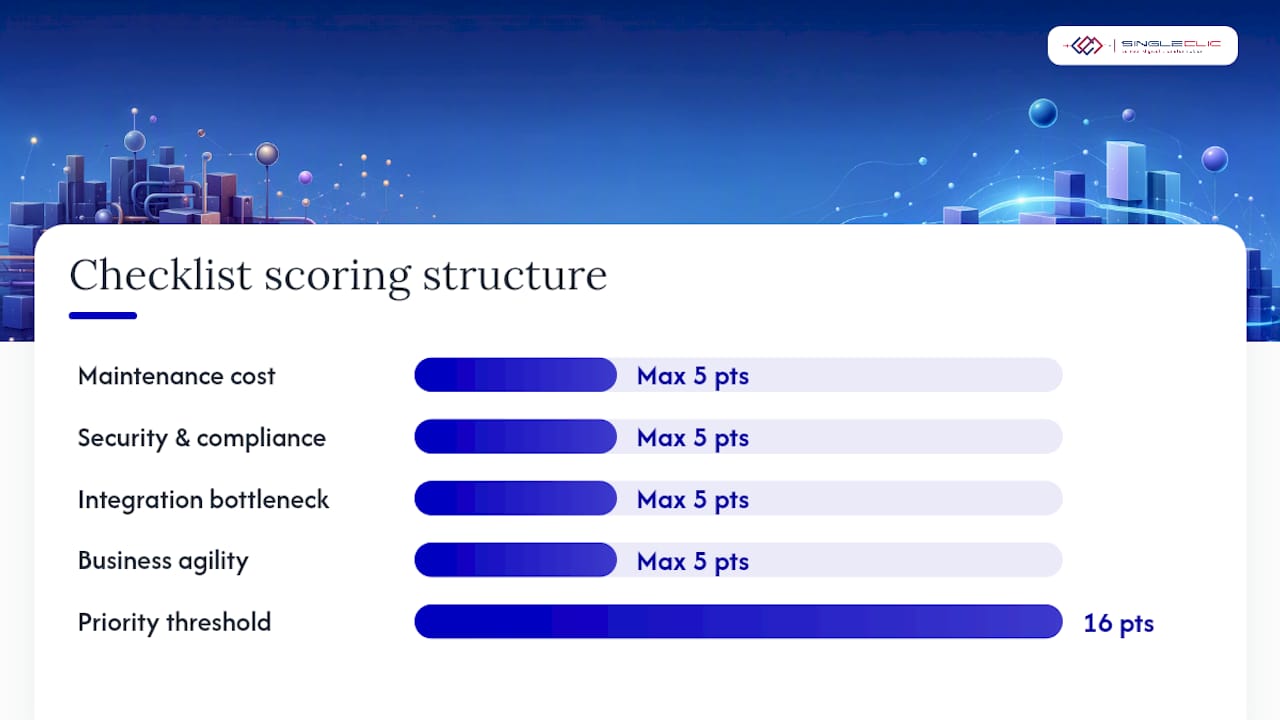
A simple scoring checklist for portfolio prioritization:
- Score each system 1–5 on maintenance cost burden (1 = low, 5 = critical spend).
- Score 1–5 on security and compliance risk (1 = fully patched, 5 = active audit finding).
- Score 1–5 on integration bottleneck impact (1 = isolated, 5 = blocks multiple digital channels).
- Score 1–5 on business agility constraint (1 = rarely changed, 5 = change requests queued for months).
- Sum the scores. Systems scoring 16 or above are your highest-priority modernization candidates.
Questions to ask vendors and implementation partners:
- Can you show references for incremental modernization programs in regulated industries comparable to ours?
- What is your rollback strategy if a migration phase fails in production?
- How do you handle automated testing coverage before and after each migration increment?
- What SLAs do you commit to during the parallel-run period when both old and new systems are live?
- Do you use automated code transformation tools, and can you demonstrate how they preserve embedded business rules?
Red flags to watch for:
- A partner who proposes a full rewrite as the first and only option without a phased alternative
- No documented rollback plan for any migration phase
- References only from greenfield implementations, not legacy migration programs
- Inability to name specific test automation frameworks they use for regression coverage
A phased modernization roadmap: from assessment to optimization
Software modernization programs are almost always multi-year efforts executed in increments, because mission-critical systems cannot simply be switched off while a replacement is built. A phased approach keeps the business running while progressively reducing risk and technical debt.
Pro Tip: Assign an executive sponsor with budget authority before the assessment phase begins. Programs without a named C-level owner stall at the governance stage, not the technical stage.
Phase model and timeline
| Phase | Key activities | Milestone / acceptance criteria | Indicative timeline |
|---|---|---|---|
| 1. Discovery and assessment | Portfolio inventory, TCO modeling, risk scoring, stakeholder interviews | Prioritized modernization backlog with approach recommendations | Weeks 1–6 |
| 2. Pilot / proof of value | Select one bounded workload, execute chosen approach, measure KPIs | Demonstrated improvement in at least two KPIs (e.g., deployment frequency, MTTR) | Weeks 7–18 |
| 3. Incremental rollout | Migrate workloads in priority order, maintain parallel operations, automate regression testing | Each workload passes acceptance criteria before the next begins | Months 5–18 |
| 4. Hardening and optimization | Decommission legacy components, optimize cloud spend, embed observability, conduct post-implementation review | Legacy system retired or encapsulated; steady-state cost model confirmed | Months 12 and beyond |
Governance model for the program:
- Executive sponsor: owns the business case, resolves cross-functional conflicts, and reports to the board.
- Architecture review board: approves approach decisions, manages technical standards, and reviews each phase’s design before execution begins.
- Change management lead: owns stakeholder communication, training plans, and adoption metrics. TechTarget’s research consistently identifies cultural change and adoption as the most common failure points in transformation programs, not the technology itself.
- Program management office: tracks milestones, manages dependencies, and escalates risks before they become blockers.
For leaders who want a ready-to-adapt executive roadmap template, Singleclic’s digital transformation roadmap for C-level success covers governance structure and milestone design in detail.
Common risks and how to mitigate them
Every modernization program carries predictable failure modes. The organizations that succeed are not the ones that avoid risk; they are the ones that plan for it explicitly.
| Risk | Business impact | Mitigation |
|---|---|---|
| Undocumented business logic in legacy code | Migration breaks critical workflows silently | Automated code analysis tools to extract and document rules before migration |
| Data quality and migration failures | Corrupted or incomplete data in the new system | Iterative data profiling, cleansing, and reconciliation runs before cutover |
| Skills gap in cloud or microservices | Program stalls or quality drops | Partner with specialists; run internal upskilling in parallel with early phases |
| Integration complexity | New system cannot connect to dependent platforms | API-first design from day one; integration testing as a first-class deliverable |
| Scope creep | Timeline and budget overrun | Strict phase gates with defined acceptance criteria; change control process |
| Stakeholder resistance | Low adoption, workarounds, and shadow IT | Early involvement of business users; change management budget equal to technical budget |
Mitigation patterns that reduce operational risk:
- Blue/green deployments: run the old and new environments in parallel, switch traffic incrementally, and roll back instantly if issues appear.
- Strangler fig increments: replace one domain or function at a time, keeping the legacy system live until each slice is validated.
- Automated regression testing: build a test suite that covers legacy behavior before any migration begins, so regressions are caught in CI/CD pipelines rather than in production.
- Parallel operations period: keep both systems live and reconcile outputs for a defined period before decommissioning the legacy platform.
For a detailed checklist of governance controls and red flags, Singleclic’s guide on how to avoid common implementation failures covers the most common points of failure across ERP, CRM, and platform migration programs.
Pro Tip: Use an automated documentation tool during the discovery phase to capture tribal knowledge and process flows before the team that built the legacy system moves on. This single step prevents the most common cause of mid-migration surprises.
Technology patterns and tooling that enable modernization
Choosing the right technical architecture is as important as choosing the right strategy. The patterns below are what you should expect to see in a credible modernization program, and what to budget for.
Core architectural patterns:
- Microservices and domain decomposition: break a monolith into independently deployable services organized around business domains (orders, payments, customers). Each service can be updated, scaled, and replaced without touching the others. This requires domain-driven design discipline and a mature DevOps practice.
- Strangler fig: route traffic to new microservices progressively while the monolith handles the remainder. The legacy system shrinks over time rather than being replaced in a single cutover.
- API-first design: expose every business capability through a versioned API before building any new channel or integration. This is the pattern that makes encapsulation viable and future integrations cheap.
- Containerization: package applications in containers (Docker) and orchestrate them with Kubernetes. Containers make deployments consistent across environments and reduce the “works on my machine” class of production failures.
- Serverless for burst workloads: use serverless functions for event-driven or batch workloads that have unpredictable volume. This eliminates the need to provision and maintain infrastructure for peak capacity.
- CI/CD pipelines: automate build, test, and deployment so that every code change is validated and deployable within minutes. This is a prerequisite for the deployment frequency improvements that justify modernization investment.
- Observability and SRE controls: instrument every service with distributed tracing, structured logging, and metrics dashboards. You cannot manage what you cannot measure, and observability is what makes MTTR improvements visible to the business.
Where low-code platforms fit:
Not every modernization challenge requires custom code. Approval workflows, integration orchestration, and rapid UX changes are well-suited to low-code platforms. Singleclic’s Cortex platform is built specifically for MENA enterprises and handles Arabic-language UI, on-premise deployment for banks and government organizations, and runtime workflow changes without downtime. During a modernization program, Cortex can connect legacy systems, ERP, CRM, and new microservices through a single workflow layer, reducing the custom integration work that typically consumes 30–40% of migration budgets.
For a deeper look at cloud-native architecture decisions, Singleclic’s guide on cloud-native modernization for leaders covers platform selection and architecture trade-offs in detail.
How to measure modernization success
Modernization programs that cannot demonstrate measurable outcomes lose executive sponsorship after the first phase. Define your KPIs before the program begins, not after.
Recommended KPIs by category:
- Speed: feature lead time (days from business request to production), deployment frequency (deployments per week or month), and release cycle time.
- Reliability: MTTR (mean time to recovery from incidents), change failure rate (percentage of deployments that cause a production incident), and system availability.
- Cost: cost per transaction, total infrastructure spend per month, and the ratio of maintenance spend to new capability spend.
- Business outcomes: time-to-market for new products, customer satisfaction scores tied to digital channels, and revenue enabled by new capabilities.
TCO checklist components:
- Current annual cost: licenses, hardware, specialist contractors, support contracts, and incident response.
- Migration cost: assessment, partner fees, tooling, testing, parallel-run period, and change management.
- Steady-state cost post-migration: cloud consumption, managed service fees, internal team capacity freed for new work.
- Risk-adjusted cost of inaction: the probability-weighted cost of a security breach, regulatory fine, or competitive loss attributable to the legacy system.
Google Cloud’s modernization research confirms that the economic benefits come from shifting expensive CapEx to flexible OpEx and from enabling automation that was previously impossible on legacy platforms. The TCO model should capture both the direct cost reduction and the indirect revenue enablement.
Reporting cadence for the board:
- Monthly: deployment frequency, MTTR, and cost-per-transaction trend.
- Quarterly: phase milestone completion, TCO variance against plan, and business outcome metrics.
- Annually: full TCO review comparing steady-state costs to the pre-modernization baseline.
Short case studies: before and after modernization
The following scenarios are anonymized composites drawn from common modernization patterns. They illustrate how approach selection, timeline, and measured outcomes connect in practice.
Case 1: Regional bank replatforms its core reporting database
A mid-size bank was running its regulatory reporting on an end-of-life database version that could no longer receive security patches. The trigger was a compliance audit finding. The team chose replatforming: migrating to a managed cloud database service with no application code changes. The migration completed within a few months. After go-live, the bank eliminated its annual hardware refresh cost for that platform, reduced MTTR for reporting incidents from 14 hours to under 2 hours, and closed the audit finding. The compliance team reported the outcome to regulators within the same quarter.
Case 2: E-commerce platform uses strangler fig to exit a monolith
A retail organization’s monolithic order management system was blocking the launch of a new mobile channel because it had no REST API. Rather than rewriting the entire system, the team used a strangler fig approach: they built a new order service with a modern API, routed mobile traffic to it, and left the legacy system handling existing web traffic. Over 14 months, they migrated domain by domain. Deployment frequency for the order domain improved significantly. The legacy system was decommissioned at month 18, and the team avoided a full-system cutover risk entirely.

Case 3: Manufacturing company replaces payroll with SaaS
A manufacturing organization was spending significant engineering time maintaining a custom-built payroll system that had no strategic differentiation. The team evaluated the build-versus-buy question and chose a SaaS replacement. The migration took 4 months, including data migration and parallel-run validation. Post-migration, the internal team that had maintained the legacy system was redeployed to a customer-facing analytics project. The SaaS vendor handles all compliance updates automatically.
Case 4: Government agency uses encapsulation to enable API channels
A government agency needed to expose citizen-facing services through a new mobile app, but its core case management system had no API layer. The team built an encapsulation wrapper that exposed the legacy system’s functions as REST APIs without touching the underlying code. The mobile app launched in 6 weeks. The legacy system remains in place, but the agency now has a clear roadmap to replace it incrementally using the strangler fig pattern, with the API layer already in place to route traffic.
Vendor and partner selection checklist for modernization engagements
Choosing the wrong implementation partner is the single most controllable risk in a modernization program. The right partner brings incremental migration experience, not just greenfield delivery capability.
Capability checklist for partner evaluation:
- Demonstrated experience with incremental modernization programs, not just full rewrites
- Automated code transformation and analysis tools for extracting business rules from legacy codebases
- Test automation practice with documented regression coverage standards
- Data migration experience including profiling, cleansing, and reconciliation for large transactional datasets
- References from regulated industries (banking, healthcare, government) comparable to your sector
- For organizations in KSA or UAE: regional delivery capacity and familiarity with local regulatory requirements
Red flags that disqualify a partner:
- Proposes a full rewrite as the default recommendation without a phased alternative
- Cannot provide references for a migration program that went live in a regulated environment
- Has no documented rollback strategy for production migration phases
- Relies entirely on manual testing with no CI/CD or automated regression capability
- Cannot explain how they handle parallel operations during the cutover period
Questions to ask during RFP and proof-of-concept evaluation:
- Walk us through a modernization program where a phase failed in production. What happened and how did you recover?
- What automated tools do you use to analyze and document legacy business logic before migration begins?
- How do you structure your test automation coverage for a system with no existing test suite?
- What is your standard SLA for incident response during the parallel-run period?
- How do you manage scope creep between phases, and what does your change control process look like?
- Can you provide two references from clients in our industry who completed a migration of comparable complexity?
For ERP-specific modernization programs, Singleclic’s field-tested ERP implementation playbook covers risk controls and phase gates for Dynamics 365 and Odoo deployments in detail.
The trade-off no one tells you about in modernization
The hardest decision in any modernization program is not technical. It is the judgment call between moving fast enough to stay competitive and moving carefully enough to avoid a production failure that sets the program back by a year.
Every leader I have worked with wants both: speed and safety. The honest answer is that you can have one more than the other, but the balance point depends on your organization’s actual risk tolerance, not the theoretical one stated in a governance document. A bank that says it tolerates “medium risk” will behave like a low-risk organization the moment a migration phase causes a two-hour outage. Plan for the real risk tolerance, not the stated one.
The second thing that gets underestimated is the human side. Technical debt is visible in code metrics and infrastructure bills. Cultural debt, the accumulated resistance to change, the teams who have built their careers around the legacy system, the managers who distrust anything they did not build, is invisible until it derails a program that was technically sound. Change management is not a soft add-on. It is a parallel workstream that requires its own budget, its own sponsor, and its own success metrics.
The third point: modernization is not a project with an end date. The organizations that treat it as a one-time program find themselves back in the same position five years later with a new set of legacy systems. The ones that build a continuous modernization practice, with a standing architecture review board, a live portfolio assessment, and a regular cadence of incremental improvements, are the ones that stay competitive. Treat it as an operating model, not a capital project.
How Singleclic helps you modernize with confidence

Singleclic brings 10+ years of enterprise delivery experience across KSA, UAE, and Egypt, with 70+ consultants and engineers who have executed modernization programs for organizations including Emirates Health Services, QNB, AlBaraka, and Emaar Misr. Whether your priority is ERP modernization with Microsoft Dynamics 365, process automation with IBM BAW, or connecting legacy systems through the Cortex low-code platform, Singleclic delivers phased, low-risk programs built around your business outcomes.
If your organization is ready to move from assessment to action, Singleclic’s business process automation guide for C-level leaders is a practical starting point for scoping the automation and integration layer that every modernization program needs.
Sources
The sources below cover strategy, technical patterns, vendor guidance, and definitional context for leaders who want to go further.
- What is legacy modernization? How does it work | Google Cloud
- 7 Options To Modernize Legacy Systems – Gartner
- A primer on modernization strategies for legacy systems | TechTarget
- Software modernization
- What is digital transformation | McKinsey
Recommended
- How to Modernize Legacy Workflows Without Replacing Every System at Once | Singleclic
- Modernize Legacy Workflows Without Disruption: A Zero-Downtime Blueprint | Singleclic
- How Low-Code Helps Enterprises Modernize Legacy Systems | Singleclic
- Cloud‑Native Modernization: What Leaders Must Know Before You Start | Singleclic