Procure-to-pay automation connects requisitions through payment in a single digital thread, so finance and procurement teams close invoices faster while keeping tighter control over spend. It replaces email chains and manual data entry with software that captures, matches, and routes transactions automatically.
The immediate payoff is threefold: shorter cycle times, fewer payment errors, and real visibility into committed spend before it happens rather than after the invoice lands. Three controls make this possible:
- Three-way matching that automatically checks the purchase order, goods receipt, and invoice before payment
- AI-OCR invoice capture that reads and codes invoices regardless of format or source
- ERP integration that keeps your Dynamics 365 or Odoo system as the single source of truth
Table of Contents
- What does procure-to-pay automation actually cover?
- What happens at each step of the P2P cycle?
- Which technologies and integrations should you require?
- How do you measure whether P2P automation is working?
- How should you roll out P2P automation without breaking things?
- How does Singleclic build P2P automation without replacing your ERP?
- Ready to automate your procure-to-pay cycle without ripping out your ERP?
- Sources
What does procure-to-pay automation actually cover?
Procure to pay automation spans the entire purchase lifecycle, not just the accounts payable inbox. That distinction matters because most “AP automation” projects only touch the last mile.
The full P2P cycle automation covers includes:
- Requisition and internal approval routing
- Sourcing and supplier selection
- Purchase order creation and transmission
- Goods or service receiving
- Invoice capture and data extraction
- Three-way matching and exception handling
- Payment execution and reconciliation
- Spend reporting and audit trail retention
Automating only invoice processing catches errors after a purchase has already happened. Automating the full cycle enforces budget and approval checks at the requisition stage, before commitments get made, which is where maverick spend actually gets stopped. IBM frames procurement process automation this way: connecting procurement to accounts payable digitizes the whole purchase-to-payment lifecycle, improving accuracy and cutting cycle time in the process. That upstream discipline is the real difference between P2P automation and AP-only tooling.
What happens at each step of the P2P cycle?
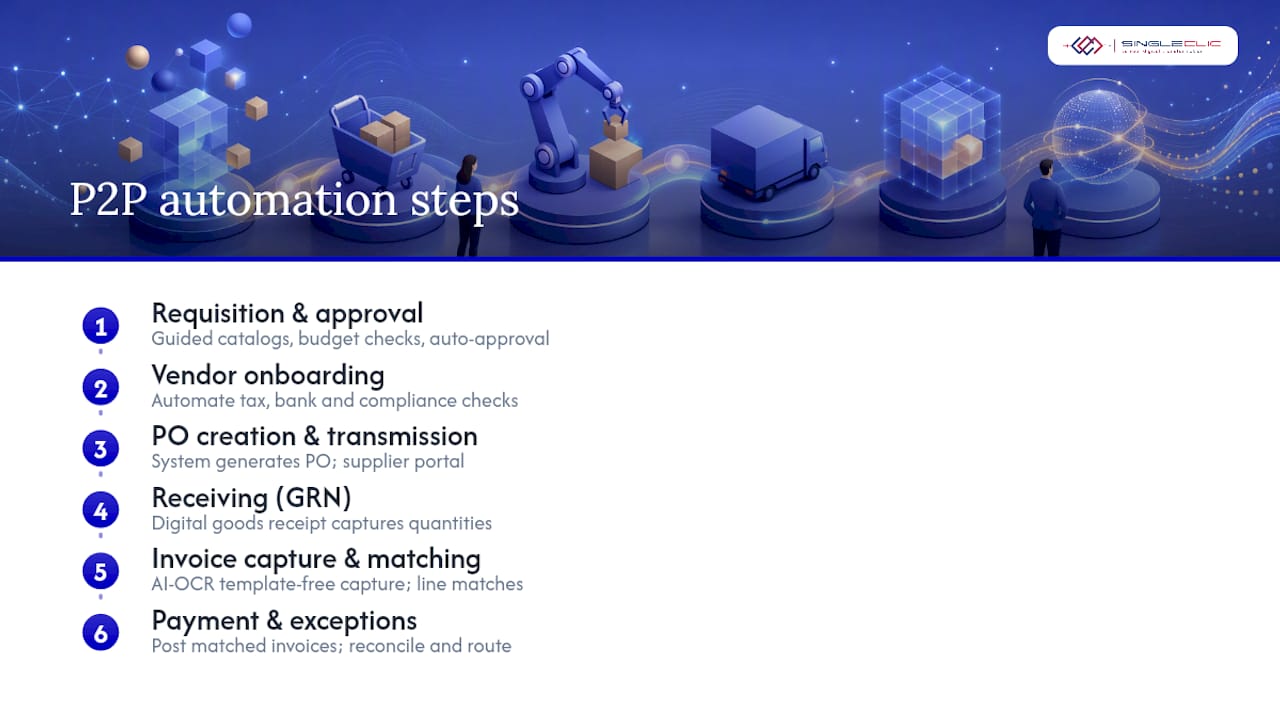
Mapping automation to each stage helps you compare vendor claims against what your team actually needs. Here’s what capable platforms handle at every point in the process.
Requisition and approval. Guided catalogs and pre-approved supplier lists stop off-contract buying before it starts. Budget validation checks committed spend in real time, and low-value or pre-approved categories can route to auto-approval instead of sitting in someone’s inbox.
Vendor master data and onboarding. Automated workflows verify tax documentation, banking details, and compliance certificates during supplier setup, rather than leaving that data entry to whoever’s free that week.
Purchase order creation and transmission. Once a requisition clears approval, the system generates and sends the PO, often through a supplier portal that lets vendors confirm, adjust, or flag issues without a phone call.
Receiving and goods receipt. A digital goods receipt note (GRN) captures quantities and condition at the point of delivery, creating the second leg of the match.
Invoice capture. This is where AI-OCR earns its place. Invoices arrive by email, portal upload, or EDI/PEPPOL feed, and template-free capture reads the line items regardless of layout.

Three-way matching. The system compares PO, GRN, and invoice at the line-item level. Matching automatically at this granularity is what prevents duplicate payments and inflated invoices from slipping through.
Payment and reconciliation. Matched invoices post for payment on schedule, and reconciliation ties the outgoing payment back to the original PO and invoice record.
Exception routing. Anything outside tolerance goes to a named owner with the discrepancy flagged, not into a generic queue nobody checks.
Pro Tip: Set tolerance rules by vendor or commodity category instead of one blanket percentage. A 2% variance might be noise on office supplies but a real problem on steel.
Which technologies and integrations should you require?
Vendors will pitch you a dozen features. Only a handful actually move the needle, and they need to work together in a specific pattern.
AI and machine learning do the heavy lifting on classification and tolerance learning. Over time, a well-tuned system learns which exceptions are genuine problems and which are recurring noise from a specific supplier, which is where AI inside ERP workflows earns its keep beyond simple rule matching.
AI-OCR capture matters because it should be template-free. If your capture tool needs a new template every time a supplier changes their invoice layout, you’ve automated a fraction of the problem.
RPA and low-code orchestration fill the gaps at legacy touchpoints your ERP doesn’t natively handle, such as a regional bank portal or an old EDI feed still in use with one major supplier.
ERP integration should follow one non-negotiable principle: the automation layer orchestrates, and the ERP remains the system of record. AI-driven matching layers that sit on top of your ERP can automate the majority of invoice volume while posting clean transactions back into Dynamics 365 or Odoo without disturbing historical data.
Supplier enablement through portals, EDI, and PEPPOL determines how much invoice volume you can actually capture electronically instead of scanning paper. Coupa’s research on P2P platforms points to supplier portals and embedded compliance controls as features worth prioritizing over flashier add-ons.
How do you measure whether P2P automation is working?
Five metrics tell you almost everything: touchless invoice rate (the share processed with zero human touch), invoice cycle time, cost per invoice, exception rate, and on-time payment rate. A rising touchless rate alongside a falling exception rate is the clearest sign the system is learning your supplier base, not just following static rules.
Savings typically show up in three places: reduced headcount needed for manual data entry, more early-payment discounts captured because invoices clear faster, and fewer costly correction cycles from duplicate or incorrect payments.
A useful ROI snapshot: multiply your monthly invoice volume by your current fully loaded cost per invoice, then estimate the share of volume that could go touchless. Adoption data suggests that only a small share of organizations have reached near-full P2P automation today, so even a partial automation rate against a realistic labor cost per invoice usually produces a defensible business case.
How should you roll out P2P automation without breaking things?
Start narrow. A pilot built around a high-volume, low-complexity supplier segment gives you clean data to learn from without betting the whole AP function on day one.
- Choose your pilot scope. Pick suppliers with consistent invoice formats and predictable order patterns, not your most complex regulated vendor.
- Get master data ready. Clean vendor records, standardized item codes, and a defined invoice intake channel (portal, EDI, or email inbox) before you turn anything on.
- Set tolerances and ownership before launch. Decide who owns each exception type and what tolerance percentage applies by category, not after the first batch of mismatches arrives.
- Roll out in phases with measurement gates. Each phase should hit a defined touchless rate and exception rate before you expand supplier scope.
- Retrain and expand. Feed exception patterns back into the matching model, then extend to higher-complexity vendor categories.
- Manage the human side. Train approvers on the new workflow and update internal SLAs to reflect faster expected turnaround, or the old habits will route around your new system.
The most common pitfall is scope creep: trying to automate every supplier category in phase one. The second is setting tolerances so tight that legitimate invoices flood the exception queue, which quietly kills user trust in the system within weeks. A well-designed pilot with clear implementation milestones avoids both.
Pro Tip: Review your exception queue weekly during the first ninety days. If the same three suppliers keep generating flags, the problem is usually their data quality, not your tolerance settings.
How does Singleclic build P2P automation without replacing your ERP?
Singleclic implements P2P automation solutions using Cortex, our Arabic-enabled low-code orchestration platform, as the layer that connects requisitions, approvals, and invoice matching to Dynamics 365 or Odoo, without touching the ERP’s role as system of record.
In practice, that means:
- AI-OCR capture tuned for multi-language and multi-format invoices common across MENA supply chains
- Three-way matching orchestration with tolerance rules configured per vendor category
- Supplier portal enablement for PO collaboration and invoice submission
- Payment reconciliation that posts cleanly back into the ERP ledger
Regional client work across banking, healthcare, and government sectors in Saudi Arabia and the UAE informs how these controls get configured for local compliance requirements. Specific case metrics for P2P engagements are available on request.
Author perspective: when automation should stop and manual review should start
Touchless automation earns its place on high-volume, low-risk categories, office supplies, routine services, standard materials. Regulated spend, new vendors, and anything above a material dollar threshold still deserves a human look. My rule of thumb: if a mismatch could trigger a compliance question, route it to a person, not a rule.
— Tamer Badr
Procure-to-pay automation succeeds when three-way matching, AI-OCR capture, and ERP integration work together to enforce controls upstream, not just clean up errors after the fact.
| Point | Details |
|---|---|
| Automate the full cycle | Cover requisition through payment, not just invoices, to stop maverick spend before it happens. |
| Tune tolerances by category | Set matching tolerances per vendor or commodity type to avoid flooding exception queues. |
| Track five core KPIs | Monitor touchless rate, cycle time, cost per invoice, exception rate, and on-time payment rate. |
| Pilot before scaling | Test on high-volume, low-complexity suppliers, then expand using measurement gates. |
| Keep the ERP as system of record | Singleclic’s Cortex platform orchestrates approvals and matching on top of Dynamics 365 or Odoo without disrupting historical data. |
Ready to automate your procure-to-pay cycle without ripping out your ERP?
Singleclic is the alternative to a rip-and-replace ERP overhaul for teams that need P2P automation now: Cortex orchestrates approvals, matching, and exception routing on top of your existing Dynamics 365 or Odoo instance, so your historical data and reporting stay intact while the manual work disappears.

Our teams across Saudi Arabia and the UAE have configured these workflows for banking, healthcare, and government clients who needed tighter spend control without a multi-year rebuild. If your finance team is still matching invoices by hand, the fastest path forward is a scoped pilot on your highest-volume supplier segment. Learn how Microsoft Dynamics 365 connects ERP, CRM, and automation into one workflow, then reach out to Singleclic to scope your first pilot.
Sources
- Procure to Pay (P2P) automation – IBM
- Procure-to-Pay Automation: Moving Finance From … – APQC
- What Is Three-Way Matching? A Definitional Guide for AP Teams – Corpay
- Three-Way Matching Automation: How AI Handles PO, Invoice, and Goods Receipt – Lleverage
- Procure-to-Pay Automation: Streamlining Your P2P Process – Coupa
Recommended
- Business Process Automation Guide for C-Level Leaders
- Order Automation and Warehouse Optimization: Transforming Supply Chain Efficiency | Singleclic
- Digital Procurement: 21% Productivity & 12% Cost Cuts Explained
- From Busywork to Business Value: How Process Automation Slashes Hidden Operational Costs | Singleclic