TL;DR:
- Cloud migration often surprises organizations due to its complex layered process rather than unfamiliar technology.
- A thorough pre-migration assessment, including audits, dependency mapping, and team readiness, is critical for success.
- Implementing a strategic, phased approach with tailored strategies, controlled execution, and continuous post-migration optimization ensures operational agility and compliance.
Cloud migration catches most organizations off guard. Not because the technology is unfamiliar, but because the process is far more layered than most teams anticipate. For IT decision-makers and business leaders across Saudi Arabia, the UAE, and Egypt, this cloud migration process guide cuts through the ambiguity. You will find a practical, sequenced framework covering assessment, strategy selection, execution, and post-migration governance, built specifically for the complexity of MENA enterprise environments.
Table of Contents
- Key takeaways
- Pre-migration assessment and preparation
- Choosing your migration strategy
- Executing the migration step by step
- Post-migration operations: monitoring and governance
- My take on cloud migration in the MENA region
- How Singleclic helps MENA organizations migrate with confidence
- FAQ
Key takeaways
| Point | Details |
|---|---|
| Assess before you move | A thorough infrastructure and application audit prevents costly surprises mid-migration. |
| Match strategy to workload | No single migration approach fits every system; choose rehost, replatform, or refactor based on business criticality. |
| Sequence your migration waves | Start with low-risk workloads to build team confidence before touching critical systems. |
| Rollback plans are non-negotiable | Every migration window must have a tested, documented rollback plan approved before execution begins. |
| Optimization starts after cutover | Cost and performance tuning is an ongoing discipline, not a one-time activity at migration close. |
Pre-migration assessment and preparation
The decisions you make before touching a single workload determine whether your migration succeeds or stalls. Enterprise migration challenges consistently trace back to insufficient preparation, specifically around network configuration, security policy alignment, and stakeholder alignment. Getting this phase right is not optional.
Start with a full IT and application audit. Catalog every application, database, integration point, and data flow in your environment. Many organizations in Saudi Arabia and the UAE discover shadow IT assets during this phase, systems that were never formally documented but are actively used by business units. These gaps become serious liabilities if you skip the audit.
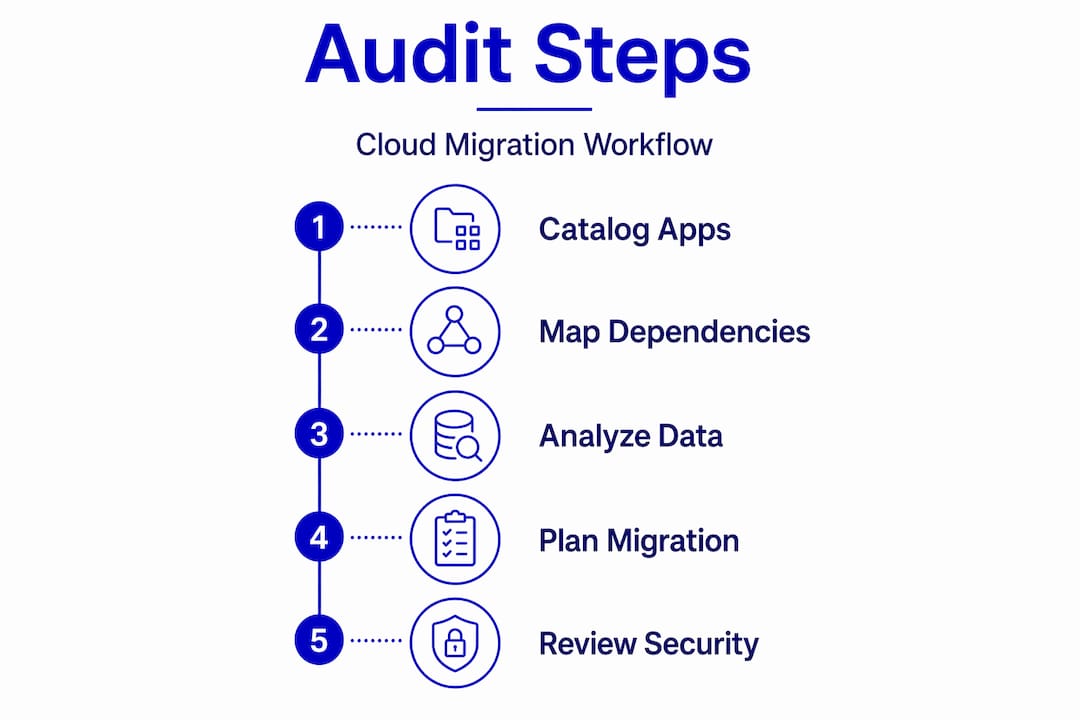
Once you have your catalog, map dependencies. Understand which applications talk to which databases, which integrations are business-critical, and which systems have hard latency requirements. This dependency mapping directly informs your migration wave sequencing later.
Beyond the technical inventory, evaluate your team’s cloud readiness. Skills gaps in cloud architecture, security configuration, and DevOps tooling are common, particularly for organizations transitioning from heavily on-premise environments. Address training needs before migration begins, not during execution.
Key preparation steps to complete before migration authorization:
- Define measurable business goals tied to migration outcomes, such as cost reduction targets, uptime improvements, or application performance benchmarks
- Identify regulatory and data residency requirements specific to your country and industry, including healthcare data rules in the UAE and government data sovereignty requirements in KSA
- Conduct a skills gap assessment and arrange targeted training or external support
- Engage both technical and business stakeholders early, since early stakeholder alignment is one of the strongest predictors of migration success
Pro Tip: Run your application audit against real usage data, not just what IT believes is running. Many enterprises find that 20 to 30 percent of cataloged applications are redundant or unused. Decommissioning these before migration reduces scope, cost, and risk.
Choosing your migration strategy
Not every workload belongs in the cloud the same way. The “6 R’s” framework gives you a structured way to classify each application and select the right approach. The six strategies are rehost, replatform, repurchase, refactor, retire, and retain.
| Strategy | What it means | Best for |
|---|---|---|
| Rehost (lift and shift) | Move the application as-is to cloud infrastructure | Legacy systems with low complexity |
| Replatform | Migrate with minor optimizations, such as moving to a managed database service | Apps that benefit from cloud-native services without full rebuilds |
| Refactor | Re-architect the application for cloud-native design | High-priority apps where scalability or performance gains justify the investment |
| Repurchase | Replace the application with a SaaS alternative | Commodity functions like HR, email, or CRM |
| Retire | Decommission the application entirely | Redundant or unused systems identified during audit |
| Retain | Keep on-premises temporarily | Applications with regulatory constraints or recent capital investment |
Most enterprise migrations use a combination of all six. The key is assigning each workload a strategy based on business value, technical complexity, and risk tolerance, not convenience.
Migration wave planning follows directly from this classification. Start pilot migrations with non-critical systems to validate your process and build team proficiency before moving business-critical data. A common mistake is migrating core databases or ERP systems in early waves. That approach exposes you to maximum operational risk before your team has worked out process gaps.
Pro Tip: Use your cloud migration strategies ROI analysis to sequence waves by business impact. The goal is to demonstrate measurable wins in early waves, which builds organizational confidence and secures continued executive support for the full program.
Executing the migration step by step
Execution is where plans either hold or unravel. A disciplined, sequential approach reduces the chance of disruption and gives you clear checkpoints to validate progress. Here is a practical sequence for how to migrate to the cloud in a controlled, verifiable way.
-
Set up your cloud environment. Configure virtual networks, identity and access management policies, encryption standards, and logging before any workload arrives. Security failures post-migration most often stem from weak identity and access management and poor automation, so building these controls into the environment from the start is critical.
-
Validate your cloud migration checklist. Before each wave, confirm that migration checklist items are completed: migration strategy confirmed, architecture peer review done, network and IAM policies tested, and backup validation passed. Static checklists fail when they are not tailored to your environment. Customize yours for each wave.
-
Transfer data and deploy applications. Use purpose-built migration tools appropriate to your cloud provider. For large data volumes, consider offline transfer options to avoid excessive network transfer costs. Pay close attention to data egress fees, since egress costs in large migrations can consume 15 to 25 percent of predicted savings if not modeled in advance.
-
Run integration, user acceptance, and security testing. Do not cut over until all three testing phases are complete. Integration testing verifies that migrated applications communicate correctly with dependent systems. User acceptance testing confirms that business workflows function as expected. Security testing validates that your cloud posture matches your defined standards.
-
Execute the cutover with a documented rollback plan. A formal rollback plan must be tested and approved before any migration window opens. Define exactly what conditions trigger a rollback, who has authority to call it, and how long the reversion process takes.
“A migration without a tested rollback plan is not a migration. It is a gamble. In the MENA region, where operational continuity expectations are high and regulatory scrutiny is real, every cutover window must have a defined exit path before it begins.” — Tamer Badr, Singleclic
For organizations in Saudi Arabia and the UAE, compliance considerations add an additional layer to execution planning. Data residency rules, sector-specific regulations from bodies like the Saudi National Cybersecurity Authority (NCA), and the UAE’s data protection frameworks all require cloud security guidance to be factored into environment configuration, not bolted on after cutover.
Post-migration operations: monitoring and governance

Many organizations treat migration completion as the finish line. It is actually the starting line for a different discipline: continuous cloud optimization. Failing to monitor and optimize post-migration is one of the leading causes of poor ROI from cloud investments.
Your post-migration operations program should cover four areas:
- Performance monitoring. Deploy real-time monitoring across all migrated workloads. Track response times, error rates, and infrastructure utilization. Set automated alerts for anomalies so your team can respond before users are impacted.
- Security posture management. Run continuous security assessments rather than point-in-time audits. Data governance frameworks should be integrated into your cloud operating model from day one.
- Cost management. Real usage metrics should drive resource sizing decisions. Mirror your on-premises infrastructure sizing in the cloud and you will overspend. Right-size based on actual consumption data, use reserved instances for predictable workloads, and review your cloud bill monthly.
- Governance and compliance. Establish clear ownership for cloud resources, define tagging policies, and run regular compliance reviews against your regulatory baseline. Cost optimization is an ongoing process, not a project with an end date.
For MENA enterprises looking to maintain operational agility after migration, low-code platforms like Singleclic’s Cortex play a meaningful role. Cortex allows operations teams to design, automate, and evolve business processes without writing code, with full Arabic UI/UX support and on-premise deployment options for banks and government entities that require data sovereignty. Runtime workflow changes without downtime mean that your operations team can adapt processes as the business evolves, without waiting on IT development cycles.
Pro Tip: Schedule a 30-day and 90-day post-migration review as formal project milestones, not optional check-ins. At 30 days, focus on stability and security posture. At 90 days, shift to cost optimization and process improvement. Organizations that build these reviews into their plan recover ROI faster than those who treat optimization as reactive.
My take on cloud migration in the MENA region
I have worked with enterprises across KSA, UAE, and Egypt on cloud migration programs, and I will tell you the single most consistent failure pattern I see: organizations treat migration as a technology project and forget that it is a business change program.
The technical steps in this guide are learnable. What is harder to fix mid-project is an organization that never aligned its business units, legal team, and IT leadership around a shared definition of success. I have seen technically flawless migrations that generated zero business value because the post-migration environment was sized wrong, governed poorly, and never optimized.
The other thing I would push back on is the assumption that cloud migration is a one-time effort. In my experience, the organizations that get the most out of their cloud investments treat it as a continuous cycle of assessment, improvement, and adaptation. The migration project gets you into the cloud. What you do in the 12 months after is what determines whether that investment pays off.
For MENA IT leaders specifically, the compliance dimension deserves more attention than most guides give it. Regulatory frameworks in Saudi Arabia and the UAE are maturing quickly. What was compliant at migration time may require reassessment 18 months later. Build that review cadence into your operating model now, before a compliance gap becomes an incident.
— Tamer
How Singleclic helps MENA organizations migrate with confidence
Cloud migration is complex enough without trying to figure it out alone. Singleclic works with enterprise clients across Saudi Arabia, UAE, and Egypt to design and execute migration programs that are technically sound, compliance-aware, and built for long-term business performance. Whether you are moving an ERP system, a custom application portfolio, or a full data center, the Singleclic team brings 10 years of regional delivery experience to your project.
Beyond migration execution, Singleclic’s Cortex low-code platform gives your operations team the agility to automate and evolve business processes in the cloud without depending on long development cycles. For organizations planning or mid-way through their ERP integration in MENA, Singleclic also offers a practical ERP implementation checklist designed specifically for the Middle East context. Talk to the Singleclic team to assess where your migration program stands and where it needs to go.
FAQ
What is a cloud migration process guide?
A cloud migration process guide is a structured framework that walks organizations through assessing, planning, executing, and optimizing the movement of applications and data to cloud infrastructure. It covers strategy selection, risk management, testing, and post-migration governance.
How long does cloud migration typically take?
Migration duration depends on scope and organizational readiness. Small migrations may take days, while mid-sized organizations typically need several weeks for preparation, testing, and cutover. Larger enterprise programs can span six to eighteen months across multiple migration waves.
What is the safest way to start a cloud migration?
Begin with low-risk, non-critical workloads to validate your process and build team confidence before migrating business-critical systems. This approach surfaces process gaps without exposing the organization to significant operational risk.
What should a cloud migration checklist include?
A solid cloud migration checklist covers confirmed migration strategy, completed architecture review, tested network and IAM policies, validated backups, a documented rollback plan, and completion of integration and security testing before each cutover window.
How do I control cloud costs after migration?
Size cloud resources based on real usage metrics rather than replicating on-premises infrastructure. Use reserved instances for predictable workloads, monitor egress costs closely, and schedule formal cost optimization reviews at 30 and 90 days post-migration.