TL;DR:
- Data migration involves the permanent transfer of data between systems, often necessary for upgrades or cloud adoption. Successful migrations require careful planning, validation, and adherence to regional compliance standards, especially in Saudi Arabia and the UAE. Using low-code platforms and structured workflows helps mitigate risks like data loss, schema errors, and downtime, ensuring a controlled and efficient process.
Data migration is defined as the permanent transfer of data between storage systems, formats, databases, or applications, typically triggered by system upgrades, cloud adoption, or vendor transitions. For IT managers and data architects in organizations across Saudi Arabia and the UAE, understanding this process is the difference between a controlled transition and a costly failure. Platforms like Microsoft Azure, IBM, and NetApp are commonly involved in enterprise-scale migrations, and the risks of poor planning include data loss, compliance violations, and extended downtime. This guide walks you through every critical dimension of the process, from types and workflows to validation standards and risk mitigation.

What is data migration and why does it matter?
Data migration is defined as the permanent transfer of data between storage types, formats, databases, or computer systems, involving preparation, extraction, transformation, validation, and legacy decommissioning. The word “permanent” is what separates it from other data processes. Once the migration closes and the legacy system is decommissioned, there is no ongoing synchronization. The move is final.
Organizations initiate migrations for several concrete reasons: replacing an aging ERP system, consolidating data centers, moving workloads to cloud infrastructure, or switching vendors after a contract ends. Each scenario carries its own complexity, but the underlying data migration process follows a consistent structure regardless of scale.
The business case is real. Proper planning reduces the risk of data loss and corruption while delivering measurable benefits, including upgraded application performance, improved productivity, and lower storage costs. Without that planning, migrations become expensive recovery exercises rather than controlled transitions.
Pro Tip: Before scoping any migration project, document every data source your organization relies on, including shadow IT systems and departmental spreadsheets. These undocumented sources are the most common cause of post-migration data gaps.
What are the common types of data migration?
Understanding the category of migration you are executing shapes every decision that follows, from tool selection to timeline. The five most common types are:
- Storage migration: Moving data between physical or virtual storage devices, such as from on-premise disk arrays to cloud object storage. This is the most operationally straightforward type but still requires careful capacity planning.
- Database migration: Transferring database files, schemas, and instances from one database engine to another, for example from Oracle to Microsoft SQL Server or from an on-premise PostgreSQL instance to Amazon RDS.
- Application migration: Moving an entire application along with its underlying data to a new environment. This type is the most complex because application dependencies, APIs, and configuration files must all migrate together.
- Cloud migration: Transferring workloads, data, or entire infrastructure to a cloud provider, a hybrid cloud model, or between cloud providers. Organizations in the UAE and Saudi Arabia are accelerating this type of migration as part of national digital transformation programs.
- Data center migration: Relocating an organization’s entire data center infrastructure, including servers, storage, and networking, to a new physical or virtual location.
The table below compares these types across three practical dimensions:
| Migration type | Trigger | Primary risk |
|---|---|---|
| Storage migration | Hardware refresh, cost reduction | Data loss during transfer |
| Database migration | Vendor change, modernization | Schema incompatibility |
| Application migration | Platform consolidation | Broken dependencies |
| Cloud migration | Digital transformation | Security and compliance gaps |
| Data center migration | Facility change, M&A | Extended downtime |
For enterprises in Saudi Arabia operating under SAMA or NCA compliance frameworks, cloud and data center migrations carry the highest regulatory scrutiny. The MENA cloud migration guide from Singleclic addresses these regional security considerations in detail.
How does the data migration process work step by step?
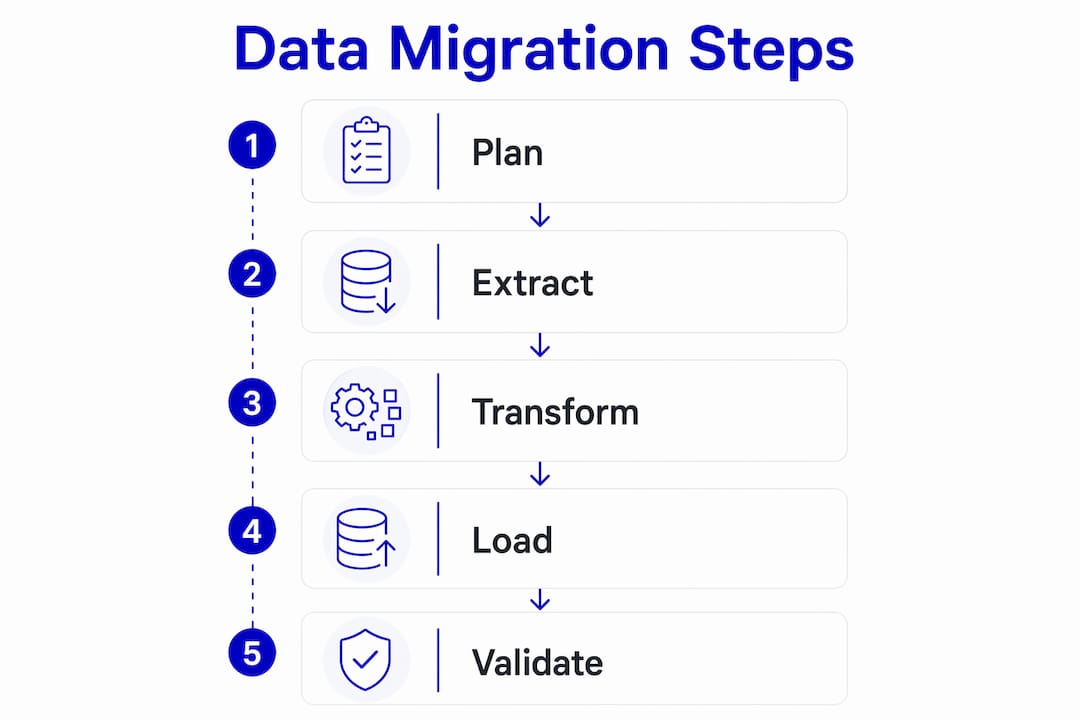
The data migration process follows a defined sequence. Skipping or compressing any stage is the primary reason migrations fail at go-live.
-
Select and prepare data. Identify which data sets will migrate, which will be archived, and which will be discarded. Data quality issues discovered here are far cheaper to fix than after transfer. Tailored migration plans per organization prevent duplicates and structural errors from carrying forward into the new system.
-
Extract data from source systems. Pull data from the source environment using ETL (Extract, Transform, Load) or ELT (Extract, Load, Transform) workflows. Enterprise migrations increasingly use ELT because it preserves raw data for analytics readiness and AI workload support.
-
Transform data to fit the target environment. Map source fields to target schemas, convert data types, normalize formats, and apply business rules. This stage is where most technical debt surfaces.
-
Load data into the target system. Transfer the transformed data into the new environment. For large data volumes, this is often done in batches during off-peak hours to minimize operational impact.
-
Validate data integrity and completeness. Confirm that the migration succeeded. Acceptance criteria must include schema alignment, metadata completeness, and lineage verification. Simply matching row counts is insufficient validation to confirm migration success.
-
Run a pilot migration first. Pilot migrations that cover edge cases reduce costly failovers during full cutover. Test with a representative slice of data before committing to a full run.
-
Decommission the legacy system. Only retire the source system after validation is complete and signed off. Maintaining the legacy environment during the validation window provides a safety net against incidents.
Pro Tip: Build your validation checklist before the migration starts, not after. Define what “success” looks like in measurable terms: row counts, schema match percentages, null value thresholds, and functional test results. This prevents subjective sign-off disputes at go-live.
How does data migration differ from data integration?
These two concepts are frequently confused, and the confusion leads to poor tool selection and misaligned project expectations.
Data migration is a one-time project with a defined end state: data moves, the legacy system is decommissioned, and the project closes. Data integration, by contrast, is an ongoing process that continuously synchronizes data between two or more systems that remain active simultaneously.
The practical implications are significant:
- A migration project has a start date, an end date, and a decommissioning milestone. An integration project has no natural end.
- Migration tools like AWS Database Migration Service or IBM InfoSphere DataStage are optimized for one-time bulk transfers. Integration platforms like MuleSoft or Dell Boomi are built for continuous, event-driven data flows.
- Project governance differs too. Migration requires a rollback plan and a cutover window. Integration requires monitoring, alerting, and ongoing schema management.
- Data integration focuses on continuous data flow, whereas migration moves and retires legacy data. Conflating the two leads organizations to apply integration governance to a migration project, which adds unnecessary complexity and cost.
If your organization is replacing an ERP system with Microsoft Dynamics 365 or Odoo, you are running a migration. If you are connecting your CRM to your ERP so they share customer records in real time, you are building an integration. Both are valuable. They are not the same thing.
What are the key challenges and best practices in data migration?
Data migration carries real risk. The most common failure modes are data loss during transfer, schema corruption, compliance violations, and unplanned downtime. Each is preventable with the right approach.
Common risks and how to address them
Data loss and corruption occur most often during the transformation stage, when field mappings are incorrect or data type conversions fail silently. Automated validation at every pipeline stage catches these errors before they reach the target system. Preservation principles must be embedded in the migration definition itself, not treated as a post-migration cleanup task.
Compliance exposure is a specific concern for organizations in Saudi Arabia and the UAE. SAMA cybersecurity frameworks, UAE PDPL data protection requirements, and sector-specific regulations in healthcare and banking all impose constraints on where data can reside and how it must be handled during transit. Your migration strategy must account for data residency, encryption in transit, and audit logging from day one.
Downtime risk is managed through phased cutover strategies and rehearsed rollback plans. Planning rollback procedures and maintaining the legacy environment during validation are non-negotiable for enterprise migrations. A rehearsed rollback takes hours. An unplanned manual reconciliation takes weeks.
Best practices that separate successful migrations from failed ones
- Define acceptance criteria before extraction begins, covering schema alignment, metadata completeness, and functional validation, not just row counts.
- Use automation to reduce human error in transformation and loading stages. Low-code platforms like Singleclic’s Cortex allow teams to build and modify migration workflows without writing custom code, which reduces both development time and the risk of manual scripting errors.
- Run at least one full pilot migration against a representative data subset before the production cutover. Pilot testing that covers edge cases is the single most effective way to surface hidden issues before they affect the live environment.
- Assign a dedicated data steward to own quality decisions throughout the project. Technical teams handle the pipeline. The data steward owns the business rules.
- For cloud migration workflows, structured planning is directly linked to avoiding cost overruns and achieving efficiency gains. Organizations that follow a documented migration framework consistently outperform those that treat migration as a purely technical exercise.
Key takeaways
Successful data migration requires treating the process as a structured project with defined acceptance criteria, not a technical task that ends when data arrives in the target system.
| Point | Details |
|---|---|
| Migration is permanent | Unlike integration, migration ends with legacy decommissioning and no ongoing sync. |
| Validation goes beyond row counts | Schema alignment, metadata completeness, and lineage verification are required for true acceptance. |
| Pilot migrations prevent failures | Testing a representative data slice before full cutover surfaces edge cases before they cost you. |
| Rollback plans are mandatory | Maintaining the legacy environment during validation protects against incidents and unplanned downtime. |
| Regional compliance shapes strategy | Saudi Arabia and UAE regulations require data residency, encryption, and audit logging from the start. |
Why I think most migration projects fail before the first line of data moves
After working with enterprises across KSA, UAE, and Egypt on ERP implementations and system transitions, I have seen the same pattern repeat. Organizations treat data migration as the final task on a project plan rather than the foundation of it. They spend months selecting a new platform, configuring workflows, and training users, then allocate two weeks for “data migration” at the end. That sequencing is backwards.
The migrations that succeed are the ones where data quality assessment happens in week one, not week twelve. When you discover that your customer master data has 40% duplicate records after you have already configured your new CRM, you are not just fixing data. You are rebuilding business logic, retraining users, and delaying go-live.
I also see organizations underestimate the regional dimension. In Saudi Arabia and the UAE, data governance is not a checkbox. SAMA, NCA, and UAE PDPL requirements affect where data can be processed, how it must be encrypted, and what audit trails you need to maintain. These constraints must be built into the migration architecture, not bolted on afterward.
The good news is that low-code platforms have genuinely changed what is possible for mid-market organizations. Tools like Cortex allow teams to build transformation pipelines, validation rules, and approval workflows without custom development. That means faster iterations, fewer scripting errors, and migration logic that non-technical stakeholders can actually review and approve. That last point matters more than most people realize.
— Tamer
How Singleclic supports your data migration projects
Singleclic works with organizations across Saudi Arabia, UAE, and Egypt to plan and execute data migrations as part of ERP and CRM implementations using Odoo and Microsoft Dynamics 365. The ERP implementation checklist for the Middle East covers data migration preparation, validation standards, and cutover planning specific to MENA regulatory requirements. Singleclic’s Cortex low-code platform lets your team build and adjust migration workflows in real time, without waiting on development cycles. With 70+ consultants across the region and clients including QNB, AlBaraka, and Emirates Health Services, Singleclic brings both the technical depth and regional context your migration project needs. Reach out to explore how a structured migration approach can protect your data and accelerate your go-live.
FAQ
What is data migration in simple terms?
Data migration is the permanent transfer of data from one system, format, or storage environment to another. It is a defined project with a start, an end, and a decommissioning milestone, not an ongoing process.
What are the main steps in a data migration process?
The core steps are: select and prepare data, extract from the source, transform to fit the target schema, load into the new system, validate integrity and completeness, and decommission the legacy system only after successful validation.
How is data migration different from data integration?
Migration is a one-time move that ends with the legacy system being retired. Integration is an ongoing synchronization between two systems that remain active simultaneously. They require different tools, governance models, and project structures.
What tools are commonly used for data migration?
Common tools include AWS Database Migration Service, IBM InfoSphere DataStage, Microsoft Azure Data Factory, and Talend. For organizations using low-code approaches, platforms like Singleclic’s Cortex support pipeline design and validation without custom scripting.
What are the biggest risks in data migration projects?
The most common risks are data loss during transformation, schema incompatibility, compliance violations, and unplanned downtime. Each is mitigated through pilot testing, automated validation, rollback planning, and embedding preservation principles into the migration design from the start.