Segregation of duties (SoD) in Dynamics 365 Finance and Operations means building rules so that no single user can perform two incompatible tasks, such as receiving goods and paying the vendor for them. Microsoft gives that exact pair as its standard example of an SoD rule. This guide shows how the control works, how to configure it, where the standard tooling stops, and what UAE organizations should keep in mind at audit time.
TL;DR
- SoD in Dynamics 365 is enforced through security roles, duties and privileges, plus SoD rules that flag or block conflicting duty pairs.
- Creating a rule does not prove compliance. You must validate existing roles and user assignments after every rule change.
- Document the risk and the mitigation on every rule you allow to stay in conflict. Auditors read those fields as evidence.
- Design modular roles around business processes, not around individual people.
- UAE federal government entities using the federal FMIS work under the Ministry of Finance SoD Manual. Private organizations should still expect auditors to ask for the same discipline.
Table of Contents
- What segregation of duties means in Dynamics 365
- How the standard security model supports SoD
- Setting up SoD rules, step by step
- Rules do not equal compliance: validate
- Limits you should plan around
- Designing roles so SoD stays manageable
- Resolving conflicts and documenting compensating controls
- Approval workflows as the second line of control
- UAE audit and regulatory considerations
- Use cases
- Perspective: what we see in SoD projects
- How Singleclic helps
- Article details
- FAQ
- Ready to review your SoD setup?
- Sources
What segregation of duties means in Dynamics 365
The principle is simple: the person who creates a payment should not be the person who approves it. In Finance and Operations, Microsoft describes SoD as rules that require different users to carry out incompatible tasks, and says the control helps reduce fraud, detect errors or irregularities and meet regulatory requirements.
The typical high-risk combinations in an ERP are well known:
- Maintaining the vendor master and processing vendor payments.
- Receiving goods and approving the vendor invoice.
- Creating purchase orders and approving them.
- Maintaining payroll data and releasing payroll.
- Posting journal entries and approving the same journals.
For a CFO or CIO, the point is not theoretical. One user holding two of these combinations is the classic fraud path, and also the way honest errors slip through unreviewed.
How the standard security model supports SoD
Dynamics 365 Finance and Operations uses role-based access. The building blocks, as Microsoft explains in its role-based security guidance, are:
- Privileges: the permission to perform a specific action or access a specific object.
- Duties: a part of a business process, made of one or more privileges.
- Security roles: the set of duties assigned to a user, usually matching a job function.
Microsoft recommends assigning duties to roles rather than attaching privileges directly where possible. That keeps the model readable, and readability is what makes SoD analysis tractable.
The standard roles were also designed with separation in mind. Microsoft’s security capabilities guidance cites separating vendor master maintenance, goods receipt and vendor payment as examples. SoD rules then detect and prevent conflicting role assignments on top of that.
Two practical cautions follow:
- Standard roles are a starting point. Once you copy, extend or combine them to fit your organization, you can reintroduce conflicts the standard design avoided.
- Standard rules cover Microsoft’s view of common risk. Your own policy, your auditors and your sector regulator may require more.
Setting up SoD rules, step by step
Microsoft’s setup procedure is short. A system administrator does the following:
- Go to System administration > Security > Segregation of duties > Segregation of duties rules.
- Select New.
- Choose the first duty and the second duty that must not sit together.
- Set the severity of the conflict.
- Record the security risk and the mitigation.
- Save.
The short list hides the real work. Before you click New, do this preparation:
Agree the conflict matrix with the business
SoD is a policy decision, not an IT setting. Sit down with finance, procurement, HR and internal audit and list which duty pairs are unacceptable, which are acceptable with a compensating control, and which are harmless. Write the matrix down before configuration. It becomes the reference for every later exception.
Set severity with intent
Use severity to reflect the business consequence. A conflict that allows a single user to create and pay a vendor is not the same as a conflict between two inquiry-level duties. If everything is marked high, reviewers stop distinguishing and the important items drown.
Write the risk and mitigation text properly
Microsoft says to record the risk and the mitigation for each rule. Examples it gives include detailed process reviews, a monthly managerial review, or sharing resources with other departments. Treat these fields as governance evidence. An auditor who opens a rule should read why it exists and what happens when it is overridden.
Rules do not equal compliance: validate
This is the step teams skip. Microsoft warns that creating an SoD rule does not itself verify compliance, because existing roles and user assignments may already be in conflict. You need to validate after you create or change rules.
The identification and resolution procedure gives you three checks:
| Check | What it finds | Where you act |
|---|---|---|
| Validate duties and roles | Roles that contain conflicting duties, with the rule and the violating role named | Modify the role in Security configuration |
| Verify compliance of user-role assignments | Users who hold role combinations that conflict | Remove a role or allow the conflict with a documented reason |
| Unresolved conflicts page | Conflicts that were detected and not yet resolved or allowed | Work through the list until it is empty or justified |
Microsoft also provides a Roles violating segregation of duties view and a Security governance report listing violations against your defined rules. Run these before every audit cycle and after every release that touches security.
What happens at assignment time
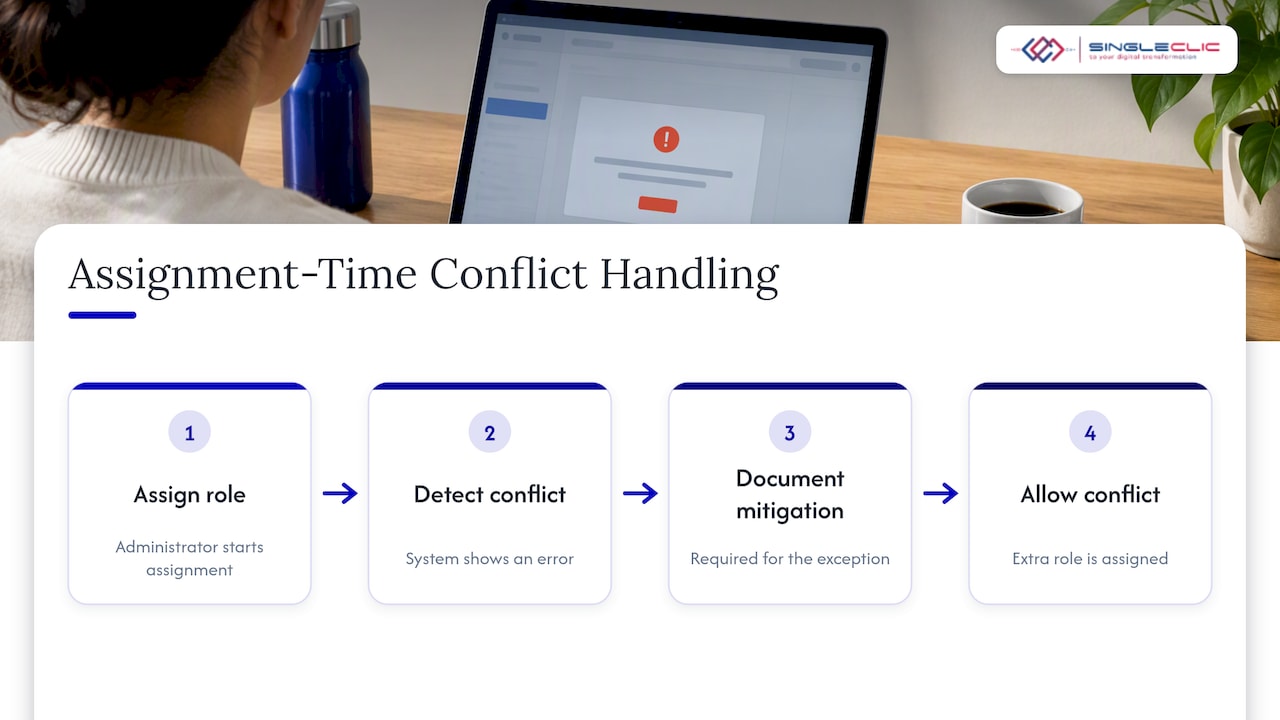
When an administrator assigns a role, Finance and Operations enforces the SoD rules automatically. If the assignment creates a conflict, the system shows an error, and the extra role is assigned only after the conflict is explicitly allowed. That “allow” action is where your documented mitigation must exist. If it does not, the control is a click-through.
Limits you should plan around
Honest planning means knowing where standard SoD does not reach.
- Domain group assignments. Microsoft states that conflicts are not currently verified for users who receive roles through Active Directory domain groups. If you manage access that way, your SoD check has a blind spot. Assign roles directly in the application, or add a separate review for group-based access.
- Small legal entities. In smaller entities a small team makes declarative rules hard to build, since one person genuinely needs several duties. Microsoft’s implementation guidance recommends modular roles and documented overrides for the conflicts you detect.
- Rules only see what is configured. A rule between two duties says nothing about a custom process built outside the duty model, an integration account or a workflow that bypasses approvals.
- Similar duties. Security governance parameters let you enable a duty similarity check for SoD validation, set the similarity level, and decide whether unpublished objects are allowed in Security configuration. Use it to catch duplicated duties that a rule would otherwise miss.
Organizations with complex approval chains often add a layer on top: a risk-analysis tool or a workflow platform that tests access combinations across systems, not just inside one ERP. Decide this at design time, not after a finding.
Designing roles so SoD stays manageable
Most SoD pain is a role design problem. Microsoft’s guidance is to design modular roles around business processes and SoD rather than around individual personas, and to avoid one role per user and nested roles. A practical pattern:
- Define small process-level roles, for example “vendor master maintenance”, “goods receipt”, “vendor payment”.
- Assign users a combination of those roles that matches their job.
- Run SoD validation against the combination, not the individual role.
- When a person needs a conflicting pair, grant it as a documented exception with a compensating control and a review date.
Modular roles can be reused across legal entities, which matters for groups operating several companies in the UAE and across the Gulf. You maintain one definition and document unavoidable exceptions per entity.
If you are planning an implementation, build security into the project plan from the first phase rather than the last. Our executive ERP implementation checklist places this work inside the wider deployment phases.
Resolving conflicts and documenting compensating controls
When validation flags a conflict, you have three honest options:
- Remove it. Split the duty across two roles or two people. This is the preferred outcome.
- Redesign the role. Move a duty out of the role that carries the conflict, then revalidate.
- Allow it with a mitigation. Keep the conflict, record why, and name the control that compensates.
Compensating controls need to be real and testable. Microsoft’s examples are a detailed process review, a monthly managerial review and sharing resources with another department. A mitigation that reads “management is aware” will not survive an audit. Name the reviewer, the frequency and the report they review.
Approval workflows as the second line of control
SoD rules stop one person holding two duties. Approval workflows stop one person completing a transaction alone even when their access is correct. The two work together: access control limits who can act, and workflow ensures that a second, independent person signs off on high-value or sensitive items.
For MENA administrators, especially those who need on-premises deployment, our guide to Dynamics 365 approval workflows covers how to structure approvals. If your teams build apps and automations on Power Platform, the low-code governance blueprint explains how to stop citizen-built flows from bypassing the controls you set in the ERP.
UAE audit and regulatory considerations
SoD expectations in the UAE depend on who you are.
Federal government entities. The UAE Ministry of Finance publishes a Segregation of Duties page that links SoD to integrity, accuracy, transparency, accountability and internal control. For entities using the federal financial management information system (FMIS), its SoD Manual is mandatory for financial, procurement and payroll transactions. Users request duties through the system and obtain approvals from the user, supervisor and business owner, with requests designed to be conflict-free. If you run Dynamics 365 alongside or in place of any government process, map your role model to that approval chain.
Private companies, banks and healthcare. The Ministry page is written for federal entities, so do not present it as a law applying to every company. Practically, though, external auditors, group internal audit and sector regulators ask the same questions: who can create a vendor, who can pay, and who reviews exceptions. Confirm the specific obligations for your sector with your auditor and regulator.
For evidence, keep these ready:
- Your approved conflict matrix and its owner.
- The current SoD rule list with risk and mitigation text.
- The latest validation output for roles and user assignments.
- A log of allowed conflicts with approver, reason and review date.
- Evidence of the periodic mitigation reviews you promised.
Use cases
Procure-to-pay in a healthcare group
A group with several clinics needs buyers to raise orders, receiving staff to confirm deliveries and finance to pay. Modular roles for each step, SoD rules between them and a workflow for high-value orders keep the chain independent even when sites are small.
Government entity with strict approvals
A public body must show who requested which duty and who approved it. Conflict-free role requests, validation before go-live and on-premises deployment for data residency make the audit trail defensible.
Bank finance team
Banks hold the most demanding SoD expectations. Journal creation and approval, treasury entry and settlement, and vendor maintenance and payment all need separate owners, with validation run on every release. See our overview of Dynamics 365 banking modules for related scope.
Perspective: what we see in SoD projects
We see the same pattern in most Dynamics 365 projects: the SoD rules are configured late, validated once and never revisited. The system supports the control. The weak point is governance after go-live, when a new role is cloned under time pressure and nobody reruns validation.
Our advice to executives is to treat SoD as an operating routine. Assign an owner, schedule validation after each change to roles, and review allowed conflicts on a calendar. Where conflicts cross systems, such as ERP, CRM, workflow and legacy applications, we connect approvals and data on Cortex, our Arabic-enabled low-code and BPM platform, so the approval path is consistent across them. For banks and government clients, Cortex deploys on premises.
— Tamer Badr
How Singleclic helps
Singleclic implements and customizes Microsoft Dynamics 365 for organizations across the UAE, Saudi Arabia and Egypt, and our engineers work with clients in healthcare, banking, real estate, construction, telecom and government. On SoD projects we typically support:
- Role and duty design that reflects your conflict matrix.
- SoD rule configuration, validation and clean-up of existing assignments.
- Approval workflows and integrations that keep controls consistent across systems.
- Ongoing D365 support and maintenance so validation stays part of routine operations.
If you are planning a new deployment or tightening an existing one, our Dynamics 365 implementation, integration and support services are the place to start. For approvals that span ERP, CRM and legacy systems, see Cortex and our wider platform.

For broader automation work around controls, our business process automation solutions page explains the options.
Article details
- SEO title: Dynamics 365 segregation of duties: rules, setup and audit
- Slug: dynamics-365-segregation-of-duties
- Keyword: dynamics 365 segregation of duties
- Secondary keywords: D365 SoD rules, D365 security roles, Dynamics 365 Finance and Operations security, SoD conflicts, ERP internal controls UAE
- Pillar cluster: Dynamics 365 ERP governance and security
FAQ
What is segregation of duties in Dynamics 365?
It is a set of rules that stops one user from holding two incompatible duties, such as receiving goods and paying the vendor. Rules are built on security duties and privileges, and the system checks them when you assign roles. The aim is to reduce fraud and catch errors.
Where do I create SoD rules in Finance and Operations?
Go to System administration > Security > Segregation of duties > Segregation of duties rules, and select New. Pick the two conflicting duties, set the severity, record the risk and mitigation, then save. Validate your existing roles and users afterward.
Does Dynamics 365 block conflicting role assignments?
Yes, for direct role assignment. The system shows an error when an assignment creates a conflict, and the role is assigned only after the conflict is allowed. Roles assigned through Active Directory domain groups are not currently checked, so review those separately.
How do I document an exception?
Use the risk and mitigation fields on the rule. Name the compensating control, such as a monthly managerial review, plus the reviewer and frequency. Keep a log of who approved the exception and when it will be reviewed.
Do UAE rules require SoD in Dynamics 365?
Federal government entities using the federal FMIS follow the Ministry of Finance SoD Manual for financial, procurement and payroll transactions. Other organizations should confirm obligations with their auditor and sector regulator. In practice, auditors expect documented SoD controls in any ERP.
Ready to review your SoD setup?
Talk to our Dynamics 365 team about a role and SoD review before your next audit or release. Start from our services page and tell us which entities and processes are in scope.
Sources
- Set up segregation of duties, Microsoft Learn
- Role-based security, Microsoft Learn
- Security capabilities for finance and operations apps, Microsoft Learn
- Identify and resolve conflicts in segregation of duties, Microsoft Learn
- Roles violating segregation of duties, Microsoft Learn
- Set up security governance parameters, Microsoft Learn
- Secure your Dynamics 365 project from day one, Microsoft Learn
- Segregation of Duties, UAE Ministry of Finance