Microsoft Cloud for Healthcare, built on Dynamics 365 healthcare apps, Power Platform, and Azure, is an industry cloud for patient engagement, care coordination, virtual visits, and analytics. It is not an electronic health record system, and it will not replace one. Standing it up requires Dataverse, correct licensing, and Power Platform admin center access before a single workflow goes live.
TL;DR:
- Microsoft Cloud for Healthcare is designed to add engagement, coordination, and analytics layers alongside existing EHR systems, not replace them.
- Core features include population segmentation for outreach, unified care management workflows, and population health dashboards, with AI-driven tools like Azure OpenAI layers supplementing functionality.
- Interoperability relies on FHIR standards for data exchange, with Dataverse serving as the operational hub, while governance and security are managed through structured role-based controls and compliance tools.
- Implementation success depends on starting with a narrow pilot, prioritizing master data quality, and gradually scaling to avoid scope creep and integration issues.
- Deployment requires careful licensing, region, and role setup, with most projects starting with read-only EHR integration before progressing to more complex bidirectional data workflows.
Table of Contents
- What’s included in Dynamics 365 for healthcare
- Core capabilities that justify the investment
- How FHIR, Dataverse, and Azure Health Data Services fit together
- Deployment prerequisites and the Power Platform admin center
- Where Dynamics 365 fits best, and where it doesn’t
- A phased playbook for implementing Dynamics 365 in healthcare
- Singleclic’s regional experience with healthcare deployments
- Patient data privacy management and consent controls
- Customization options for healthcare workflows and clinical processes
- Analytics and reporting built for healthcare operations
- Connecting Dynamics 365 to your existing EHR
- Security and compliance features for healthcare data
- What the industry gets wrong about Dynamics 365 in healthcare
- How Singleclic helps you deploy Dynamics 365 in healthcare
- Sources
- FAQ
What’s included in Dynamics 365 for healthcare
Microsoft Cloud for Healthcare is a bundle, not a single product. It combines Dynamics 365 apps (Customer Service, Field Service, Customer Insights), the Power Platform (Power Apps, Power Automate, Power BI), Azure Health Data Services, and Microsoft 365 with Teams, all wired together on a shared data layer. Organizations pick this stack for speed: preconfigured solutions ship with data models, sample workflows, and security roles already built, instead of engineering a healthcare CRM software solution from a blank canvas.
Three preconfigured solutions do most of the heavy lifting. Care management gives care teams a shared view of patient goals, assessments, and referrals. Home health supports scheduling and mobile visit management for field clinicians. Patient access handles intake, scheduling, and self-service touchpoints. Dataverse sits underneath all three as the operational database, storing patient, provider, and encounter records in a structure that other Microsoft apps can read and write without custom plumbing.
The distinction that trips up buyers is “industry cloud” versus “EHR.” An EHR like Epic or Oracle Health owns the clinical chart, orders, and medication administration record. Microsoft Cloud for Healthcare is built on Dynamics 365, Power Platform, and Azure and is designed to complement EHRs, not replace them by adding an engagement, coordination, and analytics layer on top. Think of it as the system that manages relationships and workflows around the clinical record, not the record itself.
Core capabilities that justify the investment
The functional case for Dynamics 365 health solutions rests on five capabilities that map to real operational pain points rather than generic CRM features.
- Patient and member engagement: Dynamics 365 Customer Insights segments populations by risk score, care gaps, or plan type, then triggers outreach campaigns for screenings, renewals, or chronic disease check-ins.
- Care management and case coordination: Dynamics 365 Customer Service templates give case managers a single workspace for referrals, assessments, and care plan tasks across a multidisciplinary team.
- Virtual visits with clinical context: Microsoft Teams handles the video layer, and because it is connected to the patient record in Dataverse, clinicians open a call already seeing recent notes and open tasks.
- Home health and field operations: Dynamics 365 Field Service schedules home visits, tracks technician routes, and manages equipment maintenance for durable medical equipment providers.
- Population health analytics: Power BI templates roll up readmission rates, no-show trends, and care gap closures into dashboards built for operational and clinical-adjacent reporting.
The most underrated piece is the Azure OpenAI layer some organizations add on top. Dynamic Health Systems built a solution called VitruCare 365 on Microsoft Cloud for Healthcare that uses Azure OpenAI Service to power personalized patient bots and motivational care planning, showing how a Dataverse-based patient profile becomes the foundation for AI-driven engagement rather than a generic chatbot bolted on separately.
Pro Tip: Don’t buy the full Care Management suite on day one. Start with the Customer Insights segmentation piece against one patient population, prove the outreach lift, then expand into case management.
How FHIR, Dataverse, and Azure Health Data Services fit together
Interoperability is where most healthcare CRM software projects either succeed quietly or fail expensively. Microsoft for Healthcare uses FHIR-based data models across provider, payor, and life sciences domains, which means organizations don’t have to invent a patient, encounter, or coverage schema from scratch. FHIR (Fast Healthcare Interoperability Resources) is the industry standard for exchanging clinical data, and building Dataverse tables around it means third-party systems can plug in using a vocabulary they already speak.
Dataverse acts as the operational hub in this architecture. Data flows in from the EHR, claims systems, or scheduling platforms through a FHIR sync agent pattern, lands in Dataverse tables shaped like FHIR resources, and becomes available to every Dynamics 365 app without a separate integration for each one.
Azure Health Data Services extends this further with a managed FHIR API, DICOM support for imaging, and IoMT (Internet of Medical Things) ingestion for connected devices. Azure Health Data Services gives organizations a managed way to store protected health information and integrate with shared care records, with governance and residency controls built in rather than bolted on.
The failure points are rarely the technology itself:
- MRN reconciliation: matching patient identities across systems that use different medical record number formats.
- Terminology mapping: aligning codes like SNOMED, LOINC, and ICD between the EHR and Dataverse so analytics don’t silently break.
- Data quality drift: unmonitored sync jobs that quietly stop updating fields nobody notices until a report looks wrong.
Deployment prerequisites and the Power Platform admin center
Before any healthcare workflow goes live, IT teams need to clear a specific checklist. Healthcare solutions deploy through the Power Platform admin center and require valid licenses along with administrative privileges, and skipping this step is the most common reason pilots stall in week one.
- Confirm Dataverse region and language support first. Dataverse healthcare solutions deploy only to a defined list of regions, including Asia, Australia, Canada, Europe, France, Germany, the United Kingdom, and the United States, and support a limited set of languages: Dutch, English, French, and German. Organizations in the Middle East should plan around this constraint, often deploying to a supported European region while running the interface in English.
- Assign the right admin roles. You need a tenant admin to approve the initial setup, a Dynamics 365 admin to manage app-level security, and a Power Platform admin to handle environment and Dataverse configuration.
- Check licensing against the features you actually want. Core Dynamics 365 licenses cover the base apps, but capabilities like Text Analytics for health or Azure IoT require a separate, active Azure subscription.
- Verify the solution is still supported before you build around it. Microsoft retires components periodically. Patient outreach journeys, for example, were retired in early 2025, so any implementation plan built on older documentation needs a fresh check against current supported features.
- Install in the documented order. Base solutions go in first, then industry accelerators, then custom extensions, to avoid dependency conflicts inside Dataverse.
Licensing missteps here compound quickly across a multi-year contract, which is why it’s worth reviewing how to control Dynamics 365 licensing costs before finalizing a healthcare deployment’s user counts and add-on modules.
Where Dynamics 365 fits best, and where it doesn’t
The strongest fit profile is an organization that already has a clinical EHR and needs a better layer on top of it. Payers running member outreach, outpatient systems managing referral networks, and health systems wanting unified analytics across scattered departmental tools all get fast wins from Dynamics 365 healthcare deployments.
- Best fit: patient and member engagement campaigns, care coordination across multiple providers, home health scheduling, population health dashboards.
- Weak fit: replacing a primary inpatient EHR, running end-to-end revenue cycle management, or handling core HCM and payroll without a specialized vertical add-on.
The mistake to avoid is treating Dynamics 365 healthcare as a rip-and-replace platform. It works best in a composable architecture: the EHR keeps the clinical chart, orders, and medication records, while Dataverse and D365 absorb the engagement, workflow, and analytics work that most EHRs handle poorly.
Pro Tip: If a vendor pitches Dynamics 365 healthcare as a full EHR replacement, that’s a signal they don’t understand the platform. The value is in the layer around the record, not the record itself.
A phased playbook for implementing Dynamics 365 in healthcare
The question of how to implement Dynamics 365 in healthcare almost always comes back to scope discipline. Successful implementations prioritize a narrow use case, such as patient outreach or home health scheduling, rather than launching one monolithic program, and that single decision predicts more project outcomes than any technical choice that follows.
- Pick one pilot with a measurable outcome. Patient outreach for overdue screenings, home health visit scheduling, or care coordination for a single high-risk population all work well because they’re bounded and easy to score.
- Run discovery against your actual EHR extracts. A recommended pattern is to integrate read-only EHR data into Dataverse first, enriching the patient profile before building any outbound workflow.
- Build the pilot with the right app for the job. Field Service for home care routing, Customer Service for care management cases, Power Apps for clinician-facing forms, and Power BI for the reporting layer.
- Instrument KPIs before you scale. Track outreach response rate, case resolution time, or missed-visit rate, and only expand once the pilot shows a clear lift.
- Iterate, then scale to adjacent use cases. Once the first workflow is stable, extend the same Dataverse foundation to the next department instead of starting a parallel project.
The most common pitfall is scope creep disguised as ambition, trying to automate five departments at once instead of proving one. The second is ignoring master data. Implementation success requires early investment in patient identity matching and terminology mapping to avoid brittle integrations and analytics gaps that surface months later as unexplained reporting errors.
Pro Tip: Budget real hours for terminology mapping in week one, not week ten. Teams that treat SNOMED and ICD alignment as an afterthought end up rebuilding integrations mid-project.
For a broader look at governance and rollout sequencing beyond the pilot stage, see this proven Dynamics 365 implementation playbook.
Singleclic’s regional experience with healthcare deployments
The company has experience delivering Microsoft Dynamics 365 and Odoo implementations in the region, with healthcare among its focus industries, serving various regional clients.
- Cortex integration allows connecting Dynamics 365 to legacy hospital systems, approval workflows, and third-party tools with Arabic UI support.
- Deployment options include on-premise solutions suitable for regulated healthcare entities.
- Typical healthcare engagements follow a phased approach starting with discovery and pilot phases, scaling based on outcomes.
Full case study details and outcome figures for specific engagements are available on request through Singleclic’s Dynamics 365 for healthcare overview.
Patient data privacy management and consent controls
Consent management in Dynamics 365 healthcare runs through Dataverse security roles combined with field-level and table-level permissions, not a single toggle. Every patient record can carry consent flags tied to specific data uses, such as marketing outreach versus clinical care coordination, so a patient who opts out of promotional campaigns doesn’t get excluded from care management workflows they actually need.
Row-level security in Dataverse restricts which care team members see which patient records, based on business unit, team assignment, or a custom security model tied to the care relationship. This matters operationally: a home health scheduler doesn’t need visibility into a patient’s full clinical case notes, and Dataverse permissions can enforce that separation without custom code.
Audit logging tracks who accessed or modified a patient record and when, which becomes essential during compliance reviews. Field-level encryption and data loss prevention policies, configured through the Power Platform admin center, add another layer for particularly sensitive fields like behavioral health notes or substance use history.
The practical gap organizations hit is consent portability across systems. If a patient’s consent status lives only in the EHR and Dataverse doesn’t sync it, outreach campaigns can violate a preference the patient already set elsewhere. Building the FHIR sync agent to carry consent resources, not just clinical data, closes that gap early instead of discovering it after a compliance complaint.
Customization options for healthcare workflows and clinical processes
Out-of-the-box Dynamics 365 apps are built for general sales and service scenarios, so healthcare organizations customize them into clinical-adjacent workflows using Power Apps and Power Automate rather than custom code. A care management case, for example, gets reshaped with custom fields for care plan goals, assessment scores, and referral status, all without touching the underlying platform.
Power Apps lets clinical teams build model-driven or canvas apps tailored to specific roles: a nurse intake form, a home health visit checklist, or a care coordinator dashboard. Because these apps read and write to the same Dataverse tables, a customization built for one department doesn’t fragment the data model for everyone else.
Power Automate handles the workflow logic behind these forms: routing a high-risk assessment to a case manager automatically, triggering a follow-up task after a missed appointment, or escalating an overdue care plan review. These flows replace manual handoffs that used to happen over email or phone calls between departments.
The configuration pattern that works best treats Dynamics 365 healthcare workflow automation as additive layers on the base solution rather than wholesale rewrites. Teams that heavily customize the core data model upfront often struggle with future platform updates, while teams that build role-specific apps and automation flows on top of the standard schema tend to upgrade more smoothly.
Analytics and reporting built for healthcare operations
Power BI is the reporting layer across Dynamics 365 health data analytics, and its value comes from connecting directly to Dataverse rather than requiring a separate data warehouse for basic operational reporting. Dashboards can pull case management data, outreach campaign results, and Field Service visit records into a single view without manual exports.
Population health reporting typically tracks care gap closures, readmission risk scores, and screening compliance rates by patient segment. Operational dashboards focus on different metrics entirely: average case resolution time, no-show rates for scheduled visits, and technician utilization for home health teams. Both draw from the same underlying Dataverse tables, which is the actual efficiency gain over maintaining separate reporting systems for clinical and operational data.
Azure Health Data Services adds a deeper analytics layer for organizations working with imaging or device data. DICOM-stored imaging metadata and IoMT device readings can feed into the same Power BI environment, though this typically requires additional Azure services beyond core Dynamics 365 licensing.
The realistic limitation is that Power BI reporting on Dataverse data reflects what happened inside Dynamics 365 apps. It is not a replacement for clinical quality reporting that depends on the full EHR record. Organizations get the best results treating Power BI dashboards as the operational and engagement view, while clinical outcome reporting stays anchored in EHR-native tools or a proper Azure Health Data Services analytics pipeline.
Connecting Dynamics 365 to your existing EHR
Basic interoperability gets data flowing between an EHR and Dataverse. Deeper integration means deciding what actually needs to move, how often, and in which direction, and that decision shapes the entire project timeline.
A one-way, read-only sync from the EHR into Dataverse is the lowest-risk starting point. It enriches the patient profile used by Customer Insights and Customer Service without ever writing back into the clinical system, which keeps the EHR vendor’s compliance requirements simpler to satisfy. A recommended phased pattern starts with integrating read-only EHR extracts into Dataverse for patient profile enrichment, then piloting outreach or scheduling flows before building deeper care management automation.
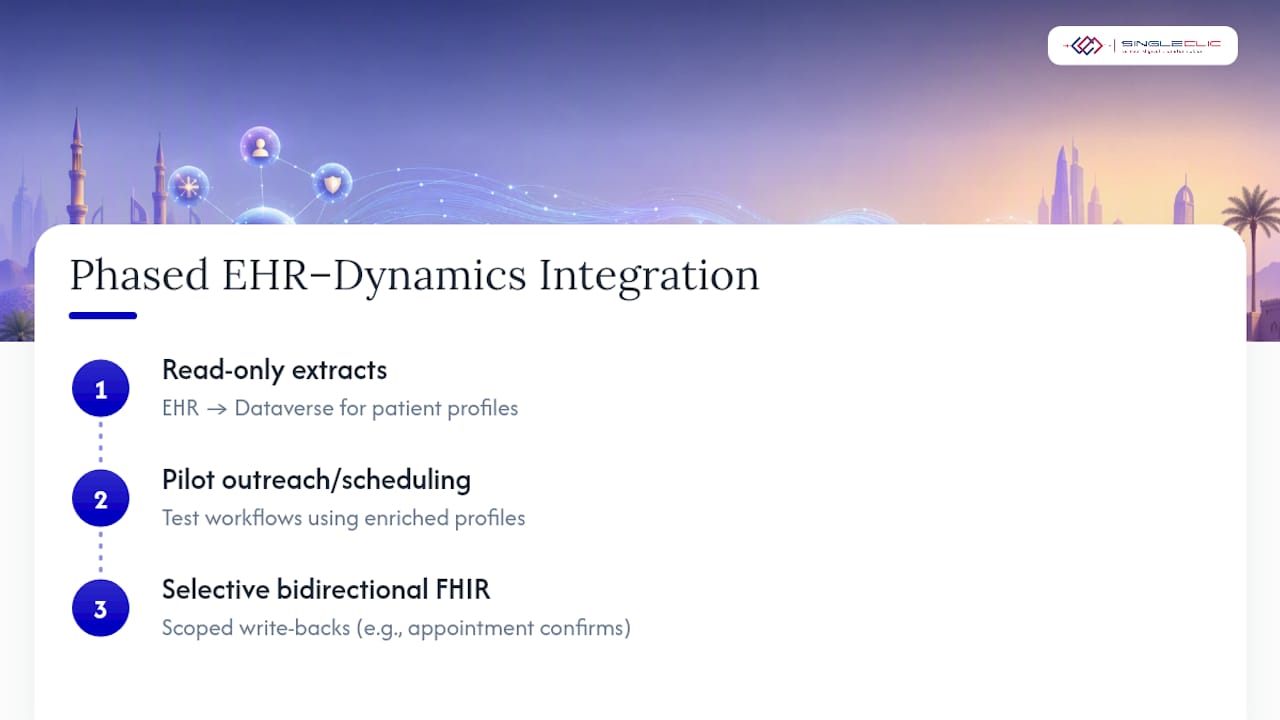
Bidirectional integration, where updates in Dynamics 365 write back to the EHR, is a bigger undertaking and usually reserved for specific, well-scoped use cases like appointment scheduling confirmations. Most EHR vendors expose FHIR-based APIs for this, which aligns naturally with the FHIR data model Dataverse already uses.
The integration pitfalls that derail timelines are rarely the connection itself. They’re the edge cases: a patient with two medical record numbers because they registered twice, a lab result coded in a local terminology system that doesn’t map cleanly to LOINC, or a nightly batch sync that silently fails for a subset of records. Budgeting real time for data quality validation, not just the technical connector, is what separates integrations that hold up from ones that need constant firefighting.
Security and compliance features for healthcare data
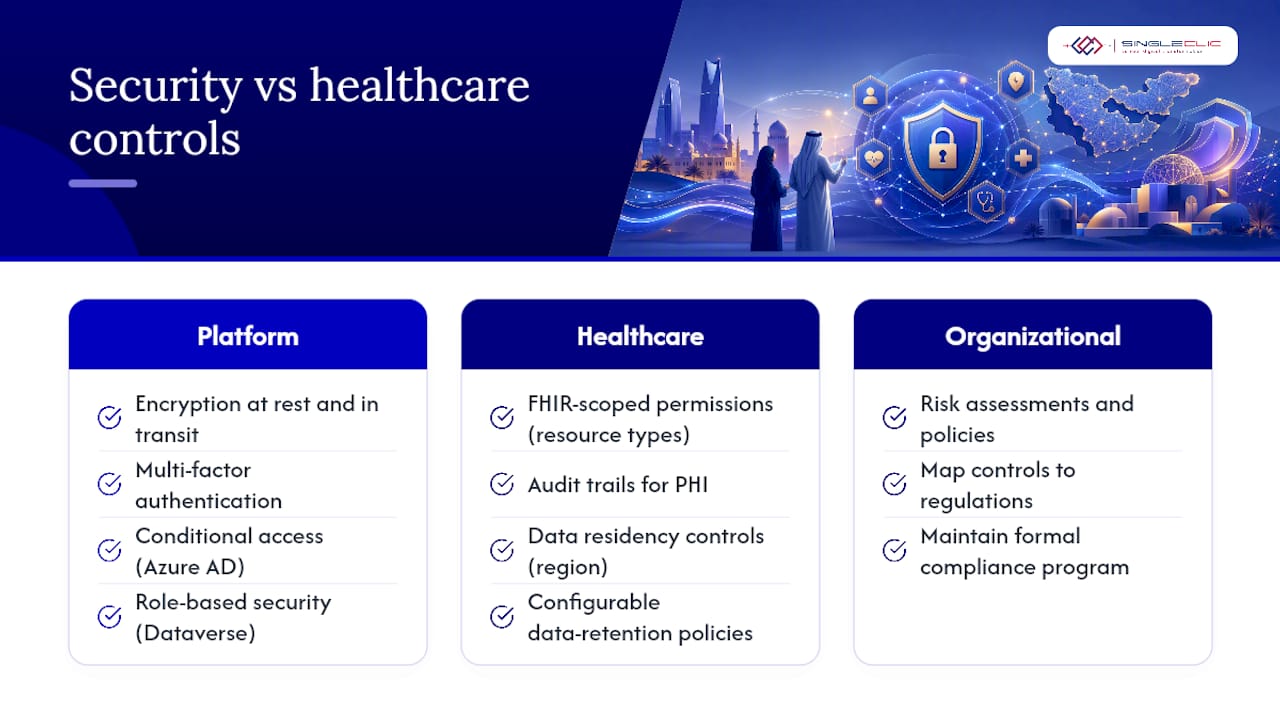
Dynamics 365 and Dataverse carry Microsoft’s standard enterprise security controls, including encryption at rest and in transit, multi-factor authentication, and conditional access policies managed through Azure Active Directory. For healthcare specifically, the FHIR-based data model itself supports more structured access control than a generic CRM schema, because permissions can be scoped to specific resource types like observations, conditions, or coverage records.
Azure Health Data Services adds compliance-specific capabilities on top of this: audit trails for every access to protected health information, configurable data retention policies, and residency controls that keep data within a specified geographic boundary. This matters for healthcare organizations in regulated markets, including government health entities in Saudi Arabia and the UAE, where data residency requirements often dictate which Azure region a deployment can use.
Role-based security in Dataverse restricts data visibility by job function, so a billing specialist and a case manager see different slices of the same patient record. Data loss prevention policies, set through the Power Platform admin center, prevent sensitive healthcare data from flowing into unapproved connectors or external applications, closing a common shadow IT risk.
None of this replaces a formal compliance program. Organizations still need their own risk assessments and policies mapped to whatever regulatory framework applies in their market, but the underlying platform controls give compliance teams a stronger starting point than a generic CRM would.
What the industry gets wrong about Dynamics 365 in healthcare
Most vendor pitches oversell Dynamics 365 healthcare as a platform that replaces clinical systems, and most skeptical IT leaders undersell it as “just a CRM with a healthcare skin.” Both are wrong, and the gap between them is where the real value sits.
The conventional advice tells organizations to run a full requirements-gathering phase before touching the platform. That’s backwards for this technology. The research is consistent: pilots that start narrow, on one outreach campaign or one scheduling workflow, succeed far more often than programs that try to map every clinical process before writing a single Power Automate flow. Discovery matters, but it should validate a pilot, not delay one.
What’s overrated is the FHIR data model as a silver bullet. It genuinely simplifies interoperability, but it does not solve MRN reconciliation or terminology mapping by itself. Organizations that skip the unglamorous work of identity matching and code alignment end up with dashboards that look authoritative and are quietly wrong.
What the reader should prioritize first is boring but decisive: pick one measurable pilot, get master data right before automation, and treat the EHR relationship as a partnership, not a competition. Everything else, including which Dynamics 365 apps to license and how to configure Cortex or other automation layers around them, is easier to get right once that foundation holds.
— Tamer Badr
How Singleclic helps you deploy Dynamics 365 in healthcare
The company offers consultancy, implementation, and integration services for healthcare providers using Dynamics 365, with additional capabilities in low-code automation and AI-driven patient engagement built on the same data foundation.

The path is straightforward: a discovery assessment to map your EHR extracts and priority use case, a scoped pilot built on Field Service, Customer Service, or Customer Insights depending on the problem, and a measured scale-up once the numbers hold. Explore Singleclic’s full Microsoft Dynamics 365 services for healthcare providers and book a discovery call to scope your first pilot.
Sources
- Deploy and configure Microsoft for Healthcare solutions powered by Dynamics 365
- Dynamics 365 for Healthcare: Independent Fit Review
- Dynamic Health Systems customer story | Microsoft
FAQ
How is CRM used in healthcare?
Healthcare CRM software like Dynamics 365 tracks patient relationships across outreach, scheduling, and care coordination rather than clinical charting. It segments populations for preventive care campaigns, manages referral and case workflows, and gives care teams a shared view of non-clinical touchpoints an EHR typically doesn’t handle well.
What is MS Dynamics 365 used for in healthcare?
Dynamics 365 is used for patient engagement, care coordination, home health scheduling, and population health analytics when layered with Power Platform and Azure Health Data Services. It’s built as an industry cloud that complements existing EHR systems rather than replacing the clinical record.
What is Microsoft for healthcare?
Microsoft for Healthcare, delivered through Microsoft Cloud for Healthcare, bundles Dynamics 365 apps, Power Platform, Azure Health Data Services, and Microsoft Teams into preconfigured solutions for care management, home health, and patient access. It uses FHIR-based data models so healthcare data stays interoperable with other clinical systems.
What is the best healthcare software for patient engagement and coordination?
There’s no single best answer since it depends on whether you need a clinical EHR, a patient engagement layer, or both working together. For organizations that already run an EHR and need stronger outreach, coordination, and analytics on top of it, Dynamics 365 healthcare deployments implemented by a regional partner like Singleclic are a strong fit; pricing for Singleclic’s D365 services is available on request through its Dynamics 365 services page.
How long does a Dynamics 365 healthcare implementation take?
Timelines vary by scope, but the research-backed pattern favors a narrow pilot such as patient outreach or home health scheduling, which can go live faster than a full care management rollout. Organizations that skip master data work upfront tend to see longer timelines later, when integration issues surface during scale-up.