Use electronic reporting (ER) backed statement imports for legacy bank file feeds, and move to API or Open Finance integration (ISO 20022 plus consent) when a bank supports real-time exchange. Before you build anything, check the bank’s Open Finance enrollment phase and confirm which statement format it actually sends. A short pre-validation pass against that format or consent schema saves weeks of rework later.
TL;DR:
- Dynamics 365 Finance accepts ABR BAI2, ABR MT940, and ABR ISO 20022 CAMT.053 imports; test ER transforms against sample bank files before go live.
- Before API development, verify the bank’s participant status, validate payment payloads against ISO 20022 schemas, and test consent withdrawal and data residency end to end.
- Automated imports should check file hashes or statement references before processing, preventing duplicate postings when scheduled jobs retry or files reappear.
Table of Contents
- Integration options: file import, bank feeds, and API/Open Finance
- Supported formats and setting up electronic reporting in Dynamics 365
- Step-by-step import, validation, and reconciliation in Dynamics 365 Finance / Business Central
- API-first integrations and Open Finance compliance: a pre-validation checklist
- Operational pitfalls and best practices for bank data integration
- Implementation checklist and effort estimates
- Field perspective: lessons from regional banking integrations
- How Singleclic helps with Dynamics 365 banking integration
- FAQ
- Sources
Integration options: file import, bank feeds, and API/Open Finance
Most Dynamics 365 banking projects fall into one of three integration postures, and picking the right one depends on how the bank itself operates, not on internal preference.
- File-based import with ER: statement files (CAMT.053, MT940, BAI2) are mapped through electronic reporting configurations and transforms, then loaded into the Bank statements entity.
- Bank feed services: some country versions pull transactions automatically through a feed provider, reducing manual file handling but adding a dependency on that provider’s uptime.
- API-first, Open Finance integration: data moves through standardized, consent-based APIs under ISO 20022 schemas, enabling near real-time visibility but requiring the bank to have reached the relevant participant phase.
File imports suit banks still issuing batch statements and work well when near real-time posting is not critical. API integration fits when you need live balances, instant reconciliation, or consent-driven payment initiation, but it only works once the bank’s Open Finance Regulation status confirms it is live as a participant. Decision criteria boil down to latency needs, compliance exposure, build effort, and how much remediation overhead you can tolerate when a feed breaks.
Supported formats and setting up electronic reporting in Dynamics 365
Dynamics 365 Finance supports advanced bank reconciliation imports through electronic reporting, and it accepts three statement formats that cover most regional banking relationships: ABR BAI2, ABR MT940, and ABR ISO20022/camt053, according to Microsoft’s ER import guidance. Each format tends to show up in a different context.
| Format | Typical source | Common use case |
|---|---|---|
| ISO 20022 CAMT.053 | European and Gulf banks modernizing messaging | Detailed daily statements, Open Finance aligned banks |
| MT940 | SWIFT-connected corporate banking | End-of-day summary statements |
| BAI2 | US and some multinational banks | Batch cash management feeds |
To bring any of these into Dynamics 365, you import the ER configuration from the Dataverse repository, selecting the ABR version that matches your format, then attach the matching XSLT transform chain. For ISO 20022, that means uploading the sample bank composite entity file, applying the ISO20022XML-to-Reconciliation transform, then the BankReconciliation-to-Composite transform in sequence, and testing against sample CAMT.053 files before go-live. Enabling the “Generic electronic import format” checkbox on the bank statement format is what lets these transforms run against real files.
- Keep sample entity files and XSLT versions in a controlled repository rather than editing transforms ad hoc.
- Re-test transforms whenever a bank changes its statement layout, since schema drift is the most common cause of failed imports.
Step-by-step import, validation, and reconciliation in Dynamics 365 Finance / Business Central
Once the ER configuration is in place, the operational flow is consistent across most Dynamics 365 Finance deployments:
- Create a bank statement format and processing group tied to the ER configuration you imported.
- Set the relevant bank account to use advanced bank reconciliation and link it to that processing group.
- Import the statement file, either manually or through an automated source.
- Let the system validate the file against the ER mapping and flag format errors before posting.
- Enable “Reconcile after import” or run matching rules manually to auto-match transactions against open entries, as described in Microsoft’s reconciliation guide.
- Open the reconciliation worksheet to review unmatched lines, apply manual overrides, and generate vouchers.
- Post the resulting journals once the worksheet balances against the bank’s closing figure.
For Business Central environments, the equivalent flow runs through the Payment Reconciliation Journal: import a bank feed or CSV, run automatic application rules, review exceptions, then post. Business Central can also pull transactions through bank feed providers such as Envestnet Yodlee in supported country versions, with scheduled hourly imports when configured, per Microsoft’s Business Central documentation.
Automation usually comes from one of two directions: a SharePoint folder configured for automatic import, or a scheduled batch job that pulls files on a fixed interval. Either approach needs a safeguard against double-posting, typically a check on file hash or statement reference number before the import job runs.
Pro Tip: Run a dry-run reconciliation on a copy of production data before switching on automated imports, so matching rules are tuned before they touch live journals.
API-first integrations and Open Finance compliance: a pre-validation checklist
Banks operating under the Open Finance Regulation are required to expose standardized APIs built on ISO 20022 message schemas, with explicit consent objects governing any data sharing or payment initiation. The regulation assigns rollout phases to licensed financial institutions, so the first practical step is confirming where your bank sits in that phase schedule before writing a single integration call.
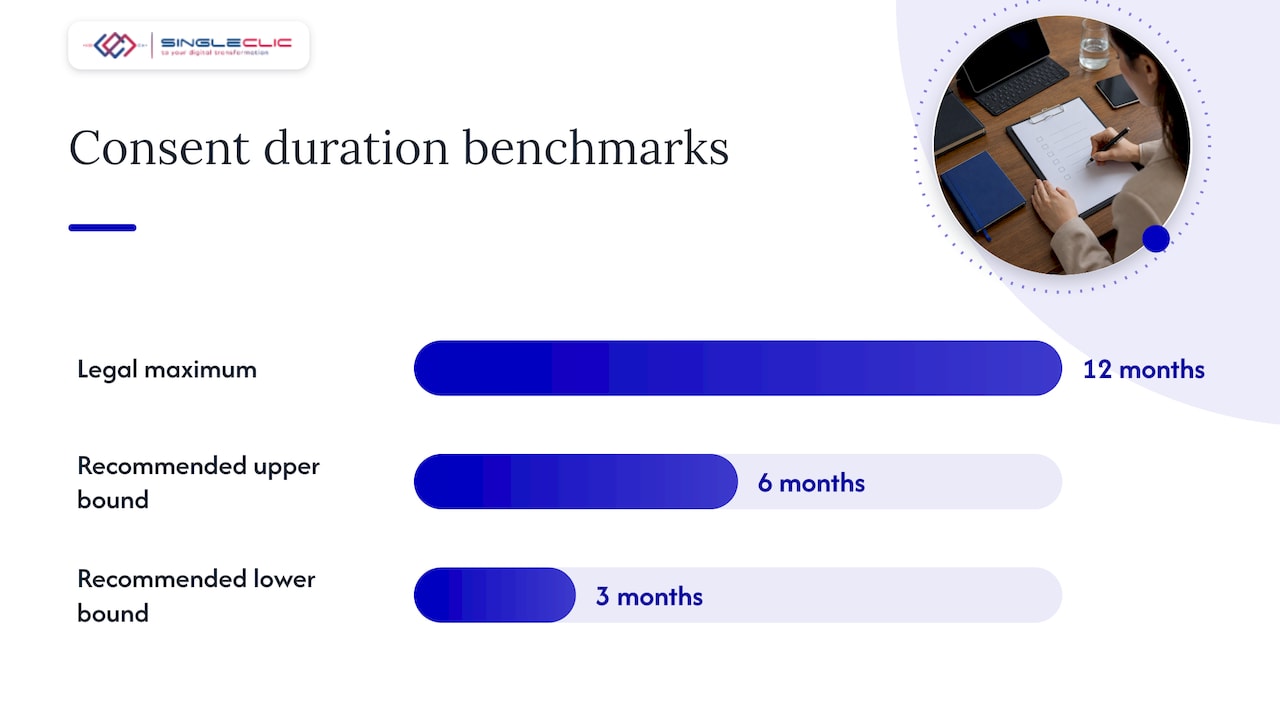
Article 22 of the rulebook sets out more than 15 mandatory consent fields, and consent objects must be time-bounded to twelve months or less, with a declared data storage location and a clear withdrawal method. A developer compliance guide for CBUAE Open Finance recommends keeping consent duration closer to three to six months in practice, with a renewal reminder built into the user experience, and setting the data storage location metadata to the UAE to match default residency expectations.
Before any live call, run these checks:
- Confirm the bank’s participant status through a lookup against the published enrollment list.
- Validate the consent object against all mandatory Article 22 fields before submission.
- Run payment payloads through a schema validator to catch ISO 20022 formatting errors early.
- Check data residency flags and the consent withdrawal flow end to end.
Prevalidating consent and payment payloads is one of the most reliable ways to avoid reject-and-retry loops in chained Open Finance flows, where a single malformed field can cascade through multiple downstream validation steps, as the KhaleejiAPI compliance guide notes. API integration makes the most sense once the bank shows active licensed financial institution status, when your use case genuinely needs real-time UX, and when your latency budget cannot absorb batch-file delays.
Operational pitfalls and best practices for bank data integration
Most reconciliation failures trace back to a handful of recurring issues rather than exotic edge cases.
- Time zone mismatches: if the source data format does not explicitly set the bank’s local time zone, dates can shift against system UTC and matching rules miss transactions that actually landed on the correct day, a risk flagged in Microsoft’s advanced bank reconciliation configuration guide.
- Hard-coded parsing: building custom parsers instead of maintaining ER mappings and transform libraries means every bank schema change becomes an emergency fix instead of a planned update.
- Schema or IBAN errors slipping through: without a pre-validation gate, malformed files reach the import step and fail there, costing more time than catching them earlier would.
- Missing monitoring: reconciliation and import jobs need defined SLAs and a runbook, so a failed job triggers an alert rather than going unnoticed until month-end close.
Pro Tip: Treat your ER mapping library as a living asset with version control, not a one-time setup task, since bank statement layouts change more often than most finance teams expect.
Implementation checklist and effort estimates
A practical rollout sequence keeps scope visible to both IT and finance stakeholders.
- Discovery: confirm bank statement formats in use, inventory existing ER configurations, and check each bank’s Open Finance participant phase.
- Build: import or update ER configs and transforms, configure matching rules, and build consent UX if API integration is in scope.
- Test: run user acceptance testing, dry-run reconciliations against historical statements, and verify participant status again before go-live.
- Go-live: set the automation schedule, assign support coverage, and document rollback and escalation paths for failed imports.
| Phase | Primary owner | Key output |
|---|---|---|
| Discovery | IT and finance | Format and phase inventory |
| Build | Integration team | Working ER configs and matching rules |
| Test | QA and finance | Signed-off dry-run reconciliation |
| Go-live | Support team | Monitored, automated import schedule |
Field perspective: lessons from regional banking integrations
What separates a smooth Dynamics 365 banking rollout from a stalled one in this region usually comes down to how early teams validate against the bank’s actual file format and consent rules, rather than assuming a generic configuration will fit. Low-code platforms like Cortex can cut mapping time meaningfully, since prebuilt transform templates and visual workflow design let a team adjust an ER mapping or approval step without rewriting code, which shortens the path to a clean user acceptance test.
— Tamer Badr
How Singleclic helps with Dynamics 365 banking integration
We develop end-to-end Dynamics 365 banking integrations: ER and XSLT transform setup, readiness checks against the bank’s participant status, and reconciliation workflows to streamline finance team operations with AI-powered collections software automating outreach and payment tracking. Experienced teams support mapping and compliance work for regulated sectors in the region, and the Cortex low-code platform connects bank workflows directly to approvals, ERP, and CRM without lengthy custom builds.

- D365 integration and ER/XSLT transform configuration for legacy and modern bank feeds.
- Open Finance readiness and consent validation checks ahead of a go-live date.
- Cortex-based workflow orchestration linking bank reconciliation to approvals and ERP postings.
If your team is scoping a banking integration project, our Dynamics 365 services page covers implementation, integration, and support options, and we are glad to walk through a scoping workshop for your specific bank formats and timeline.
FAQ
What can I integrate with Dynamics 365?
Dynamics 365 commonly integrates with banking systems through ER-based file imports, bank feed services, payment gateways, CRM platforms, and third-party APIs including Open Finance endpoints under ISO 20022 schemas. The right integration depends on whether the connected system supports batch files or real-time API exchange.
Does Dynamics 365 have a payroll module?
Dynamics 365 Finance and Business Central do not include a dedicated native payroll module in most regions, so payroll typically runs through a third-party payroll provider or a localized add-on that integrates with the general ledger. Finance teams handle payroll postings as journal entries synced from that external system.
What is integration in banking?
Integration in banking refers to connecting a bank’s statement, payment, or account data with an organization’s own financial systems, either through file imports like CAMT.053, MT940, and BAI2, or through standardized APIs under frameworks such as the CBUAE Open Finance Regulation. The goal is accurate, timely reconciliation without manual re-entry.
What is Dynamics 365 for finance and operations?
Dynamics 365 Finance and Operations is Microsoft’s enterprise resource planning suite covering financial management, supply chain, and operations, with advanced bank reconciliation and electronic reporting built in for bank statement processing. It supports structured imports from formats like ISO 20022 CAMT.053 for reconciliation against the general ledger.
How do I choose between file import and API integration for bank data?
Choose file-based ER imports when your bank still issues batch statements or has not reached an active Open Finance participant phase, and choose API integration once the bank supports standardized, consent-based access under ISO 20022. The decision should follow the bank’s own readiness, not just your internal preference.
Sources
- Open Finance Regulation — Central Bank of the UAE rulebook
- Set up advanced bank reconciliation import by using Electronic reporting – Finance | Dynamics 365 | Microsoft Learn
- The Developer’s Guide to CBUAE Open Finance Compliance 2026