WPS integration means your payroll or ERP system builds a valid salary file, passes it to your bank, and receives the confirmation that wages were paid, without anyone re-keying data. Since June 2026 the stakes are higher. Under Resolution No. 0340 of 2026, previous-month wages are due by the first day of each Gregorian month, and at least 85% of the total wages due must reach employees on time. The Wage Protection System (WPS) is the UAE’s electronic salary-transfer system, and a payroll process that only works “most months” no longer fits it. This guide explains how the integration works, what the file must contain, where it breaks, and how to design it so the 1st of the month is routine.
TL;DR
- WPS integration links payroll data (contracts, attendance, deductions) to a Salary Information File (SIF) that your bank submits to the Central Bank’s system, then brings the status back into your ERP.
- Resolution No. 0340 of 2026, effective 1 June 2026, set a single deadline: the 1st of the month for the previous month’s wages, with at least 85% of wages due paid on time.
- Most rejections come from data that does not match the MoHRE-registered contract, so validation belongs inside payroll, before the file leaves your system.
- Enforcement escalates within days, so bank cut-offs, file timing and rejection handling must be designed, not improvised.
- A well-built integration gives HR, finance and IT one shared view of payroll status.
Table of Contents
- What the 2026 rules mean for your integration
- Who is in scope
- How the WPS flow works, step by step
- What a reliable integration needs
- Why files get rejected, and how to fix them
- Build, buy or connect: the design decision
- Use cases by function
- How Singleclic helps
- Plan your WPS integration with us
- FAQ
- Article details
- Sources
What the 2026 rules mean for your integration
The u.ae official platform states that MoHRE-registered establishments must pay previous-month wages through WPS by the first day of each Gregorian month. Where lawful deductions apply, at least 85% of the total wages due must be transferred on time. EY’s analysis adds that the resolution was issued on 12 May 2026, took effect on 1 June 2026 and replaced the previous WPS resolution. It also requires payment through WPS or an MoHRE-approved system.
The escalation timeline matters more to system design than the deadline itself. According to u.ae, the measures include:
- monitoring from the due date and alerts from day 2;
- suspension of work permits on day 5;
- fines and Third-Category reclassification on day 11 for repeat violations within six months;
- further measures on days 16 and 21 for specified establishments and circumstances.
Baker McKenzie’s payroll analysis compares this with the old regime. The due date used to follow each contract’s payroll cycle, a 15-day grace period existed, and the threshold was 80%. Now the date is unified, the grace period is gone and the threshold is 85%. It also notes that repeat violations within six months trigger fines under Cabinet Resolution No. 21 of 2020, commonly understood as AED 1,000 per affected employee, capped at AED 20,000, plus demotion to the Third Category. Its advice is blunt: the speed of escalation leaves little room to fix technical or banking delays, so treat the 1st as a hard regulatory deadline, not an internal target.
For a CIO or CFO, the consequence is practical. A manual step that used to be absorbed by the grace period, such as a late approval or a file emailed to the bank, is now a compliance risk.
Who is in scope
WPS covers private-sector establishments registered with MoHRE. The u.ae platform lists exclusions, including employees with wage complaints referred to the judiciary, absconding workers, workers under a court-ordered restriction, workers on documented unpaid leave, and mission-permit workers of three months or less. Excluded employer categories include banks, houses of worship, public taxis and nationals’ fishing boats.
Free zones and special jurisdictions can have their own arrangements. If your entities sit in more than one jurisdiction, confirm the wage-payment rules with each authority and with your bank before you design a single payroll flow, and build the integration so each legal entity can follow its own rules.
How the WPS flow works, step by step
The Central Bank’s corporate responsibility guide describes the sequence. Understanding it tells you where your system must act and where it only waits.
- Your system generates the SIF. The employer produces the Salary Information File in the mandated format and forwards it to its bank with debit authority for the wages.
- The bank checks and secures funds. It verifies the totals and secures the money, then sends the file to WPS.
- WPS validates the file. It acknowledges acceptance or rejection.
- Funds move. Accepted funds go to a salary-payment transit account. WPS splits the file by paying agent, receives the agents’ receipt confirmations and releases funds to them.
- Agents pay employees and report disbursement details back to WPS.
The Central Bank’s UAEWPS page states that the system was implemented in 2009 and that the Central Bank secures the employer’s funds before dispatching wage information to agents. It also sends frequent data feeds to the labour authority for monitoring. That last point is why a late or partial payment becomes visible to MoHRE almost immediately.
An integration does not replace any of these steps. It makes steps 1 to 3 reliable and brings the outcome of steps 3 to 5 back into your records.
What a reliable integration needs
The data model
The file layout is specific. Dubai Islamic Bank’s SIF reference guide shows the level of detail your system must hold per employee and per file:
- An Employee Detail Record (EDR) for every employee, with a 14 to 35 character labour reference ID, a 9-digit routing code for the paying agent, the employee account, pay dates in YYYY-MM-DD format, and fixed and variable income components with no negative amounts.
- A Salary Control Record (SCR) with a 13 to 35 character employer ID, the employer bank’s routing code, the creation date, the time as HHMM, and the salary month as MM-YYYY.
- Refunds handled through a Fund Detail Record, capped at the sum of the employee’s income components.
Banks publish their own versions of these specifications, so your integration should be built against the format your bank accepts and re-tested when the bank updates it.
Master data you must keep clean
Most integration problems are master-data problems. The fields that must agree with MoHRE records are the labour card or contract number, Emirates ID, bank or exchange-house details, and the contracted salary. If HR approves a raise in the ERP but the contract is not updated with MoHRE, the SIF will carry a figure the authority does not recognise.
Validation before the file leaves
A good integration checks the file before the bank ever sees it:
- every active employee has a complete, correctly formatted record;
- salary components match the registered contract, and no component is negative;
- every deduction carries a valid reason code, and total deductions leave at least 85% of wages due payable;
- pay period dates are correct and the file totals equal the amount authorised for debit;
- the file encoding and separators match the bank’s specification.
Reconciliation after payment
The wage run is not finished when the file is sent. Finance should match the debit on the bank statement to the SIF total, then post gross wages and withholdings to the general ledger so the audit trail ties payroll, bank and accounts together. A payment status that lands back in the ERP, accepted, rejected or paid, lets HR and finance see the same truth without chasing emails.
Why files get rejected, and how to fix them
The Central Bank’s guide is plain: if WPS rejects a salary file, the bank must correct the errors reported and submit another file. In practice, your team is the one who must supply the corrected data, quickly. Typical causes are:
- an Emirates ID that does not match the registered contract;
- a salary in the file that differs from the MoHRE-registered contract, often after an unrecorded raise;
- a deduction without a valid remark code;
- wrong payment-period dates;
- format errors such as missing separators or incorrect encoding.
Every one of these can be caught by validation rules in payroll. That is the difference between an integration that exports a file and one that protects the deadline.
A worked timeline
Suppose payroll for October must be paid by 1 November. A defensible calendar looks like this:
| Day | Action | Owner |
|---|---|---|
| Last week of the month | Freeze attendance, approvals and deductions | HR |
| 3 to 5 business days before the 1st | Run payroll, validate against contract data, generate the SIF | Payroll and finance |
| 2 to 3 business days before | Send to the bank, confirm funds, resolve any rejection | Finance and bank |
| 1st of the month | Wages credited, status confirmed in ERP | Finance |
| Within days after | Bank statement match and ledger posting | Finance |
This follows Baker McKenzie’s advice to stress-test bank cut-offs and file-upload timing, and to keep documentation that evidences wage payment. Check your own bank’s cut-off times and weekend or holiday processing, because the 1st can fall on a non-working day.
Build, buy or connect: the design decision
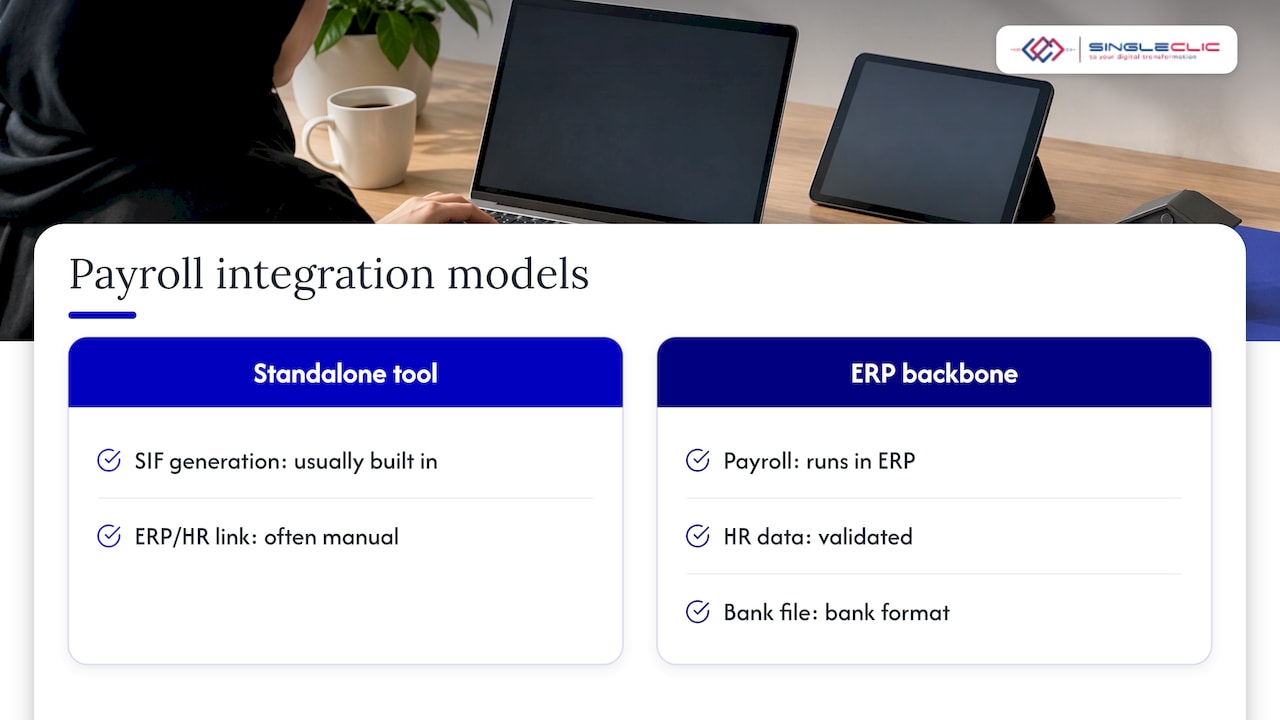
If you run a standalone payroll tool, SIF generation is usually built in, but the link to your ERP, HR master data and approvals is often manual. If you run an ERP such as Dynamics 365 or Odoo, the better pattern is to treat WPS as one more integration on the finance backbone: payroll in the ERP, validated against HR data, with a bank file produced in the bank’s format.
The bank side has two common routes: file-based exchange and API-based connectivity. Our guide to Dynamics 365 banking integration with ER files or Open Finance APIs explains how to choose between them. For a wider view of what must be in place before go-live, see our Dynamics 365 UAE localization checklist.
A payroll flow also depends on approvals: leave, overtime, deductions, new joiners and leavers. When these live in email and spreadsheets, the file is only as good as the last person who remembered to update it. Workflow automation that routes each approval and writes it back to the payroll record removes that dependency, and AI automation services can add monitoring of transfer status on top. For the process layer, see our overview of top business workflow tools for KSA and UAE leaders.
Use cases by function
- HR managers: joiner and leaver changes flow to the payroll record the day they are approved, so the contract and the SIF agree.
- Finance and CFO office: the debit, the SIF total and the ledger entry reconcile automatically, with an audit trail.
- CIOs and CTOs: one governed integration instead of several scripts, with monitoring and alerts on file status.
- Supply chain and operations managers: site-based and project-based workforces are paid on the same calendar, with attendance approvals completed before the cut-off.
- Group companies: each legal entity follows its own jurisdiction’s rules from one platform.
How Singleclic helps
Singleclic implements and integrates Microsoft Dynamics 365 and Odoo for organizations in the UAE and Saudi Arabia, and our D365 integration and implementation services cover connecting finance and HR processes to the systems around them. Our Cortex low-code platform is an Arabic-enabled, on-premise platform for designing business processes and connecting approvals, ERP, CRM, data and legacy systems, with workflow changes made at runtime without downtime. For a payroll cycle, that means the approvals that feed WPS can be modelled once and changed when rules change. Our business process automation solutions page explains the approach.
Our view on WPS integration
Resolution 0340 turned the 1st of the month into a system requirement. We see WPS as a process problem first: the file is the last step of a chain that starts with an approved contract change, an approved deduction or a new joiner. If that chain lives across inboxes, no export button will save you on the 1st.
That is why we start from the workflow and the master data, then connect the ERP, the HR records and the bank. Cortex lets teams model approvals and change them while the process keeps running, and our Dynamics 365 integration work connects payroll and finance to the bank. The goal is that your CFO and your HR director look at the same status screen and trust it.
The organizations that handle this best treat compliance as a by-product of a well-designed process, not a monthly rescue.
Tamer Badr
Plan your WPS integration with us
If your payroll still depends on manual files, a short review of your data, approvals and bank connection usually shows where the risk sits. Our team works with Dynamics 365, Odoo, IBM workflow tools and Cortex across the UAE and Saudi Arabia. Explore our ERP, CRM and automation services or speak to us about your payroll cycle.
FAQ
What does WPS stand for in the UAE?
WPS stands for Wage Protection System. It is the electronic salary-transfer system operated with the Central Bank and monitored by MoHRE, which records that private-sector wages were paid through regulated channels. The Central Bank states it implemented the system in 2009.
What is the WPS deadline in 2026?
Under Resolution No. 0340 of 2026, previous-month wages must be paid by the first day of each Gregorian month, with at least 85% of total wages due transferred on time where lawful deductions apply. The full escalation timeline is on the u.ae platform, which is the place to check for updates.
What happens if WPS is blocked or a file is rejected?
A rejected file must be corrected and resubmitted: the Central Bank’s guide says the bank corrects the reported errors and sends another file. Delays trigger monitoring and alerts from day 2, permit suspension on day 5 and fines from day 11 for repeat violations within six months, so resolve rejections the same day.
What data does a WPS integration need?
Per employee, it needs the labour reference ID, paying agent routing code, account details, pay dates, fixed and variable income components and any deduction reason codes. Per file, it needs employer ID, employer bank routing code, creation date and time, and the salary month.
Can an ERP like Dynamics 365 handle WPS?
Yes, when payroll data, validation rules and the bank connection are configured for the UAE format and the bank’s requirements. Our team can scope this as part of a Dynamics 365 or Odoo implementation.
Article details
- SEO title: WPS integration in the UAE: connect payroll, ERP and bank
- Slug: wps-integration-uae
- Keyword: WPS integration UAE
- Secondary keywords: wage protection system UAE, WPS SIF file, WPS payroll ERP, workflow automation, Cortex low-code
- Pillar cluster: ERP and CRM automation, UAE compliance
Sources
- Payment of salaries/wages, The Official Platform of the UAE Government
- UAE introduces enhanced Wage Protection System, EY
- UAE: New Resolution Impacting Payroll, Baker McKenzie
- Central Bank of the UAE, WPS corporate responsibility guide
- CBUAE, UAEWPS
- Dubai Islamic Bank, SIF file format reference guide