Unlimited-user licensing usually makes sense when you plan to roll out one application across most or all of your organization and want flat, predictable costs instead of a bill that grows with every new hire. Before you sign, verify exactly what “unlimited” covers: per-application, per-tenant, or per-organization scope, plus any environment limits. The procurement checklist later in this piece will help you pressure-test a vendor’s claim before you commit.
TL;DR:
- Check whether the grant covers one application, specific modules, tenants, or environments; unlimited seats can still trigger extra fees when deployment expands.
- Forecast active users over the next 18 to 24 months, then compare realistic per seat costs with the unlimited fee plus ongoing maintenance.
- Review maintenance charges, renewal increases, audit rights, transfer rules, and exit terms, since a flat license fee does not cap these obligations.
- Confirm whether single sign on is included, and test identity integration and license manager behavior in development, test, and production before committing.
- Run a bounded pilot on one application using production identity settings, and validate license enforcement under load before signing a long term agreement.
Table of Contents
- What unlimited users licensing actually means
- How unlimited licensing changes your total cost of ownership
- Contract and commercial terms to check before buying
- Technical and administration considerations for scale
- Procurement checklist: evaluating unlimited-user offers
- A regional perspective on scoping and piloting unlimited licenses
- Why the licensing conversation misses the real question
- How we help you scope and roll out unlimited-user licensing
- FAQ
- Sources
What unlimited users licensing actually means
“Unlimited users” is not one standard license. It is a commercial term that vendors attach to several different technical models, and the fine print decides what you actually get.
- Named-user licensing assigns a license to a specific person, while concurrent or floating licensing pools a set number of simultaneous sessions across many potential users.
- Node-locked licensing ties usage to a specific machine or server rather than a person.
- Usage-based licensing charges by consumption (transactions, API calls, or data volume) instead of headcount.
Unlimited-user licensing typically removes the per-seat count but still scopes the grant somewhere else. Dynamsoft’s own unlimited license agreement, for example, grants deployment to an unlimited number of web servers for one specified application, while restricting use to that application and requiring a separate license for any other product. That pattern repeats across the industry: vendors scope “unlimited” by application, by tenant, or by module, not by your entire technology estate. Read the grant clause closely. A license that is unlimited for one application can still require new fees the moment you deploy a second one.
How unlimited licensing changes your total cost of ownership
Unlimited-user pricing shifts the cost conversation from “how many seats do we need” to “does this application belong in front of everyone.” That shift has real financial and operational consequences.
- Costs become predictable. A flat fee replaces a count that moves every time you hire, restructure, or add a department.
- Onboarding gets faster. IT does not have to request, approve, or reconcile a new seat before a new employee can log in.
- Adoption spreads more naturally. Occasional or power users across departments get access without someone weighing the marginal cost of one more seat.
- Administration gets simpler. There is no seat inventory to audit every renewal cycle, which is one of the benefits vendors like Inductive Automation highlight when describing unlimited licensing as a way to remove per-seat friction.
Unlimited licensing pays off fastest with large headcounts, frequent role changes, or a fast rollout across many departments, making it essential to consolidate your SaaS stack efficiently. A small, stable user base with tightly defined roles often does better on per-seat or usage-based pricing, where you are not paying a flat premium for capacity you will not use.
Pro Tip: Map your expected active users for the next 18 to 24 months before comparing quotes. Unlimited licensing only wins the math when growth or turnover is real, not hypothetical.
Contract and commercial terms to check before buying
The word “unlimited” in a vendor’s pitch deck and the word “unlimited” in the signed agreement rarely mean exactly the same thing. Procurement and legal teams should read the contract for these specifics before approving a purchase.
- Grant scope: confirm whether the license covers one application, a set of modules, or multiple environments, and whether a future module requires a new purchase.
- Maintenance and renewal terms: ask how support and upgrade fees are calculated, since a flat license fee plus a rising maintenance percentage can quietly erode the per-user savings over time.
- Audit rights: understand what the vendor can inspect, how often, and what counts as a compliance breach.
- Transferability: check whether the license moves with a merger, acquisition, or infrastructure migration, or whether it is void the moment you change environments.
- Exit rights and price escalation: confirm what happens at renewal if the vendor raises the unlimited fee, and whether you can downgrade without penalty.
A license agreement that reads “unlimited” in its title but restricts use to one named application, as in the Dynamsoft example, is common practice, not a red flag. The risk is signing without noticing the restriction.
Technical and administration considerations for scale
Removing the per-seat ceiling does not remove the work of managing access. If anything, it shifts that work from license counting to identity and policy management.
- SSO and directory integration: confirm whether single sign-on through Active Directory or LDAP is included in the unlimited grant or licensed separately, since some vendors treat SSO as an add-on feature.
- License management mechanics: many vendors rely on a license manager, local or cloud-based, to enforce entitlements. Reprise License Manager is one example of a product that supports multiple license modes, perpetual, subscription, floating, node-locked, and usage-based, through policy-driven controls rather than changes to the application itself.
- Deployment and monitoring: plan separate license handling for development, test, and production environments, and set up usage monitoring so you can defend your deployment footprint during a vendor audit.
A license manager with policy-driven licensing lets a vendor or an IT team toggle features or license types at runtime, without reissuing software binaries, according to Reprise’s own product documentation. That matters under an unlimited model because it means feature rollout and access changes can happen through configuration, not a new deployment cycle.
Procurement checklist: evaluating unlimited-user offers
Before you compare an unlimited quote against your current per-seat spend, gather the same facts for every vendor on your shortlist.
- Confirm the exact scope: which application, which modules, and which environments are actually covered.
- Check support terms: what SLA applies, and whether support responsiveness changes once you remove the per-seat cap.
- Review the update policy: whether new features or modules are included automatically or billed separately.
- Verify audit rights: how the vendor confirms compliance and what documentation you need to keep on hand.
- Clarify termination terms: what happens to your data and access if you do not renew.
- Run a quick TCO test: take your current per-seat cost, multiply it by your realistic rollout headcount over the next two to three years, and compare that number against the quoted unlimited fee plus maintenance.
Ask vendors directly how they define “unlimited” in the contract, not in the sales deck, and gather your own numbers first: expected active users, rollout timeline, and identity model (SSO, directory sync, or local accounts). Our enterprise software selection guidance walks through the broader evaluation criteria that apply alongside licensing terms.
A regional perspective on scoping and piloting unlimited licenses
Enterprises across the region tend to get the best results when they pilot unlimited licensing on one well-defined application before expanding the scope. A construction firm or a bank will typically run the new license against a single department, confirm the grant language holds up in practice, and only then extend it organization-wide.
- Start with a bounded pilot that mirrors your production identity setup, including SSO and directory sync.
- Validate license-manager behavior under real load before signing a multi-year term.
- Confirm on-premise or hybrid deployment options when data residency or regulatory rules apply, which is common across banking and government projects in Saudi Arabia and the UAE.
Our low-code platform, Cortex, is built for exactly this pattern: Arabic-enabled, on-premise-capable, and designed to connect approvals, ERP, CRM, and legacy systems under one workflow layer with unlimited users by design. For teams managing a mix of modern and legacy ERP systems, our ERP system guide covers how user roles typically map across departments during a rollout.
Why the licensing conversation misses the real question
Most advice on unlimited licensing stops at cost comparison, per-seat spend versus a flat fee, as if the decision were purely arithmetic. That misses the actual risk, which sits in the grant language, not the price tag. A vendor can offer a genuinely attractive flat fee and still leave you exposed if the contract scopes “unlimited” to one application while your rollout plan assumes coverage across three.
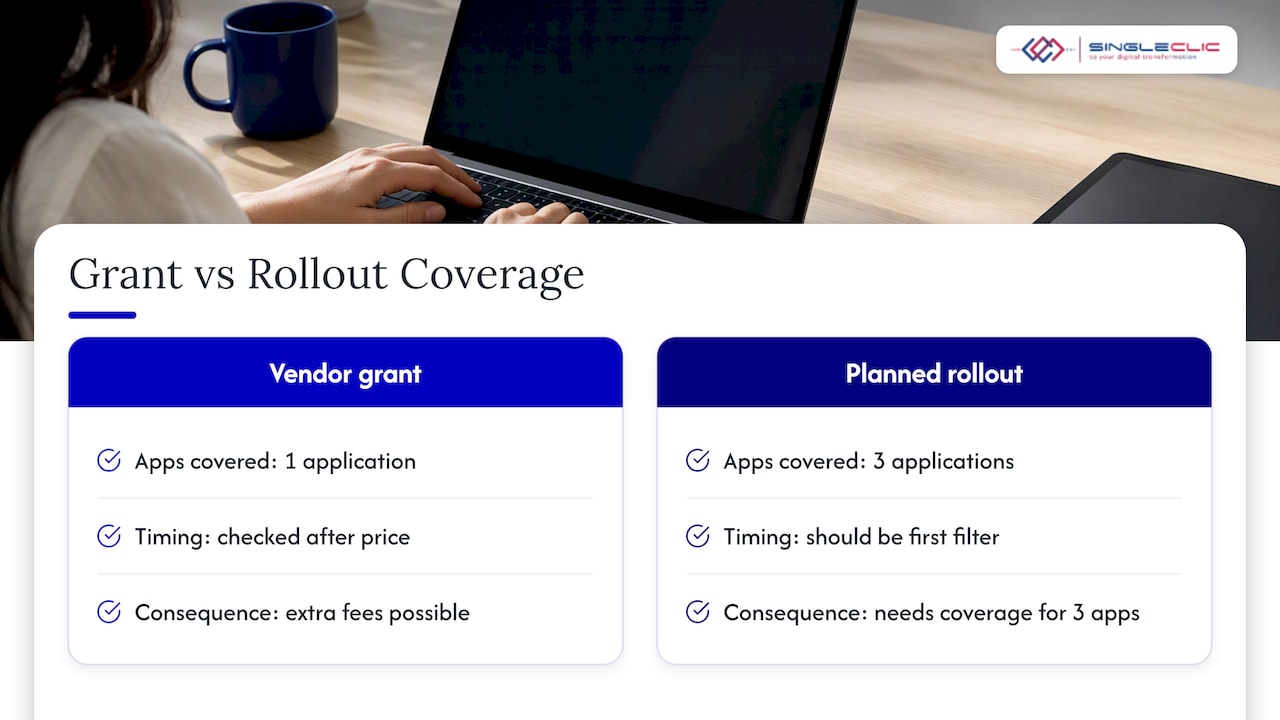
The conventional checklist treats scope verification as a legal formality to confirm after the commercial terms are settled. We would flip that order. Scope should be the first filter, before you let a quoted number anchor your thinking, because a cheap unlimited fee tied to a narrow grant can cost more than a transparent per-seat model once you account for the extra licenses you will need later.
If you take one thing from this guide, let it be this: ask for the grant clause in writing before you ask for the price. Everything else, maintenance terms, audit rights, SSO licensing, is easier to negotiate once the scope itself is locked down correctly.
— Tamer Badr
How we help you scope and roll out unlimited-user licensing
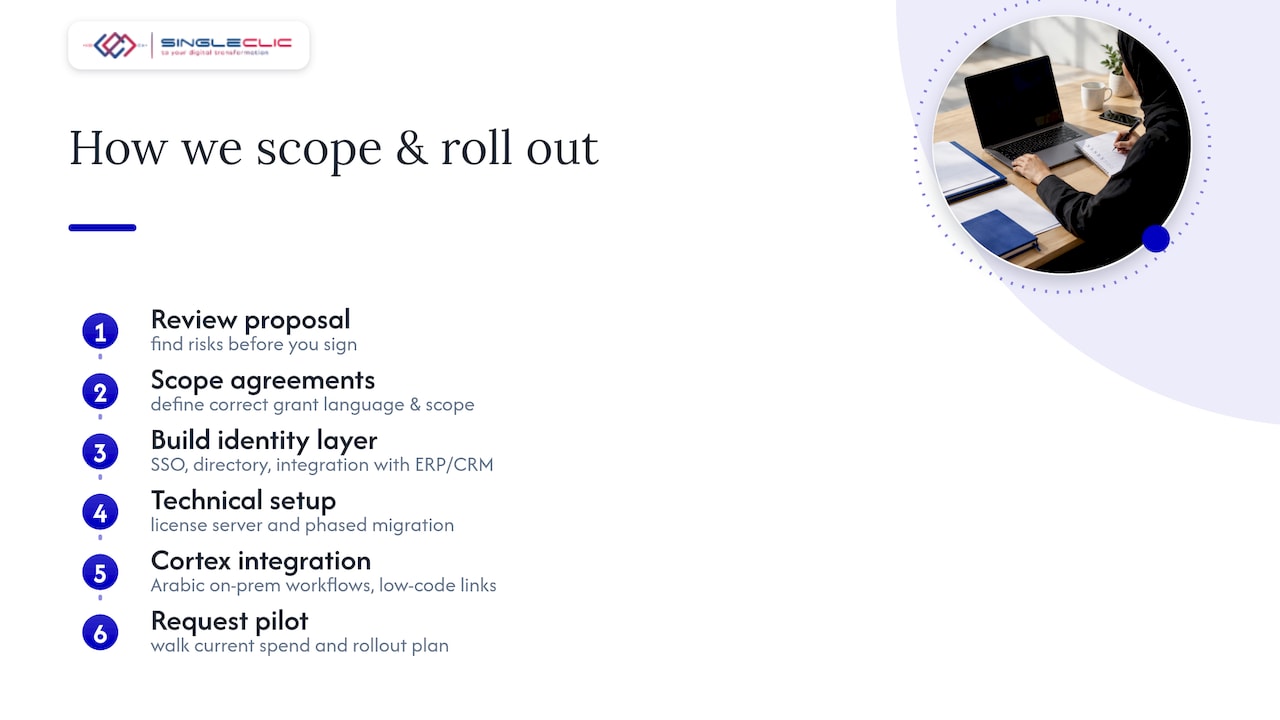
Reviewing a licensing proposal before you sign is far cheaper than renegotiating scope after a rollout stalls. We work with enterprise teams across construction, real estate, healthcare, banking, and government to review Dynamics 365 and Odoo licensing structures, scope unlimited-user agreements correctly, and build the identity and integration layer that makes unlimited access actually usable at scale.

Our team handles the technical side too: SSO and directory integration, license server setup, and phased migration from per-seat to unlimited models through our Dynamics 365 services. For organizations that need Arabic-enabled, on-premise workflow automation layered on top of an unlimited-user deployment, our Cortex platform connects ERP, CRM, and legacy systems under one low-code environment.
Request a licensing review or ask us to scope a pilot through our services page, and we will walk through your current spend, your rollout plan, and the exact grant language you need to verify first.
FAQ
What is a multi-user license?
A multi-user license allows more than one person to access a piece of software under a single agreement, typically capped at a defined number of seats or concurrent sessions. It differs from an unlimited-user license, which removes that numeric cap but usually still restricts use to a specific application or environment.
How much does a perpetual license cost?
Perpetual license pricing varies by vendor, application, and deployment scope, and is not standardized across the industry. Rather than a single figure, the realistic total cost includes the upfront license fee plus ongoing maintenance or support fees, which can run for years after purchase, so request a full quote covering both before comparing options.
Does SSO require a license?
Single sign-on is sometimes bundled into a license and sometimes sold as a separate add-on, depending on the vendor and product tier. Confirm this directly in the contract rather than assuming it is included, since license management products like RLM show how feature-level licensing, including authentication features, is commonly handled through separate policy controls.
What is single user licensing?
Single user licensing restricts software use to one named individual or one device, typically through a node-locked or named-user model. It sits at the opposite end of the spectrum from unlimited-user licensing, which removes the per-person restriction in favor of a flat fee scoped to an application or organization.
What should I check before signing an unlimited-user agreement?
Confirm the exact grant scope (application, modules, and environments covered), maintenance and renewal terms, audit rights, and transferability before signing. A short pilot that mirrors your production identity setup, including SSO, is the most reliable way to validate a vendor’s unlimited-licensing claims before a full rollout.