AI in accounts payable automates invoice capture, matching, approval routing, and anomaly detection so AP teams can move from touching every invoice to reviewing only the exceptions. Teams that pilot this well typically start narrow: invoice capture plus PO matching wired directly into the ERP, not a standalone tool bolted on the side. The immediate payoff is a shorter cycle time and fewer manual touches per invoice, with fraud and duplicate-payment detection following once the data flow is clean. Singleclic is one option for organizations that want that pilot built on top of an existing Dynamics 365 or Odoo environment rather than replacing it.
TL;DR:
- AI in accounts payable requires integration with your ERP’s logic, especially for accurate account posting and compliance with regional tax rules.
- Early gains are seen with invoice and document capture, while significant improvement in matching and approval routing may take several months.
- Cost savings largely depend on achieving high touchless processing rates and reliable exception handling, which varies based on supplier invoice consistency.
- Continual model learning from corrections improves accuracy over time, making AP AI more effective after initial deployment.
- Successful implementation should start narrow with high-volume suppliers, with expansion based on measurable KPI improvements like cycle time and automation rate.
Table of Contents
- What is AI in accounts payable, exactly?
- Where does AI actually change AP work day to day?
- What ROI and benchmarks should AP leaders expect?
- How do you integrate AI into your ERP and roll it out?
- How do you keep AI-driven AP auditable and compliant?
- Can AI assess supplier risk and creditworthiness?
- Do AI models in AP keep improving after go-live?
- Singleclic’s perspective on rolling out AP AI in the region
- How Singleclic helps you implement AI in accounts payable
- Sources
What is AI in accounts payable, exactly?
AP teams have used automation for two decades. What changed is the mechanism underneath it, and that difference matters more than most vendor pitches let on.
Traditional AP automation runs on optical character recognition (OCR) and hard-coded rules: it reads text off a scanned invoice and matches it to a template. The moment a supplier changes its invoice layout, the template breaks and the document lands in a manual review queue. Intelligent document processing (IDP) replaces the rigid template with a trained model that recognizes fields by context, not position. It can pull the invoice number, tax amount, and line items from a document it has never seen before, because it learned what those fields look like across thousands of examples rather than where they sit on one specific form.
Machine learning is what makes that recognition improve over time. Every time an AP analyst corrects a misread field or reclassifies a GL code, that correction feeds back into the model. Over months, the system’s initial error rate on new supplier formats drops, and the exceptions queue shrinks without anyone manually reprogramming a template. This is the mechanism behind what Forrester categorizes as core AP AI use cases: data capture, intelligent matching, reporting, fraud management, payment management, and e-invoicing compliance all draw on the same underlying learning loop.
Agentic AI is the newer layer, and it is worth separating from plain automation because the two get conflated constantly. A rules-based bot executes one task: extract data, then stop. An agentic system coordinates a sequence of decisions, routing an invoice through validation, checking it against a purchase order, flagging a mismatch, and deciding whether to auto-post or escalate, without a human writing a rule for every branch in that path. Automation Anywhere describes this as agents that coordinate intake, validation, matching, approvals, and posting as connected steps rather than isolated scripts. The distinction is autonomy over a workflow versus execution of a single task.
None of this works in isolation from the ERP, and that is the part vendor demos tend to skip. AI models need to understand your GL structure, your tax jurisdictions, your intercompany posting rules, and your approval hierarchy, or they will produce technically accurate extractions that post to the wrong account. Forrester’s own analysis of agentic AP notes that the real barrier to value is integration with company-specific ERP logic and standard operating procedures, not the underlying AI model quality.
What this means in practice for AP teams evaluating tools:
- OCR alone is adequate only for single-format, high-volume suppliers with stable layouts.
- IDP is worth the investment the moment your supplier base has more than a handful of invoice formats.
- Machine learning models need a training period; expect lower accuracy in month one and steady gains through quarter two.
- Agentic capability matters most for multi-step decisions (three-way matching, approval routing) rather than single-field extraction.
- ERP and SOP alignment determines whether extracted data becomes a clean posting or another manual cleanup task.
The practical takeaway is that “AI in accounts payable” is not one product category. It is a stack of capabilities, and the ERP integration layer decides whether the rest of the stack earns its keep.
Where does AI actually change AP work day to day?
The use cases below are ordered roughly by how quickly AP teams see measurable results, based on where Forrester and Medius report the most consistent adoption gains. Start at the top if you’re planning a first pilot.
1. Invoice and document capture
This is the entry point for almost every AP AI deployment, and for good reason: it’s the highest-volume, most repetitive task in the department. IDP-based capture handles multi-layout, multi-language invoices, PDFs, scanned paper, and even email-embedded invoices, extracting header fields, line items, and tax data without a template per supplier. The gain compounds because every downstream step (matching, coding, approval) depends on clean extraction at this stage. Get capture wrong and every later automation inherits the error.

2. Intelligent matching (PO, GRN, and invoice)
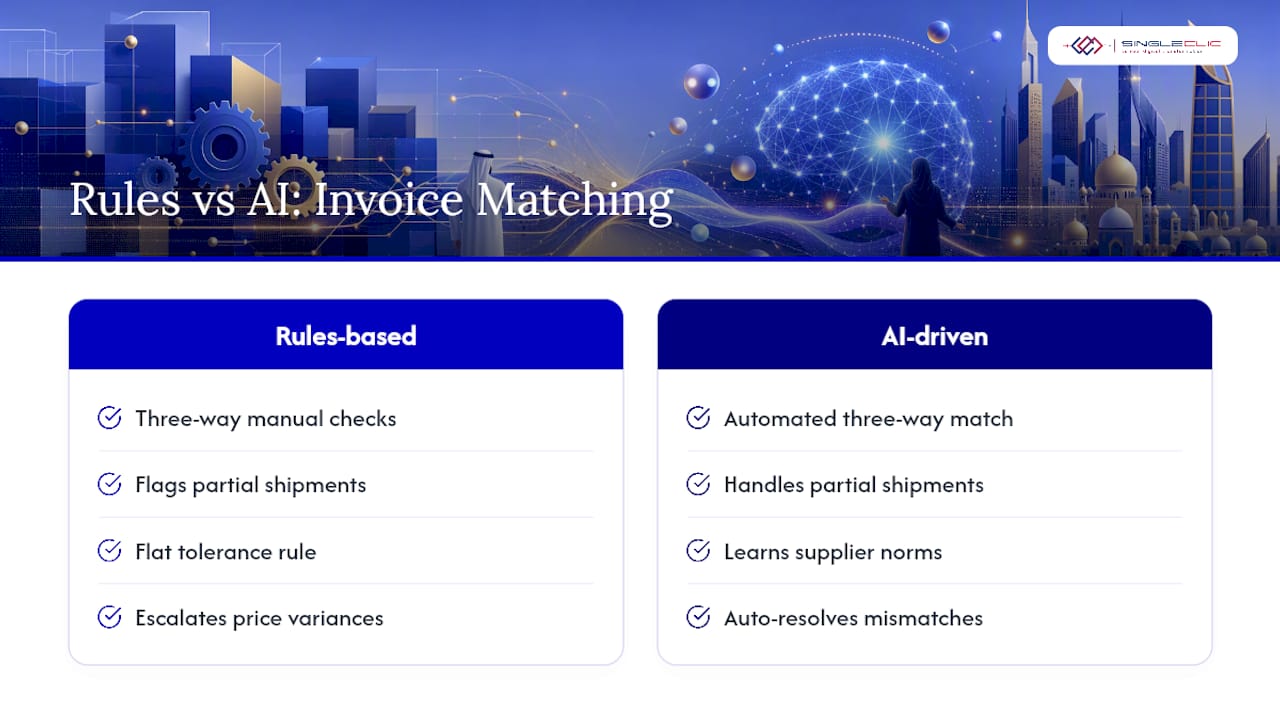
Three-way matching, tying the purchase order, the goods receipt note, and the invoice together, has historically been the single biggest bottleneck in AP because it demands cross-referencing three documents that rarely arrive at the same time. AI-driven matching handles partial shipments, quantity variances within tolerance, and price discrepancies by learning what “normal” variance looks like for a given supplier or category, rather than applying one flat tolerance rule across every vendor. Medius frames this shift as the move from rules-based automation to autonomous AP, where the system resolves routine mismatches instead of routing every variance to a person.
3. Approval routing and dynamic delegation
Static approval chains break the moment someone goes on leave or a threshold needs a temporary exception. AI-driven routing adjusts dynamically: it reassigns approvals based on real-time availability, enforces SLA timers that escalate stalled invoices automatically, and applies different routing logic based on invoice risk score rather than a single fixed hierarchy. This is where the “exception-based” promise of AP AI becomes tangible. Low-risk, high-confidence invoices post without a human ever seeing them; anything unusual gets flagged with context attached.
4. Exception handling with contextual packets
When an invoice does need human review, the difference between a good and a mediocre AI implementation shows up here. A poorly designed system dumps a flagged invoice into a queue with no explanation. A well-designed one builds a task packet: what triggered the flag, what the system’s confidence level was, what similar past invoices resolved to, and what action is recommended. Analysts resolve these faster because they’re not starting from zero on every exception.
5. Anomaly and duplicate-payment detection
This is where AI in accounts payable earns its keep on pure risk reduction. Machine learning models trained on historical payment data spot patterns a rules engine misses: near-duplicate invoice numbers with slight formatting changes, invoices from a supplier that suddenly changed its bank details, or payment requests that deviate from a vendor’s typical invoicing cadence. Forrester’s research points to intelligent matching and anomaly detection as the highest-impact AP AI capabilities specifically because they catch financial leakage early, before a duplicate payment goes out the door rather than after finance discovers it in a reconciliation.
6. Payment optimization
Once matching and approval are reliable, AI can shift AP from a cost center to a modest cash-flow lever. Systems can flag early-payment discount opportunities, model the cash impact of paying now versus at term, and stagger payment runs to avoid unnecessary short-term borrowing. This use case tends to get piloted last because it depends on the earlier stages being trustworthy.
Pro Tip: Don’t pilot all six use cases at once. Invoice capture and PO matching alone, done well, typically unlock enough of the exception-based workflow to justify expanding into approval routing and fraud detection in a second phase.
Expected KPI movement varies by use case, but the pattern holds across most deployments: touchless processing rates usually improve first, followed by cycle time, and then exception rates improve later, because that requires the model to have seen enough edge cases to generalize.
What ROI and benchmarks should AP leaders expect?
Cost per invoice is the number finance leadership actually cares about, and it’s worth anchoring expectations before a pilot starts. Industry benchmarking compiled by ACARP shows organizations moving from double-digit dollar costs per invoice down to low single digits after AI-driven automation matures, a gap large enough that even a partial rollout across high-volume suppliers tends to justify the implementation cost within a year.
Touchless processing, meaning invoices that post with zero human intervention, is the metric that best predicts whether the cost savings will materialize. That range is wide because it depends heavily on supplier mix: a vendor base dominated by a handful of high-volume, template-consistent suppliers reaches the top of that band faster than one with hundreds of low-volume, one-off invoicers.
Exceptions and duplicate payments are the quieter part of the ROI story. Every invoice that gets caught before payment rather than after is a recovery cost avoided, not just a processing cost saved. Precoro’s review of AP AI adoption notes that even mature deployments remain human-supervised rather than fully autonomous, which is a realistic expectation to set with finance leadership up front: the goal is exception-based review, not zero human involvement.
For a pilot, track three numbers from day one and compare them at 30, 60, and 90 days: touchless rate, average cycle time from receipt to posting, and cost per invoice (including labor allocation). Those three tell you whether the investment is compounding or plateauing.
Here’s an illustrative before-and-after based on the benchmark ranges above, useful as a planning reference rather than a guarantee:
A few things worth flagging before you build a business case around these numbers:
- The upper end of the touchless range assumes structured, template-stable invoices; highly variable suppliers will sit lower.
- Cycle-time gains depend on approval routing being automated too, not just capture.
- Cost-per-invoice improvement compounds over 12 to 18 months as the model’s accuracy improves; expect a slower first quarter.
How do you integrate AI into your ERP and roll it out?
This is the step most AP AI projects underestimate, and it’s also where Forrester’s research is most direct: the technology rarely fails on its own merits. It fails because nobody mapped it correctly into the ERP’s own logic.
- Map ERP fields before you map anything else. Every invoice field the AI extracts needs a destination: GL codes, tax jurisdictions, currency handling, and intercompany posting rules if you operate across entities. Do this mapping exercise with your ERP admin and your AI implementation partner in the same room, not sequentially, because gaps surface faster in a live conversation than in a handoff document.
- Clean your vendor master data first. Duplicate vendor records, inconsistent naming, and missing bank details will confuse a matching model faster than any invoice formatting issue. If your vendor master hasn’t been audited in over a year, budget time for that before the AI pilot, not during it.
- Feed the model historical invoices with PO linkage. A model trained only on invoices, with no visibility into which POs and goods receipts they resolved against, will extract fields accurately but won’t learn matching logic. The training set needs the full three-way relationship, not just the invoice side of it.
- Design the pilot narrow, with clear acceptance criteria. Pick one supplier segment, ideally your highest-volume, most template-consistent vendors, and define success upfront: a target touchless rate, a target cycle time, and a defined exception threshold. Vague pilots that “see how it goes” rarely produce a defensible business case.
- Configure tolerance rules and approval matrices deliberately. Don’t inherit default tolerance settings from the vendor’s out-of-the-box configuration. Your existing segregation-of-duties controls and approval thresholds should shape the AI’s routing logic, not the other way around.
- Plan the roll-forward before the pilot ends. Decide in advance what expanding from the pilot segment to the next supplier tier looks like, and what metric threshold triggers that expansion. Otherwise a successful pilot stalls indefinitely in “proof of concept” limbo.
- Build change management in parallel, not after. AP analysts need training on how to work exception queues differently, suppliers may need onboarding if self-service portals are introduced, and governance owners need to sign off on new SLAs before go-live, not after complaints start.
Pro Tip: Start your pilot with high-volume, template-variant suppliers rather than your simplest, most uniform vendor. Counterintuitively, a supplier that sends invoices in three or four slightly different formats trains the model’s flexibility faster than a vendor whose invoices never change, and that flexibility is what determines whether the system scales past the pilot.
Reliable AP AI integration also depends on the ERP itself supporting flexible workflow logic rather than rigid, hard-coded approval chains. This is precisely where a low-code layer connecting ERP, CRM, and legacy systems earns its place: it lets finance teams adjust routing, tolerance rules, and escalation logic without waiting on a development cycle every time a policy changes.
How do you keep AI-driven AP auditable and compliant?
Finance and audit teams will ask the same question the moment an AI system starts posting invoices without human review: can you show why it made that decision? If the answer is no, the pilot stalls regardless of how good the accuracy numbers look.
Decision lineage is the foundation. Every automated match, every auto-posted invoice, and every routing decision needs an immutable log showing what data the system saw, what confidence score it assigned, and what rule or model output triggered the action. Otera’s work on autonomous AP frames this as a core requirement, not an add-on: governed audit logs and configurable escalation rules are what let an organization defend an autonomous decision months later during an audit.
Confidence scoring matters just as much as the decision itself. A mature system doesn’t just extract a field or make a match; it attaches a confidence level to that output, and low-confidence items route to a human before posting rather than after. This human-in-the-loop checkpoint is what keeps automation defensible rather than reckless.
Autonomous AP does not mean removing human judgment from the process. It means concentrating human judgment on the invoices that actually need it, while routine, high-confidence transactions post on their own with a full audit trail behind them.
Security and data residency deserve a direct conversation, especially for banks, government entities, and healthcare organizations bound by strict data handling rules. Cloud-based AI platforms work well for many mid-market companies, but organizations with stricter residency requirements often need on-premise deployment options that keep invoice and vendor data inside their own infrastructure rather than a third-party cloud.
A few governance elements worth confirming before go-live:
- Immutable logging on every automated posting, not just flagged exceptions.
- Confidence thresholds that are configurable, not fixed by the vendor.
- A defined escalation path for anything below that threshold.
- Data residency options matching your regulatory environment, particularly if you operate in a jurisdiction with specific e-invoicing or tax digitization mandates.
Tax and e-invoicing rules vary sharply by country and even by entity type, so any specific compliance claim needs to be checked against your own jurisdiction’s requirements rather than treated as universal.
Can AI assess supplier risk and creditworthiness?
Supplier risk assessment is one of the less publicized AP AI use cases, but it’s becoming one of the more valuable ones as finance teams get pulled into procurement risk conversations. Machine learning models can score suppliers using a mix of payment history, invoice consistency, financial stability signals, and behavioral patterns, such as sudden changes in invoicing frequency or bank details, that often precede either a supplier’s financial distress or a fraud attempt.
This matters because AP data holds signals procurement teams don’t always see. A supplier whose invoice volume drops sharply, whose payment terms requests tighten, or whose invoices start arriving from a new remittance address is telling you something, and an AI model watching that pattern across your entire vendor base can flag it long before a human analyst would notice it manually across hundreds of vendors.
Credit evaluation extends this further. Instead of a static annual credit check, AI-driven risk scoring updates continuously as new invoice and payment data comes in, giving finance and procurement a rolling risk profile rather than a snapshot that’s stale within weeks. For organizations managing large, distributed supplier bases, particularly across multiple entities or countries, this continuous scoring reduces the odds of extending favorable terms to a supplier whose financial position has quietly deteriorated.
The practical limitation is data availability. A model is only as good as the signal it has access to, and thin transaction history with a new supplier means thin risk signal. Treat AI-driven supplier scoring as a strong second opinion early in a relationship, not a replacement for standard due diligence.
Do AI models in AP keep improving after go-live?
Yes, and this is one of the more underappreciated aspects of the technology. Unlike a rules engine, which stays static until someone manually edits a rule, machine learning models used in AP continue learning from every correction an analyst makes after go-live.
When an AP analyst overrides a coding suggestion, flags a false-positive duplicate, or corrects a mismatched GL entry, that correction becomes training data. Over successive months, the model’s accuracy on your specific supplier base and your specific chart of accounts improves, because it’s learning your organization’s patterns rather than a generic industry template. This is why touchless rates typically climb steadily in the months following a rollout rather than reaching their ceiling immediately.
Adaptability also shows up when your business changes. New suppliers, new entities after an acquisition, new tax jurisdictions, or a shift in your ERP’s chart of accounts all require the model to adjust. A well-designed system incorporates this new data without needing a full retraining cycle, though a significant structural change (a new ERP module, a new country of operation) usually does warrant a deliberate retraining pass rather than assuming the model will catch up on its own.
The organizational implication is that AP AI is not a “set it and review annually” system. It benefits from a light ongoing governance rhythm: periodic review of exception patterns, confidence score drift, and whether new supplier segments need dedicated model attention. Teams that treat the pilot as finished at go-live tend to see accuracy plateau; teams that keep feeding corrections back into the system see it keep improving.
Singleclic’s perspective on rolling out AP AI in the region
Most AP AI pitches are written as if every finance department runs on the same ERP, in the same language, under the same regulatory framework. They don’t. Singleclic works with banks, healthcare networks, and government entities across Saudi Arabia and the UAE, and the pattern we see repeatedly is that the technology is rarely the blocker. The blocker is whether the AI layer actually understands the client’s chart of accounts, approval hierarchy, and, often, whether it can operate fully in Arabic without a translation layer bolted on as an afterthought.
That’s the gap Cortex is built to close. As Singleclic’s low-code and BPM platform, Cortex connects invoice capture, matching, and approval routing directly into a client’s existing Dynamics 365 or Odoo environment, with full Arabic UI/UX and on-premise deployment where data residency requirements demand it, which matters considerably for banking and government clients who cannot put invoice data on a third-party cloud. It also supports runtime workflow changes, meaning when a tolerance rule or approval matrix needs adjusting, it happens without a development cycle or system downtime.
The engagement model we recommend mirrors the pilot approach outlined earlier in this article: start with a narrow, high-volume supplier segment, integrate capture and matching directly against the ERP rather than as a bolt-on tool, and expand once the touchless rate and cycle-time numbers hold up. We don’t recommend chasing full autonomy on day one. A defensible rollout earns trust with finance leadership and audit before it earns scale, and that sequencing is what separates a pilot that becomes a permanent capability from one that stalls after the demo phase.
— Tamer Badr
How Singleclic helps you implement AI in accounts payable
Singleclic is the alternative to hiring a generic AI vendor for AP automation in MENA: instead of a standalone tool that sits outside your finance systems, we build the AI layer directly into your existing Dynamics 365 or Odoo ERP, using Cortex to handle the workflow logic, Arabic-language interfaces, and on-premise deployment that banks, healthcare networks, and government entities in the region typically require.

The engagement typically runs in three phases: a discovery phase that maps your current invoice volumes, supplier mix, and ERP configuration; a pilot phase focused on one high-volume supplier segment with clearly defined touchless-rate and cycle-time targets; and a scale phase that expands matching, approval routing, and fraud detection once the pilot metrics hold. Deliverables at each stage are concrete: a data-readiness assessment, a configured pilot environment integrated with your ERP, and a documented roll-forward plan rather than a slide deck promising future capability.
If your finance team is evaluating Microsoft Dynamics 365 as the ERP backbone for this kind of rollout, that’s a natural starting conversation with Singleclic’s implementation team, particularly if Arabic-language support and on-premise data residency are non-negotiable requirements for your organization.
Sources
External research cited above comes from Forrester, Medius, and Automation Anywhere. For related reading on Singleclic’s site, see AI business process automation and predictive financial insights using AI.
- Top AI Use Cases For Accounts Payable Automation In 2025 — Forrester
- Autonomous accounts payable — Medius
- AI in accounts payable: how AI transforms AP — Automation Anywhere