Field service route optimization means building each technician’s day around every constraint that decides whether a visit succeeds: location, time window, skills, parts, job duration, shift hours and priority. The shortest drive is only one input. For a UAE operator, the practical route to it is to connect scheduling, dispatch, your ERP and your CRM, so routes are built and rebuilt from live job data instead of by hand. That is the work we do with Dynamics 365 and with Cortex, our low-code and BPM platform.
This guide covers what optimization is, which constraints to model, how to audit your current routes, how to connect routing to your operational systems, how to handle disruptions, and which metrics prove it is working.
TL;DR
- Route planning orders stops. Route optimization weighs time windows, skills, durations, priority and live conditions to produce a day that can actually be completed.
- Routing quality depends on input quality: reliable job durations, skill tags and site details matter more than the algorithm.
- Audit first: compare planned routes with real GPS paths, then measure drive time as a share of the working day, bumped appointments and callbacks.
- Optimization pays off when it is integrated with scheduling, ERP, CRM and mobile apps, and when urgent jobs trigger re-planning instead of phone calls.
- Track a small set of metrics before and after, and review routes on a fixed cycle.
Table of Contents
- What route optimization means in field service
- The constraints your routes must respect
- Audit your current routes first
- How to implement route optimization step by step
- Handling urgent jobs and disruptions
- Metrics that show whether it is working
- Common obstacles and how to avoid them
- Use cases in the UAE and wider Gulf
- Perspective: why routing is a process problem, not just an algorithm problem
- How Singleclic helps
- Article details
- FAQ
- Sources
What route optimization means in field service
Planning and optimizing are often used as if they were the same thing. They are not.
Route planning decides which stops a technician visits and in what order. Done manually, it is a spreadsheet and a map, and it works while you have a handful of technicians and uniform jobs.
Route optimization automates that decision with algorithms that evaluate many possible sequences and assignments against rules you define. It can reorder stops, combine jobs in one area, swap which technician goes where, or propose a different route entirely when that gets everything done faster and at lower cost.
The difference shows up in a typical day:
- A planner sees ten jobs in Dubai and Sharjah and sorts them by area. An optimizer also sees that two of them need a certified engineer, one has a 9:00 to 11:00 access window, and one needs a part that is only on one van.
- A planner builds the schedule at 7:00. An optimizer rebuilds it at 10:30 when a priority breakdown arrives.
- A planner measures success by kilometers. An optimizer measures success by completed, on-time, first-visit-fixed jobs per technician.
The goal is a feasible day, not just a short drive. A route that looks tidy at 8:00 but ignores job duration runs behind by lunch. A route that ignores skills sends a technician to a job the van is not equipped to close, and the customer gets a second visit.
The constraints your routes must respect
The quality of any optimization engine is set by how completely its constraint model describes your operation. Start by listing the constraints in three groups.
Customer-side constraints
- Appointment windows. Hard windows (the customer will not accept a late arrival) and soft windows (late is possible at a cost) should be modeled differently.
- SLA deadlines. A four-hour response commitment is a different constraint from a next-business-day one, and priority jobs should be allowed to displace routine ones.
- Access requirements. Gate codes, security passes, building management approvals, and contact names belong on the job record, not in a technician’s memory. This matters in managed communities, towers and government or healthcare sites where entry is controlled.
Technician-side constraints
- Skills and certifications. Tag each technician with what they can close, and tag each job type with what it needs.
- Shift hours, breaks and overtime. If the engine does not know a shift ends at 17:00, it will happily plan a route that ends at 18:30.
- Workload balance. Fairness across technicians affects retention as well as output.
- Two-person jobs. Mark stops that need two people so they are routed together.
Operational constraints
- Job duration. Write expected durations against the work type, then refine them from actual completion data.
- Parts and vehicle stock. A route is only feasible if the van carries what the visit needs.
- Depots and start points. Technicians who start from home and technicians who start from a depot produce very different routes.
- Traffic and cross-emirate travel. A day that crosses emirate boundaries in peak hours is not the same as a day inside one district, so travel time should come from time-of-day-aware data.
The more constraints you have, the less effective manual planning becomes. That is the real argument for automation: the human planner is not bad at it, but the combinations outgrow what a person can hold in their head by mid-morning.
Audit your current routes first
Before you buy or configure anything, measure where you are. A route audit does not need special software, only a week of data.
- Pick a representative period. One normal week, plus one with unusual demand if you have it. Start with a single week of appointments and widen later.
- Compare plan with reality. Put the planned route next to the GPS trace for each technician and each day. Gaps show where technicians reorder stops themselves, and why.
- Measure drive time as a share of the day. Divide travel time by total shift time per technician. High variance between technicians doing similar work is a signal.
- Count bumped appointments and callbacks. Separate misses caused by routing (ran out of time, wrong area) from misses caused by skills or parts.
- Look at clustering. Map where customers sit across a week. If jobs in the same district are spread across several technicians, you are paying for drive time you could have avoided.
- Check the inputs. Are durations realistic? Do jobs carry skills, access notes and contacts? Poor data here undermines every later step.
If you have a GPS tracking layer on vehicles or equipment, trip and mileage reporting plus idle-time tracking give you the raw data for steps 2 and 3. A tracking guide for vehicles and small equipment explains the options for capturing location, mileage and fuel-related behavior across a fleet.
Make the audit routine. Repeat it every quarter and whenever you hire technicians, add contracts or change service areas, because each of those shifts the optimum.
How to implement route optimization step by step
The sequence below works whether you start in a spreadsheet or in an enterprise platform. At each step we note what goes wrong and what we take off your hands.
Step 1: Fix the data model
Create clean records for work types (with duration), technician skills, service territories, customers and sites. What goes wrong: teams import customer lists with missing coordinates, inconsistent addresses or duplicated sites, and the engine routes to the wrong building. In ERP and CRM projects we treat data cleansing and mapping as part of implementation, so the routing layer starts from one trusted source.
Step 2: Define goals and weights
Decide what the engine should favor: shortest travel, highest number of jobs, strict SLA compliance, or balanced workloads. These goals compete. In Dynamics 365 Field Service, Resource Scheduling Optimization is configured with maps enabled for the environment and a default goal that tells it what to prioritize, while users can still choose a different goal when they start an optimization request. What goes wrong: a single goal like “minimize distance” quietly sacrifices SLA compliance.
Step 3: Choose manual, assisted or automated scheduling
Most organizations move in stages: dispatchers first use a map and schedule board, then assisted suggestions, then fully automated scheduling with exceptions routed to a human. We lay out those stages in our guide to D365 field service scheduling, manual and automated. What goes wrong: jumping straight to full automation before durations and skills are trustworthy.
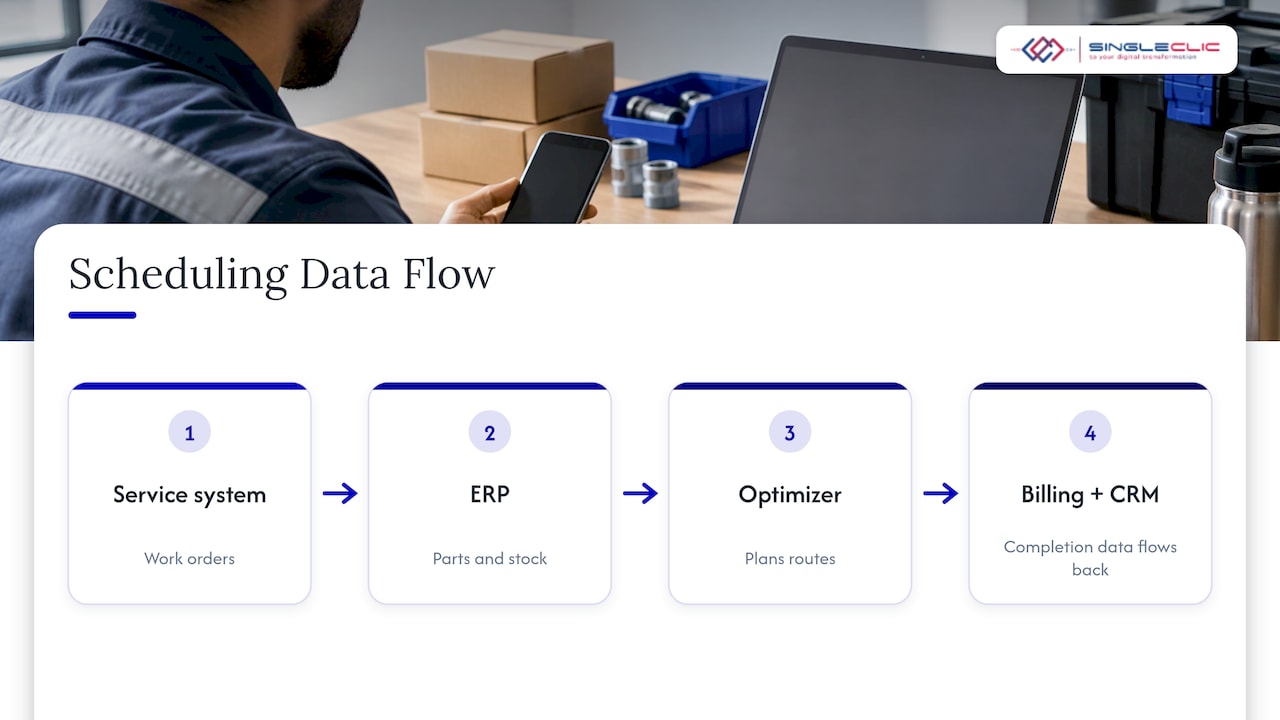
Step 4: Connect scheduling to ERP and CRM
Routing only works as well as the data it receives. Work orders come from CRM or service management, parts and stock come from ERP, and completion data must flow back to billing and customer records. Without integration, dispatchers re-key information and the optimizer plans on stale facts. Our D365 integration and implementation team builds these connections, and where you run Odoo, our Odoo service management work covers the same flow. For general scheduling needs, see our overview of scheduling software for service companies.
Step 5: Equip technicians with a mobile app
Technicians need the day’s route, job details, access notes and a way to report status and actual durations from the site. What goes wrong: if the app is cumbersome, technicians stop updating it and the data decays. Resistance to change is one of the commonly reported barriers to adopting AI in field service, so involve technicians in the pilot. Our guide to mobile enterprise solutions covers what a field app needs.
Step 6: Pilot, measure, expand
Run one territory or team for four to six weeks, compare against your audit baseline, and adjust constraints before rolling out. What goes wrong: launching everywhere at once, then blaming the engine for what were input errors.
Handling urgent jobs and disruptions
A route plan that cannot absorb change is a fragile plan. Same-day call-outs, cancellations, traffic incidents, overruns and no-access visits all arrive after the day has started. A resilient process has four parts.
- Priority rules. Define which job types may displace others and what the cost of displacing them is. A cooling failure at a clinic is not equal to a routine inspection.
- Insertion before reshuffling. When an urgent job arrives, test inserting it into the nearest qualified technician’s route before rebuilding the whole day. Rebuilding everything creates churn for technicians and customers.
- Impact comparison. Show the dispatcher the alternatives with their effect on time, cost and service level, so the decision is made on facts.
- Automatic communication. Once a change is accepted, notify the technician and the affected customers through the app or messaging, so nobody learns about a new arrival time by surprise.
In practice this means a workflow, not just an algorithm: a trigger (new urgent order), a decision (re-optimize or insert), an approval where needed, and notifications. That is where business process automation matters, and it is why we build these flows on IBM BAW and Cortex alongside the scheduling engine.
Metrics that show whether it is working
Pick a short list, baseline it from your audit, and review it monthly.
| Metric | What it tells you |
|---|---|
| Drive time as % of shift | Whether routing reduces non-productive time |
| Jobs completed per technician per day | Capacity gained without hiring |
| On-time arrival rate against windows | Whether customer promises are kept |
| SLA compliance by priority class | Whether urgent work is protected |
| First-visit fix rate | Whether skills and parts are matched to jobs |
| Callbacks and bumped appointments | Hidden routing and data failures |
| Fuel use and mileage per job | Cost impact and sustainability reporting |
| Planner time per schedule | Admin effort removed from dispatchers |
What benefit can you reasonably expect? Published figures vary widely by industry and starting point, so treat them as direction rather than promise. One pest-control trade magazine reports that users of a routing tool serviced 20% more customers per technician and spent 30% less on fuel. Your own baseline from the audit is the number that matters for your business case, because your territory, traffic and job mix decide the result.
Small savings compound. Trimming a few minutes per stop across dozens of technicians and a full year of working days is a meaningful amount of recovered capacity.
Common obstacles and how to avoid them
- Unreliable job durations. An optimizer cannot optimize on guesses. Start with estimates, then feed actual completion times back every month.
- Missing data. Skills, access notes and coordinates must be complete. Make fields mandatory at work order creation.
- Technician adoption. Choose tools that are simple and relevant to technicians’ work, train on real routes and show them how the change shortens their day.
- Security and privacy. Location and customer data are sensitive. For banks, government entities and healthcare providers in the UAE and Saudi Arabia, on-premise deployment is often the requirement, which is why Cortex supports it.
- Siloed systems. Routing that sits outside ERP and CRM creates a second version of the truth. Integrate before you expand.
- Over-tuned constraints. Too many hard rules can make a day infeasible. Separate must-haves from preferences.
Use cases in the UAE and wider Gulf
The pattern changes by sector, but the structure stays the same.
- Telecom and infrastructure. Installations and repairs with SLA clocks, mixed skills and parts. Our guide to Dynamics 365 Field Service for telecom in the UAE covers this in detail.
- Facilities and building services. Preventive maintenance cycles mixed with reactive calls, across towers and communities with access rules.
- Healthcare. Biomedical equipment maintenance and home-care visits where skills, certifications and strict time windows are decisive.
- Utilities and construction. Crews and equipment moving between sites, where planning ties into project schedules, as in our note on enterprise project planning.
- Retail and distribution service teams. Installation and after-sales visits tied to delivery data in the ERP.
Across all of them, the UAE adds a planning factor that spreadsheets handle poorly: travel between emirates, where the same distance can take very different times depending on the hour.
Perspective: why routing is a process problem, not just an algorithm problem
Most routing projects we see discussed fail for ordinary reasons, not mathematical ones. The schedule is built from bad durations, skills live in someone’s head, and the CRM, ERP and scheduling board disagree about the same job.
Our view is that route optimization belongs inside a connected business process. The work order, the approval, the parts check, the dispatch, the customer notification and the invoice should be one flow. That is why we build field service on Dynamics 365 and connect it to ERP, CRM, data and legacy systems, and why Cortex exists: to let organizations change workflows at runtime, in Arabic or English, without downtime, and to keep sensitive data on-premise when regulation requires it.
If you take one step this quarter, make it the audit. Measure drive time, callbacks and bumped jobs. Then decide which part of the flow, data, scheduling, integration or communication, is costing you the most.
Tamer Badr
How Singleclic helps
Singleclic is a regional Microsoft Dynamics 365 integrator, and we also work with Odoo and IBM BAW. We have more than ten years of delivery across the region and 70+ consultants and engineers across KSA, UAE and Egypt. For field service operations, we help with:
- D365 implementation, customization and integration to link scheduling with ERP and CRM, including Dynamics 365 implementation in the UAE.
- Business process automation with IBM BAW to automate dispatch approvals, escalations and notifications.
- Cortex, our Arabic-enabled low-code platform that supports unlimited users, on-premise deployment and runtime workflow changes without downtime.
- AI solutions and data analytics to turn job, GPS and SLA data into the metrics above.
- D365 support and maintenance to keep the setup tuned as your territories and teams change.
If you are planning a field service scheduling or routing project, our team can review your current process and propose the integration path. Start from our services overview or contact us through the Singleclic site.
Article details
- SEO title: Field service route optimization: a UAE guide for 2026
- Slug: field-service-route-optimization
- Keyword: field service route optimization
- Secondary keywords: route optimization field service, field service scheduling, Dynamics 365 Field Service, workflow automation, system integration
- Pillar cluster: Business process automation and Dynamics 365 Field Service
- Call to action: Talk to Singleclic about connecting scheduling, ERP and CRM for your field teams.
FAQ
What is the difference between route planning and route optimization?
Route planning sequences stops, often manually with a map or spreadsheet. Route optimization uses algorithms to build and update routes against constraints such as time windows, skills, job duration, priority and traffic. The first gives you a list of stops, the second gives you a day your team can complete.
Which constraints matter most for field service routes?
Start with appointment windows, SLA deadlines, technician skills, shift hours, job duration and parts availability. Then add access requirements, two-person jobs and workload balance. Accurate durations and skill tags usually deliver the largest improvement.
How do I know where my routes are inefficient?
Run a one-week audit. Compare planned routes with GPS paths, calculate drive time as a share of each shift, and count bumped appointments and callbacks. Separate routing misses from skill or parts misses so you fix the right problem.
Can route optimization connect to my ERP and CRM?
Yes, and it should. Work orders, stock, customer records and billing all sit in those systems. In Dynamics 365 this is done through integration of Field Service with ERP and CRM, and we implement and support those connections for UAE and Saudi organizations.
How should urgent jobs be handled without breaking the plan?
Define priority rules, try inserting the job into a qualified technician’s route first, compare the impact on time, cost and service level, and notify technicians and customers automatically once a change is accepted. Automating this as a workflow keeps dispatchers from handling it by phone.
Sources
- Configure Resource Scheduling Optimization in Dynamics 365 Field Service
- The benefits of route optimization, NPMA PestWorld, January-February 2024