Dynamics 365 Asset Management is an advanced module for managing assets and maintenance jobs in Dynamics 365 Supply Chain Management. It tracks machines, production equipment and vehicles, plans preventive maintenance, runs work orders and feeds the costs back into your finance and operations data. For UAE operators of plants, fleets, facilities and infrastructure, it replaces spreadsheets and disconnected maintenance tools with one governed record for every asset. This guide explains what it does, how it is set up, what the mobile app needs and what to settle before you start a project.
TL;DR
- Asset Management is an add-in to Dynamics 365 Supply Chain Management, not a standalone product. It covers asset tracking, maintenance planning, work orders, fault management, reporting and cost control.
- Preventive maintenance runs on maintenance plans, either time-based or counter-based, which generate work orders for you.
- The mobile app lets technicians work orders in the field, but it has specific version, Dataverse and license prerequisites.
- Results depend on clean master data: asset hierarchy, functional locations, job types and skills must be designed before go-live.
- Singleclic implements, customizes and supports Dynamics 365 for organizations in the UAE, Saudi Arabia and Egypt.
Table of Contents
- What Dynamics 365 Asset Management does
- The core objects: assets, functional locations and work orders
- Preventive maintenance with maintenance plans
- Scheduling work orders and workers
- Parameters that shape behavior
- The Asset Management mobile app
- Where it fits: use cases for UAE organizations
- What to settle before you implement
- Our perspective
- How Singleclic helps
- Plan your asset management project with Singleclic
- FAQ
- Sources
What Dynamics 365 Asset Management does
Microsoft describes the module as an add-in that provides end-to-end asset management, from tracking assets and their physical locations to maintenance planning, orders and scheduling, fault management, reporting and cost controls. It helps organizations manage and service equipment across many industries, and it integrates with other finance and operations apps, so maintenance is not a silo.
That integration is the main reason finance and operations leaders choose it over a stand-alone maintenance tool. Spare parts come from inventory, labor comes from human resources, and costs land on the financial dimensions your controllers already use. Maintenance stops being a cost you reconcile at month end and becomes data you can read next to production and procurement.
The Microsoft datasheet for the add-in also lists connections to Field Service, IoT sensor intelligence for proactive maintenance, spare parts management, MRP for maintenance spares and mixed reality through Dynamics 365 Guides. Which of these you adopt is a scoping decision, and most organizations start with the core: assets, plans and work orders.
The core objects: assets, functional locations and work orders
Three concepts carry most of the design.
Assets and asset types
Assets are machines or machine parts that need continuous maintenance and service. They can be structured in a hierarchy and maintained at every level, so you can service a pump as a whole or replace a single component. Every asset has an asset type, and the asset type defines which maintenance job types can be performed on it. When someone creates a work order, they can only choose job types that belong to that asset type, which keeps the data consistent.
Functional locations
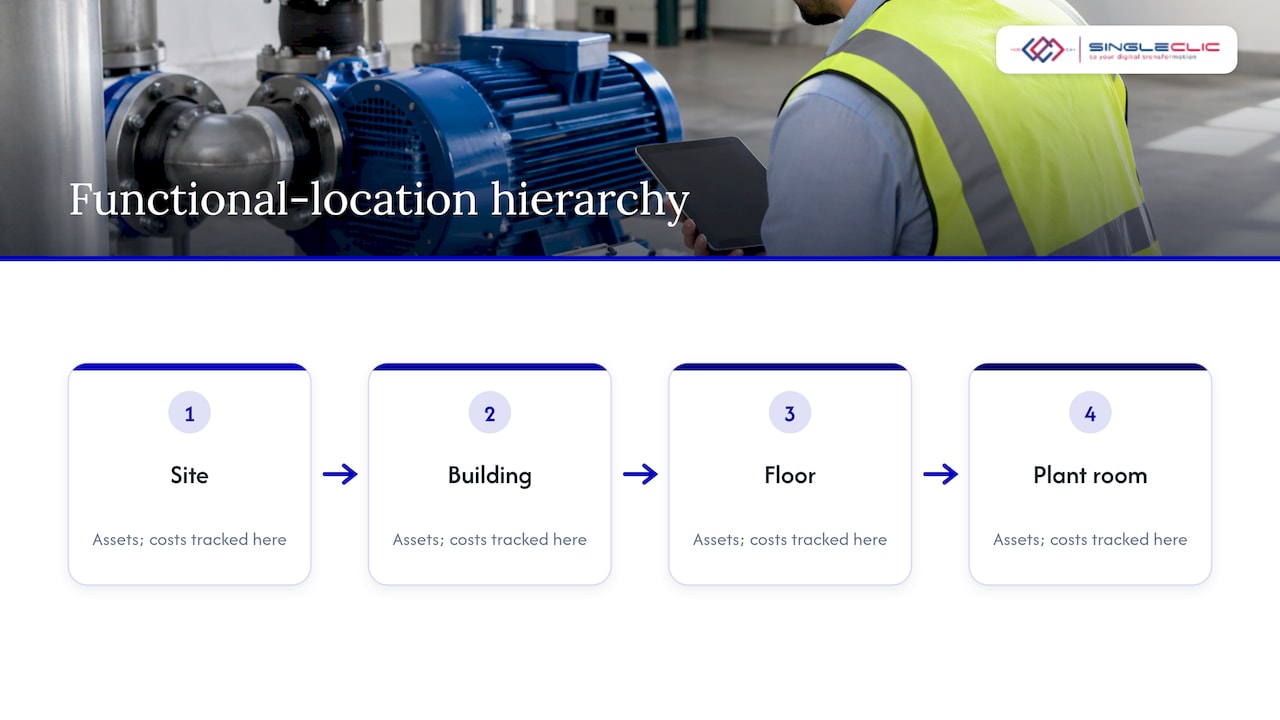
Functional locations describe where assets sit and how costs are tracked. Per Microsoft, they are structured hierarchically with sublocations, and the structure itself is static. Assets are installed on a location and can later move to another one. Costs follow the asset automatically, using the financial dimensions of the new location.
For a UAE business with sites in several emirates, or a facilities operator with many buildings, this matters. You can model a site, a building, a floor and a plant room, and see maintenance cost at any of those levels without manual allocation.
Work orders and jobs
Every work order has a type, such as preventive maintenance, corrective maintenance or inspection. It contains one or more jobs, each defining work to be done on an asset, and one work order can relate to multiple assets. Examples Microsoft gives for job types include a 10,000 km service, a 50,000 km service, a one-year overhaul and a safety inspection.
Preventive maintenance with maintenance plans
A maintenance plan defines when a pre-planned preventive maintenance job is carried out on an asset. Plans can attach to assets, asset types, functional locations or functional location types. That last option lets you write one plan for, say, every chiller of a given type instead of maintaining hundreds of copies.
Plan lines come in two types:
- Time: recurring maintenance on a fixed interval, for example a quarterly inspection.
- Counter: maintenance triggered by asset counter registrations, for example running hours or distance.
The plan has a start date, an active toggle (a deactivated plan creates no schedule posts when the scheduling job runs) and tolerance days before and after, which handle overlapping jobs. Plans are created under Asset management > Setup > Preventive maintenance > Maintenance plans.
Counter-based plans are where equipment-heavy operators see the most value. Maintaining a generator every 500 running hours rather than every calendar month avoids both over-servicing idle assets and under-servicing hard-worked ones. If you also want live location and usage signals from mobile equipment, small equipment GPS tracking shows what that data can look like for trailers, tools and vehicles before you decide how to feed counters.
Scheduling work orders and workers
Maintenance only works if the right person with the right skill is assigned. Work orders can be scheduled only when their lifecycle state allows it, which you control with the Allow scheduling option under Asset management > Setup > Work orders > Lifecycle states. The scheduling process scores work orders and maintenance workers, checks required competencies such as skills and certificates, and can respect capacity limits for assets, tools and workers already booked.
Hours needed are calculated as forecasted hours minus posted hours, so keeping forecasts honest keeps schedules honest. Skills and certificates are held on workers in the Human resources module, which means HR managers have a real role in a maintenance implementation: if certifications are not maintained there, scheduling cannot match them.
Lifecycle states
Work order lifecycle states describe where an order is, for example Created, Scheduled, In progress and Ended. Each state has options for adding or deleting lines, allowing scheduling, setting actual start and validations such as maintenance downtime, checklist, fault symptom, fault cause and fault remedy. In practice this is where you enforce discipline: for instance, a work order cannot close until a fault cause is recorded.
If your teams also dispatch technicians to customer sites, compare this internal scheduling with our guide to D365 field service scheduling, which covers manual and automated options.
Parameters that shape behavior
General settings live under Asset management > Setup > Asset management parameters. The Assets tab holds the default functional location, the standard calendar for KPIs, the default request type, forecast project and forecast model. The Work orders tab covers default and preventive work order types, the related work order mask, copying faults, journals for posting consumption and real-time update. These are small settings with large effects on daily use, so decide them in design workshops, not during testing.
The Asset Management mobile app
Technicians rarely sit at a desk. The mobile app lets them search assigned work orders, record progress, update checklists, register time and materials, and view or add notes. Permitted users can raise maintenance requests, and maintenance workers can create work orders from scratch or from existing ones.
Prerequisites to plan for
| Requirement | What Microsoft states |
|---|---|
| Platform version | Supply Chain Management 10.0.36 or later |
| Environment | Integrated Dataverse environment with the Power Apps component framework enabled |
| Roles | Maintenance requester or Maintenance worker; system administrators can also use the app |
| Licenses | Team Members license for maintenance requests; Operations – Activity license for work order processing |
| Foundation | A fully implemented Asset Management setup in Supply Chain Management |
Two details save projects from rework. First, the app recognizes only the standard security roles, and custom roles are not supported even when copied from the standard ones. Plan your access model around them. Second, the app is a Power Apps canvas app, and Microsoft now offers it as an open-source sample that you can customize freely. Customization is possible, but your team or partner owns it afterward.
Where it fits: use cases for UAE organizations
- Healthcare: biomedical equipment needs inspection schedules, fault history and location tracking across facilities. Counter and time plans keep inspections on cadence. See our view on Dynamics 365 for healthcare.
- Construction and real estate: plant, vehicles and building systems are spread across sites. Functional locations tie cost to each project or property.
- Manufacturing and logistics: production equipment downtime is expensive. Preventive plans, spare parts through inventory and MRP, and synchronized maintenance and production schedules reduce surprises.
- Government and utilities: a clear audit trail of who serviced which asset, when, and at what cost.
The Microsoft community announcement for the module framed the goal as optimizing asset lifespan while reducing costs and production downtime. Treat that as the business case to quantify against your own downtime and maintenance spend.
What to settle before you implement
- Asset register quality. Decide what counts as an asset, how deep the hierarchy goes and how you name things. Our piece on fixing master data first in Dynamics 365 Supply Chain applies directly here.
- Functional location design. Locations are static, so model physical sites carefully.
- Job types, variants, trades and checklists. Build them per asset type so work orders stay consistent.
- Skills and certificates. Load them in Human resources before testing scheduling.
- Mobile rollout. Confirm version, Dataverse, roles and licenses early.
- Total cost. Licensing, support and upgrades compound over five years. Our five-year Dynamics 365 TCO view for UAE leaders helps frame it.
- Integration. Decide what connects to finance, procurement, IoT and legacy systems, and who owns each interface.
Our perspective
Most asset management projects do not fail on features. They fail on data and on adoption. A technician who finds the mobile app slower than a paper form will go back to paper, and a finance team that cannot trust asset costs will go back to spreadsheets.
That is why we start with the asset hierarchy, the functional locations and the roles, then configure plans and work orders around the way your teams already work. With more than ten years of delivery in the region and consultants across the UAE, Saudi Arabia and Egypt, we have seen that regulated and asset-heavy organizations value one thing above all: a maintenance record they can defend in an audit.
Where approvals, legacy systems or Arabic-language workflows sit around the maintenance process, we connect them through Cortex, our Arabic-enabled low-code and process platform, so the Dynamics 365 core stays clean and the surrounding process remains flexible.
Tamer Badr
How Singleclic helps
Singleclic is a Microsoft Dynamics 365 integrator serving organizations in the UAE, Saudi Arabia and Egypt. For asset management, we can support:
- Consultancy and design: asset hierarchy, functional locations, plans and lifecycle states.
- Implementation and customization: configuring the module and tailoring it to your sector.
- Integration: connecting maintenance with ERP, CRM, data analytics and legacy systems.
- Support and maintenance: keeping the solution healthy after go-live.
- Process automation: approvals and escalations around work orders, using Cortex or IBM BAW.
Our Dynamics 365 services cover implementation, customization, integration, support and consultancy. For the broader ERP picture, read our overview of Dynamics 365 ERP.
Plan your asset management project with Singleclic
If you are scoping Dynamics 365 Asset Management for a plant, fleet or facilities portfolio in the UAE, we can help you define the asset model, the rollout sequence and the integrations before you commit to a build. Our team works with banks, healthcare providers, real estate developers and government bodies across the region.
Talk to us through our Dynamics 365 page, or see how Cortex can connect approvals, ERP and legacy systems around your maintenance process.
FAQ
Is Asset Management a separate product from Dynamics 365 Supply Chain Management?
No. It is an add-in module within Dynamics 365 Supply Chain Management, per Microsoft’s documentation. It shares data with other finance and operations apps, which is what lets maintenance costs, parts and labor flow into the same system as the rest of your operations.
What is the difference between a maintenance plan and a work order?
A maintenance plan defines when preventive work should happen, based on a time interval or an asset counter. A work order is the actual task, with type, jobs, assets, workers and materials. Plans generate scheduled work, and work orders record and control its execution.
Can technicians use Asset Management on a phone or tablet?
Yes, through the Asset Management mobile app. It needs Supply Chain Management 10.0.36 or later, an integrated Dataverse environment and the standard Maintenance requester or Maintenance worker roles, plus the licenses Microsoft specifies for requests and work order processing.
Does it support preventive and corrective maintenance?
Yes. Work order types include preventive maintenance, corrective maintenance and inspection. Preventive work is driven by maintenance plans, while corrective work is raised from requests or faults, with fault symptom, cause and remedy captured through lifecycle validations.
What should a UAE company prepare before starting?
Start with an asset register, a functional location structure, job types per asset type and up-to-date worker skills in Human resources. Then confirm platform version, Dataverse and licensing for the mobile app, and agree which systems must integrate. A Dynamics 365 partner can run these as design workshops.
Sources
- Asset management overview, Microsoft Learn
- Overview and benefits, Microsoft Learn training
- Assets and work orders, Microsoft Learn
- Maintenance job types, categories, variants, trades and checklists, Microsoft Learn
- Functional locations and assets, Microsoft Learn
- Maintenance plans, Microsoft Learn
- Schedule work orders, Microsoft Learn
- Work order lifecycle states, Microsoft Learn
- Asset Management parameters, Microsoft Learn
- Asset Management mobile app overview, Microsoft Learn
- Onboard the Asset Management mobile app, Microsoft Learn
- Asset Management mobile app sample, GitHub
- Dynamics 365 Asset Management datasheet
- Asset Management preview program announcement, Microsoft Dynamics community