Construction document control is the governance layer that keeps every drawing, submittal, and RFI on a project tied to a single verified version, with a clear record of who approved it and when. The first move for any project manager is establishing one authoritative repository and a mandatory naming and revision rule, aligned with frameworks like ISO 19650. Get that right, and rework drops before the second submittal cycle ends. Singleclic builds this governance into automated workflows for construction and real estate clients across the region.
TL;DR:
- Standardized naming and revision rules are essential to prevent teams from working with unauthorized, outdated documents, especially during critical project phases.
- Automated workflows that log transmittals, enforce naming conventions, and track permissions significantly reduce manual errors and improve document traceability.
- Implementing a dedicated document controller or assigning clear ownership early ensures better compliance, oversight, and timely updates across the project.
- Offline and mobile access in control systems is crucial, as losing connectivity often causes teams to revert to inefficient email or spreadsheets.
- A well-structured 90-day rollout, focusing on key controls like authoritative repositories, naming consistency, and mobile access, accelerates adoption and enhances project compliance.
Table of Contents
- What construction document control actually covers
- Why document control matters: the cost of getting it wrong
- Core practices: naming, versioning, and latest-approved tracking
- Who owns it: the document controller and the accountable chain
- Processes and workflows: RFIs, submittals, and field sync
- Choosing the right platform without over-buying
- Rolling it out: a 90-day implementation plan
- How automation and low-code close the gaps manual systems leave
- Three priorities for the first 90 days
- Turn document control into an automated compliance advantage
- Sources
What construction document control actually covers
Construction document control governs drawings, specifications, RFIs, submittals, contracts, change orders, and daily reports across the life of a project. It is not the same as document management, which is really just storage. Management asks where a file lives; control asks whether that file is the correct, current, formally approved version, and whether there is a record proving it.
This distinction matters because a shared drive can “manage” thousands of files while still letting a subcontractor pour concrete against a superseded structural drawing. Control adds the governance layer on top: version locking, approval status, distribution logging, and an audit trail that survives a dispute years later. A related primer on what document management actually solves covers the storage side in more depth if you need the foundational context first.
Why document control matters: the cost of getting it wrong
Poor document control in construction projects shows up as rework, blown schedules, and disputes nobody can resolve because nobody can prove which drawing was current on the pour date. Industry data backs this up directly.
By the numbers: Practitioner research cited by Autodesk shows construction professionals lose a meaningful share of their week simply hunting for the right project information, and poor document control is a recurring driver of rework across projects.
Common failure modes are predictable: a superintendent builds from an emailed PDF instead of the CDE’s approved version, two teams issue conflicting revision numbers, or a closeout package arrives missing half the as builts. FMI research referenced by Datagrid links standardized change order and document control processes to measurably better schedule adherence and profitability among specialty contractors. Track KPIs like average RFI turnaround, hours spent searching for files, rework hours tied to outdated documents, and closeout completeness at handover. These four numbers tell you more about your control system’s health than any audit checklist.
Core practices: naming, versioning, and latest-approved tracking
A defensible record starts with rules simple enough that a tired superintendent follows them at 6 a.m. Procore’s guidance recommends a naming structure built from a small set of mandatory fields, not a free-text description everyone interprets differently.
A workable template looks like this: project ID, discipline code, document type, sequence number, revision, and status. For example, PRJ04-STR-DWG-0012-Rev3-APPROVED tells anyone, instantly, what the file is and whether they can build from it.
Two fields get confused constantly: revision and status. Revision tracks how many times a document changed. Status tracks whether it is currently approved, under review, or superseded. Conflating the two is one of the most common reasons teams build from unauthorized files, since a high revision number does not automatically mean an approved one.
Beyond naming, four controls form the backbone of a working system:
- Maintain a single latest-approved register that flags every superseded file automatically, not manually.
- Log every transmittal (who received what, when, and in which format) so distribution is provable later.
- Assign permissions by role: field crews view approved-for-construction only, while design teams retain edit and markup rights.
- Set a retention policy up front. Most capital projects need records held years past substantial completion, and some public contracts specify the exact retention period.
Pro Tip: Lock down transmittal logging before you lock down anything else. A missing approval stamp is annoying. A missing record of who received a superseded drawing and never got the correction is the kind of gap that turns into a six-figure claim.
Who owns it: the document controller and the accountable chain
Someone has to own this daily, and on any project past a certain size that person is the document controller. Their job is operational, not administrative: logging incoming and outgoing documents, verifying naming compliance before anything enters the register, managing the transmittal record, and flagging conflicts between revision and status before they reach the field.
On smaller projects, the project manager often absorbs this role, usually with mixed results, since PMs get pulled into scheduling and budget fires first. On design-build or complex multi-prime jobs, ownership typically sits with a dedicated controller reporting into project controls, separate from design authority.
A working accountability model needs:
- A named document controller (or clearly assigned PM duty) before mobilization, not after the first RFI backlog builds.
- Designers and subcontractors who submit files that already match the naming and revision convention, not files the controller has to fix.
- A hiring or training checklist covering CDE proficiency, transmittal discipline, and familiarity with ISO 19650 workflow concepts.
Processes and workflows: RFIs, submittals, and field sync
Most document control failures trace back to a broken handoff between office and field, not a broken naming rule. The fix is a repeatable process with enforced service levels.
- RFI submission and routing. The field or subcontractor submits through the CDE, not email, tagged to the relevant drawing and discipline, and routed automatically to the correct reviewer.
- Submittal review. Reviewers get a defined SLA, commonly 5 to 10 business days depending on contract terms, with automatic escalation if that window lapses.
- Approval and status update. Once approved, the system updates status and revision simultaneously, then flags the prior version as superseded.
- Transmittal and notification. The platform logs the transmittal and pushes an automatic notification to every affected party, closing the gap that email chains leave open.
- Field sync. Crews pull the current approved-for-construction set through a mobile app with offline caching, since a jobsite trailer with no signal cannot depend on a browser tab.
That last step is where systems quietly fail. Fieldwire’s field guide notes that losing reliable mobile or offline access is the single most common reason teams abandon a CDE and drift back to email and spreadsheets. A workflow approval guide walks through how to structure these routing rules so they hold up under real field conditions.
Choosing the right platform without over-buying
Three platform categories solve different problems, and most projects eventually need pieces of all three. A common data environment (CDE) centralizes drawings, RFIs, and approvals under ISO 19650 style governance. A drawing management tool focuses narrowly on version control for design files. A broader project management information system (PMIS) ties documents to scheduling, cost, and quality data. Field/mobile apps extend whichever of these you use out to the jobsite.
Before signing anything, run the selection against a short checklist:
- Does it maintain a full audit trail, not just a version number?
- Can permissions be set by role, discipline, and project phase?
- Does it work offline, with automatic sync once connectivity returns?
- Is it structured for ISO 19650/ISO 9001 alignment, or will you bolt that on later?
- Does it expose an API for ERP, BIM, and approvals integration?
InEight’s platform overview illustrates why dedicated CDEs outperform shared drives on large capital projects: automated transmittals and granular permissions are structural features, not add-ons. Integration with ERP and cost systems matters more than most buyers expect, since a document control platform that cannot talk to your financials or your BIM model just becomes another silo. A review of ERP and CRM integration for construction firms covers this integration layer directly, and partners like FlowLab’s ERP integration work show how workflow systems get wired into broader operational stacks.
Pro Tip: Test offline mode before you test anything else during a vendor demo. A polished dashboard means nothing if the app locks up the moment a foreman walks into a basement with no signal.
Rolling it out: a 90-day implementation plan
Getting from spreadsheet chaos to a governed system does not require a year-long transformation program. It requires a sequenced 90-day plan with a named owner at each step.
- Weeks 1 to 2: Finalize the naming convention, stand up the single source of truth, and assign the document controller.
- Weeks 3 to 4: Build the distribution matrix (who receives what, by role and discipline) and configure permissions.
- Weeks 5 to 8: Migrate active documents, train field and office teams, and run a parallel period alongside any legacy process.
- Weeks 9 to 12: Cut over fully, begin periodic audits, and start tracking your KPIs.
A change management framework helps here, since the hardest part of rollout is rarely the software. It is getting a superintendent who has used email for fifteen years to trust a new system on day one.
| Phase | Primary owner | Key output |
|---|---|---|
| Setup (weeks 1–2) | Document controller | Naming rule, single source of truth live |
| Structure (weeks 3–4) | PM + controller | Distribution matrix, permissions set |
| Migration (weeks 5–8) | Controller + field leads | Legacy files migrated, teams trained |
| Cutover (weeks 9–12) | PM | Full adoption, KPI tracking started |
How automation and low-code close the gaps manual systems leave
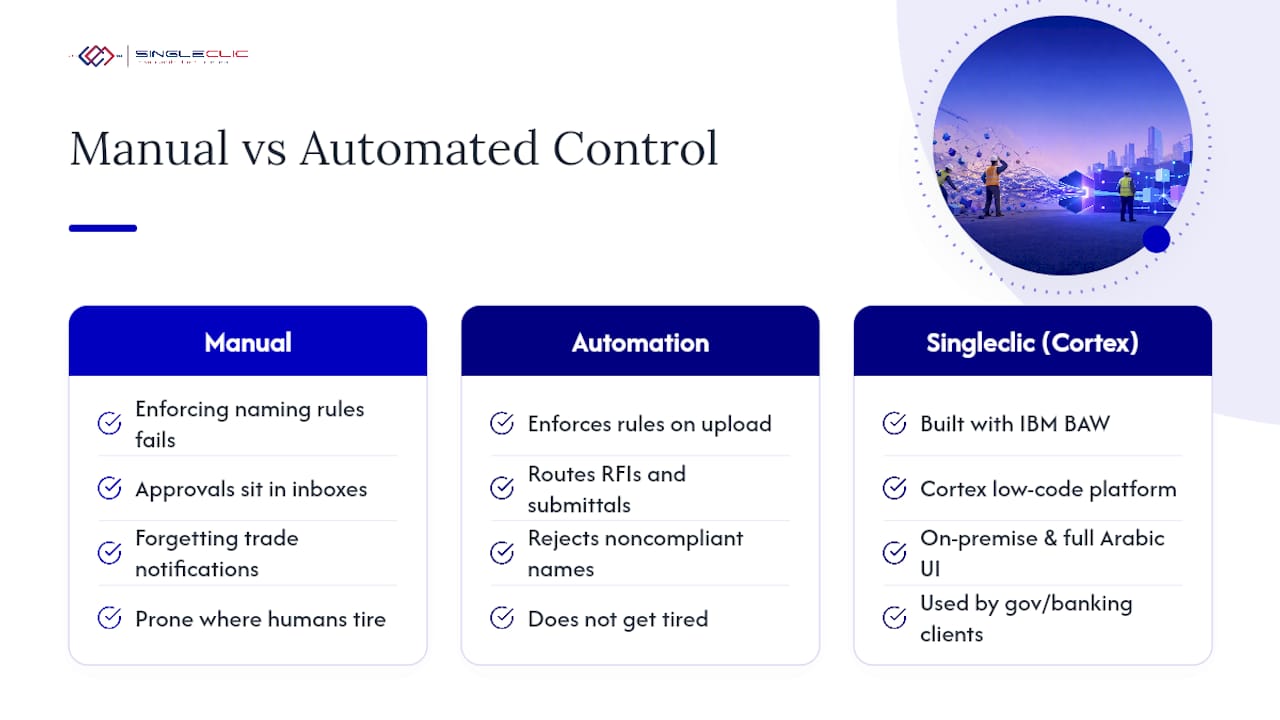
Manual document control breaks down exactly where humans get tired: enforcing naming rules on every upload, chasing approvals that sit in someone’s inbox, and remembering to notify every affected trade after a revision. Automation does not get tired.
Singleclic builds this enforcement directly into workflow automation using IBM BAW and its own Cortex low-code platform, which routes RFIs and submittals against pre-set rules and rejects noncompliant naming before a file ever enters the register. For owners in regulated or compliance-sensitive environments, including government and banking clients across Saudi Arabia and the UAE, Cortex’s on-premise deployment and full Arabic UI matter as much as the automation itself. Managed implementation tends to outperform an out-of-the-box rollout precisely because someone maps your approval chains and naming logic before go-live, not after the first dispute.
Three priorities for the first 90 days
Fix three things first: one authoritative source of truth, a naming and revision rule everyone follows without exception, and reliable field access on mobile. Every other control depends on this three holding. The pitfall I see most often is teams buying a platform before agreeing on the naming convention, which just moves the chaos into a nicer interface. Track your KPIs from week one and adjust the rule set as real conflicts surface, not once a year at review time.
— Tamer Badr
Turn document control into an automated compliance advantage
Manual CDEs and spreadsheet trackers get you partway there, but they still depend on someone remembering to enforce the rule. Singleclic closes that gap by wiring document control directly into your ERP, CRM, and approval workflows through Microsoft Dynamics 365, Odoo, and Cortex, our Arabic-enabled, on-premise low-code platform built for compliance-sensitive owners across the region.

The result for most clients is faster submittal turnaround, fewer duplicate RFIs, and a closeout package that is audit-ready the day the project finishes, not three months later. Where a project’s complexity or regulatory exposure calls for it, managed implementation beats an out-of-the-box CDE because Singleclic’s team maps your naming rules, approval chains, and integration points before go-live. If you are evaluating how Microsoft Dynamics 365 connects approvals, finance, and project controls into one governed system, that is the right next step. Book an assessment with Singleclic to map your current document workflow and see where automation removes the manual gaps first.
Sources
- 10 Expert Tips for Construction Document Control — Autodesk
- What is Document Control in Construction? | Datagrid
- Construction document control: Best practices for managing project files | Procore