Start at the UAE PASS Developer Portal and the official UAE PASS integration docs at docs.uaepass.ae. Use the OAuth2 authorization code flow for web portals, and mobile-on-device deep linking for native apps when the UAE PASS app is installed, falling back to a push notification flow when it isn’t. Before writing a line of code, line up a valid trade license, pick your SOP account level, and decide whether users get linked automatically or manually.
TL;DR:
- UAE PASS integration requires precise selection of OAuth2 flow or deep linking, with strict registration of redirect URIs and verification levels.
- Handling mobile fallback involves detecting app installation and testing push notification flow thoroughly before production.
- Complete onboarding documentation, including trade licenses, user flow diagrams, and questionnaires, is essential to avoid delays.
- Use separate client credentials for staging and production, store secrets securely, and implement regular credential rotation to maintain security.
- Proper implementation reduces login complexity, enhances compliance with Dubai’s digital identity regulations, and benefits from partner support for faster deployment.
Table of Contents
- What is UAE PASS integration and where do you start?
- How does the web integration OAuth2 flow work?
- How do you handle mobile integration and deep linking?
- What documents do you need before UAE PASS onboarding?
- How do you choose account levels and linking strategy?
- How do you set scopes and handle token errors?
- What’s required to enable digital signature and e-Seal?
- How do you manage token refresh and long sessions?
- What do integration code patterns look like across frameworks?
- How do you obtain and manage client credentials?
- Singleclic’s take: why UAE PASS integration is worth doing right
- How Singleclic helps you deploy UAE PASS faster
- Sources
What is UAE PASS integration and where do you start?
UAE PASS is the UAE’s national digital identity, and integration means wiring your application into it for authentication and, optionally, document signing. Every service provider building against it works from two starting points: the Developer Portal for registration and credential management, and the technical documentation for endpoints, flows, and code samples.
The federal identity system, overseen through ICP’s UAE PASS program, lets citizens and residents register once using their Emirates ID, an OTP-verified phone or email, and facial recognition, then reuse that identity across government and private digital services. For developers, that single identity becomes the authentication mechanism you plug into your login screen, replacing (or sitting alongside) your own username and password system.
Two integration paths exist, and picking the wrong one early costs weeks later. Web applications use a standard OAuth2 authorization-code exchange. Native mobile apps use deep linking to hand off to the UAE PASS app directly on the device, with a web-based fallback when that app isn’t installed. Government-facing and regulated private-sector apps in Dubai also carry an added layer: Executive Council Resolution No. (106) of 2023 requires any service needing authenticated identity verification to link into the national digital identity system and get an implementation plan approved before going live. That regulatory step belongs in your project timeline from day one, not as an afterthought before launch.
How does the web integration OAuth2 flow work?
Web integration follows a standard authorization-code grant, documented in the UAE PASS web integration guide. The sequence is predictable once you’ve built one OAuth2 flow before, but the parameter details are UAE PASS specific.
The flow runs in four steps:
- Redirect the user to the
/authorizeendpoint with yourclient_id,redirect_uri, requestedscope, and astatevalue you generate and store. - UAE PASS authenticates the user and redirects back to your
redirect_uriwith an authorizationcodeand the samestateyou sent. - Your backend exchanges that
codeat the/tokenendpoint for an access token, using your client credentials. - Call
/userinfowith the access token to retrieve the user’s verified profile attributes.
Validate the returned state against what you stored before trusting the callback. It’s the single most common gap in early implementations, and it’s what stops an attacker from forging a callback request. Register your exact redirect_uri in the Developer Portal; UAE PASS rejects mismatches outright. Where the platform supports it, layer in PKCE for public clients that can’t safely hold a client secret. Logout requires calling the session termination endpoint with the active token so it’s revoked on the UAE PASS side too, not just cleared from your app’s local session.
How do you handle mobile integration and deep linking?
Native mobile apps take a different route: instead of a browser redirect, your app hands off to the UAE PASS app directly through a deep link, per the mobile integration guide. Detecting whether the app is installed determines which of two paths you follow.
- Check for the UAE PASS app using its scheme:
uaepass://in production,uaepassstg://in staging, with Android package idae.uaepass.mainapp.stgfor staging builds. - If installed, invoke the app with
acr_valuesset for mobile-on-device authentication, passing your success and failure callback URLs. - Rewrite
successURLandfailureURLto your own app scheme, following the patternyourapp:///resume_authn?url=<encoded_callback>, so control returns to your app rather than a browser tab. - If the app isn’t detected, fall back to the standard web flow with a lower assurance
acr_valuessetting, which triggers a push notification to any UAE PASS app already registered on the user’s device. - Your app resumes on the rewritten callback, extracts the authorization code, and completes the same token exchange used in web integration.
Pro Tip: Test both branches, app-installed and fallback, in the staging environment before you ever touch production schemes. Developers who only test with the app installed on their own dev phone routinely discover the fallback push flow is broken the week before launch.
What documents do you need before UAE PASS onboarding?
Onboarding starts in the Developer Portal, but the real bottleneck is paperwork, not code. The initiation phase documentation lays out exactly what UAE PASS expects before a technical review even begins.
Private entities need to submit:
- A valid UAE Trade License tied to the applying business.
- Completed questionnaires covering authentication, digital signature, and e-Seal requirements, depending on which features you’re requesting.
- UI wireframes showing where and how UAE PASS login appears in your application.
- Workflow diagrams mapping the user journey through authentication, linking, and any signing steps.
Incomplete initiation packets are the single most common cause of onboarding delays. A questionnaire left half-answered or a missing wireframe sends the whole packet back for revision, adding a full review cycle you could have avoided. Submit complete artifacts the first time, even if that means holding your submission an extra few days to finish the wireframes properly.
How do you choose account levels and linking strategy?
UAE PASS defines three account levels, or SOPs, that determine how strongly a user’s identity has been verified, and by extension, what your app can ask them to do. The UAE PASS overview breaks down each tier.
- SOP1: mobile and email verified only, suitable for lower-risk services with no signing requirement.
- SOP2 and SOP3: mobile, email, and Emirates ID verified, required for services that need stronger identity assurance or digital signature features.
Linking existing users to their UAE PASS identity happens one of two ways. Automatic linking works when your system already holds a verified unique identifier, an Emirates ID number or an SPUUID, that matches what UAE PASS returns. Manual linking is the fallback for everyone else, and it needs its own secure, audited UI flow. The standard authentication scenarios documentation organizes these into use-case categories: UC 1.1 for existing users only, UC 1.2 for existing plus new registration, and UC 1.3 for new-user registration exclusively. Pick the category that matches your actual user base before you design the linking screens, not after.
How do you set scopes and handle token errors?
Scope selection determines exactly what UAE PASS hands back in the /userinfo response, and getting it wrong means either under-fetching data you need or over-asking for data you don’t. Standard profile scopes cover name, Emirates ID number, and contact details for authenticated users. Visitor scopes, using unifiedId and profileType, are for apps that need a stable identifier for users who haven’t gone through full identity verification.
The exchange itself, code for access token, then token for user info, needs the same rigor as any OAuth2 implementation:
- Validate the
stateparameter on every callback before processing the authorization code. - Exchange the code for a token immediately. Authorization codes expire quickly and are single-use.
- Store the access token server-side only. Never expose it to client-side JavaScript or app-local storage in plaintext.
- Handle denied consent, expired codes, and malformed callback parameters as distinct error states, each with its own user-facing message.
Push-notification timeouts are the error condition teams miss most often in the mobile fallback flow. If the user doesn’t respond to the push within the timeout window, the flow returns a failure state that your app has to catch and offer a clear retry path for, not a generic “something went wrong” message.
What’s required to enable digital signature and e-Seal?
Digital signature and e-Seal are separate features from authentication, and UAE PASS treats them that way during onboarding. You’ll fill out an additional signature and e-Seal questionnaire alongside your standard onboarding packet, and typically need at minimum SOP2 verification, since signing carries a higher identity assurance bar than simple login.
The integration pattern itself is straightforward once onboarding approves the feature:
- Generate a hash of the document or data you need signed, rather than sending the full document to the signing API.
- Call the UAE PASS signing endpoint with that hash and the user’s authenticated session.
- Store the returned signature metadata, including timestamp and certificate reference, alongside your document record for audit purposes.
- Design the signature prompt as a distinct, clearly labeled step in your UX, separate from the login screen, so users understand exactly what they’re authorizing.
Never cache or persist signing keys on your own infrastructure. UAE PASS manages the certificate and key material on its side by design.
How do you manage token refresh and long sessions?
Access tokens issued through UAE PASS are short-lived by design, which is correct security practice but means your application needs a deliberate strategy for sessions that run longer than the token’s lifetime. Don’t try to extend token lifetime server-side; work with the expiration UAE PASS gives you.
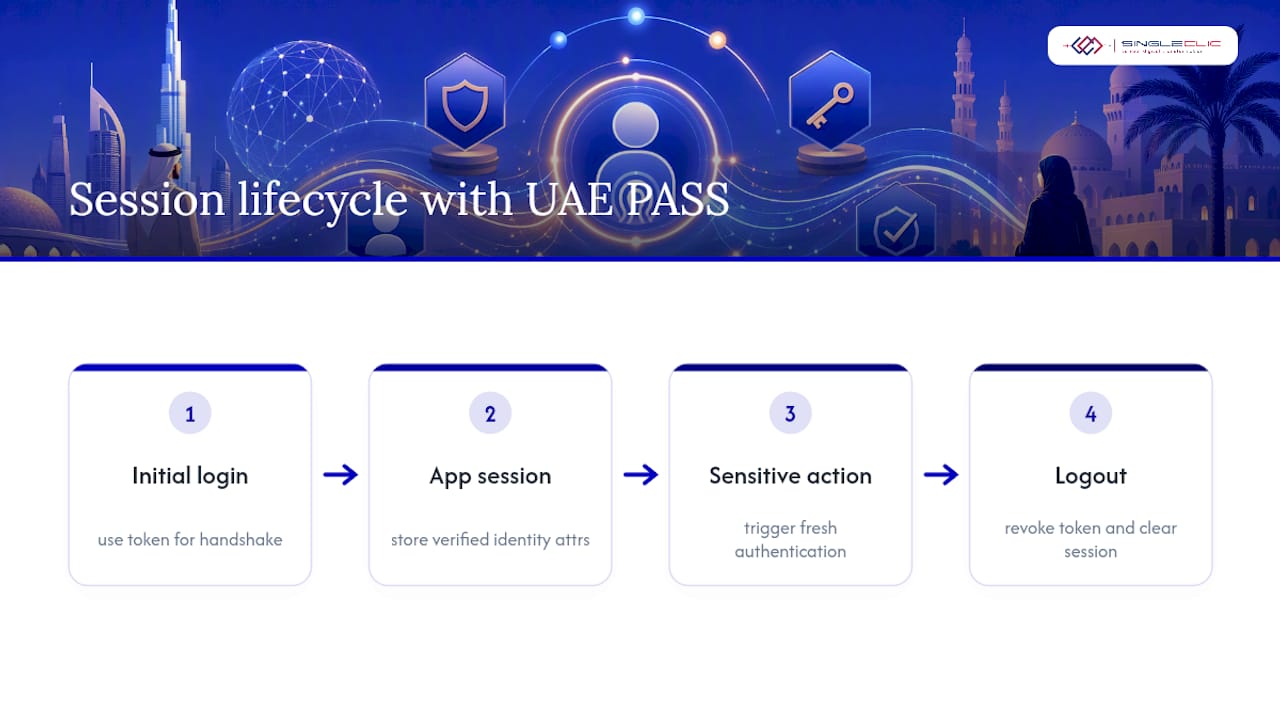
The practical pattern most teams land on: maintain your own application session, separate from the UAE PASS token, once the initial authentication and userinfo call complete. Store the verified identity attributes you need (name, Emirates ID number, linked account reference) in your own session store, and treat the UAE PASS token itself as a one-time credential used only during the login handshake, not something you hold onto and refresh repeatedly throughout the day.
If your application needs to re-verify identity mid-session, for a sensitive action like approving a large transaction, trigger a fresh authentication round rather than trying to silently refresh a stale token in the background. This matters more for government and financial workflows, where re-authentication before a high-value action is often a compliance expectation, not just a security nicety.
For session termination, call the logout endpoint to revoke the UAE PASS token when your own session ends, and clear your local session store at the same time. A user who logs out of your app but leaves an active UAE PASS token dangling is a loose end that shows up in security audits later.
Build session timeout logic that matches your risk profile: a government portal handling sensitive personal data warrants a shorter idle timeout than an internal staff tool, even though both authenticate through the same UAE PASS flow.
What do integration code patterns look like across frameworks?
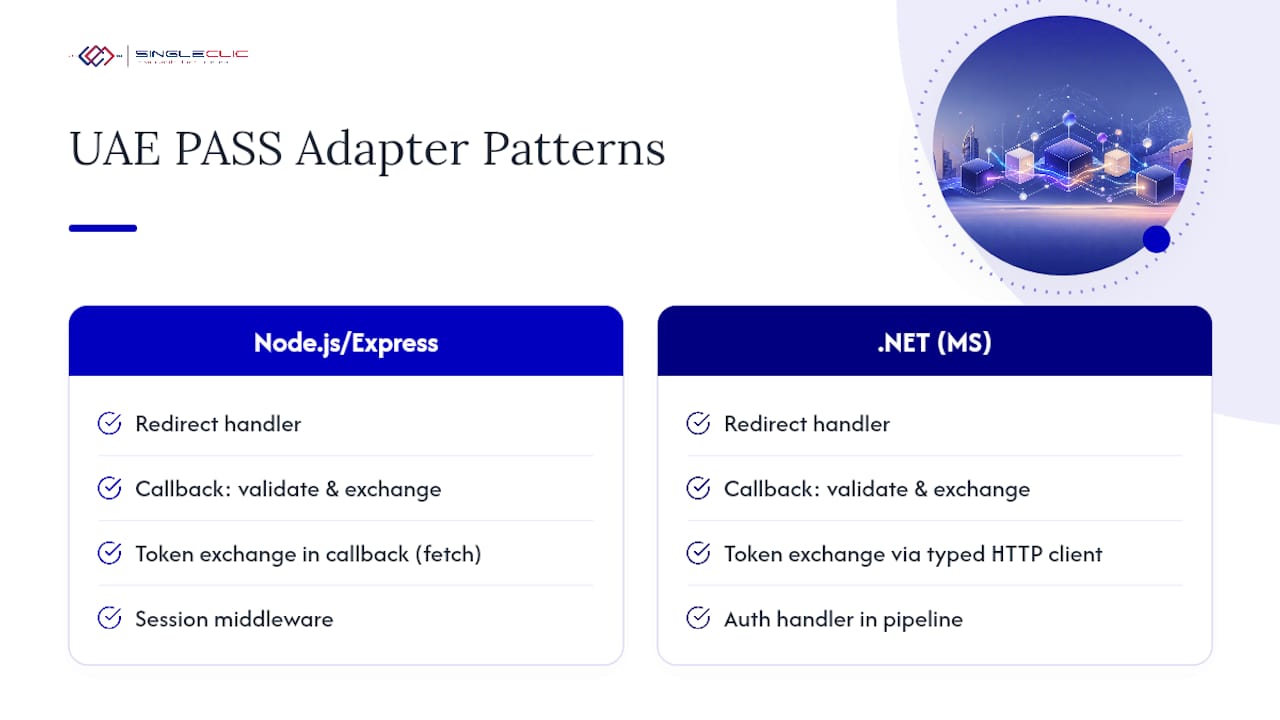
The exact syntax varies by language, but the shape of a UAE PASS integration is consistent everywhere: an auth adapter layer that owns the authorize redirect, the token exchange, and the callback handling, kept separate from your business logic.
For a Node.js or Express backend, that typically means a dedicated route for /authorize redirect construction, a callback route that validates state and exchanges the code, and a middleware function that checks for a valid application session before allowing access to protected routes. For .NET applications, common in UAE enterprise environments already running Microsoft stacks, the same pattern maps to an authentication handler registered in the middleware pipeline, with the token exchange wrapped in a typed HTTP client rather than raw fetch calls.
For mobile, iOS apps typically handle the deep link callback in the AppDelegate or SceneDelegate, parsing the custom URL scheme and extracting the authorization code before handing off to your existing token exchange logic. Android apps register an intent filter for the uaepass:// (or uaepassstg:// in staging) scheme in the manifest, then parse the resulting intent data in the receiving activity.
Whichever stack you’re on, resist the urge to scatter UAE PASS calls across multiple controllers or view models. One adapter, one set of endpoint calls, one place to update when UAE PASS changes an endpoint or parameter, which happens more often than most integration timelines account for.
How do you obtain and manage client credentials?
Client credentials, your client_id and client secret, come from the Developer Portal once your onboarding submission clears technical review. You’ll receive separate credential sets for staging and production, and they are not interchangeable. A staging client secret used against the production authorize endpoint will simply fail, and vice versa.
Store the client secret in a proper secrets manager, environment variables injected at deploy time, or your cloud provider’s key vault, never committed to source control and never hardcoded in a mobile app binary, where it can be extracted through decompilation. For mobile apps specifically, consider whether your app needs a client secret at all; PKCE-based public client flows avoid needing one embedded on the device in the first place.
Rotate credentials on a defined schedule rather than only when you suspect a leak, and keep the rotation process documented, since the person who set up the original credentials is rarely the one troubleshooting a production outage six months later. Keep your registered redirect_uri list in the portal current as your app’s domains change; a stale entry is a common cause of integration failures after a rebrand or domain migration that nobody remembers to update.
Singleclic’s take: why UAE PASS integration is worth doing right
UAE PASS integration isn’t a checkbox. Done well, it removes a login form and a password reset flow from your product, and replaces it with an identity your users, and increasingly your regulators, already trust. That’s a real compliance advantage under Dubai’s digital identity directives, not just a UX nicety.
Where we see projects go sideways is scope: teams treat this as a weekend integration, then discover the onboarding paperwork and manual-linking edge cases take longer than the actual code. Platforms like Cortex, Singleclic’s low-code and BPM engine can wrap the auth adapter, linking logic, and approval workflows into a single maintained layer rather than scattered scripts, cutting real time off the path from onboarding approval to production. Small in-house teams can absolutely build this. Enterprise and government projects where linking touches legacy systems and compliance sign-off usually benefit from a partner who’s done the onboarding cycle before.
— Tamer Badr
How Singleclic helps you deploy UAE PASS faster
Integration providers can handle the parts that actually eat timelines, complete onboarding packets, callback rewriting for both web and mobile, and manual-linking UX design, so implementation teams aren’t debugging push-notification timeouts the week before launch.

Our engineers build the auth adapter layer as part of broader Microsoft Dynamics 365 implementations and enterprise system integration projects across the UAE, wiring UAE PASS authentication directly into ERP and CRM workflows rather than bolting it on as a separate login screen. For teams that need extra engineering capacity without a long hiring cycle, our offshore development center model staffs the integration work while your core team stays focused on product.
The engagement typically runs discovery first (mapping your existing user store and required SOP level), then onboarding support (wireframes, questionnaires, trade license coordination), then implementation and staged testing before rollout. If your organization is weighing UAE PASS against a broader digital identity and workflow strategy, our guide to what Microsoft Dynamics 365 offers connected enterprises is a useful next read. Ready to scope your integration? Reach out to Singleclic for a scoping call and we’ll map the fastest path from onboarding to production.