Step by step change adaptation is a funded, PMO-owned workstream that begins during vendor selection and runs through at least 6–12 months post go-live. The verdict for any C-level leader commissioning an ERP, CRM, or BPM project: start change management at Day 0, name accountable owners, and measure usage behavior rather than training attendance.
Three non-negotiable commitments before your program kicks off:
- Allocate a significant portion of the total implementation budget to change activities — training, communications, adoption tracking, and hypercare.
- Name an executive sponsor and a full-time change manager before the vendor contract is signed. Unnamed sponsors are the single most common failure pattern.
- Set telemetry-based adoption KPIs (daily active users, transaction volumes, feature utilization) from the outset. Attendance records tell you who sat in a room; system telemetry tells you whether the investment is working.
SAP Learning’s organizational change management course frames this precisely: user readiness must be managed as carefully as system readiness. Prosci’s ERP change management guidance reinforces the same point — the people side of an implementation is not a soft-skills add-on. It is an equal program workstream with its own budget, governance seat, and deliverables.
Table of Contents
- What does a step-by-step change adaptation roadmap look like?
- How to execute each stage: activities, owners, and acceptance gates
- How do you make change management a real PMO workstream?
- How do you measure adoption and close the post-go-live feedback loop?
- What risks and budget checkpoints should you plan for?
- How Singleclic maps to each stage of your roadmap
- Key takeaways
- Why naming owners changes everything
- Ready to run a readiness assessment for your next ERP or BPM project?
- Useful sources and further reading
What does a step-by-step change adaptation roadmap look like?
Seven stages cover the full lifecycle. The table below maps each stage to a timeline relative to go-live, the primary owner, and where Microsoft Dynamics 365, Odoo, IBM BAW, or Cortex (Singleclic’s low-code/BPM platform) enters the picture.

| Stage | Timeline (relative to go-live) | Primary Owner | Key Platform Touch |
|---|---|---|---|
| 1. Assess & Align | Month 1 (Day 0) | Change Manager + PMO Lead | Readiness baseline; Cortex process discovery |
| 2. Define Vision | Months 1–2 | Executive Sponsor + Change Manager | Dynamics 365 / Odoo solution design |
| 3. Engage & Communicate | Months 2–5 | Change Manager + Functional Leads | Audience-specific messaging cadence |
| 4. Enable & Train | Months 4–6 | Functional Leads + IT | Role-based Dynamics 365 / Odoo / Cortex sandboxes |
| 5. Test & Validate (UAT) | Months 6–7 | PMO Lead + Functional Leads | IBM BAW workflow validation; UAT scripts |
| 6. Cutover & Hypercare | Go-live to +30 days | IT + Change Manager + Singleclic | War-room triage; rollback plan active |
| 7. Reinforce & Optimize | +30 to +90 days | Executive Sponsor + Change Manager | Adoption dashboards; Cortex runtime adjustments |
RACI sketch: The executive sponsor holds accountability for benefits realization and escalation authority. The change manager owns day-to-day activities and reporting. The PMO lead integrates change tasks into the master schedule. Functional leads own process sign-off and UAT. IT owns system readiness. Singleclic (as implementer) provides delivery expertise, configuration, and hypercare triage.
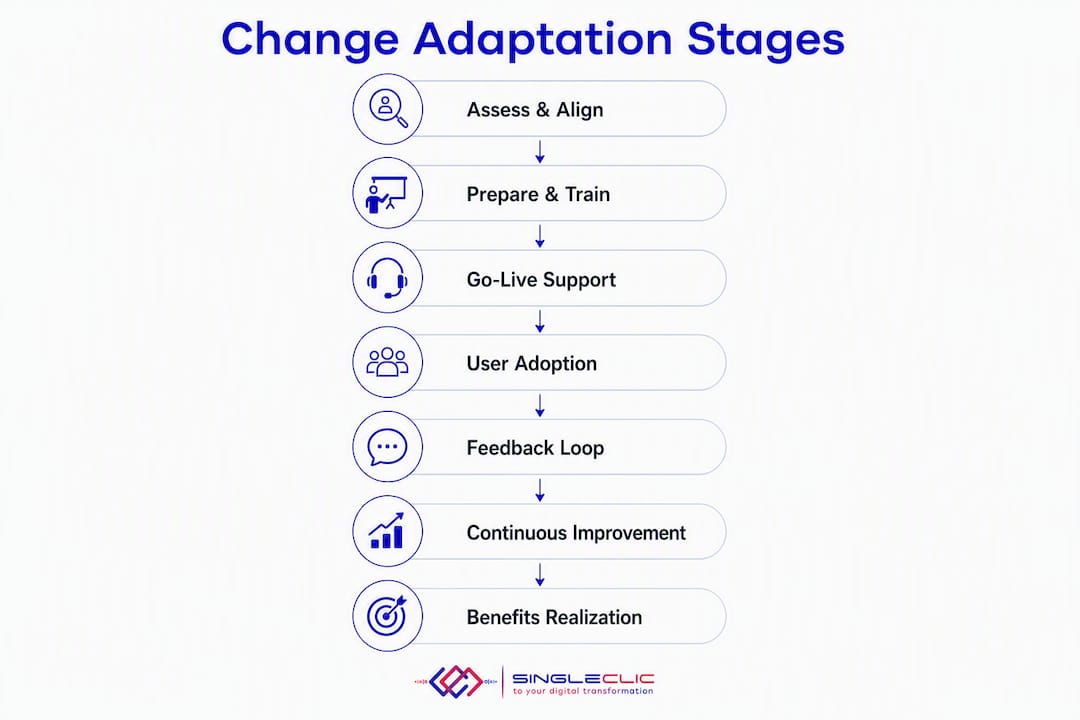
Starting change activity 3–6 months before go-live — not two weeks before training — is what separates programs that achieve adoption from those that produce expensive data-entry tools.
How to execute each stage: activities, owners, and acceptance gates
The seven stages above become actionable when each one carries a concrete deliverable and a clear gate criterion.
-
Assess & Align. Produce a stakeholder map (role, impact level, influence, current sentiment) and an impact-by-role matrix. Gate: steering committee approves the impact assessment and change budget line.
-
Define Vision. Write a change narrative (why this change, what success looks like, what stays the same). Set measurable success criteria: target transaction volumes, error-rate reductions, time-to-close targets. Gate: executive sponsor signs the change charter.
-
Engage & Communicate. Build audience-specific message tracks and a cadence calendar (weekly team updates, monthly town halls, bi-weekly sponsor videos). Gate: communications plan reviewed by functional leads and HR.
-
Enable & Train. Deliver role-based scenarios in a live sandbox — not slide decks. Role-based training with sandbox practice and refresher sessions 2–4 weeks post go-live measurably increases retention. Identify and brief change champions by Day 30 of this stage. Gate: 90% of targeted users complete scenario-based training; champions confirmed.
-
Test & Validate (UAT). Run UAT with real business data and role-specific scripts. Exit criteria per role: pass rate ≥ 95% on critical transactions; zero open severity-1 defects; business process owner sign-off. Piloting with a controlled group before full rollout validates configuration and training before the organization-wide launch.
-
Cutover & Hypercare. Execute the go-live checklist: credentials provisioned, data reconciliation confirmed, executive floor-walking scheduled for Day 1. Maintain a live rollback plan. Activate the hypercare intake with a single triage point and documented escalation paths.
-
Reinforce & Optimize. Run refresher sessions at the 2–4 week mark when users can ask context-specific questions. Review adoption dashboards weekly. Feed resistance themes back into training or configuration changes.
Roles and readiness sign-off:
| Readiness Domain | Business Owner | IT Owner | PMO Sign-off |
|---|---|---|---|
| Process readiness | Functional Lead | — | PMO Lead |
| System readiness | — | IT Lead | PMO Lead |
| User readiness | Change Manager | IT (access/credentials) | Executive Sponsor |
| Data readiness | Functional Lead | IT Lead | PMO Lead |
A typical mid-market rollout on Microsoft Dynamics 365 or Odoo runs 9–12 months from kickoff to hypercare exit. Stages 1–2 occupy the first two months; Stages 3–5 run in parallel through months 2–7; Stage 6 spans go-live to Day 30; Stage 7 continues through month 12.
How do you make change management a real PMO workstream?
The most common governance failure is treating change management as a communications sub-task rather than a program workstream with its own budget line, meeting seat, and change-request process. SAP and Prosci both treat change management as an equal program workstream that attends steering committees and submits change requests exactly as technical streams do.
Governance checklist:
| Governance Element | Cadence | Owner | Escalation Path |
|---|---|---|---|
| Steering committee change update | Bi-weekly | Change Manager | Executive Sponsor |
| Change impact re-assessment | At each design freeze | Change Manager + Functional Leads | PMO Lead |
| Adoption dashboard review | Weekly (hypercare), monthly (post-stabilization) | PMO Lead | Executive Sponsor |
| Resistance log triage | Weekly | Change Manager | Functional Lead → Sponsor |
| Hypercare exit criteria review | Day 30, Day 60, Day 90 | PMO Lead + IT | Executive Sponsor |
Dashboard metrics to track: user readiness score (% of roles certified), system readiness (open defects by severity), daily active users as % of total licensed users, top-5 support ticket themes, and business KPI trend (e.g., order-to-cash cycle time).
Pro Tip: Structure your program dashboard so user readiness and business-impact KPIs appear on the same screen as system readiness. When executives see both side by side, they stop treating adoption as someone else’s problem.
Effective project planning is what gives the change workstream the structural authority it needs to hold its seat at the governance table.
How do you measure adoption and close the post-go-live feedback loop?
Training completion is a lagging indicator of attendance, not adoption. The metrics that actually tell you whether the change adaptation process is working are behavioral.
Priority metrics:
- Daily active users (DAU): target 85% of total licensed users by Day 90.
- Transaction volumes by role: compare actual vs. expected volumes weekly; a gap signals workarounds or avoidance.
- Feature utilization rate: which modules or workflows are bypassed? Bypassed features reveal process misalignment or training gaps.
- Workaround incidence: count manual workarounds logged via helpdesk; each one is a process or configuration signal.
- Error and rework rates: elevated error rates in finance close or procurement approval point to training deficiency or configuration error.
- Time-to-close / order-to-cash: the business KPI that ultimately validates whether the system is being used as designed.
Measuring adoption via system telemetry — login frequency, transaction volumes, feature utilization, data quality — rather than self-reported attendance is the standard that leading ERP programs now apply.
The feedback loop runs in five steps: telemetry → triage → root-cause analysis (training gap vs. configuration issue vs. process mismatch) → corrective action → verify impact. Resistance is a diagnostic signal, not a people problem. Cataloguing resistance themes by role and function tells you exactly where to intervene. Cortex’s runtime workflow adjustment capability means configuration corrections can be deployed without system downtime, which shortens the corrective-action cycle materially.
You can automate adoption telemetry workflows to surface these signals in near real time rather than waiting for weekly manual reports.
What risks and budget checkpoints should you plan for?
The six risks that derail ERP/CRM/BPM change programs most often:
| Risk | Red-Flag Trigger | Owner | Mitigation |
|---|---|---|---|
| Late change start | Change manager not hired by Month 2 | Executive Sponsor | Fund change workstream at contract signature |
| Under-budgeted training | Training budget below 10% of total project cost | PMO Lead | Enforce 10–15% change allocation benchmark |
| Unnamed executive sponsor | No sponsor named in project charter | CEO/CIO | Require sponsor name before vendor selection |
| Excessive customization | Customization requests exceed 10% of base config | PMO Lead + IT | Freeze scope at design; re-assess impact |
| Weak hypercare intake | No single triage point defined pre-go-live | Change Manager + IT | Deploy structured hypercare model with severity definitions |
| No pilot before full rollout | Full rollout planned without controlled pilot | PMO Lead | Mandate a pilot group per ConsultClarity guidance |
Budget checkpoints: At vendor selection, confirm the change budget line is in the contract. At design freeze, verify training content development is funded. At pre-UAT, confirm hypercare staffing is budgeted. If Day-60 DAU is below 70%, reallocate technical contingency to targeted coaching and refresher sessions rather than waiting for the quarterly review.
How Singleclic maps to each stage of your roadmap
Singleclic’s delivery model covers every stage of the change adaptation process, with specific capabilities tied to each phase.
| Roadmap Stage | Singleclic Offering | Expected Outcome |
|---|---|---|
| Assess & Align | Readiness assessment; stakeholder impact mapping | Funded change charter with named owners |
| Define Vision | Change narrative workshops; success-criteria definition | Signed change charter aligned to Dynamics 365 / Odoo design |
| Engage & Communicate | Communications planning; champion network setup | Named change champions active by Day 30 |
| Enable & Train | Role-based scenario training; Cortex and Dynamics 365 / Odoo sandboxes | 90%+ scenario completion; certified user cohort |
| Test & Validate | UAT script design; IBM BAW workflow validation; exit-criteria sign-off | Zero severity-1 defects at cutover gate |
| Cutover & Hypercare | War-room support; single-triage intake; SLA-backed issue resolution | Stable go-live; rollback plan never triggered |
| Reinforce & Optimize | Adoption dashboards; Cortex runtime workflow adjustments; refresher sessions | 85% DAU by Day 90; measurable KPI improvement |
Singleclic integrates Microsoft Dynamics 365 F&O and CRM, Odoo (real estate and construction verticals), and IBM BAW for process automation. Cortex, Singleclic’s Arabic-enabled on-premise low-code platform, connects approvals, ERP data, CRM workflows, and legacy systems without requiring code changes — and supports runtime workflow modifications without downtime, which is critical during hypercare when process corrections need to reach users the same day they are identified.
Clients including Emirates Health Services, QNB, AlBaraka, and Emaar Misr have used this integrated delivery model to reduce manual process steps and accelerate transaction completion rates post go-live. For a practical ERP implementation playbook that maps these stages to Dynamics 365 and Odoo deployments, Singleclic’s field-tested guide is a useful starting point.
Key takeaways
Effective change adaptation in ERP/CRM/BPM projects requires a funded PMO workstream, named owners, telemetry-based adoption measurement, and at least 6–12 months of post-go-live reinforcement.
| Point | Details |
|---|---|
| Fund change from Day 0 | Allocate 10–15% of the total implementation budget to change activities before the vendor contract is signed. |
| Name owners before kickoff | An executive sponsor and a full-time change manager must be named in the project charter, not assigned after go-live problems appear. |
| Measure behavior, not attendance | Track daily active users, transaction volumes, and feature utilization; set an 85% DAU target by Day 90. |
| Hypercare is where ROI is realized | Structure a single-triage intake with severity definitions and escalation paths; run refresher sessions at the 2–4 week mark. |
| Singleclic covers every stage | From readiness assessment through Cortex-powered runtime optimization, Singleclic maps delivery capabilities to each roadmap stage. |
Why naming owners changes everything
Most ERP and CRM programs that fall short share one pattern: the change workstream was treated as a communications task rather than a funded program discipline. The sponsor was named on paper but absent from weekly reviews. The change manager was a part-time project coordinator with no authority to escalate. Training was delivered once, two weeks before go-live, with no sandbox access and no refresher plan.
What actually changes outcomes is visible, weekly executive sponsorship — a sponsor who reviews the adoption dashboard personally, asks about resistance themes by name, and reallocates budget when Day-60 signals are weak. Pair that with a named change network identified in the first 30 days: peer advocates who support hypercare, answer role-specific questions, and reduce reliance on vendor consultants as the program matures. A named change network identified in the first 30 days reduces vendor dependency during hypercare and embeds peer-to-peer support that scales adoption across the organization.
The change management approach Singleclic applies in KSA and UAE reflects exactly this discipline: governance-first, telemetry-driven, and reinforced well past go-live.
Ready to run a readiness assessment for your next ERP or BPM project?
Singleclic delivers faster adoption on Microsoft Dynamics 365, Odoo, and IBM BAW implementations because the change workstream is built into the delivery model from Day 0, not bolted on at training time. For organizations in KSA, UAE, and Egypt, that means a named change manager, a Cortex-powered adoption dashboard, and hypercare triage that resolves configuration issues the same day they surface.

The concrete next step: book a scoped readiness assessment with Singleclic’s delivery team. You will leave with a stakeholder impact map, a change budget recommendation, and a stage-by-stage plan tied to your specific platform. Start with the Microsoft Dynamics 365 leader’s guide to align your leadership team on the platform’s capabilities before the assessment conversation.
Useful sources and further reading
- Microsoft Dynamics 365 implementation guide: adoption and change management — Microsoft’s official implementation guidance on building a change management strategy that prevents low adoption and misaligned expectations.
- Prosci: ERP change management — Prosci’s practitioner framework for the people side of ERP implementations; the standard reference for the 10–15% budget benchmark.
- ERP change management best practices | ERP Research — Covers telemetry-driven adoption measurement, the change champion model, and the cost of starting change activity late.
- Delivering effective organizational change management | SAP Learning — SAP’s course-based guidance on integrating change workstreams into ERP program governance.
- ERP change management plan: a 30, 60, 90 rollout | NMS Consulting — Practical hypercare playbook with triage model, severity definitions, and exit criteria.
- ERP change management: drive user adoption & minimize resistance | Ecosire — Role-based training design, sandbox practice guidance, and telemetry-based adoption targets.
- 17 proven software change management strategies | ConsultClarity — Practitioner-tested strategies including the pilot-before-full-rollout approach.
- Singleclic: change management process workflow — Singleclic’s operational workflow guide for implementing change adaptation in technical environments.