Odoo contract management means two different things, and mixing them up is the most common reason projects stall. The first is the employee contract that sits inside the HR and payroll apps. The second is the commercial contract (customer, vendor, lease or service agreement) that drives recurring invoicing, approvals and renewals. Both can run in one Odoo system. They need different modules, different owners and different rules, and in the UAE they also need to respect local labour law and your own approval policy. We implement Odoo for organizations across the Gulf, and the pattern we see below is the one that separates a contract register people trust from one they ignore.
TL;DR
- Odoo’s standard contract feature is built for employees: a running contract is required before payroll can pay a person.
- Commercial contracts with recurring invoicing, renewals and approvals rely on additional modules and, often, configuration to match your approval chain.
- In the UAE, new employment contracts are fixed-term with a maximum of three years, so renewal tracking is a core requirement, not an extra.
- The version you run (17, 18 or newer) and whether you use community extensions change what is available, so decide this before design.
- The best results come from mapping your contract lifecycle first, then configuring Odoo and connecting it to ERP, CRM and approval workflows.
Table of Contents
- Article details
- What Odoo contract management covers
- Employee contracts in Odoo for UAE and Saudi teams
- Managing a business contract in Odoo: the lifecycle
- Use cases we see in the Gulf
- What to check before you configure
- Scoping the project well
- How Singleclic helps
- Our view: contracts are a process, not a document
- Talk to us about your contract process
- FAQ
- Sources
Article details
- SEO title: Odoo contract management: a guide for UAE businesses
- Slug: odoo-contract-management
- Keyword: odoo contract management
- Secondary keywords: Odoo contracts module, Odoo recurring contracts, Odoo employee contract, contract approval workflow, contract renewal automation, Odoo implementation UAE
- Pillar cluster: Odoo ERP and CRM, business process automation, workflow automation, low-code
What Odoo contract management covers
The word “contract” appears in Odoo in several places, and that is why searches for this topic return very different pages. Think of three layers.
1. Employee contracts (HR and payroll). This is the built-in feature. Odoo’s documentation states that every employee needs a contract in order to be paid, and the contract holds the terms of the position and compensation. The contract PDF is handled through the Documents app and signing goes through the Sign app, both of which must be installed to send and sign contracts, according to a mirror of the Odoo 17 documentation.
2. Recurring commercial contracts. These are agreements with customers or vendors that generate invoices on a schedule: maintenance agreements, facility services, leases, managed services, subscriptions. In Odoo this is typically handled by a recurring-contract module, extended by companion modules. The community-maintained OCA contract repository on GitHub lists extensions such as contract termination, price revision, automatic invoice validation, refund on stop and forecasting. That list shows how many decisions sit around the core module: what happens when a contract ends, how prices change at renewal, whether invoices post without review.
3. Contract approval and obligation tracking. Many organizations need a contract to pass legal, finance and a department head before it can bill anyone. Odoo apps exist that tie approved contracts to the creation of customer invoices and vendor bills. Where your approval chain has more steps than a standard app offers, a workflow layer on top is the cleaner answer than customizing every module.
Before you open any configuration screen, decide which layer you are solving. A CHRO and a CFO asking for “contract management” in the same meeting are often describing different projects.
Employee contracts in Odoo for UAE and Saudi teams
For HR managers, the employee contract is where payroll starts. Without a running contract, there is nothing for payroll to calculate against. That makes contract data quality a payroll issue, not just a filing issue.
What the UAE contract must contain
A summary of UAE labour law based on the Ministry of Human Resources and Emiratisation (MoHRE) guidance says an employment contract should state the employer’s name and address, the employee’s name, nationality and date of birth, and the agreed wage including allowances and supplements. The same summary notes a maximum term of three years for fixed-term contracts (WPS payroll and employment contracts, UAE). The 2022 labour law reform, Federal Decree-Law No. 33 of 2021, removed the old unlimited-contract category, so new contracts are fixed-term and renewable (2026 UAE hiring handbook).
In practice this gives you three configuration requirements:
- Mandatory fields for nationality, date of birth and each allowance, so a contract cannot be saved incomplete.
- An end date on every new contract, with an alert well before it arrives.
- A clear link between the wage on the contract and the wage that payroll and your Wage Protection System file use.
Confirm the exact legal wording with your legal adviser or MoHRE before you freeze templates. The list above describes what your system should enforce, not legal advice.
The offer and signature flow
In Odoo 17, HR opens a contract under Payroll, then Contracts, and generates an offer. The candidate receives an email whose link is valid for 30 days by default, with an editable expiration date. The candidate then clicks Review Contract & Sign to start signing (Odoo 17 documentation mirror). Menu names shift between versions, so treat this as the flow to look for, not a fixed path.
For Saudi readers, the same logic applies with local requirements layered on; our page on the Odoo HR system in Saudi Arabia covers how we approach that market, and the broader Odoo human resource page explains the HR scope.
Managing a business contract in Odoo: the lifecycle
The common question is what the steps of contract management are. The usual five are creation, review and approval, signature, performance tracking, and renewal or termination. Here is what each takes in Odoo and where projects go wrong.
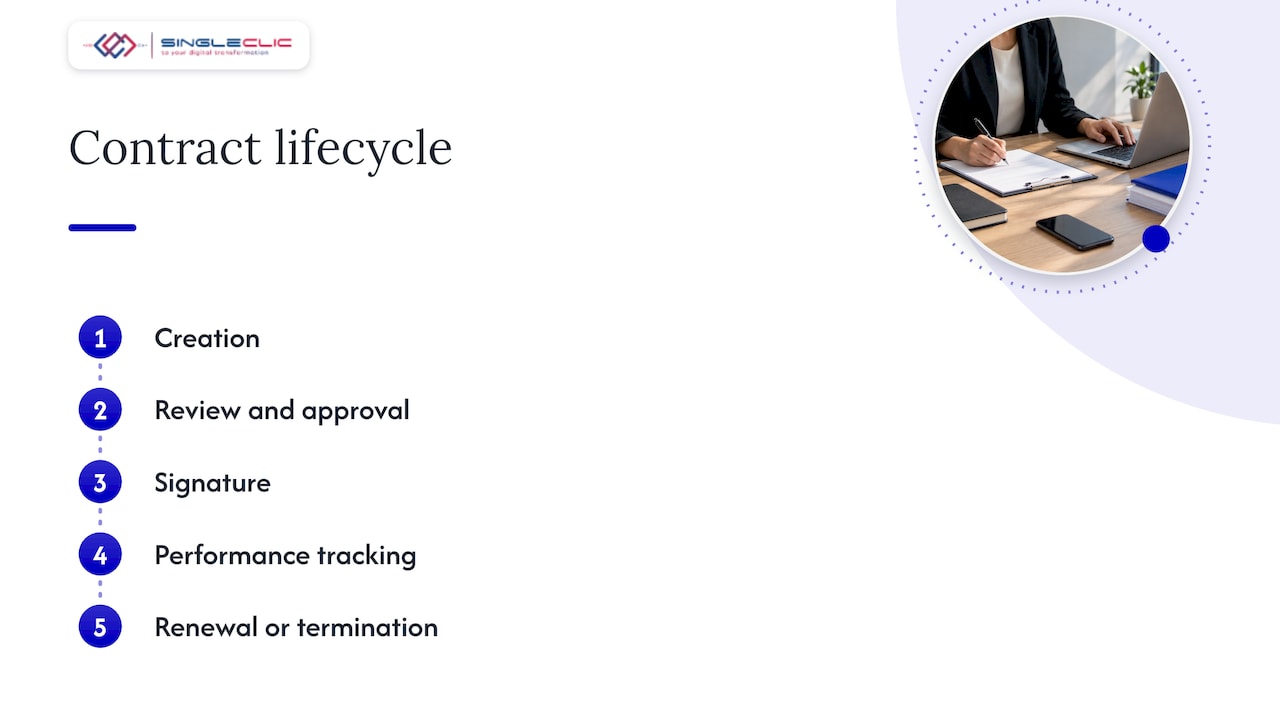
1. Creation from a template
Start from standard clauses held as templates, with variable fields for party, value, start date, term and billing frequency. The failure here is free-text contracts: if the key terms are typed into a document and not stored as fields, nothing downstream (billing, alerts, reporting) can use them.
2. Review and approval
Define who approves what. A common rule set in larger UAE organizations is a value threshold: below a set amount the department head signs off, above it finance and legal join, and above a higher one the CEO or board does. Write the thresholds down before configuring. The failure here is approvals living in email, which leaves no record of who agreed to which version.
3. Signature
The signing step connects the approved version to a legally binding signature. Make sure the approved document is the one sent for signing, not a re-uploaded copy. For contracts with government entities or regulated sectors, check which signature type the counterparty accepts before you design this step.
4. Tracking and invoicing
Once active, the contract should drive billing. With a recurring-contract module, each contract line generates invoices on a schedule, and you decide whether they post automatically or wait for review. The OCA extensions for automatic invoice validation and forecasting exist precisely because finance teams answer this differently. Link contracts to projects when the work is delivered by teams; our Odoo project management page shows how that side fits.
5. Renewal and termination
Renewal is where contract value leaks. Missed notice periods roll agreements over at old prices, or let profitable ones lapse. Set alerts at the notice period, not at the end date, and decide in advance how prices change at renewal. Termination should record the reason and stop future invoices, which is the problem the community termination and refund-on-stop modules address.
Use cases we see in the Gulf
- Real estate and property management. Lease contracts with escalation, cheque schedules and renewals. See our guide to Odoo real estate leasing.
- Facility and managed services. Annual maintenance contracts that bill monthly or quarterly and renew with indexation.
- Healthcare and education. Staff contracts with licensing and visa dependencies, plus supplier agreements. Our Odoo education solutions page covers the sector.
- Regulated industries. Banks, government and healthcare need audit trails, role separation and often data held in-country. Read how we approach Odoo for regulated industries.
- Supply chain. Vendor agreements with agreed prices that purchasing and accounts payable should respect at order and invoice time.
What to check before you configure
Version and edition
The feature set differs by version, and the documentation for Odoo 17, 18 and 20 describes contracts in slightly different ways. Settle your target version first, then confirm that each community extension you need has a release for it. The OCA repository organizes its code by version branch, with an 18.0 branch among them, so availability is something to verify per module. If you plan an upgrade within two years, favor configuration over custom code. Our Odoo software overview explains the modular approach, and Odoo pricing explains how editions and scope affect cost.
Data and hosting
Contracts hold commercial terms and personal data. Decide where the system is hosted, who can read which contract, and how access is authenticated. For UAE organizations, enterprise single sign-on for Odoo keeps access tied to your identity provider, so a leaver loses contract access the moment they lose their directory account.
Arabic and bilingual contracts
Many UAE and Saudi agreements exist in Arabic and English. Check that templates, printed reports and signature pages render both languages and right-to-left layout correctly before go-live, not after the first contract is rejected by a counterparty.
Integrations
A contract register that does not talk to the rest of the business becomes a second spreadsheet. List the connections you need:
| System | What the contract should drive |
|---|---|
| Accounting | Invoice schedule, revenue recognition, VAT treatment |
| CRM | Opportunity won creates the contract draft |
| Payroll | Wage, allowances and end date for staff contracts |
| Projects | Delivery tasks and milestones per contract |
| Document store | One approved, signed version |
| Legacy systems | Existing contract data and customer or vendor master |
Migration of existing contracts
Most organizations start with hundreds of contracts in folders and spreadsheets. Decide what to migrate as structured data (value, dates, parties, billing terms) and what to attach as a signed PDF only. Migrating everything as data is expensive and rarely needed. Migrating nothing as data defeats the purpose.
Scoping the project well
Odoo gives you a modular base, and good scoping decides how far standard modules take you. A short checklist for C-level sponsors:
- Name one owner for the commercial contract process and one for employee contracts.
- Write the approval matrix on a single page.
- List the contract types, and for each the billing frequency, renewal rule and signing party.
- Choose the version and the community modules before design.
- Define the three reports leadership needs: expiring contracts, contracted revenue, and contracts without a signed copy.
- Plan the migration of the existing contract base by tier.
If the approval chain is complex, for example parallel reviews by legal and finance, escalation after a deadline, or links to systems outside Odoo, a workflow layer is the right place to model it. Our business process automation guide for C-level leaders explains that approach.
How Singleclic helps
Singleclic is an Odoo Silver Partner, and our Odoo work focuses on real estate and construction, with ERP and CRM delivery across Saudi Arabia, the UAE and Egypt. We have more than 10 years of digital delivery in the region and 70+ consultants and engineers across KSA, UAE and Egypt.
For contract management, that means:
- Mapping your contract types, approvals and renewal rules before configuration.
- Implementing and customizing Odoo so contracts connect to accounting, CRM, HR and projects.
- Modeling multi-step approvals in Cortex, our Arabic-enabled low-code and BPM platform, which connects approvals, ERP, CRM, data, legacy systems and workflows. Cortex supports full Arabic UI/UX, runtime workflow changes without downtime and on-premise deployment for banks and governments.
- Where your estate also runs Microsoft Dynamics 365, aligning both; see our Dynamics 365 and Odoo blueprint.
Our view: contracts are a process, not a document
Most contract problems we are asked to fix are not software problems. They are process problems that software exposed. A contract signed late, renewed at an old price or approved by email is a process that never had an owner.
Odoo gives you a strong, modular base for both employee and commercial contracts. We use it to put the terms into fields, the billing into schedules and the renewals into alerts. Where the approval chain is longer than a standard app can express, we model it in Cortex, so the rule changes when your policy changes, without a rebuild and without downtime.
For UAE and Saudi organizations, add Arabic-first documents, local labour rules and, for banks and government, in-country hosting. Start with the lifecycle on one page. The configuration follows quickly from there.
Tamer Badr
Talk to us about your contract process
If your contracts live across folders, email and spreadsheets, we can map the lifecycle with you and show what an Odoo-based design looks like for your sector. Explore our Odoo implementation work or our full services.
Singleclic builds ERP, CRM and automation projects for organizations in the UAE, Saudi Arabia and Egypt. Contact us through singleclic.com to book a scoping conversation.
FAQ
Does Odoo have a built-in contract management module?
Odoo includes a built-in contract record for employees, required before payroll can pay a person. For commercial agreements with recurring invoicing, renewals and approvals, organizations typically add dedicated modules, such as those in the OCA contract repository, and configure them to their process.
Can Odoo handle payroll?
Yes. Payroll works from the employee contract, and Odoo’s documentation says each employee needs a contract to be paid. The wage, allowances and dates on the contract are what payroll uses, so keep that data complete and aligned with your local payroll rules.
What are the five steps of contract management?
They are creation, review and approval, signature, tracking and performance, and renewal or termination. In Odoo, each step maps to a template, an approval rule, a signing flow, a billing schedule and an alert on the notice period.
How long can an employment contract run in the UAE?
Under the 2022 reform, new employment contracts are fixed-term with a maximum of three years, renewable, according to a 2026 hiring handbook. Set an expiry alert in your system and confirm current rules with MoHRE or your legal adviser.
What should we decide before starting an Odoo contract project?
Decide the Odoo version, the contract types and their billing rules, the approval matrix and the integrations with accounting, CRM and HR. Settling these first keeps the build mostly configuration, which is easier to maintain and upgrade.
Sources
- Contracts, Odoo 17.0 documentation mirror
- OCA contract repository, GitHub
- WPS payroll and employment contracts, UAE
- Hiring in the UAE: 2026 handbook