Choose low-code for standard internal workflows, approval chains, and rapid MVPs where speed matters more than uniqueness. Choose custom development for customer-facing platforms, differentiated products, or systems tied to regulatory data residency. Most enterprises that get this right don’t pick one side; they run both, layered deliberately, and treat vendor lock-in as a cost to plan for rather than a surprise to absorb later.
TL;DR:
- Most low-code projects remain cost-effective for internal workflows and rapid prototyping but can become costly over time with scaling, licensing, and integrations.
- Custom development offers full control, better performance, and tailored integrations, but requires longer timelines and higher upfront investment.
- Hybrid architecture layers low-code interfaces with core logic in custom services, balancing speed and control while reducing vendor lock-in.
- When evaluating projects, consider integration complexity, data residency, user count, and compliance needs to determine whether low-code or custom is more suitable.
- A layered approach preserves agility for user interfaces while maintaining strategic control over critical systems and data architecture.
Table of Contents
- Low-code vs custom development: the six dimensions that actually decide it
- What low-code gets right (and where it runs out of road)
- What custom development gets right (and what it costs you)
- Modeling the real cost, security, and integration risk
- A seven-point scorecard for choosing your approach
- The hybrid architecture that protects speed and IP
- Why this framework holds up across MENA enterprises
- What most leaders get backward about this decision
- How Singleclic helps you build both fast and right
- Sources
- FAQ
Low-code vs custom development: the six dimensions that actually decide it
The low-code vs custom development question isn’t binary, and treating it that way is how projects end up rebuilt twice. Practitioner guidance increasingly frames the choice around job-to-be-done rather than ideology, because the two approaches solve different problems well and the same problem badly when forced into the wrong slot. Score your project against these six dimensions before you write a single requirement document.
- Speed to first release. A four-week internal approval workflow is a low-code win. A twelve-month customer portal with bespoke UX rarely is. Academic reviews report 5 to 10 times faster delivery for low-code on typical internal apps.
- Upfront cost vs total cost of ownership. Low-code wins the first invoice; custom often wins the three-year ledger once license seats and add-ons stack up.
- Customization and extensibility. If the app needs a workflow no template anticipated, low-code hits a ceiling fast. Custom has none, by design.
- Integration depth. Two or three modern SaaS connectors, low-code handles easily. Legacy mainframes and real-time transaction systems are a different conversation.
- Security and compliance. Data residency rules and sector-specific audits often force a deployment model, not just a platform choice.
- Maintenance and lock-in. The vendor patches the platform; you still own your app logic, your data, and your exit plan.
The signal to remember: when a dimension starts pulling toward “we need full control,” that’s custom development asserting itself, not a low-code shortfall.
What low-code gets right (and where it runs out of road)
Low-code earns its reputation for one reason: it removes the wait. A business analyst can build an approval workflow without pulling a developer off a roadmap, and Microsoft’s own documentation frames this as the platform’s core promise, letting templates and visual tools handle the repetitive 80% while pro-code extensions cover the rest.
- Faster prototyping means stakeholders see a working screen in days, not sprints.
- Lower initial cost, since you’re licensing a platform instead of staffing a full build.
- Vendor-handled patching and built-in connectors cut the maintenance burden your IT team would otherwise carry.
- Citizen developers, non-engineers building real business apps, expand what your organization can ship without growing headcount.
The trade-offs are just as real. Customization ceilings show up the moment a workflow needs logic the platform wasn’t built for. License drag creeps in as user counts and environments multiply. And academic research is blunt about the governance gap: low-code empowers citizen developers but needs organizational strategy behind it, or shadow IT sprawl becomes the next problem you’re solving.
Pro Tip: Before greenlighting a citizen-developer build, require a one-page data ownership note: who owns the schema, who approves schema changes, and what happens if the app outgrows the platform. It costs an hour and saves a migration headache.

What custom development gets right (and what it costs you)
Custom development wins when the software itself is the differentiator, not just the delivery mechanism. A patient portal for a hospital network, a claims engine for an insurer, a proprietary logistics dashboard, these need architecture built around the business, not a business bent around a template.
- Full architectural control means the UX, data model, and performance profile are exactly what the product needs, with no platform ceiling.
- Better long-term total cost of ownership on strategic, high-scale applications, since you’re not paying recurring per-user license fees on a system that will run for a decade.
- Stronger guarantees on integrations, performance under load, and intellectual property, because you own the code outright.
- No feature you need is “not supported by this version of the platform.”
The cost is real and upfront: longer delivery timelines, higher initial spend, and total dependence on the quality of your in-house or contracted engineering team. A custom build with a weak development partner is worse than a mediocre low-code app; a mediocre low-code app still ships. Skills and resourcing become the binding constraint here more than budget, and it’s why many MENA enterprises pair internal product owners with an experienced regional implementation partner rather than building a full team from scratch.
Modeling the real cost, security, and integration risk
Run the math before you run the project. A three-to-five-year total cost of ownership projection needs three line items most teams forget: license fees that scale with users, the cost of migrating off the platform if you outgrow it, and the engineering hours spent working around limitations that weren’t visible in the demo. Low-code’s recurring license structure can quietly erode its early cost advantage once a pilot becomes an enterprise-wide rollout.
Security follows a shared-responsibility model that catches people off guard. Vendors patch the platform itself; your organization still owns app-level logic, data classification, and access control regardless of which approach you pick, a nuance Microsoft’s own platform documentation is careful to spell out.
Use this rough sequence to evaluate a specific project:
- Count your real integration targets, not the ones you might add later.
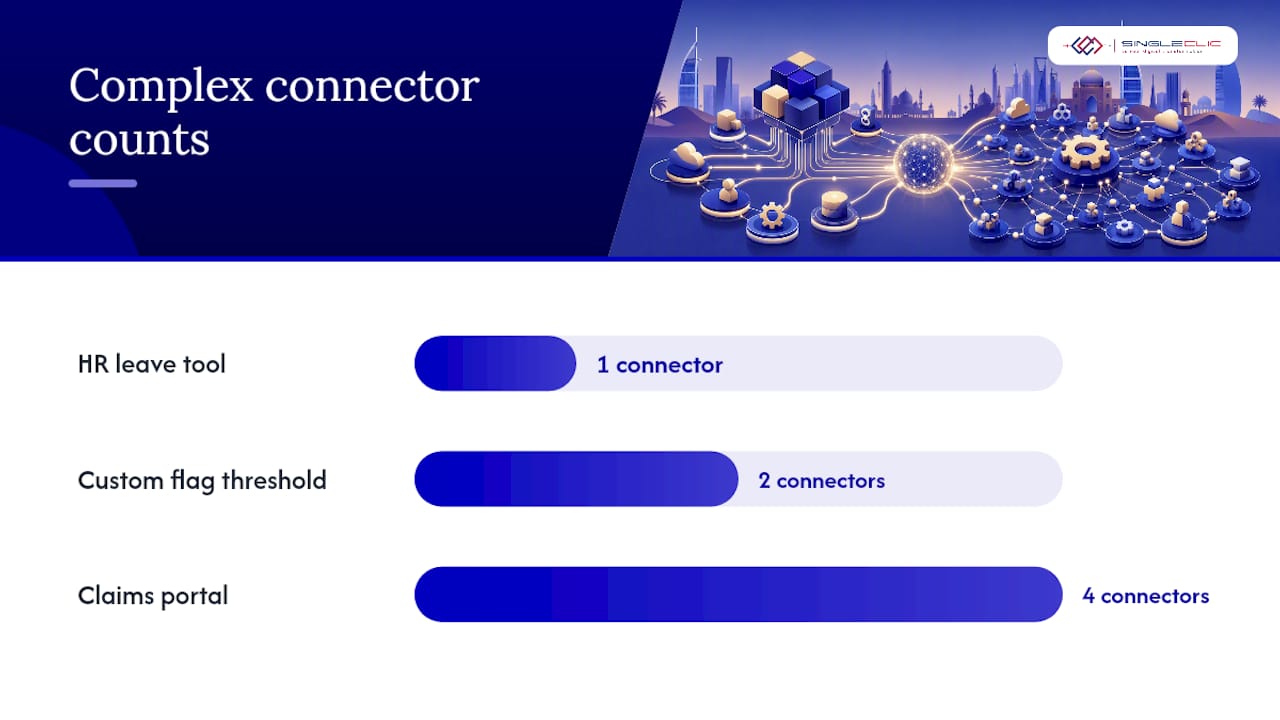
- If you’re above two complex or legacy connectors, flag the project for custom evaluation before writing requirements.
- Check whether data residency or sector regulation requires on-premise deployment, which many low-code platforms don’t support natively.
- Model license cost at your projected user count in year three, not your pilot headcount.
- Assign a named owner for security patching at the application layer, whoever that ends up being.
A quick worked example: an internal HR leave-approval tool with one integration and 40 users is a clean low-code build. A customer-facing insurance claims portal with four legacy system connectors and strict data residency requirements is a custom build almost every time, regardless of how fast the low-code demo looked.
A seven-point scorecard for choosing your approach
Score each project from 1 (favors low-code) to 3 (favors custom) across these seven criteria, then total the result.
- App type: internal utility (1) vs customer-facing differentiator (3).
- User count: dozens (1) vs tens of thousands (3).
- Integration count: one or two SaaS tools (1) vs multiple legacy or real-time systems (3).
- Performance needs: standard CRUD operations (1) vs high-throughput or real-time processing (3).
- Compliance load: light internal data (1) vs regulated, sector-specific data (3).
- Roadmap horizon: short-term or experimental (1) vs multi-year strategic asset (3).
- Ownership need: fine with vendor dependency (1) vs IP and architecture must stay in-house (3).
A total score under 12 points toward low-code. Above 16 points firmly toward custom. The middle band is where most hybrid decisions live.
Two traps sink most projects regardless of score: skipping the exit-plan conversation, and letting a citizen developer’s quick win become a system of record nobody documented. Document your migration assumptions on day one, including your data export format, even if you never end up needing them.
- Trap: no documented data model, so migrating later means reverse-engineering your own app.
- Trap: no governance policy, so five departments build five incompatible versions of the same workflow.
- Trap: choosing custom for prestige rather than genuine need, burning budget you didn’t have to spend.
The hybrid architecture that protects speed and IP
The strongest enterprise pattern layers the two approaches instead of picking one. Keep the experience layer, forms, dashboards, and approval screens, on low-code where iteration is fast and cheap. Push core domain logic and your data model into custom services sitting behind stable APIs, which keeps you free of platform lock-in on the parts of the system that actually differentiate you. Industry analysis consistently backs this layered hybrid model as the most durable enterprise strategy, and Singleclic’s own guidance on low-code automation implementation follows the same logic.
- Build an integration facade and API contract early, before the low-code layer accumulates business rules it shouldn’t own.
- Require a documented data model and export strategy for anything meant to outlive its pilot phase.
- Set a governance rule that custom code extending a low-code app goes through the same review as a standalone build.
Pro Tip: Treat your low-code layer’s API contract as a legal document, not a technical footnote. If it changes without notice, your custom services break silently.
Why this framework holds up across MENA enterprises
A regional technology services company has spent over a decade delivering ERP, CRM, and automation projects across Saudi Arabia, the UAE, and Egypt, working with many consultants across the region and numerous enterprise clients in banking, healthcare, and government. That vantage point is where this framework comes from: the same low-code versus custom question, asked project after project, sector after sector. A regional low-code and BPM platform was built specifically to close the gap this article describes, with full Arabic UI, on-premise deployment for regulated industries, and deep integration into legacy ERP and CRM systems.
What most leaders get backward about this decision
I’ve watched procurement teams treat low-code and custom development as a budget line item to argue over, when it’s really an architecture decision with a five-year shadow. The mistake isn’t picking low-code or picking custom. It’s picking either one without writing down, on day one, what happens if the project outgrows the choice. If you’re genuinely unsure which side a project belongs on, start it in low-code, but build the exit plan before you build the app.
— Tamer Badr
How Singleclic helps you build both fast and right
A certain partner for enterprises that refuse to choose between speed and control delivers both sides of the hybrid model under one roof, a low-code platform for the experience layer, and deep integration with leading ERP and BPM technologies for the systems that need full control.

A content publishing platform offers full Arabic UI/UX, supports many users, allows on-premise deployment for regulated entities, and real-time process changes without downtime, connecting approvals, ERP, CRM, and legacy systems into one workflow. When projects involve complex legacy integrations, on-premise regulatory requirements, or Arabic-enabled interfaces, experienced engineering teams across the region typically provide support. Explore the full range of Singleclic’s services or see how Cortex fits your architecture, and request a scoping conversation before your next build locks in a direction you can’t easily reverse.
Sources
- Exploring low-code development adoption and limits (ScienceDirect)
- Low-code decision guide (LogRocket)
- The debate between low-code and custom development is fundamentally flawed (Forbes)
- Low-code vs custom development enterprise (Sunbytes)
FAQ
Will AI replace low-code?
AI is more likely to extend low-code than replace it, generating workflow logic and UI suggestions inside existing platforms rather than eliminating the need for structured, governed app development. Enterprises still need the governance and architecture decisions this article covers regardless of how much AI assists the build.
What does “low-code development” mean?
Low-code development means building applications through visual, template-driven tools that reduce the need for hand-written code, while still allowing pro-code extensions for advanced logic. Microsoft’s own platform documentation frames it as accelerating common app scenarios without removing the option to write custom code where needed.
Is Python considered low-code?
No. Python is a general-purpose programming language requiring hand-written code, which is the opposite of the visual, drag-and-drop approach that defines low-code platforms. Some low-code platforms let developers extend apps with Python or similar scripting for advanced logic, but that’s a pro-code extension, not the low-code layer itself.
What does low coding mean?
“Low coding” is an informal variant of “low-code development,” referring to building software with minimal hand-written code through visual tools and prebuilt components. It’s the same concept as low-code; the terms are used interchangeably in most industry writing.
Is low-code worth it for enterprise projects?
Low-code is worth it for internal workflows, approval chains, and rapid prototypes where speed and cost matter more than deep customization. It becomes less worth it once a project needs more than two complex integrations, strict data residency, or differentiated customer-facing features, at which point custom development or a hybrid approach usually pays off over a three-to-five-year horizon.