Nearly 80 percent of organizations in Saudi Arabia and the United Arab Emirates report delays and errors in manual workflows, yet most american low-code tools are not tailored for the region’s complex requirements. Leaders in healthcare and banking cannot afford inefficiencies that slow operations and increase risk. This guide reveals actionable steps and proven strategies to help CTOs and CIOs automate processes effectively, reduce operational bottlenecks, and achieve measurable business results.
Table of Contents
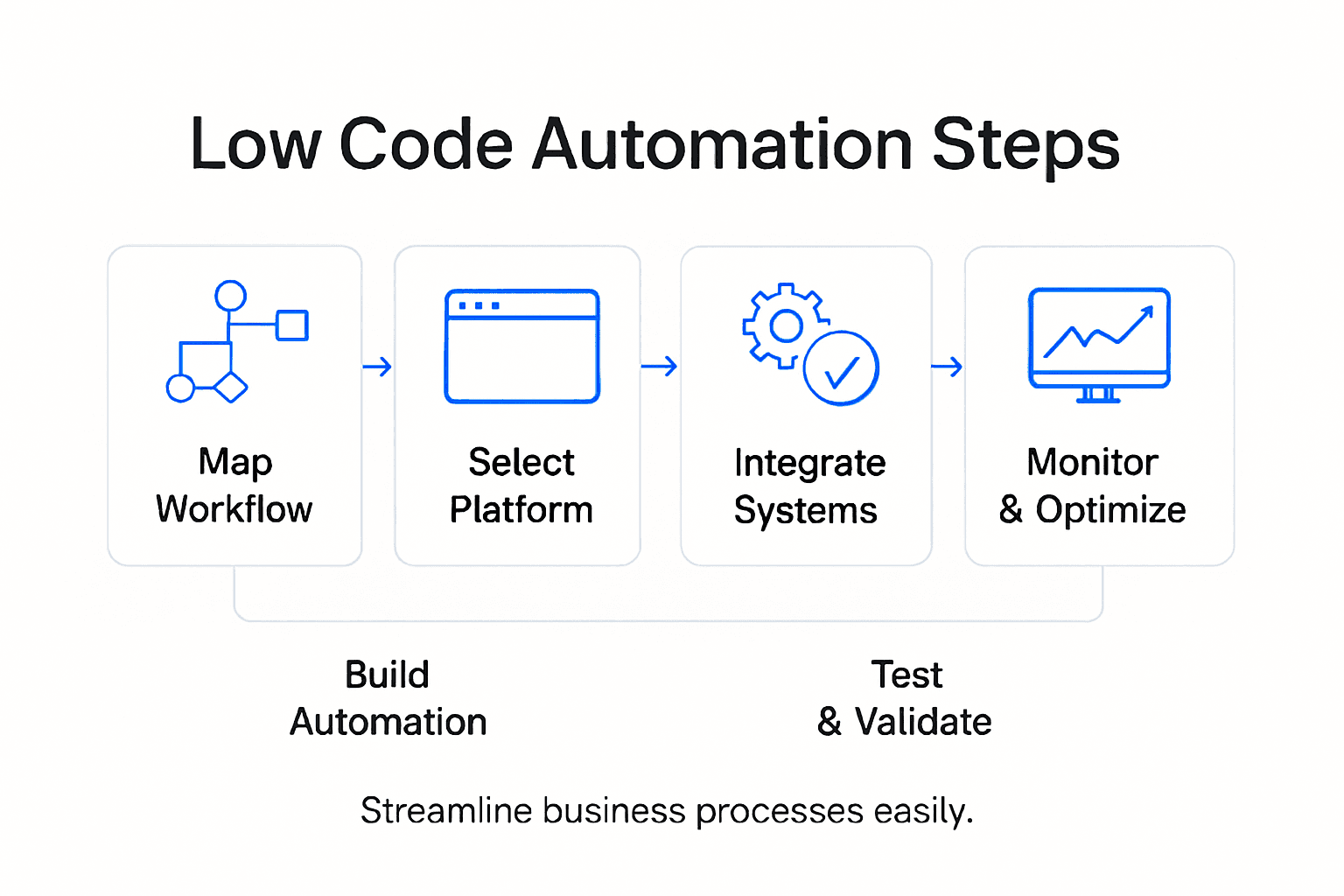
- Step 1: Assess Existing Processes And Define Automation Goals
- Step 2: Select And Configure The Low-Code Platform
- Step 3: Design Automated Workflows Using Visual Tools
- Step 4: Integrate Enterprise Systems And Data Sources
- Step 5: Test And Validate Workflow Functionality
- Step 6: Deploy And Continuously Monitor Automation
Quick Summary
| Key Point | Explanation |
|---|---|
| 1. Map Existing Workflows | Document and assess current processes to identify inefficiencies and automation opportunities that align with business goals. |
| 2. Select the Right Low-Code Platform | Evaluate platforms based on integration, user experience, and scalability to find the best fit for your organizational needs. |
| 3. Design Visual Workflows | Use intuitive design tools to create automated workflows that accurately represent your business processes and logic. |
| 4. Thoroughly Test Workflows | Conduct rigorous testing to validate workflows against multiple scenarios, ensuring they meet requirements and function correctly. |
| 5. Monitor and Optimize Automation | After deployment, continuously track performance metrics and user feedback to refine and enhance automated processes for sustained effectiveness. |
Step 1: Assess Existing Processes and Define Automation Goals
Effective low code automation begins with a comprehensive understanding of your current business workflows. You’ll map out existing processes, identify inefficiencies, and establish clear automation objectives that align with your strategic business goals.
Start by conducting a thorough process inventory across different departments. Review your current workflows manually tracking each step from initiation to completion. Strategic process assessment requires examining how tasks currently move through your organization. Look for repetitive tasks, manual data entry points, communication bottlenecks, and areas consuming significant human time and effort.
Document each workflow meticulously using flowcharts or process mapping tools. Involve team members from various departments to gain holistic insights. Ask critical questions: Which processes are most time consuming? Where do errors frequently occur? What workflows could benefit most from automation? Prioritize processes that have clear performance metrics and potential for significant productivity improvements.
Once you’ve mapped existing processes, define specific automation goals. These should be measurable and aligned with broader business objectives like reducing operational costs, improving accuracy, accelerating response times, or enhancing customer experience. Establish baseline performance metrics to track automation success.
Pro tip: Create a weighted scoring system to objectively evaluate and prioritize processes for automation based on complexity, potential impact, and implementation effort.
Step 2: Select and Configure the Low-Code Platform
Choosing the right low-code platform is a critical decision that will determine the success of your business workflow automation strategy. In this step, you will evaluate and select a platform that aligns seamlessly with your organizational requirements and technical ecosystem.
Systematic platform selection involves a comprehensive assessment of multiple factors. Start by identifying platforms that offer robust integration capabilities with your existing systems. Look for solutions that support APIs, have pre-built connectors, and provide flexibility in customizing workflows. Consider platforms like our Cortex solution that are specifically designed for regional enterprises in Saudi Arabia and the United Arab Emirates.
Evaluate each potential platform across key dimensions. Technical compatibility and user experience are paramount. Assess features such as drag-and-drop interfaces, visual workflow designers, real-time collaboration tools, and scalability. Prioritize platforms that enable non-technical team members to build and modify automation processes without extensive coding knowledge. Request demo versions or trial periods to test platform functionality in your specific business context.
During configuration, map your previously documented processes directly onto the platform. Verify that the low-code tool can accurately represent your workflow complexity. Test integrations with critical business systems like CRM, ERP, and communication platforms. Pay special attention to security features, user access controls, and compliance requirements specific to your industry.

Here’s a summary of key evaluation dimensions for selecting a low-code platform:
| Evaluation Dimension | Why It Matters | Example Considerations |
|---|---|---|
| Integration Capabilities | Ensures seamless data flow between systems | API support, pre-built connectors |
| User Experience | Empowers non-technical staff to build workflows | Drag-and-drop tools, intuitive design |
| Scalability | Supports future growth and process expansion | Handles increasing workflows or users |
| Security and Compliance | Protects business data and meets regulations | User access controls, data encryption |
Pro tip: Create a detailed evaluation matrix with weighted scoring for platform features to objectively compare and select the most suitable low-code automation solution for your organization.
Step 3: Design Automated Workflows Using Visual Tools
With your low-code platform selected, you are now ready to transform your mapped processes into powerful automated workflows using intuitive visual design tools. This critical step will translate your business process understanding into executable automation sequences that streamline operations.
End-to-end process mapping requires a strategic approach to visual workflow design. Begin by dragging process elements onto the visual canvas, connecting each step logically to represent your actual business workflow. Focus on creating clear pathways that show exactly how information and tasks move between different departments and systems. Pay close attention to decision points, approval stages, and potential alternate routes within your process.
Intuitive workflow modeling allows you to design complex automation without traditional coding. Utilize drag-and-drop interfaces to add conditional logic, set up automated notifications, integrate system triggers, and establish error handling mechanisms. Collaborate closely with stakeholders from different departments to ensure the workflow accurately captures all necessary steps and business rules. Test each workflow segment thoroughly, simulating various scenarios to validate that the automation performs as expected.
As you build your workflows, maintain a holistic view of how individual processes interconnect. Consider potential bottlenecks, optimize handoff points, and design flexibility into your automation to accommodate future business changes. Document each workflow step carefully, creating a clear reference for ongoing maintenance and potential future modifications.
Pro tip: Start with smaller, less complex workflows to build confidence and gradually expand your automation complexity as your team becomes more proficient with the visual design tools.
Step 4: Integrate Enterprise Systems and Data Sources
Successful low-code automation hinges on creating seamless connections between your diverse enterprise systems and data sources. In this critical step, you will establish robust integrations that enable smooth data flow and synchronization across your organizational ecosystem.
Business process automation strategies require a comprehensive approach to system integration. Begin by identifying all the critical systems in your organization such as CRM, ERP, financial platforms, and communication tools. Map out the specific data points and workflows that need to interact across these systems. For organizations in Saudi Arabia and the United Arab Emirates, consider regional compliance requirements and local system nuances that might impact integration.
Enterprise application integration demands careful planning and execution. Utilize your low-code platform’s native connectors and APIs to establish direct links between systems. Where pre built connectors are unavailable, leverage middleware or custom integration modules. Pay special attention to data transformation requirements, ensuring that information can be accurately translated between different system formats. Implement robust error handling and logging mechanisms to track and manage any integration challenges.
Validate each integration thoroughly by running comprehensive test scenarios. Simulate real world data transfers, verify data accuracy, and monitor performance metrics. Create fallback mechanisms and manual override options to maintain business continuity in case of unexpected integration failures. Document each integration point meticulously, capturing system configurations, data mapping details, and potential troubleshooting steps.
Pro tip: Develop a centralized integration dashboard that provides real-time visibility into system connections, data flows, and potential integration bottlenecks.
Step 5: Test and Validate Workflow Functionality
Now that your automated workflows are designed, you will thoroughly validate their performance and reliability before full deployment. This critical phase ensures your automation meets business requirements and operates seamlessly across integrated systems.
Automated workflow testing strategies require a systematic and comprehensive approach. Begin by developing a detailed test plan that covers multiple scenarios including standard operations, edge cases, and potential failure points. Create test scripts that simulate realistic business scenarios specific to your organizational context in Saudi Arabia and the United Arab Emirates. Focus on verifying that each workflow step executes accurately, data transfers correctly, and business rules are consistently applied.
Business process validation techniques demand rigorous testing across multiple dimensions. Conduct functional tests to confirm each workflow performs its intended tasks, integration tests to validate system interactions, and user acceptance tests to ensure the automation meets stakeholder expectations. Use sample datasets that represent your actual business information to simulate real world conditions. Pay special attention to error handling mechanisms, checking that the workflow gracefully manages unexpected inputs or system disruptions.
Document all test results meticulously, capturing performance metrics, identified issues, and resolution steps. Establish a systematic approach to track and prioritize any discovered workflow limitations. Work collaboratively with stakeholders to address potential improvements, refine workflow logic, and optimize overall automation performance. Create a baseline performance report that demonstrates the automation’s effectiveness and potential business impact.
Pro tip: Implement a continuous testing framework that allows periodic automated validation of workflows to maintain ongoing performance and quickly identify potential system changes or emerging issues.
Step 6: Deploy and Continuously Monitor Automation
With your automated workflows thoroughly tested, you are now ready to transition from development to live production. This critical phase involves strategic deployment and establishing robust monitoring mechanisms to ensure sustained performance and ongoing optimization.
Automation deployment strategies require careful planning to minimize operational disruption. Implement a phased rollout approach, beginning with pilot departments or specific business units in your Saudi Arabian or United Arab Emirates operations. Start with lower risk workflows, gradually expanding automation coverage. Communicate clearly with all stakeholders about the deployment timeline, expected changes, and potential short term performance adjustments.
Continuous performance monitoring is essential for maintaining automation effectiveness. Establish a comprehensive dashboard that tracks key performance indicators such as processing time, error rates, cost savings, and workflow completion percentages. Configure real time alerts to notify your team of any potential issues or performance deviations. Regularly schedule review sessions to analyze these metrics, identifying opportunities for workflow refinement and optimization.
Below is an overview of performance metrics to monitor after deployment:
| Metric | What It Measures | Business Impact |
|---|---|---|
| Processing Time | Duration for workflow completion | Faster operations, improved efficiency |
| Error Rate | Frequency of workflow failures | Reduced rework, higher reliability |
| Cost Savings | Reduction in operational expenses | Demonstrates automation ROI |
| Completion Percentage | Workflows closed vs. initiated | Identifies bottlenecks, tracks success |
Create a feedback loop that allows end users and stakeholders to report their experiences and suggest improvements. Maintain flexibility in your automation design, enabling quick modifications based on actual operational insights. Document all performance data, changes, and improvements to build an institutional knowledge base that supports continuous learning and adaptation.
Pro tip: Develop a standardized change management protocol that allows rapid but controlled modifications to your automated workflows based on performance data and user feedback.
Accelerate Your Business Workflow Automation with Singleclic
The journey through low-code automation involves carefully assessing processes, choosing the right platform, designing workflows visually, and ensuring seamless system integrations. Many organizations in KSA, UAE, and Egypt face complex challenges like managing multi-department workflows, avoiding costly errors, and accelerating time to market. Singleclic understands these pain points and empowers businesses to overcome them by delivering tailored solutions that match your automation goals while maintaining full control over your enterprise systems.
With our Arabic-enabled low-code platform Cortex, designed specifically for MENA enterprises, and expertise in IBM BAW, Odoo, Microsoft Dynamics 365, and UiPath, we help you build flexible, scalable workflows without writing code. From real-time process optimization to deep enterprise integrations, our solutions bring measurable benefits like reduced operational costs, faster processing times, and improved data accuracy.
Take the next step toward seamless automation and true business optimization. Discover how Singleclic’s digital transformation expertise can transform your organization. Start by exploring our Business Process Automation offerings and learn how to unlock your team’s potential with groundbreaking low-code tools.
Ready to eliminate bottlenecks and accelerate growth? Visit Singleclic today to connect with a team committed to elevating your workflows beyond digitalization. Act now and transform how your business operates in the heart of the Middle East.
Frequently Asked Questions
How do I assess my existing business processes for low code automation?
To assess your existing business processes, create a comprehensive inventory of workflows across departments. Document each step and identify inefficiencies by tracking manual tasks, communication lags, and areas where automation could add value.
What are the key factors to consider when selecting a low-code platform?
When selecting a low-code platform, evaluate integration capabilities, user experience, scalability, and security features. Prioritize platforms that easily connect with your existing systems and enable non-technical team members to build and modify workflows.
How can I design automated workflows effectively using visual tools?
To design automated workflows effectively, use a visual design tool on your low-code platform to map out each step logically, including decision points and approval stages. Focus on creating clear pathways and test each segment thoroughly to ensure accuracy in execution.
What testing strategies should I use to validate workflow functionality?
Utilize a detailed test plan that covers various scenarios, such as standard operations and edge cases, to validate your automated workflows. Conduct functional tests, integration tests, and user acceptance tests to ensure the automation performs as expected and meets business requirements.
How can I continuously monitor and optimize my automated workflows?
Continuously monitor your automated workflows by establishing a dashboard to track key performance indicators like processing time and error rates. Set up real-time alerts for performance deviations and regularly review metrics to identify opportunities for workflow improvements.