A sound Dynamics 365 upgrade strategy answers five questions before anyone touches the system: what you run today, which path fits it, what happens to your customizations and data, how you will rehearse go-live, and where your data must live. Get those right and the upgrade becomes a managed project with a known downtime window. Skip them and you discover the risks during cutover.
This guide is written for CIOs, CTOs, finance leaders and business owners in the UAE who run an older Dynamics system, or an earlier Dynamics 365 release, and need a plan their steering committee can approve.
TL;DR
- Start with a formal assessment of processes, customizations, integrations, data and licensing. Customizations and integrations usually carry the most technical risk.
- Pick the path by starting system: an upgrade, a data migration, a phased transition or a reimplementation. There is no single route for every product.
- Adopt standard functionality first and customize only where the business case is clear.
- Rehearse cutover more than once, keep a tested rollback, and protect the budget lines for testing, data validation, training and change management.
- In the UAE, confirm data residency, DESC alignment and personal data law before you choose the hosting model.
Table of Contents
- Article details
- What an upgrade strategy has to cover
- Assess where you are before choosing a path
- Choose the upgrade path that fits your starting system
- Handle customizations, integrations and data deliberately
- Testing, cutover and rollback
- Plan timeline, budget and training
- UAE requirements to settle before you choose hosting
- Use cases: how the strategy changes by situation
- Perspective
- How Singleclic helps
- Next step
- FAQ
- Sources
Article details
- Slug: dynamics-365-upgrade-strategy
- Keyword: dynamics 365 upgrade strategy
- Secondary keywords: Dynamics 365 migration plan, AX 2012 upgrade, Business Central cloud migration, D365 cutover plan, Dynamics 365 UAE
- Pillar cluster: Dynamics 365 implementation and ERP modernization in the UAE
What an upgrade strategy has to cover
Treat the upgrade as a small implementation. Microsoft’s own guidance says a Dynamics 365 implementation strategy should cover vision, business drivers, success metrics, roles, resources, budget, methodology, deployment and release management. The same list works for an upgrade, because the questions are the same: why now, how will we know it worked, who decides, and who pays for what.
For a UAE enterprise, we suggest writing the strategy as a short document with six headings:
- Business drivers and success metrics. Support ending, a new entity or branch, e-invoicing readiness, or a reporting gap. Each driver gets a measurable outcome, such as a shorter month-end close.
- Scope by process, not by module. List the business processes that move, change or retire.
- Path and release approach. Upgrade, migrate, phase or reimplement, and big bang or waves.
- Environment plan. Which development, test and production environments you need and how they are refreshed.
- Risk register. Customizations, integrations, data quality, key-person dependency, licensing.
- Governance. Named sponsor, a product owner per process, and a go/no-go authority.
Microsoft’s guidance on environment strategy asks you to define the topology and lifecycle of development, testing and production environments, and to make sure data loss prevention policies apply across the tenant. Decide this early, because every later rehearsal depends on it.
Assess where you are before choosing a path
The assessment is the most underfunded step in most upgrades. Microsoft’s AIM Assessment reviews current business processes, customizations, integrations and technical architecture, and compares the options for moving to Dynamics 365 in the cloud. It documents requirements such as integrations, database schema, custom code, processes, reports and licensing.
In practice, build an inventory with these columns:
| Item | What to record | Why it matters |
|---|---|---|
| Customizations | Custom code, modified forms, reports, workflows | Each one is a retest and a possible rewrite |
| ISV add-ons | Vendor, version, cloud-ready or not | Add-ons that are not cloud-ready block the path |
| Integrations | Banks, payroll, government portals, e-commerce, BI | Interfaces break first at cutover |
| Data | Volume, history required, quality, owners | Drives migration effort and downtime |
| Licensing | Current users and roles versus target | Must be confirmed before go-live |
| Reports | Operational, statutory and board reports | Often rebuilt, rarely planned for |
For Business Central, Microsoft’s cloud migration planning guidance is blunt that customizations, ISV add-ons and integrations typically represent the biggest technical risk and effort. Catalog them first, and decide for each one whether to keep it, replace it with standard functionality, or retire it.
If your landscape is still on AX 2012, our AX 2012 to Dynamics 365 migration guide covers the specifics. If you are already on a cloud release and want to prepare for the next release wave, use our Dynamics 365 readiness primer as a validation checklist.
Choose the upgrade path that fits your starting system
“Upgrade” covers very different projects. Microsoft’s migration overview sets out what is supported for each starting point:
| Starting system | What Microsoft supports |
|---|---|
| AX 2012 R2/R3 | An upgrade path that moves data and code to finance and operations apps |
| AX 2009 | The Data Migration Tool to migrate data |
| Dynamics NAV (supported versions) | Upgrade to Business Central online when customizations are handled by extensions; data from tables with code customizations cannot be carried forward |
| Dynamics GP 2015 and later | Data migration to Business Central online if the on-premises system uses SQL Server 2016 or later at database compatibility level 130 or higher |
| On-premises Dynamics CRM | Guidance for migrating databases to Dynamics 365 and Dataverse |
The NAV row is the one that surprises people. If your logic lives in modified base objects, you are not looking at a technical upgrade but at a redesign of that logic as extensions.
When a phased transition makes sense
If two systems must run side by side, a phased approach reduces exposure. Microsoft’s reference architecture for migrating to Dynamics 365 Sales in phases describes gradually moving parts of the organization to the new platform, and stresses that full synchronization is critical for uninterrupted operations. This suits groups with several UAE entities, or a UAE head office with branches in other markets, where one country goes first as the pilot.
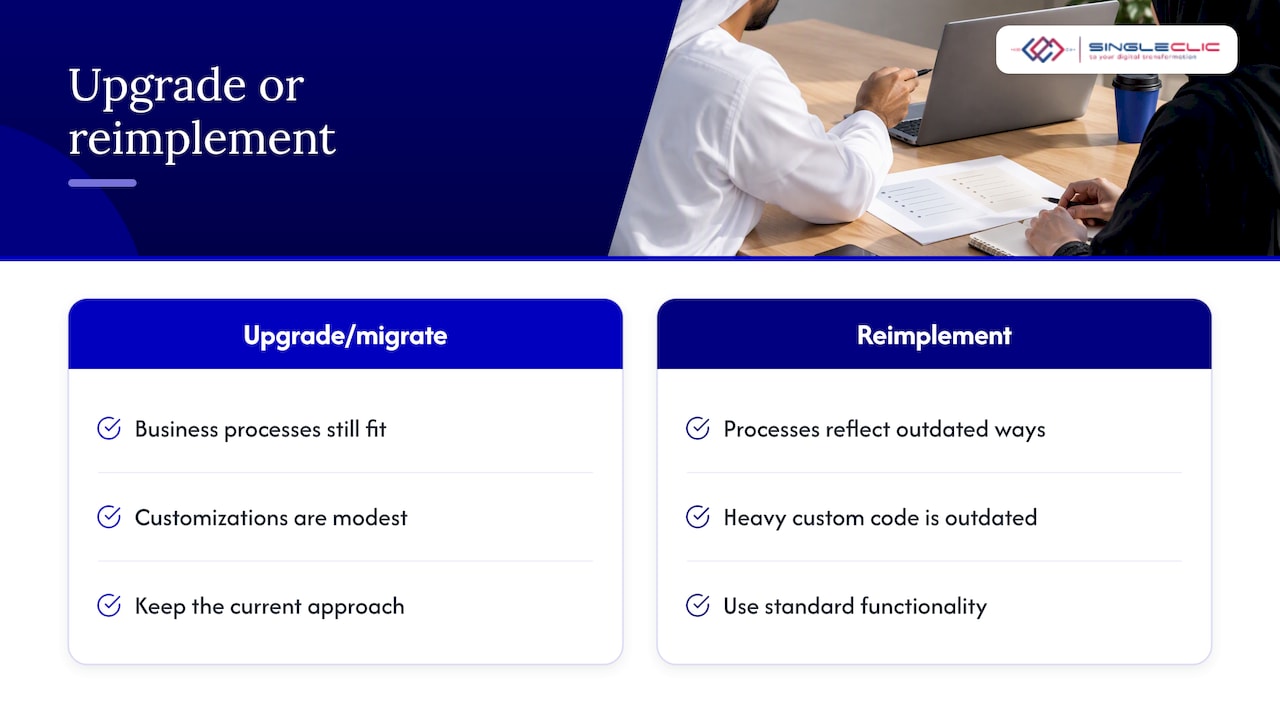
Upgrade or reimplement?
Use this rule of thumb. If your processes still match how the business works and your customizations are modest, upgrade or migrate. If the system has been bent around outdated processes, or most of the value is in heavy custom code you would not write today, reimplementing on standard functionality is usually the cleaner decision. Our Dynamics 365 implementation guide for UAE leaders lays out what that route involves.
Handle customizations, integrations and data deliberately
Adopt first, adapt only where justified
Microsoft promotes a culture of adopting standard functionality wherever possible and adapting only where justified, and recommends using the Business Process Catalog to compare your processes with standard before considering customization. Its fit-to-standard guidance is the right frame for the review workshop. For every customization, ask three questions:
- Does standard functionality now do this?
- Does this give a competitive or regulatory advantage, or is it habit?
- Can it be rebuilt as an extension or an external workflow rather than modified code?
Things that fail the second question are retired. Things that pass it are rebuilt and kept outside the core where possible, which makes every future release cheaper.
Treat data migration as its own workstream
Microsoft advises treating data migration as a distinct, disruptive activity that should not overlap with other testing phases, so validation stays accurate and resources are not contended. Plan separate migration cycles, with finance and operations owners signing off the numbers: opening balances, open purchase orders, open sales orders, fixed assets and inventory.
Decide how much history moves. Many organizations bring across current-year transactions and summarized prior years, and keep older detail in a read-only archive. Retention rules in your sector may dictate otherwise, which is where the data section below matters.
Integrations and security
List every interface with an owner, a protocol and a test case. Re-point and retest them in the test environment, not at cutover. Review security roles against the target licensing at the same time, so that users do not discover missing access on day one. If you need to connect legacy systems, approvals and ERP data into one flow without rebuilding everything, an integration layer such as our Cortex low-code platform can sit around the core and keep it close to standard.
Testing, cutover and rollback
Most upgrade failures are rehearsal failures. Microsoft’s guidance on preparing to go live expects sign-off on system integration, user acceptance and performance testing, a signed-off cutover plan, a production support plan, and confirmed license availability.
The cutover strategy guidance adds the structure: a strategy covering goals, resources, timing and communication; a task-level plan with owners, verification, sign-off and rollback steps; repeated rehearsal in a test environment; validated migration and testing; stakeholder approval; training scheduled to finish by go-live; and an operational support plan afterwards.
Run mock cutovers
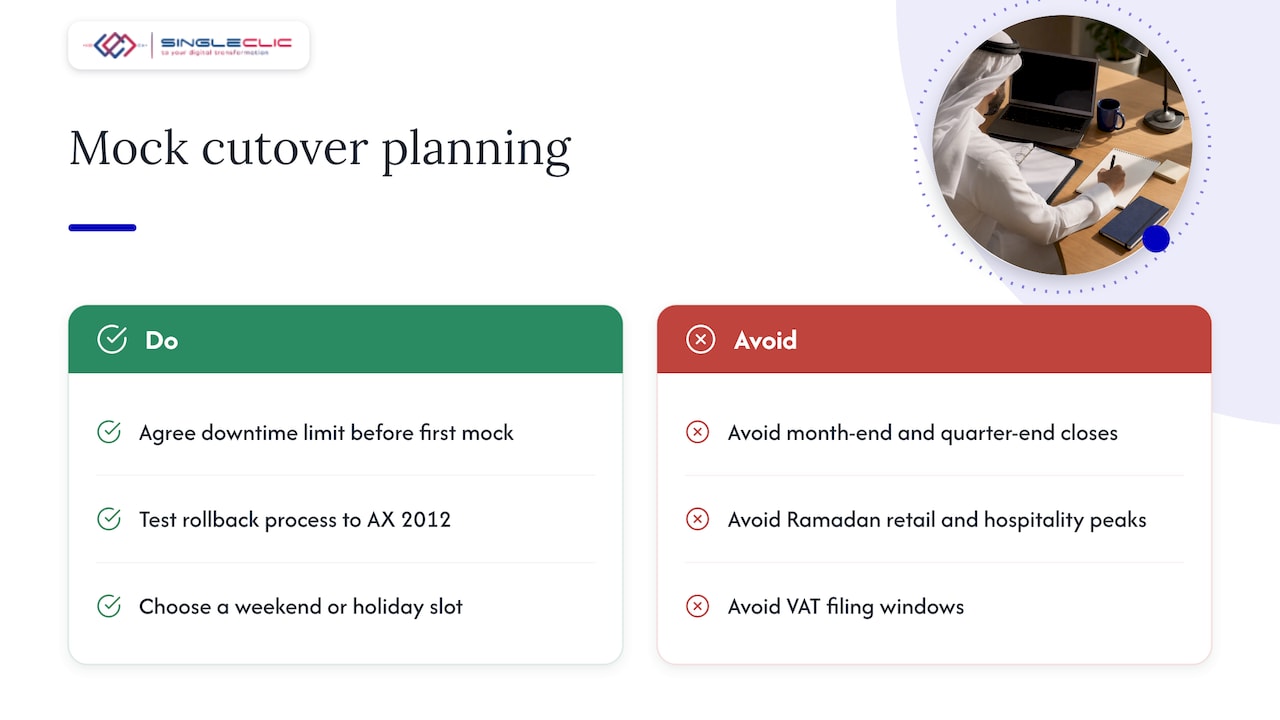
A mock cutover practices the real sequence and lets the technical team check the data upgrade procedure against the business’s downtime limit. Microsoft describes this in its AX 2012 cutover testing page, which also advises having a tested process for rolling back to AX 2012, even though rollback is unlikely. Agree the downtime limit with the business before the first mock, so each rehearsal is judged against it.
A practical cutover calendar for a UAE business should avoid month-end and quarter-end closes, Ramadan peak periods for retail and hospitality, and any VAT filing window. Choose the weekend or holiday slot that gives your finance team the most uninterrupted time.
Use a sandbox for Business Central
For Business Central, Microsoft recommends using a sandbox for dry runs and validation, because replicating into a production environment that is already in use can overwrite data. Follow the cloud migration preparation steps and do not treat the first production run as a test.
Go/no-go criteria
Write them down before the project starts. A workable set:
- Integration, user acceptance and performance testing signed off.
- Two successful mock cutovers within the agreed downtime limit.
- Opening balances reconciled and approved by the finance lead.
- Users trained and licenses confirmed.
- Rollback tested and the support plan staffed for the first weeks.
Plan timeline, budget and training
Microsoft says the deployment and release strategy should match business objectives, risk appetite, budget, resources and time, and consider rollout geography, pilots, localization, parallel operation, user productivity, training needs and integration complexity. That list is a useful way to challenge a vendor’s proposed timeline.
On budget, Microsoft’s implementation strategy page names these categories: subscription, storage, design, testing, deployment, incumbent-system migration, training, change management, continuous improvement, and DevOps and test automation. It also warns that performance testing, data validation, training and change management are often cut when scope or budgets tighten, which harms implementation quality. Those are exactly the lines a finance committee is tempted to trim. Ring-fence them.
We do not publish fixed prices, because an upgrade of a 40-user NAV system and a multi-entity group on AX 2012 are different projects. A fair estimate comes after the assessment, with effort split by workstream.
UAE requirements to settle before you choose hosting
The UAE adds a layer that generic upgrade guides ignore.
- In-country data residency. Microsoft has two UAE data centers, in Abu Dhabi and Dubai, and offers in-country data residency for Dynamics 365 Core Services, according to its UAE DESC compliance page. The same page notes that Microsoft was the first global cloud services provider to obtain the DESC CSP Security Standard certification, which matters for Dubai government work.
- Personal data law. Federal Decree Law No. 45 of 2021 governs personal data processing in the UAE, with controls for privacy and confidentiality and requirements for cross-border transfers. Check where your offshore support, reporting or backup teams access data from.
- DIFC entities. DIFC Law No. 5 of 2020 allows transfers of personal data to a third country only under adequacy conditions or with appropriate safeguards. A DIFC company needs this reflected in its upgrade design.
- Localization. Statutory reports, VAT and invoicing requirements need to be validated in the target release. See our note on Dynamics 365 UAE localization for what finance and IT should check before go-live.
If a regulated business is weighing cloud against on-premises, read our piece on when on-premise is the right call for UAE data residency, and our data security practices for IT teams in the UAE and KSA.
Use cases: how the strategy changes by situation
Group on AX 2012 with heavy customization. Assess code and ISV dependencies, use the supported upgrade path for data and code, retire custom logic that standard now covers, and run at least two mock cutovers against the downtime limit.
Mid-size company on NAV or GP moving to Business Central. Confirm the version and database prerequisites, convert customizations to extensions, validate in a sandbox, and plan what to do with data in tables with code customizations. Our Business Central implementation guide for the UAE is the next read.
Multi-entity group with sales teams on separate CRMs. Use a phased transition, with one entity as pilot and full synchronization between systems until the last entity moves.
Healthcare or banking organization. Settle the hosting and residency question first, since it determines the architecture and the audit evidence you will need.
Perspective
Most upgrade conversations begin with the version number. We think they should begin with the process list. In our projects across the UAE, Saudi Arabia and Egypt, the organizations that move smoothly are the ones that decide early which customizations deserve to survive and which only existed because an old system required them.
Our approach is to keep the ERP core close to standard and put the business-specific logic, approvals and integrations on a flexible layer around it. That is how Cortex, our Arabic-enabled low-code platform, is designed to be used: workflows can change at runtime without downtime, and it can be deployed on-premise where a bank or government entity needs it.
The second lesson is to treat rehearsal as the real project. A team that has completed two mock cutovers inside its downtime window is calm on go-live night. A team that has not is improvising.
Tamer Badr
How Singleclic helps
We are a Microsoft Dynamics 365 integrator with more than 10 years of delivery in the region, over 70 consultants and engineers across KSA, UAE and Egypt, and enterprise clients in healthcare, banking, real estate and government. For an upgrade, we can run the assessment, recommend the path, handle customization and integration work, and support the business after go-live. Our Dynamics 365 services cover implementation, customization, integration, consultancy, and support and maintenance.
If custom logic is the sticking point, we can also look at moving it into Cortex, so the ERP stays upgrade-friendly. For the broader picture of how a well-run program pays back, see our Dynamics 365 implementation playbook.
Next step
Bring us your current version, your list of customizations and integrations, and your downtime limit. We will return a scoped assessment plan and a recommended path. Talk to Singleclic about your Dynamics 365 upgrade.
FAQ
What should come first in a Dynamics 365 upgrade?
An assessment of your current environment. Inventory processes, customizations, ISV add-ons, integrations, data and licensing, then choose the path. Customizations and integrations are usually the largest source of effort and risk, so they deserve the most attention.
Can we upgrade directly from AX 2012 or NAV?
Microsoft supports an upgrade path for AX 2012 R2 and R3 to finance and operations apps, and for supported NAV versions to Business Central online. For NAV, customizations must be handled by extensions, and data from tables with code customizations cannot be carried forward. Confirm your exact version before planning.
How many cutover rehearsals do we need?
Microsoft recommends rehearsing the cutover several times in a test environment. Our practical view is at least two mock cutovers that finish within the agreed downtime limit, plus a tested rollback, before you approve go-live.
Does our Dynamics 365 data have to stay in the UAE?
Not as a blanket rule for every business, but requirements depend on your sector, your regulator and whether you are in a free zone such as the DIFC. Microsoft offers in-country residency for Dynamics 365 Core Services through its Abu Dhabi and Dubai data centers. Check federal personal data law and your own regulator’s rules before deciding.
Which budget lines should never be cut?
Performance testing, data validation, training and change management. Microsoft cautions that these are often reduced when budgets tighten and that doing so harms implementation quality. Protect them when you negotiate scope.
Sources
- Plan a Dynamics 365 implementation strategy, Microsoft Learn
- Plan your environment strategy for Dynamics 365, Microsoft Learn
- AIM Assessment, Microsoft Learn
- Prepare and plan for cloud migration from Business Central, Microsoft Learn
- Migrate to Dynamics 365 online, Microsoft Learn
- Key considerations for migrating to Dynamics 365 Sales, Microsoft Learn
- Fit-to-standard and fit-gap analysis, Microsoft Learn
- Manage configuration and migration data, Microsoft Learn
- Prepare your production environment to go live, Microsoft Learn
- Transition to new solutions with the cutover strategy, Microsoft Learn
- Upgrade from AX 2012 cutover testing, Microsoft Learn
- Plan your solution deployment and release, Microsoft Learn
- UAE DESC, Azure Compliance, Microsoft Learn
- Data protection laws, The Official Platform of the UAE Government
- DIFC Law No. 5 of 2020