Copilot for Dynamics 365 is Microsoft’s in-app AI assistant that automates routine CRM and ERP tasks and surfaces contextual, role-specific insights directly inside Sales, Customer Service, Finance, Business Central, and other modules. It drafts emails, summarizes records, preps meetings, and increasingly runs multi-step processes through autonomous agents. For business and IT teams, the payoff is fewer hours lost to clerical work and faster, better-informed decisions across the platform.
TL;DR:
- The success of Copilot depends heavily on data quality in Dataverse, as poor data degrades the accuracy of summaries, suggestions, and generated content.
- Autonomous agents are suitable for low-risk, repetitive tasks like transaction reconciliation but require proven accuracy and governance maturity before increasing independence.
- Rollouts should begin with a scoped pilot focusing on one module and one workflow, with clear KPIs and phased expansion to larger processes.
- Proper governance includes permission controls, audit trails, and responsible AI sign-off, which are vital to prevent errors and ensure compliance in autonomous workflows.
- Partner expertise, especially for regional compliance and on-premise deployment options, is crucial to translating Copilot’s features into effective, scalable implementations.
Table of Contents
- What is Copilot for Dynamics 365?
- Which Dynamics 365 modules does Copilot support?
- Should you use autonomous agents or conversational Copilot?
- How does Copilot access your organization’s data?
- What does a compliant Copilot rollout look like?
- What business results can you expect from Copilot?
- How Singleclic helps you deploy Copilot the right way
- Where to go deeper on Copilot and Dynamics 365
- The overlooked risk in most Copilot rollouts
- Get your Dynamics 365 Copilot rollout right the first time
- Sources
What is Copilot for Dynamics 365?
Copilot is not a single feature bolted onto Dynamics 365. It is a layer of AI-powered assistance woven through the applications you already use, showing up as a chat interface, an embedded summary, or an autofill suggestion depending on where you’re working. Microsoft describes it as an in-app assistant spanning Sales, Customer Service, Business Central, and Finance & Operations, built to automate repetitive tasks like data entry, record lookups, and meeting preparation.
The interaction model varies by module, and that variation matters for training and rollout planning. In finance and operations apps, Copilot lives primarily as a conversational sidecar, a panel you open alongside your normal screen to ask questions or request a summary. In other modules, it appears as embedded content, such as an AI-generated case summary sitting at the top of a customer service ticket, or an autofill suggestion in a Business Central form field.
Four experiences show up repeatedly across the platform:
- Conversational sidecar. A chat panel where you ask Copilot to explain a workflow history, pull related records, or answer a policy question grounded in your organization’s documentation.
- Record and case summaries. Copilot condenses long email threads, case histories, or account activity into a short brief you can scan in seconds.
- Autofill and suggestions. Copilot proposes field values, product descriptions, or matching entries based on patterns in your existing data.
- Content generation. Copilot drafts emails, meeting prep notes, and responses that a human then reviews and sends.
Grounding is what keeps these outputs relevant instead of generic. Copilot draws on your organization’s Dataverse records, public Microsoft documentation, and, in finance and operations apps, custom knowledge that administrators add directly in Copilot Studio. That means the answers you get reflect your company’s actual processes and policies, not a generic model response detached from your data.
Pro Tip: Copilot’s answers only get better if someone uses the feedback controls. Train your team to click thumbs-up or thumbs-down on Copilot responses from week one. That feedback loop is how the assistant’s accuracy improves inside your specific tenant over time.
Microsoft has also built its responsible AI commitments into the product rather than treating them as an afterthought. Every Copilot experience across Dynamics 365 is designed with content filtering, transparency about AI-generated output, and human review built into the workflow, a point Microsoft emphasized when it first introduced Dynamics 365 Copilot as an enterprise-grade assistant rather than a novelty chatbot. That framing matters more as agentive features take on tasks with less direct human oversight, a shift covered in detail later in this piece.
Which Dynamics 365 modules does Copilot support?
Copilot’s feature set is not uniform. Each module gets capabilities tuned to the work that actually happens there, and knowing the breakdown helps you prioritize where a pilot will show the fastest return.
Sales. Sellers get record summaries that compress account history into a quick read, AI-generated meeting preparation notes pulled from CRM data and email threads, and draft emails that reference the right context automatically. Microsoft’s own Dynamics 365 Sales Copilot overview confirms these three capabilities as the core of the sales experience, with feature availability varying by region according to the Copilot international availability report. The sales-specific assistant is also evolving toward a more autonomous sales agent that can qualify leads and nurture prospects with less manual intervention, foreshadowing the agent model covered further down.
Customer Service. Agents handling support tickets get case summaries that pull together the customer’s history, prior interactions, and open issues into one digestible view. Copilot drafts reply suggestions grounded in your knowledge base articles, and agents can chat directly with Copilot to search internal documentation instead of digging through multiple systems manually.
Field Service. Technicians in the field get contextual guidance drawn from equipment manuals, work-order history, and past resolutions, reducing the need to call a supervisor for routine troubleshooting. Work-order creation and scheduling suggestions also benefit from Copilot’s ability to match technician skills and location to incoming jobs.
Finance. Finance teams get workflow history summaries that explain, in plain language, why an approval sat in someone’s queue or what changed in a multi-step process. Preview agent features extend this further: account reconciliation agents can match transactions automatically, and collections-focused capabilities help prioritize which overdue accounts need attention first, both detailed in Microsoft’s documentation on Copilot for finance and operations.
Business Central. Smaller and mid-market teams get some of the most immediately useful features here, including automatic product description generation for catalog items and inventory matching that reconciles incoming stock against purchase orders. Autofill suggestions speed up everyday data entry without requiring any custom development, which is a meaningful advantage for SMEs that don’t have a development team to build custom logic on top of the ERP.
Supply Chain. Planners get demand analysis summaries that flag unusual patterns, workload insights that highlight bottlenecks before they cause delays, and early alerts when a disruption in one part of the network is likely to ripple downstream.
Project Operations. Project managers can generate an initial work breakdown structure from a project brief, giving them a starting point to refine rather than a blank page. Copilot also assists with resource and timeline planning suggestions based on similar past projects.
A few patterns repeat across all seven modules:
- Summarization is the most mature and widely available capability, present in nearly every module.
- Drafting (emails, descriptions, replies) shows up wherever written communication is part of the job.
- Predictive and matching features (demand analysis, reconciliation, inventory matching) are newer and often still in preview.
- Role-specific assistants are gradually converging toward autonomous agents rather than remaining purely conversational.
Should you use autonomous agents or conversational Copilot?
Chat-based Copilot answers questions and drafts content, but a human still decides what happens next. Agents go further: they can execute multi-step business processes on their own, with human oversight built in at checkpoints rather than at every action. Microsoft describes this shift explicitly, noting that Copilot is evolving from chat-based assistance into agent models capable of managing complex workflows end to end.
The practical difference shows up in what each can do:
- Conversational Copilot answers a question, drafts a document, or summarizes a record, then waits for you to act on it.
- Agents can execute a sequence, such as matching a batch of transactions, flagging exceptions, and routing only the exceptions to a human for review.
- Agent management tools, currently in production-ready preview, give administrators supervision dashboards, audit trails, and an activity feed showing exactly what each agent did and when.
- Rollback and observability become essential once an agent can make changes autonomously, since a single misconfigured agent can propagate errors faster than a human ever would.
Deciding between the two comes down to three questions. How complex is the process, does an error carry real financial or compliance risk, and does your organization currently have the governance maturity to supervise autonomous action rather than approve every step manually? A high-volume, low-risk task like matching routine reconciliations is a strong agent candidate. A judgment-heavy process, like negotiating contract terms, still belongs with a human backed by conversational Copilot.
Loosen oversight only after the audit trail shows consistent, accurate behavior. Agents that make multi-step changes autonomously need proven track records before you hand them more independence, a point Microsoft’s own agent guidance reinforces.*
How does Copilot access your organization’s data?
Copilot’s usefulness depends entirely on what it can see and how reliably it can reason over that information. Three technical pieces make that possible.
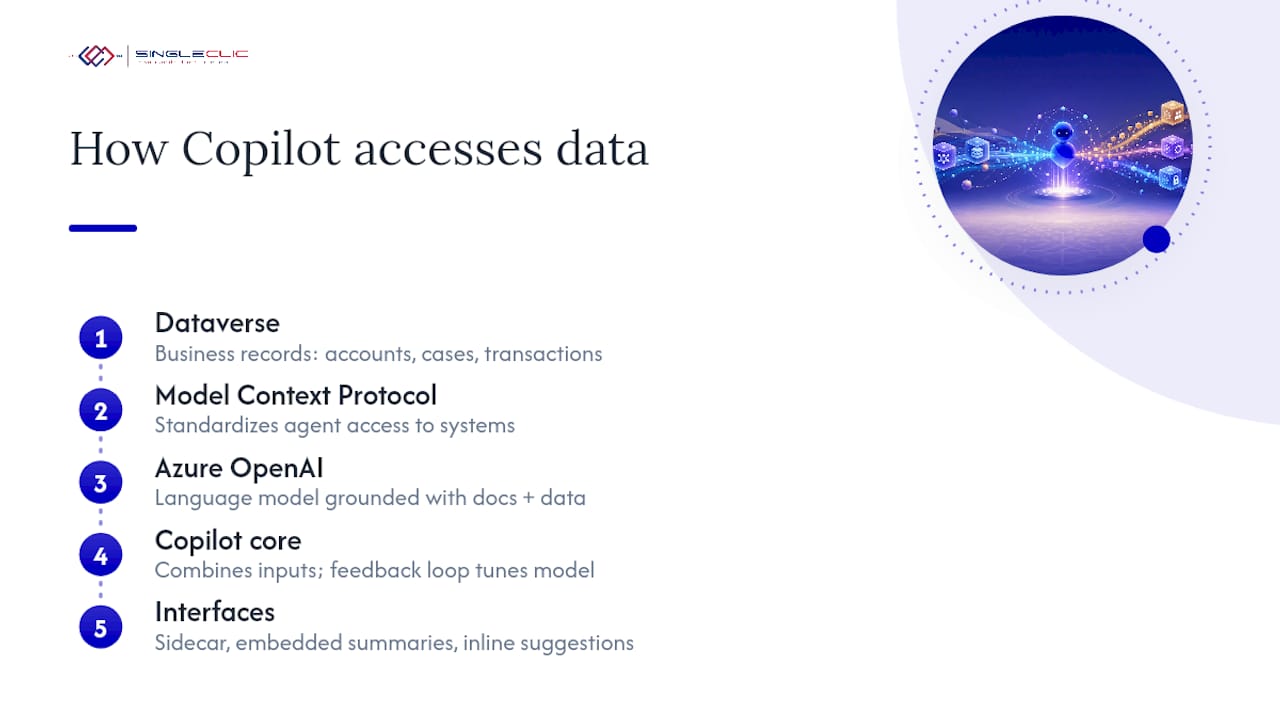
Dataverse is the foundation. It’s the common data layer underneath most Dynamics 365 apps, and Copilot queries it to pull the account records, case histories, and transaction data that ground its responses in your actual business rather than generic training data. Without clean, well-structured data in Dataverse, Copilot’s summaries and suggestions degrade quickly, which is why data quality sits at the top of every serious governance conversation.
Model Context Protocol (MCP) gives finance and operations agents an internal framework for operating without requiring a custom connector for every system they touch. Rather than building bespoke integration code for each new agent capability, architects can rely on MCP to standardize how agents interact with underlying business logic and data, which shortens the path from pilot to production for new agent workflows.
Azure OpenAI supplies the underlying language model that powers Copilot’s natural-language understanding and generation. Grounding happens by combining that model with your organization’s Dataverse records and public Microsoft documentation, and administrators can extend this further in Copilot Studio by feeding in internal policy documents or knowledge articles, as Microsoft’s generative help documentation explains.
The interface layer follows a consistent pattern: a sidecar panel in finance and operations apps, versus embedded summaries or inline suggestions elsewhere in the platform. That split isn’t arbitrary. It reflects how each module’s users typically work, and it has direct implications for how you train staff on the tool.
Data handling deserves its own line of scrutiny. Organizations in regulated industries, or those with Arabic-language deployment needs, often require tighter control over where data physically resides and how it’s processed, a consideration especially relevant for banks and government entities in the region evaluating on-premise or controlled-region alternatives. Practitioners consistently flag that Copilot’s reliability tracks directly with an organization’s internal data quality and knowledge base maturity, which is why the feedback loop, that simple thumbs-up or thumbs-down click, is not a cosmetic feature. It’s how the model calibrates to your business over time.
What does a compliant Copilot rollout look like?
A Copilot deployment that skips governance planning tends to generate frustrated users and inconsistent output faster than it generates productivity gains. Treat the rollout as a program with distinct phases, not a single licensing purchase.
- Confirm availability and licensing. Check the Copilot international availability report for your region and module combination before promising capabilities to stakeholders. Not every feature ships everywhere simultaneously, and licensing tiers determine which agent features you can actually enable.
- Configure least-privilege data access. Set permission scopes so Copilot and any agents only see the records a given role should see. Broad access might feel convenient during a pilot, but it becomes a liability the moment an agent starts acting autonomously.
- Enable logging and audit controls. Every summary, draft, and agent action should leave a trail. This isn’t optional once agents begin executing multi-step processes without a human approving each individual step.
- Establish responsible AI governance. Decide who approves new knowledge sources added to Copilot Studio, who reviews flagged content, and where human-in-the-loop checkpoints are mandatory versus optional. Get sign-off from legal, IT security, and the business unit owner before go-live.
- Design a scoped pilot. Pick one module and one well-defined workflow, such as sales meeting prep or case summarization, rather than attempting a platform-wide rollout on day one.
- Set measurable KPIs before you start. Track minutes saved per task, percentage reduction in manual data entry errors, and SLA closure time improvements so you have a real before-and-after comparison.
- Expand in phases. Move from pilot to a single department, then to additional modules, only after the governance controls and KPI results from the previous phase hold up.
Governance is not a one-time checklist you complete and file away. Practitioner guidance consistently frames Copilot enablement as an ongoing program, pilot, then governance, then scale, with the feedback loop actively monitored throughout, not just during the initial rollout.
Pro Tip: Assign a named “Copilot owner” inside IT before your pilot starts, someone responsible for reviewing feedback data, flagging degraded responses, and coordinating updates to your knowledge sources. Without a clear owner, feedback loops quietly stop getting reviewed within a few weeks.
For a deeper walkthrough of roles, templates, and sign-off structures, Singleclic’s Copilot governance playbook maps out the operational detail this checklist only summarizes.
What business results can you expect from Copilot?
The clearest wins show up in tasks that are repetitive, time-boxed, and currently done manually by skilled staff who could be doing higher-value work instead.
Sales meeting preparation is a good example. A rep who previously spent fifteen to twenty minutes before every client call reviewing account history, recent emails, and open opportunities can get a Copilot-generated brief in seconds, reclaiming that time for actual selling. Customer service teams see a similar pattern with case summaries and draft replies: an agent who used to read through a full ticket history now scans a summary and edits a suggested response, cutting average handling time on repetitive inquiries. Finance teams running account reconciliation agents report faster matching of routine transactions, freeing analysts to focus on the exceptions that actually require judgment.
Useful KPIs to track when building the business case include:
- Minutes saved per task, measured against a pre-Copilot baseline for meeting prep, case handling, or reconciliation.
- Percentage reduction in manual data entry, tracked through autofill and matching feature adoption in Business Central or Finance.
- SLA closure time improvement, particularly in Customer Service and Field Service where response speed is contractually measured.
- Agent action accuracy rate, once autonomous agents move beyond the supervised pilot phase.
A mid-sized distribution company piloting Copilot in Business Central, for instance, might start by measuring how much faster new product listings get created once description generation and inventory matching replace manual catalog entry, then expand into Supply Chain once that single workflow shows a clear time reduction. The pattern that works best is narrow scope, clear baseline, then expansion, not a broad rollout with no way to prove impact.
How Singleclic helps you deploy Copilot the right way
Rolling out Copilot for Dynamics 365 across Sales, Finance, or Business Central takes more than flipping a licensing switch. It takes a partner who understands both the Microsoft roadmap and the compliance realities of operating in Saudi Arabia, the UAE, and Egypt. Singleclic has spent 10+ years delivering Dynamics 365 implementations across the region, backed by 70+ consultants and engineers and a track record with 100+ enterprise clients spanning healthcare, banking, and government sectors.
An effective engagement model for deploying Copilot should follow a pilot, governance, scale sequence. This includes:
- Implementing and configuring Dynamics 365 based on specific modules and workflows.
- Providing governance playbooks covering permission scopes, audit logging, and responsible AI sign-off.
- Integrating with an Arabic-enabled, on-premise low-code platform to connect Copilot-driven workflows to legacy systems, approvals, or governance rules beyond Dynamics 365 alone.
- Offering on-premise deployment options for organizations with strict data residency requirements.
Clients receive a working pilot, documented governance framework, and a scaling roadmap tied to measurable KPIs, rather than only enabled features without training.
Where to go deeper on Copilot and Dynamics 365
Microsoft’s own documentation remains the most reliable source for feature-level detail and licensing specifics. Start with the Copilot for Dynamics 365 roadmap for a module-by-module capability list, then review agent and AI capabilities documentation for the latest on autonomous agent features and management tools. The generative help and guidance guide covers sidecar configuration and Copilot Studio knowledge ingestion in detail.
For governance templates and regional deployment considerations, Singleclic’s Copilot governance playbook and its guide to extending Dynamics 365 intelligence with Cortex both translate the Microsoft documentation into implementation steps suited to MENA compliance requirements.
The overlooked risk in most Copilot rollouts
Most of the conversation around Copilot fixates on the feature list, summaries here, autofill there, agents on the horizon. That’s the easy part to sell and the easy part to demo. What gets skipped is the unglamorous work of data hygiene and governance sign-off before the first pilot user ever opens the sidecar.
I’d argue the organizations getting real value from Copilot aren’t the ones with the most modules enabled. They’re the ones that spent real time on Dataverse data quality and assigned someone to actually watch the feedback loop instead of treating it as a nice-to-have. Agents make this more urgent, not less: an agent executing a flawed process at machine speed multiplies a data problem instead of catching it.
If you take one thing from this piece, prioritize governance and data readiness before feature breadth. Pick one module, prove the KPI improvement, then expand. The teams skipping that discipline are the ones who end up disabling Copilot six months in and calling it overhyped, when the actual problem was never the AI.
— Tamer Badr
Get your Dynamics 365 Copilot rollout right the first time
A capable partner can turn Copilot’s feature list into a working, governed rollout instead of a stalled pilot. A regional Microsoft Dynamics 365 integrator can pair Copilot enablement with an Arabic-enabled, on-premise low-code platform to ensure approvals, legacy systems, and compliance requirements are included in the automation process.

If you’re weighing whether your organization is ready for Sales Copilot, Finance agents, or a Business Central pilot, the fastest way to find out is a scoped assessment rather than another feature comparison. Singleclic’s team can walk through your current Dynamics 365 setup, flag the data readiness gaps this article covers, and outline a pilot, governance, scale plan specific to your modules. Start by reviewing what a connected Dynamics 365 implementation looks like end to end, then reach out to scope your Copilot pilot.
Sources
- Generative help and guidance with Copilot – Finance & Operations
- Introducing Microsoft Dynamics 365 Copilot