Arabic-enabled, enterprise-grade low-code platforms exist, and they suit MENA enterprises that need Arabic-first UX, strong governance and flexible deployment. Prioritize full Arabic and right-to-left support, on-premise or hybrid options, and deep ERP and CRM integration. We offer Cortex, an Arabic-enabled platform that can run on-premise. The rest of this guide covers features, deployment, use cases and a selection checklist.
TL;DR:
- Test Arabic support across the designer, admin tools, reports, and mixed language input; ask vendors to demonstrate realistic data volumes and printed output.
- Keep sensitive records and process engines on premises or in a private cloud when residency rules require control; use public cloud for less sensitive pilots.
- Run a 90 day pilot on one workflow, build with real users in Arabic, then measure cycle time, handoffs, rework, and adoption against a baseline.
- Weight vendors against Arabic UX, deployment, integration, security, and support before demos, then compare ownership costs over three years, including training, infrastructure, and governance.
Table of Contents
- What is an Arabic low-code platform and why does Arabic-first UX matter?
- What business benefits does an Arabic-capable low-code platform deliver?
- Which enterprise features should you require from an Arabic low-code platform?
- How do deployment options and compliance affect the choice for UAE and MENA enterprises?
- What are the common enterprise use cases and implementation patterns in MENA?
- How do you evaluate and choose the right Arabic low-code platform?
- Why do Singleclic and Cortex suit enterprises looking for an Arabic low-code platform?
- What should leaders do next? An author’s view
- Ready to test Cortex on your own process?
- FAQ
- Sources
What is an Arabic low-code platform and why does Arabic-first UX matter?
A low-code platform lets teams design, build and change business applications and workflows mostly through visual tools, with code added only where the logic demands it. For enterprises, that usually means approvals, case management, forms and process automation that used to take months of custom development. An Arabic low-code platform adds one condition that sounds small and is not: the product must work natively in Arabic, in the tool your builders use and in the screens your employees and customers see.
That is different from a translated interface. A translation pass over English screens tends to break layouts, mangle mixed Arabic and English text and leave admin consoles in English. A genuinely Arabic-first platform treats the language as a design input from the start.
Here is what you should expect to see:
- Full Arabic UI across runtime screens, designer tools and admin consoles, not just end-user forms.
- Right-to-left layout that mirrors navigation, tables, charts and workflow diagrams correctly.
- Locale-aware dates, numbers, currencies and calendars, including Hijri date support where your processes need it.
- Validation rules that understand Arabic names, addresses and mixed-script input.
- Arabic search, sorting and reporting that handle diacritics and letter variants properly.
The business case is practical. When people work in their own language, onboarding is faster, data entry errors drop and frontline staff stop avoiding the system. Translation errors in legal or customer-facing workflows also stop being a recurring cleanup task. We cover the adoption side in more depth in why Arabic-first UX matters in low-code platforms.
Regional momentum points the same way. The UAE government publishes AI and coding licensing initiatives meant to attract AI investment and talent, which keeps pushing enterprises toward tooling that local teams can use without friction. Vendors are responding too: Genesys announced Arabic language support for Genesys Cloud AI Studio in 2025, a sign that Arabic-capable tooling is becoming a baseline expectation rather than a niche request.
What business benefits does an Arabic-capable low-code platform deliver?
Features matter only when they change outcomes you can report to a board. Here are the outcomes that C-level and IT buyers usually care about most, in the order we see them show up in real projects.
- Faster delivery at lower cost than custom development. Visual modeling replaces much of the hand-coding behind forms, routing rules and status tracking. Teams ship a working first version in weeks and spend developer time only on the parts that need it. We compare the two approaches in low-code versus traditional development.
- A pilot-to-scale path. Regulated sectors in MENA often follow a “start small, scale fast” approach: prove one workflow in one department, build internal confidence, then extend to more sensitive processes. Low-code suits this because the pilot is not throwaway work. The same application grows into the production version.
- Better governance and auditability. When processes are modeled rather than buried in scripts, every step, owner, approval and exception is visible. Audit logs, role-based access and versioned process definitions make life easier for compliance officers and internal auditors, especially in banking, healthcare and government departments.
- Cleaner integration with ERP, CRM and analytics. A low-code layer can sit between your systems of record and the people who use them. Approvals can trigger ERP postings, CRM updates can start onboarding flows, and process data can feed your BI tools. This is where the platform stops being an app builder and becomes connective tissue. See how this plays out in our guide to ERP and CRM integration.
- Agility that survives change. Policies, forms and approval chains change constantly. When a platform lets you adjust a running workflow without downtime, a rule change becomes a configuration task instead of a release project. That is the practical meaning of enterprise agility, and we expand on it in how low-code improves business agility.
Regional government is already moving in this direction. Dubai Municipality is implementing Microsoft Dynamics 365 and Power Platform to unify case management and scheduling and to enable mobile low-code applications that speed access to services. The lesson for private enterprises is that low-code is no longer an experiment inside IT. It is part of how large organizations deliver service.
Which enterprise features should you require from an Arabic low-code platform?
Procurement lists tend to be long and flat. A better approach is to separate the non-negotiables from the nice-to-haves. For an Arabic low-code platform, we would treat the following as non-negotiable.
- Arabic and RTL everywhere. Runtime screens, the designer, admin consoles, notifications, reports and generated documents. If any one of these is English-only, your power users will feel it daily.
- Identity and access management. Single sign-on with your existing identity provider, role-based access control down to field level, and tamper-evident audit logs that record who changed what and when.
- Flexible deployment. On-premise, hybrid and private cloud options, so regulated workloads are not forced into a hosting model your compliance team rejects.
- Enterprise connectors and open APIs. Ready connectors for ERP, CRM and databases, plus REST APIs and webhooks for everything else. Legacy systems should be reachable, not rewritten.
- Runtime workflow change without downtime. You should be able to adjust a live process, publish the new version and let in-flight cases finish on the rules they started with.
- Scalability and monitoring. Unlimited or generously licensed user counts, clustering, queue and job monitoring, and dashboards that show process bottlenecks in real time.
- Extensibility for professional developers. SDKs, custom code hooks and scripting for requirements that visual tools cannot express, while citizen developers keep building within guardrails.
Performance deserves its own conversation. Arabic text rendering, bidirectional strings and large reporting tables can behave differently from English-only workloads, so ask vendors to demonstrate speed with realistic Arabic data volumes, not a clean demo dataset.
Pro Tip: Ask every vendor to show a live Arabic workflow with mixed Arabic and English input, a printed Arabic report and an admin screen, all in one session. Gaps in any of the three tell you how deep the Arabic support really goes.
Training matters as well. Check whether documentation, learning paths and support channels exist in Arabic, because your citizen developers and business analysts will rely on them long after the vendor’s implementation team leaves. For a broader view of the technology side, our overview of low-code platforms for enterprise innovation is a useful companion.
How do deployment options and compliance affect the choice for UAE and MENA enterprises?
Deployment is where many Arabic low-code evaluations are won or lost. The choice is rarely about technology preference. It is about where your data may legally and politically reside, and who must be able to prove it.
Choose on-premise when data residency rules are strict, when the system touches core banking, citizen records or sensitive health data, or when a regulator or internal policy requires physical control of infrastructure. Banks and government departments commonly fall here.
Choose cloud when speed, elasticity and lower infrastructure overhead matter more than physical control, and when the data involved is less sensitive. Cloud also suits fast pilots that do not yet touch regulated records.
Choose hybrid or in-region private cloud when you need both: sensitive data and process engines stay in your controlled environment, while less critical components use cloud scalability. For many enterprises this is the pragmatic compromise.
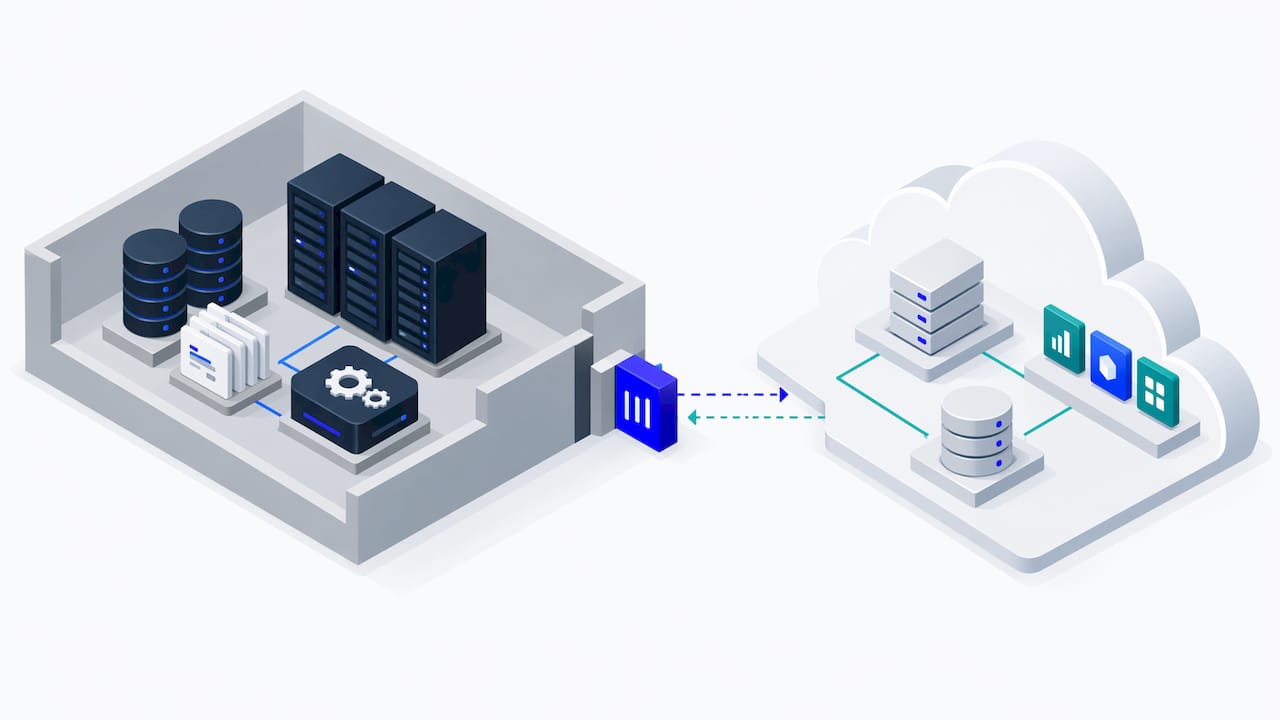
Several regulatory signals shape the decision in the UAE. The UAE Data Protection Law governs how personal data is processed and transferred. Financial free zones such as DIFC and ADGM publish their own data protection guidance, which can be stricter for entities operating inside them. The national AI agenda adds another layer: the UAE National AI Strategy encourages adoption of AI-enabled low-code tools that follow strict data privacy frameworks, and AI adoption is gaining attention among UAE companies. Always confirm which rules apply to your entity with legal counsel, since requirements differ by sector and jurisdiction.
When you talk to vendors, put these questions in writing:
- Where exactly is data stored, processed and backed up, and can it be pinned to a single country?
- How is data encrypted at rest and in transit, and who controls the keys?
- What is the incident response process, and what are the notification timelines?
- Which security attestations and audits can the vendor show, and how recent are they?
- Can the platform run fully disconnected from the public internet if your policy requires it?
Industry guidance also stresses that choosing the right technology stack is central to integrating AI and low-code into operations in the UAE. Treat deployment and compliance as part of that stack decision, not a late-stage legal check.
What are the common enterprise use cases and implementation patterns in MENA?
Strong low-code candidates share a pattern: many people, clear rules, frequent change and a need for a paper trail. These are the use cases we see most often across the region.
- Case management. Citizen requests, customer complaints, legal matters and internal investigations, with routing, deadlines and escalation built in.
- Approvals. Purchase requests, contract sign-off, credit decisions and policy exceptions, with delegation and full audit trails.
- HR onboarding. New-hire document collection, equipment requests, access provisioning and training assignments, in Arabic and English.
- Field service apps. Mobile forms for inspectors, technicians and surveyors, working with intermittent connectivity and syncing to the central system.
- Customer agent tools. A single screen for service staff that pulls data from CRM, billing and ERP, then guides the agent through the next step.
The integration pattern behind most of these is consistent. The low-code application owns the workflow and the user experience. ERP, CRM and legacy systems remain the system of record. APIs or connectors move data in both directions, and an analytics layer reads process data to show cycle times, backlog and rework. Our guide to Business Process Automation for C-level leaders goes deeper on how to frame these projects for executive sponsors.
A bounded pilot makes the case better than any slide deck. A typical 90-day scope looks like this:
- Days 1 to 15: pick one process with clear pain, agree three success metrics and map the current flow.
- Days 16 to 60: build and test the workflow with a small group of real users, in Arabic first.
- Days 61 to 90: run it in production for one department and measure against the baseline.
Useful metrics include average case cycle time, number of manual handoffs removed, error or rework rate and user adoption in the pilot group. If the numbers move, scaling is a sequencing exercise: add departments, add integrations, formalize a center of excellence and set governance for who may build what. For region-specific implementation detail, see our guide to low-code application development in the UAE and our overview of low-code development in the MENA region.
One integration detail often gets missed: automated workflows frequently need to send and receive email, from approval notices to agent-driven replies. Services such as Sendmux, which provides email API and mailbox infrastructure for AI agents, show how messaging can be wired into automated processes without manual mailbox setup.
How do you evaluate and choose the right Arabic low-code platform?
A repeatable process beats a long feature spreadsheet. Follow these steps in order.
- Align stakeholders on outcomes. Get business, IT, security and legal in one room. Agree the three to five outcomes the platform must deliver and the compliance requirements that are non-negotiable, such as data residency or on-premise hosting.
- Build a weighted scoring matrix. Score every vendor on the same criteria: Arabic UX depth, deployment model, integration capability, security and governance, support and training, and total cost of ownership. Weight the criteria before you see any demos, so enthusiasm does not rewrite the priorities.
- Shortlist on evidence, not brochures. Ask for regional references, in-region support presence and proof of deployments in regulated sectors.
- Run a bounded pilot. Use the 90-day pattern described above and define time-to-value KPIs up front, for example days from request to first working workflow and hours saved per process cycle.
- Run a structured vendor demo. Use your own scenario and your own Arabic data, not the vendor’s script.
- Decide and document. Record the scores, the pilot results and the open risks, so the decision survives personnel changes.
Your demo checklist should cover:
- Support SLAs, response times and escalation paths, including Arabic-speaking support staff.
- Upgrade and rollback policies, and how in-flight workflows behave during an upgrade.
- Local presence for implementation and ongoing support.
- Proof of regional deployments in sectors similar to yours.
- Licensing model, including what happens to cost as users and processes grow.
Pro Tip: Weight total cost of ownership over three years, not the first-year license. Include integration work, training, infrastructure and the internal time needed to govern citizen development, which is where many budgets quietly leak.
Why do Singleclic and Cortex suit enterprises looking for an Arabic low-code platform?
We deliver digital projects across Saudi Arabia, the UAE and Egypt, serving enterprise clients including Emirates Health Services, Dubai Healthcare City, QNB, AlBaraka and Emaar Misr. We are an Odoo Silver Partner, a Microsoft Dynamics 365 integrator and an IBM BAW specialist, so we understand the ERP and CRM estates your low-code applications will sit beside.
Cortex is our Arabic-enabled, on-premise low-code and BPM platform, built for MENA enterprises. It connects approvals, ERP, CRM, data, legacy systems and workflows in one place, and it lets teams design, build, automate and evolve complex business processes without writing code.
Here is how Cortex maps to the checklist in this guide:
- Arabic UX: full Arabic UI and UX, built in from the start rather than layered on.
- Deployment: on-premise deployment for banks, government bodies and other regulated organizations.
- Integration: deep enterprise system integrations across ERP, CRM, data sources and legacy applications.
- Agility: runtime workflow changes without downtime and real-time process optimization.
- Scale: unlimited users, so growth from pilot to enterprise program does not hit a license wall.
- Governance: modeled, visible processes that make auditing and change control straightforward.
You can read more about the AI side of the platform in AI-powered low-code development with Cortex. If you want to see Cortex against your own process, we are glad to run a demo or scope a pilot with you, and we can share relevant client references during that conversation.
What should leaders do next? An author’s view
Most Arabic low-code programs I see stall for the same reason: nobody defined what success looks like before the first demo. My advice is simple. Start with an outcome you can measure, such as cutting approval time on one process. Run a small pilot in Arabic with real users, not a showcase for executives. And require governance from day one: who can build, who approves releases, and where the audit trail lives.
Be careful with unmanaged citizen development. Without guardrails, you trade a backlog for shadow IT. For regulated workloads, favor an enterprise-ready platform that treats Arabic UX, deployment control and auditability as core features rather than add-ons.
— Tamer Badr
Ready to test Cortex on your own process?
We can run a Cortex demo or scope a pilot around one of your real workflows in Arabic.

- Explore our low-code development and automation services and book a Cortex demo.
- Talk to us about a pilot at Singleclic.
FAQ
Does an Arabic low-code platform differ from a translated one?
Yes. A translated platform converts labels, while an Arabic-first platform supports right-to-left layout, Arabic validation, locale-aware formats and Arabic admin tools throughout. The difference shows up in daily use, especially in reports and mixed-language data entry.
Can Arabic low-code platforms run on-premise?
Some can. Cortex, for example, is designed for on-premise deployment, which suits banks and government bodies with strict data residency rules. Always confirm deployment options with each vendor, including hybrid and private cloud.
How long should an Arabic low-code pilot take?
A bounded pilot of about 90 days is a practical target. It leaves time to scope one process, build it with real users and measure results against a baseline before you commit to a wider rollout.
Is low-code suitable for regulated departments?
Yes, when the platform provides role-based access, audit logs, versioned processes and flexible hosting. Start with a small pilot, confirm the applicable data protection rules with legal counsel, then expand to more sensitive workflows.
What should I check first when comparing vendors?
Check Arabic depth across the designer, runtime and admin screens, then deployment model, integrations and security attestations. A live demo with your own Arabic data reveals more than any feature list.
Sources
- Dig
- Dubai Municipality collaborates with Microsoft to drive digital growth
- How to successfully integrate AI into your business operations – BDO
- Artificial intelligence in government policies | The Official Platform of the UAE Government
- Genesys expands Agentic AI capabilities to the Middle East with Arabic support for Genesys Cloud AI Studio | ZAWYA