Enterprise AI agents are autonomous, goal-driven systems that plan and execute multi-step workflows across your CRM, ERP, and support systems with minimal human handoff. They deliver measurable value when three conditions are met: solid system integration, an active governance framework, and clean, accessible data. Skip any one of those, and the agent becomes an expensive demo rather than a working part of your operation.
TL;DR:
- Enterprise AI agents require robust system integration, active governance, and clean, accessible data to deliver measurable value in automation.
- Their success hinges on connecting with core systems via low-code tools, maintaining persistent memory, and coordinating actions across multiple agents when necessary.
- Focus on high-volume, rule-based processes such as IT incident management, finance reconciliation, or customer support for the most effective deployment.
- On-premise or private deployment is often necessary in regulated sectors, with full Arabic UI/UX support, deep system integration, and ongoing governance being critical.
- Starting with structured tasks like IT automation or invoice processing allows for forgiving pilots that can scale with proper governance and integration investments.
Table of Contents
- What are enterprise AI agents and how do they work?
- Where do enterprise AI agents deliver the most value?
- What architecture and integrations does an agent need?
- How do you govern and secure a fleet of AI agents?
- What does a realistic deployment roadmap look like?
- How does Singleclic approach enterprise agent deployment in MENA?
- What should your first enterprise AI agent project actually be?
- How can Singleclic help you deploy enterprise AI agents?
- Sources
What are enterprise AI agents and how do they work?
An enterprise AI agent is software that pursues a defined goal by choosing its own sequence of actions, rather than following a fixed script. That single distinction separates agents from every automation tool that came before them, and it’s why IT leaders need to evaluate them on different criteria than they used for RPA bots or chatbots.
Autonomy is the first axis to assess. Some agents operate with a human approving every step (a “copilot” pattern). Others run fully unsupervised within guardrails, only escalating when confidence drops below a set threshold. Most enterprise deployments start at the supervised end and earn autonomy over time, as the agent proves it handles edge cases correctly.
Tool integration determines whether an agent can actually do anything useful. An agent that can only converse is a chatbot with better grammar. An agent that can query your ERP, update a CRM record, open a ticket, or call an external API is doing real work. This connectivity typically comes through low-code builders and API connectors that bridge the agent to core business systems, which is why integration platforms have become as important to agent projects as the underlying language model.
Memory and context shape how an agent handles anything longer than a single exchange. Short-term memory keeps track of the current task; long-term memory lets the agent recall a customer’s history, a prior escalation, or a pattern from last quarter’s reconciliation. Without persistent memory, an agent forgets, and forgetting at enterprise scale means repeated errors and frustrated employees.
Reasoning and planning let an agent break a goal into steps, decide the order, and adjust when a step fails. A finance agent told to “close the books faster” has to figure out which reconciliations matter, in what sequence, and what to do when a vendor invoice does not match a purchase order. That planning layer is what makes the agent goal-driven instead of trigger-driven.
Agent-to-agent coordination is the newest and least understood capability. A supply chain agent might hand off an exception to a procurement agent, which then loops in a finance agent to check budget. Coordinating that handoff cleanly requires a shared protocol and a registry both agents can trust.
Here’s how the building blocks compare to what most IT teams already run:
- Chatbots answer questions inside a conversation; they do not take independent action on enterprise systems.
- RPA bots execute a fixed, pre-scripted sequence of clicks and data transfers with no reasoning about exceptions.
- AI agents set a goal, plan the steps, call the necessary tools, and adapt when conditions change mid-task.
- Multi-agent systems split a large goal across specialized agents that negotiate and hand off work to each other.
Understanding where your current automation sits on that list tells you exactly how big the jump to agents will be.
Where do enterprise AI agents deliver the most value?
The strongest returns show up wherever a process is high-volume, rule-governed, and currently bottlenecked by manual triage. Five functions consistently top the list.
IT operations benefit from agents that classify incoming incidents, match them against a runbook, and execute the fix, such as restarting a service or resetting an access token, without waking up an on-call engineer. Escalation only happens for genuinely novel failures.
Finance teams deploy agents for reconciliation and month-end close. An agent can match thousands of transactions against invoices, flag discrepancies, and draft the exception report a controller used to build by hand over two days. Enterprise vendor case studies show measurable operational gains in support, sales, IT, and finance functions once integration and governance are properly in place.
Sales and marketing use agents to qualify inbound leads, draft personalized outreach sequences, and update CRM records automatically as a deal moves stages, freeing sales development reps to focus on live conversations instead of data entry.
Customer support agents resolve full cases end to end, pulling order history, checking policy, issuing a refund or replacement, and only escalating when the case falls outside pre-approved limits.
Supply chain teams apply agents to exception handling and demand sensing. In B2B procurement specifically, agents that continuously monitor supplier data and pricing feeds can flag discrepancies that would otherwise take procurement staff hours to uncover manually.
Turning these use cases into a business case means tying each one to a concrete metric before you build:
- Hours of manual work eliminated per week, measured against the team’s current baseline.
- Percentage of tickets, invoices, or leads the agent handles without escalation.
- Error or rework rate before and after deployment.
- Cycle time from case opened to case closed.
Pick the use case with the cleanest data and the clearest escalation rule first. A messy, judgment-heavy process will punish your first agent deployment no matter how good the model is.
What architecture and integrations does an agent need?
Agents fail quietly for a boring reason: the plumbing underneath them was never built to support long-running, event-driven decisions. Get the architecture right before you get precious about which model to use.
- Adopt an event-driven backbone. Agents work best reacting to real-time signals, a new support ticket, a stock threshold breach, a payment failure, rather than polling a database on a timer. Event-driven design reduces latency and gives multiple agents a shared, reliable way to react to the same event without stepping on each other.
- Wire in connectors for every system the agent touches. At minimum this means your CRM, ERP, ticketing platform, and identity provider. Enterprise integration platforms handle much of this through prebuilt connectors and API management layers, so you are not hand-coding a bridge to every legacy system.
- Choose a runtime built for long-running tasks. A reconciliation agent might run for twenty minutes across thousands of records; a support agent might need to hold state across a conversation that spans days. Cloud vendors have begun packaging dedicated runtime, registry, and observability features specifically to support this kind of long-lived agent execution, as reflected in Google Cloud’s enterprise agent platform.
- Decide between low-code builders and code-first development kits. Low-code visual builders let business users assemble and adjust agents without engineering support, which matters when the process owner understands the workflow better than any developer does. Code-first agent development kits fit custom, long-running agents that need tight control over logic and error handling. Most enterprises need both: low-code for business-user-driven agents and code-first tools for the harder, custom cases.
- Build continuous data validation into the pipeline, not just at launch. Field names, formats, and business rules drift over time. Canonicalizing data on the way in and re-validating it on a schedule prevents the slow accuracy decay that kills agent trust six months after go-live.
None of this is exotic engineering. It is the same integration discipline that made ERP rollouts succeed or fail for the last two decades, applied to a faster, more autonomous class of software.
How do you govern and secure a fleet of AI agents?
Every agent you deploy is a new identity with access to enterprise systems, and treating it any other way is how governance gaps happen. The fix is to build the same identity and access discipline you already apply to employees, and apply it to agents from day one.
- Maintain an agent registry that lists every agent in production, what it is permitted to touch, and who owns it. Without this, “shadow agents” spun up by individual teams become invisible risk.
- Assign each agent a distinct Agent Identity with scoped, permissioned access. Centralized control through an agent registry and gateway is what lets you enforce those permissions and trace every action back to its source, a pattern security teams are now standardizing through unified agent gateways.
- Log reasoning traces, not just outcomes, so an auditor can see why an agent approved a refund or flagged a transaction, not just that it did.
- Set confidence thresholds that force escalation to a human when the agent’s certainty drops, and build a tested rollback path for when an agent takes a wrong action anyway.
- Run new agents through simulation and testing environments before production, the same way you would stress-test a new ERP module before go-live.
- Watch for model and prompt drift, since an agent’s behavior can shift subtly as underlying models update, and schedule periodic re-approval rather than assuming yesterday’s testing still holds.
Pro Tip: Put a governance board in place before your second agent, not your tenth. Retrofitting oversight onto ten live agents is far harder than building the review process around your first two and scaling it from there.
Gartner has warned that a large share of agentic AI initiatives will be canceled before delivering value, and weak governance is consistently named as a root cause. The organizations that avoid that fate are the ones treating governance as infrastructure, not paperwork.
What does a realistic deployment roadmap look like?
Most successful rollouts follow the same three phases, and the timeline rarely surprises anyone who has run an ERP or CRM implementation before.
- Pilot (typically 6 to 10 weeks). Pick one use case with clean data, a clear success metric, and a forgiving escalation path. The goal here is proof, not scale.
- Limited production (roughly 2 to 4 months). Expand the pilot agent to a wider slice of real traffic, under close monitoring, while you build out the governance and registry infrastructure the rest of your fleet will need.
- Broad rollout (ongoing). Add new agents and use cases against the now-established registry, gateway, and review board, so each new deployment gets faster and safer than the last.
Assemble the right team before phase one starts. You need a product owner who understands the business process, data engineers who can canonicalize and validate the source data, security staff who define access scope, and SRE or operations staff who own uptime and rollback. Skipping any one role is the single most common reason pilots stall.
| Phase | Typical duration | Primary owner | Core KPI |
|---|---|---|---|
| Pilot | a typical several-week period | Product owner | Task completion accuracy |
| Limited production | a typical few-month period | Data engineering + SRE | Escalation rate, hours saved |
| Broad rollout | Ongoing | Governance board | Error reduction, ROI per agent |
Research on agentic AI adoption consistently finds that roughly 80% of the real effort goes into data engineering, governance, and integration rather than model tuning. Budget your project timeline and headcount accordingly, or the model will be the easy part and everything around it will blow your schedule. The most common pitfall is treating data cleanup as a side task instead of the main deliverable, closely followed by under-resourcing governance until an incident forces the issue. Reading a structured readiness checklist before you commit budget catches most of these problems early.
How does Singleclic approach enterprise agent deployment in MENA?
Enterprises across the Saudi Arabia and the UAE face a governance question that most global agent platforms answer poorly: where does the data actually live, and who can see it? For banks, government entities, and healthcare providers, that question decides the entire architecture before a single workflow gets designed.
Singleclic builds enterprise AI agents on Cortex, its Arabic-enabled, on-premise low-code platform, precisely because regulated sectors in the region cannot always route sensitive workflows through a public cloud. Cortex connects approvals, ERP, CRM, and legacy systems into a single automation layer, letting business teams design and adjust agent workflows without writing code, and without moving data outside the organization’s own infrastructure.
That approach shapes a few concrete decisions worth knowing before you scope a project:
- Choose on-premise or private deployment whenever the workflow touches regulated data, patient records, financial transactions, or government approvals, where residency rules leave little room for negotiation.
- Demand full Arabic UI/UX support, not machine-translated menus, for any agent that frontline staff or citizens will interact with directly.
- Verify runtime workflow changes happen without downtime, since a bank or hospital cannot pause operations to update an approval chain.
- Confirm deep integration with existing systems like Microsoft Dynamics 365 and IBM BAW-based BPM, rather than asking teams to rebuild processes around a new platform from scratch.
This pattern has been applied across many enterprise clients in the region, including health authorities and financial institutions where data sovereignty was a non-negotiable requirement, not a preference. That regional grounding is what separates a workable agent deployment from a compliance headache waiting to surface.
What should your first enterprise AI agent project actually be?
Start with IT service management automation or invoice processing. Both have clean, structured data, well-understood escalation rules, and a failure mode that is annoying rather than dangerous. That combination makes them forgiving enough to learn on without risking a customer-facing incident.
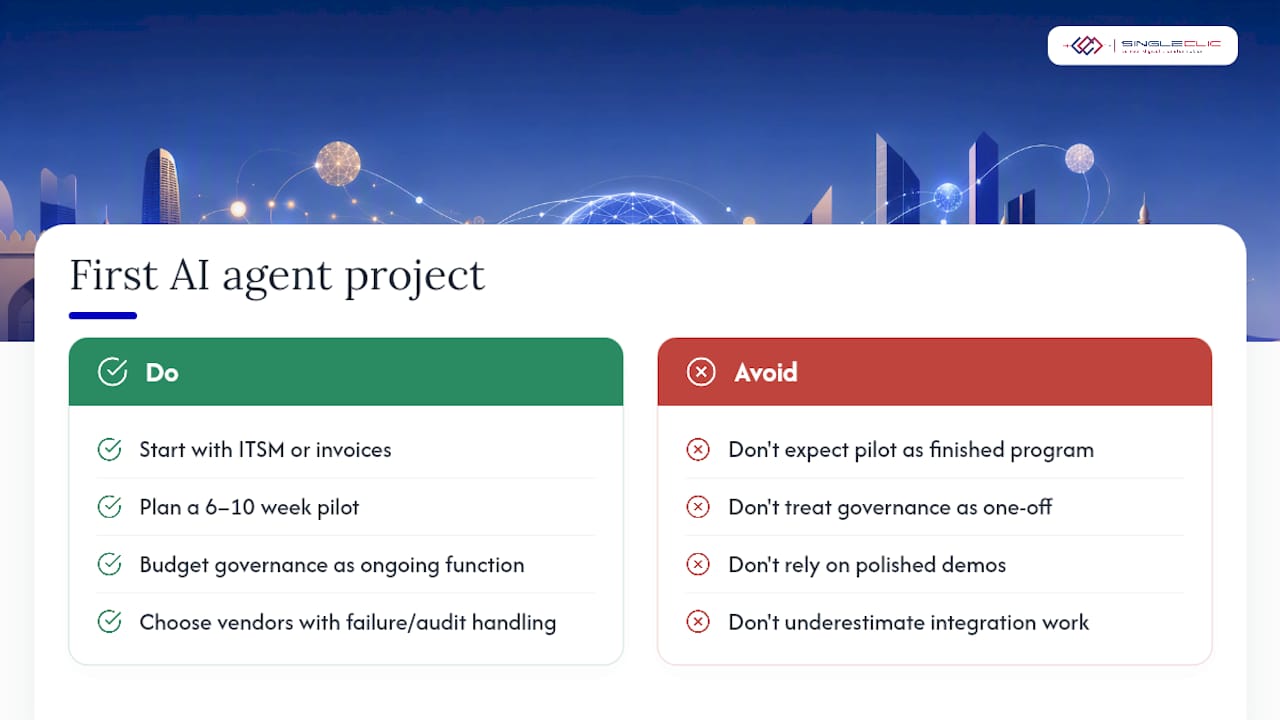
Set realistic timeline expectations from the outset. Six to ten weeks gets you a working pilot, not a finished program, and governance work does not end once the pilot succeeds. It scales with every agent you add afterward, so budget for it as a permanent function, not a one-time setup cost.
On build versus buy: most enterprises underestimate how much of the “build” is actually governance and integration work, not model development. A platform that already handles registry, identity, and connector management saves months compared to assembling those pieces from open-source parts. Evaluate vendors on how they handle failure and audit trails, not just on how well their demo performs. A polished demo tells you nothing about what happens when an agent hits a case it has never seen.
— Tamer Badr
How can Singleclic help you deploy enterprise AI agents?
Most enterprise agent projects stall not because the model is weak, but because nobody built the integration, governance, and Arabic-language layer underneath it. That is the layer Singleclic specializes in.

Singleclic deploys enterprise AI agents on Cortex, connecting them directly to Microsoft Dynamics 365, IBM BAW process flows, and CRM data without forcing a rip-and-replace of your existing systems. Our team has built AI-driven business process automation for banks, healthcare providers, and government entities across the Saudi Arabia and the UAE, so the governance and Arabic UI/UX work is already proven, not theoretical. For teams evaluating Microsoft Copilot agents alongside a low-code build path, we can map both options against your actual systems rather than a generic checklist.
If your first agent use case is still undefined, start with a discovery session. Singleclic will help you pick the pilot with the cleanest data and the clearest ROI case, then scope a Cortex-based deployment built for your compliance requirements from day one. Reach out to start a discovery and pilot scope with our automation team.
Sources
- AI integration platforms (Dremio)
- Agentic AI explained (MIT Sloan)
- Introducing Gemini Enterprise Agent Platform (Google Cloud Blog)