Good RTL UI design for enterprise software means rebuilding the reading path of every screen for Arabic users: navigation that starts on the right, tables that scan right to left, forms that handle mixed Arabic and English input, and charts and codes that correctly stay left to right. Mirroring the layout is the easy 20%. The rest is deciding what must not be mirrored, and testing with real data before go-live.
This guide is written for CIOs, CTOs, and business owners in the UAE and Saudi Arabia who are buying or commissioning ERP, CRM, workflow, or internal applications that staff will use in Arabic every day.
Table of Contents
- TL;DR
- What RTL changes in an enterprise interface
- What not to mirror
- Navigation, dashboards, and tables
- Mixed Arabic and English content
- Forms, data entry, and validation
- Typography, accessibility, and responsive checks
- How to test and implement RTL across enterprise software
- Use cases from the region
- Our perspective on enterprise RTL
- How Singleclic helps
- Ready to review your Arabic interface?
- FAQ
- Sources
TL;DR
- RTL support changes alignment, reading order, navigation, and control placement, not just text direction.
- Some content stays left to right even in Arabic: media controls, many charts, phone numbers, URLs, emails, IDs, and codes.
- Forms, tables, and dashboards need their own RTL rules; a translated English screen is not an Arabic screen.
- Test with real Arabic and mixed-language data, not placeholder text, and check accessibility against UAE government guidance.
- Choose platforms where Arabic is native, not patched in after delivery.
SEO details
- SEO title: RTL UI design for enterprise software: a UAE guide
- Slug: rtl-ui-design-enterprise
- Keyword: rtl ui design enterprise
- Secondary keywords: Arabic UI design, Arabic enterprise software, bidirectional text, RTL dashboards, Arabic-first UX, Arabic low-code platform
- Pillar cluster: Arabic-first enterprise applications > RTL UI design
What RTL changes in an enterprise interface
Right-to-left support is often scoped as “turn on Arabic.” In practice it touches every layer of the screen. Microsoft’s globalization documentation explains that Arabic RTL support changes text alignment and reading order, and that UI elements such as edit-control handles, pull-down buttons, and scrollbars follow the RTL layout. A scrollbar, for example, moves to the left side of the control.
For an enterprise user, that means:
- The eye enters the screen at the top right, so the most important label, status, or action belongs there.
- Sidebars, menus, and step indicators open from the right.
- Progress runs right to left: a workflow’s first step sits on the right, the last on the left.
- Directional icons (back, forward, next, undo-style arrows) point the other way.
The cost of getting this wrong is not cosmetic. A finance approver who has to hunt for the Approve button, or misreads a column because the numbers sit on the wrong side of the label, makes slower and riskier decisions. Our own view is that an Arabic screen should pass a simple test: could a user who has never seen the English version complete the task without hesitation?
If you want the broader argument for treating Arabic as a first-class interface rather than a language pack, see our piece on why Arabic-first UX matters in low-code platforms.
What not to mirror
The most common RTL mistake in enterprise projects is mirroring everything. A flip of the stylesheet produces screens that look Arabic but behave wrongly. Three categories stay as they are.
Media controls and charts
Material Design’s bidirectionality guidance states that media controls for video and audio players are always left to right, because they mirror the physical direction of time on a recording device. The same guidance says graphs and charts keep LTR directionality for Persian and Urdu. That statement names those two languages, so for Arabic charts, decide deliberately: time axes are commonly kept in their familiar direction for analysts who work in both languages, while axis titles, legends, and tooltips are fully translated and aligned to the right. Whatever you choose, apply it consistently across every dashboard so executives do not have to relearn the reading direction per report.
Numbers, codes, and identifiers
Phone numbers, URLs, email addresses, IDs, codes, and embedded English fragments keep their intrinsic left-to-right order even inside an RTL Arabic layout. A trade license number or an invoice reference that is reversed is a defect that can cause a real operational error.
Icons without direction
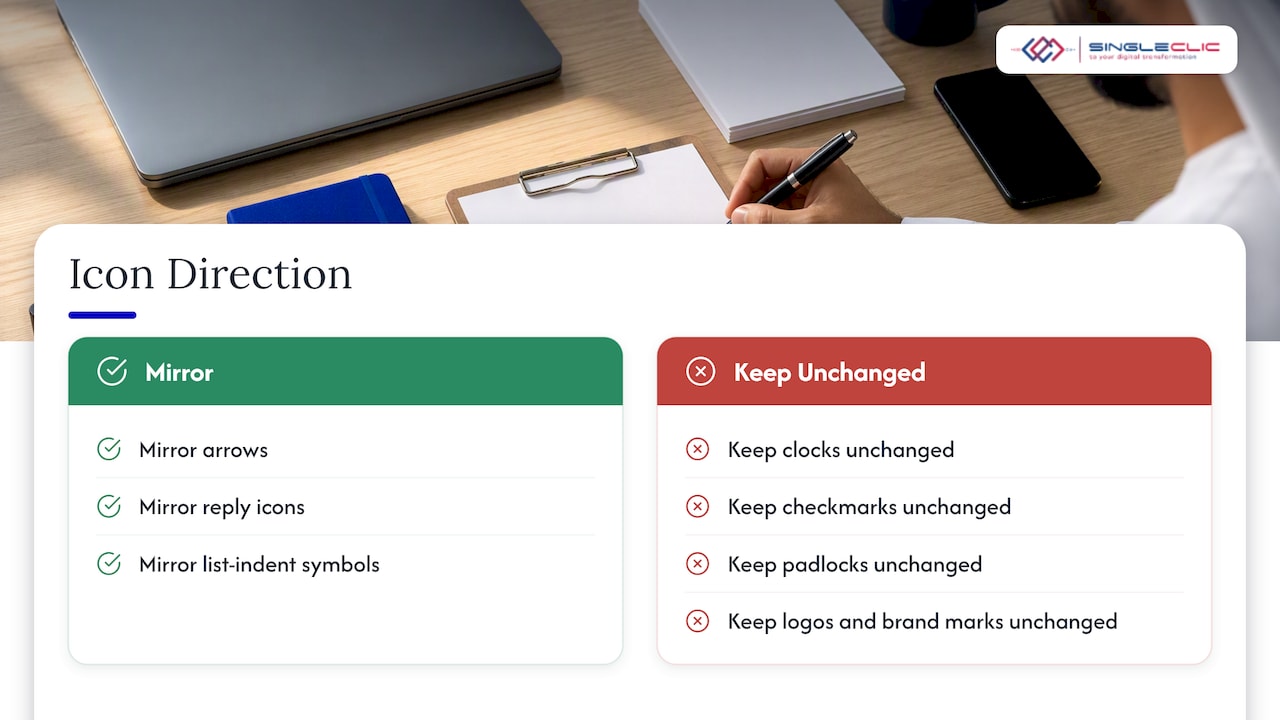
Mirror an arrow, a “reply” icon, or a list-indent symbol. Do not mirror a clock, a checkmark, a padlock, a logo, or a brand mark. Icons that depict real objects with no left-to-right meaning stay unchanged. In design reviews we keep a short icon register with a mirror or keep decision for each icon, so developers do not guess.
Navigation, dashboards, and tables
Enterprise applications are dense: nested menus, data grids, filters, approval queues. These patterns need explicit RTL decisions.
Navigation and workflow screens
Primary navigation starts from the right. Breadcrumbs read right to left, and multi-step forms or approval chains show step one on the right. Main action buttons sit where the Arabic reading path naturally ends, which is usually the bottom left of a dialog, so the confirm button follows the eye instead of fighting it.
For workflow-heavy systems, such as purchase approvals, leave requests, or case management, we recommend that the approval trail be a vertical timeline. It avoids the left-versus-right argument for status steps and works in both directions. Our guidance on designing simple and effective system interfaces covers the broader principles of reducing screen clutter.
Dashboards
Row labels align to the right, the primary KPI sits in the top-right card, and numeric columns stay clear and comparable. Treating Arabic as a translation exercise tends to produce dashboards that look finished but stop helping people decide, because the scanning order is wrong. If your executives live in Power BI, the layout logic in our guide to Power BI executive dashboards for the C-suite applies equally to an Arabic report canvas, with the RTL rules above layered on top.
Tables and data grids
Tables are where RTL projects fail quietly. Check these points:
- The first column (usually the record name or ID) is on the right.
- Row actions (edit, delete, more) are on the left end of each row, at the end of the Arabic scan path.
- Sort arrows, expand chevrons, and pagination controls are mirrored.
- Numeric columns align consistently and use the same digit set everywhere.
- Frozen columns freeze on the right, not the left.
- Horizontal scroll starts at the right edge.
Mixed Arabic and English content
No UAE enterprise works in Arabic only. Customer records mix Arabic names with English company names, SKUs carry Latin letters, and emails never change direction. This is the hardest area of RTL design because the browser must decide direction for each run of text.
The W3C’s Arabic and Persian layout requirements describe how bidirectional algorithms split text into directional runs based on character properties, which is why a sentence with a trailing English word or a number in brackets can render in a surprising order. Developers need to understand that mechanism; designers need to supply real mixed examples so the problems appear before launch.
Practical rules we apply:
- Set direction at the document level and let each field decide its own direction by its data, rather than forcing the whole page.
- Wrap embedded LTR fragments (emails, product codes, URLs) so they keep their order and do not scramble the punctuation around them.
- Use one digit convention across the product. In our delivery work, Latin digits are the safer default for technical metrics, IDs, and financial dashboards, unless the customer requires Arabic-Indic digits. Decide it once, write it in the design system, and apply it to dates, currency, and reports.
- Show currency in a fixed pattern. A dirham amount such as AED 1,200 should read the same way in every list, invoice, and export.
- Avoid all-caps styling on English labels inside Arabic screens; it adds visual noise without meaning.
If you run Odoo or Dynamics 365, the same issues surface in printed output. Our write-ups on Odoo Arabic localization PDFs and Dynamics 365 UAE localization show where mixed content breaks in invoices and statutory documents.
Forms, data entry, and validation
Forms decide whether staff adopt a system. In an Arabic interface:
- Labels and helper text align to the right, and text fields follow the page direction.
- Phone, email, URL, card-number, and one-time-code fields stay LTR, as Ritla’s RTL principles set out, because users type those values in Latin characters and expect them to read left to right.
- Labels, help text, and validation messages are all translated, not just the labels. An English error under an Arabic field breaks trust immediately.
- Error messages appear directly under the field concerned and say what to correct, for example which format an Emirates ID number expects, rather than “Invalid input.”
- Placeholder text should never be the only label; it disappears and flips unpredictably in mixed content.
For onboarding screens that handle a Latin name next to an Arabic name, give each field its own direction and let the user enter both without the cursor jumping.
Typography, accessibility, and responsive checks
Typography
Arabic needs fonts designed for screen reading. Our working standards are a body size of at least 15 px and a line height in the 1.65 to 1.8 range, because Arabic letterforms carry dots and marks above and below the baseline that crowd at tight spacing. Avoid tight letter spacing entirely: it breaks the connection between letters. Check weight and size parity with the English UI too, since many Latin fonts look heavy next to a light Arabic face.
Accessibility in the UAE
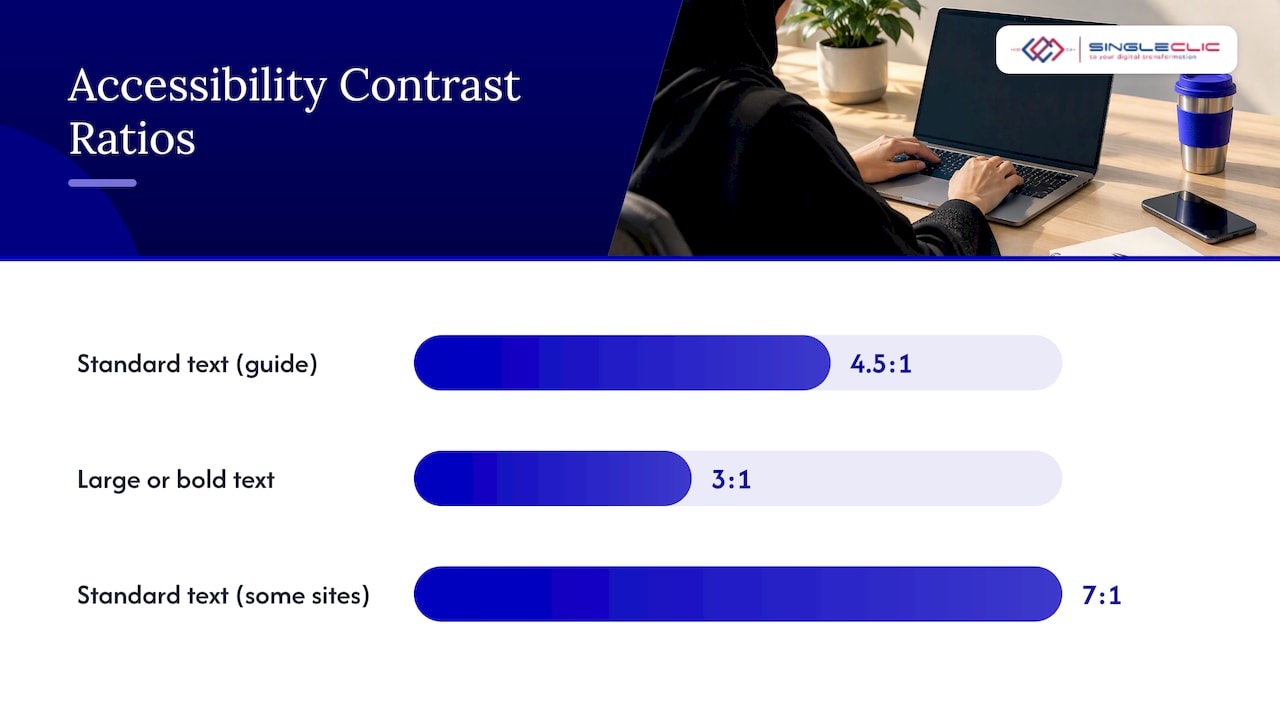
The UAE’s Telecommunications and Digital Government Regulatory Authority published a web accessibility guide for government in January 2016. It is inspired by WCAG 2.0 and provides selected guidance, not a comprehensive WCAG reference or policy, so treat it as a baseline and align your own acceptance criteria to current WCAG. The guide recommends contrast of at least 4.5:1 for standard text and 3:1 for text of 18 px or larger, or bold text of 14 px or larger; some sites go to 7:1 for standard text. It also makes the point that accessibility is shared work among designers, content writers, and developers, which matches how RTL quality works in practice.
Because the guide is dated and selective, ask your vendor which WCAG level they test against and request the report. If you serve public-sector customers, confirm the current requirements with your regulator or legal adviser before sign-off.
Responsive and touch
Enterprise users approve on phones. Verify the mirrored layout on small screens, thumb reach for the primary action, bottom sheets that open from the correct side, and swipe gestures whose direction matches the reading flow.
How to test and implement RTL across enterprise software
Microsoft’s guidance lists what to validate: UI mirroring, consistency of the RTL experience, touch optimization, and mixed-text support. Turn that into a repeatable plan.
- Define the design rules first. Write a one-page RTL standard: mirror and keep lists, digit convention, chart direction, typography scale.
- Set the basics in code. Confirm the document has the right language and direction attributes. It is a frequent and simple omission, and it affects screen readers and browser behavior.
- Build with logical properties. Use start and end instead of left and right in styles, so one codebase serves both directions.
- Test with production-like data. Use real Arabic names, long company names, mixed SKUs, and Arabic validation messages. Placeholder text hides the exact problems that appear in static mockups.
- Run adversarial strings. Feed fields with a Latin name inside Arabic text, trailing punctuation, brackets, long numbers, and URLs.
- Check parity. Every task, state, and term should work the same in Arabic and English. If an approval status has three labels in English, Arabic must not merge two of them.
- Review with native Arabic users. A native user from the business, not only a translator, signs off on terminology and flow.
- Retest after every release. RTL regressions return with each new component.
Use cases from the region
- Healthcare: patient and clinical forms mixing Arabic names, English drug names, and numeric IDs. Field-level direction and clear validation are the core requirements.
- Banking: approval queues and credit workflows where table scanning, number alignment, and audit trails must be unambiguous.
- Real estate and construction: contracts, unit lists, and payment schedules with mixed currency and area measurements.
- Government: public-facing services under accessibility expectations, with on-premise hosting for data control.
No single UI pattern fits all four. The common thread is that Arabic-speaking staff are not an afterthought group, but often the majority of users.
Our perspective on enterprise RTL
We see the same pattern on enterprise projects in the UAE and Saudi Arabia. A platform is chosen for its features, Arabic is added at the end as a language pack, and months later adoption stalls because screens feel foreign. Fixing this late costs more than designing for it early, because direction affects components, reports, printed documents, and integrations at once.
Our approach is to treat direction as an architectural decision on day one: the design system, the data model for bilingual fields, and the test plan all start from Arabic. That is also why we built Cortex, our Arabic-enabled, on-premise low-code platform, with a full Arabic interface and runtime workflow changes without downtime. Teams adjust an approval form and keep their RTL behavior intact instead of reopening a development cycle.
— Tamer Badr
How Singleclic helps
Singleclic delivers Dynamics 365, Odoo, IBM BAW, and Cortex projects for organizations across the UAE, Saudi Arabia, and Egypt, with sector experience in healthcare, banking, real estate, construction, and government. For RTL work specifically, we can:
- Audit an existing ERP, CRM, or workflow screen set against the rules in this guide.
- Design and build Arabic-first approval flows, forms, and dashboards on Cortex, including on-premise deployment for regulated teams. Read more about Arabic low-code platforms for MENA.
- Localize Dynamics 365 and Odoo, including documents and reports.
- Connect the interface to ERP, CRM, and legacy systems so Arabic data flows consistently end to end.
See our services overview for the full range, or visit Singleclic to talk to a consultant about your Arabic interface requirements.
Adoption is the other half of the story: a well-built RTL screen still needs change management, which we cover in CRM adoption best practices for Saudi Arabia and UAE.
Ready to review your Arabic interface?
Bring us the three screens your Arabic-speaking staff complain about most. We will map what breaks, what to mirror, and what to keep, and show you what an Arabic-first fix looks like on your own system. Contact Singleclic to book a working session.
FAQ
What is RTL UI design in enterprise software?
It is the practice of designing and building interfaces so Arabic, Hebrew, and other right-to-left language users get a native layout: right-aligned text, mirrored navigation and controls, and correct handling of mixed-direction content. In enterprise software it covers forms, tables, dashboards, workflows, and printed documents, not only the home page.
Should every element be mirrored in an Arabic interface?
No. Directional controls such as back arrows, sidebars, and scrollbars mirror, while media controls stay left to right, and phone numbers, URLs, emails, and codes keep their order. Charts need a deliberate, consistent decision per product.
Which digits should an Arabic enterprise screen use?
There is no single rule. For technical metrics, IDs, and financial dashboards we default to Latin digits, and use Arabic-Indic digits only when the customer’s policy requires them. Whichever you choose, apply it to dates, currency, and exports consistently.
How do we test RTL support before go-live?
Validate mirroring, consistency, touch behavior, and mixed-text handling, using real Arabic data and adversarial strings instead of dummy text. Add review by native Arabic business users and retest on every release.
Are there UAE accessibility requirements for Arabic interfaces?
The UAE government has published web accessibility guidance with contrast ratios of 4.5:1 for standard text. It is selective and based on WCAG 2.0, so confirm which requirements apply to your service with your regulator or legal adviser, and test against current WCAG.
Sources
- Mirroring – Globalization, Microsoft Learn
- Bidirectionality & RTL, Material Design 3
- Arabic and RTL principles, Ritla UI
- Arabic & Persian Layout Requirements, W3C
- Guidelines for web accessibility, TDRA (UAE)