Dynamics 365 Human Resources gives HR teams one place to manage people records, leave and absence, benefits, compensation, learning and employee self-service, all on the Microsoft Dataverse platform. It covers the HR core well. What it does not do out of the box is handle every local rule in the UAE or Saudi Arabia, so the real question for a CIO or HR director is how the features fit your finance system, your payroll and your regulators. This guide walks through each feature area, shows where integration decisions matter, and flags the gaps to plan for.
TL;DR
- Core features include personnel management, employee and manager self-service, leave and absence, benefits, compensation and training, built on a shared data layer.
- Integration runs through Dataverse, and a dedicated Payroll API connects HR to external payroll providers.
- You can run HR standalone or alongside Finance and Operations. Tight financial posting favors the second option.
- It is not plug-and-play for GCC payroll rules such as WPS, GOSI or Mudad. Budget for localization and integration.
- A regional implementation partner decides whether the system reduces administration or just moves it.
Table of Contents
- What Dynamics 365 Human Resources is built to do
- Core features of Dynamics 365 Human Resources
- Feature overview at a glance
- Integration: where the architecture decision sits
- Standalone HR or HR inside Finance and Operations?
- What the standard features do not cover in the UAE
- Where the features pay off: three use cases
- Our perspective
- How Singleclic helps
- FAQ
- Sources
What Dynamics 365 Human Resources is built to do
Microsoft positions the product as an HR application that connects people data with the rest of the Dynamics 365 family. Its documentation hub covers training, setup and product capabilities for HR staff and administrators.
For a leadership team, the value is less about any single feature and more about a single source of truth. When employee records, absence balances, benefits elections and organizational structures live in one environment, HR stops reconciling spreadsheets and exports. Managers see the same facts HR sees. Finance sees the same headcount that HR reports.
The main feature areas are below. We then cover how they connect.
Core features of Dynamics 365 Human Resources
Personnel management
Personnel management is the foundation. You define jobs, positions and the organizational structure, then attach workers to them. Everything else, from leave rules to compensation, hangs off these records. For a group with several legal entities, such as a holding company with subsidiaries in Dubai, Abu Dhabi and Riyadh, a clean structure is what makes consolidated reporting possible later.
Practical advice: design the job and position model before you migrate any data. A messy job catalog is the most common reason HR reports disagree with finance reports after go-live.
Employee and manager self-service
The Employee self service workspace is the gateway where employees view essential company information and handle their own requests, such as time off. Managers get a matching view of their team. The business case is simple: every leave request, address change or benefits question that an employee handles directly is one less ticket for the HR operations team.
In a workforce with many nationalities and a mix of office and field staff, self-service also means consistent, auditable requests instead of messages in chat apps.
Leave and absence
You create a leave and absence plan for each type of leave you offer, and plans can accrue at defined intervals. That matters in the UAE, where annual, sick, maternity and other leave types follow different rules and entitlements. The system gives you the engine for accruals and balances. Your implementation team must then configure the plans to match your contracts and the applicable labor law.
Benefits management
The benefits management module is designed for organizations that need a rich set of benefits to attract and retain talent, beyond standard medical and dental cover. You can define plans with eligibility rules, tiers and enrollment, so a senior manager and a field technician each see only the options that apply to them. For employers that offer housing, transport or education allowances, this is where those rules become structured data instead of side agreements.
Compensation management
Compensation management lets you design pay structures and grids, so salary decisions follow a defined framework rather than case-by-case negotiation. Linked to personnel records, it supports pay reviews, grade structures and consistent offers across entities. Leaders gain visibility into pay equity and cost, which is difficult when compensation lives in separate files.
Learning, performance and wider talent processes
The product documentation also covers training and courses, where administrators and managers maintain course information. Combined with job and skills data, this gives HR a record of who is trained for what. In regulated sectors such as healthcare, government and banking, that record supports audits as much as development.
Feature management and release cadence
New capabilities arrive on a release schedule. The Feature management workspace lists features delivered in each release, and by default new features are turned off until you enable them. For IT, this is a useful control: you decide when a change reaches your users, and you can test it first.
Feature overview at a glance
| Feature area | What it handles | Who benefits most |
|---|---|---|
| Personnel management | Jobs, positions, organization structure, worker records | HR operations, finance |
| Self-service | Employee and manager requests such as time off | Employees, line managers |
| Leave and absence | Leave plans, accruals, balances | HR, payroll |
| Benefits | Plans, eligibility rules, enrollment | Total rewards teams |
| Compensation | Pay structures and grids | CHRO, finance leadership |
| Learning | Courses and training records | Compliance, department heads |
| Integration | Dataverse, Payroll API, Power Platform | CIO, CTO |
Integration: where the architecture decision sits
Most HR projects succeed or fail on integration, not on features. Microsoft describes several integration technologies and how to choose between them. Dataverse is the preferred interface.
Virtual tables or native tables
Human Resources acts as a virtual data source in Dataverse, with full create, read, update and delete operations from Dataverse and Power Platform. The data stays in HR and is not copied. That suits real-time apps, such as a Power Apps screen that shows live leave balances.
Where you need data physically in Dataverse, for example for long-term reporting, the Data Integrator and its Human Resources to Dataverse template handle the synchronization. Our rule of thumb:
- Virtual tables for live lookups and workflow apps that should never hold a second copy of employee data.
- Native tables for analytics and Power BI models that combine HR with sales, projects or finance.
Payroll integration
The Payroll integration API enables streamlined end-to-end integration between Human Resources and partner payroll systems. This is the pattern most GCC employers will use, because payroll in the region usually involves bank files, government platforms and local rules that sit outside the HR application.
Standalone HR or HR inside Finance and Operations?
This is the decision leaders ask us about most. The two models differ in how they handle money.
| Criterion | Standalone Human Resources | HR within Finance and Operations |
|---|---|---|
| Financial integration | Through integration and the Payroll API | Native, in one application |
| Best for | Multi-entity groups that want separated operations with central control | Organizations that already run or plan to run Finance and Operations |
| Integration effort | Higher, but flexible | Lower for finance-related flows |
| Data isolation | Stronger between entities | Shared with the finance environment |
If your CFO wants payroll and accruals posted to the general ledger without custom middleware, the embedded model is usually simpler. If you run several distinct entities that must keep their operations separate, the standalone model with Dataverse as the connector can fit better. Neither is universally right. The correct answer depends on the architecture you already have. Our guide to Dynamics 365 implementation in the UAE explains how we approach that choice for finance and IT teams.
What the standard features do not cover in the UAE
This is the part vendor brochures skip. Dynamics 365 Human Resources is highly extensible, but it is not a ready-made answer to local statutory processes. Regional payroll tasks such as WPS file submission in the UAE, or GOSI and Mudad in Saudi Arabia, typically need supplementary localized solutions or API integration. Trying to handle them with out-of-the-box functions alone leads to manual work.
The UAE rules also keep moving. EY reports that the UAE introduced an enhanced Wage Protection System, effective 1 June 2026, with updated requirements for private sector employers. If your payroll process is built on assumptions from two years ago, review it against the current requirements with your payroll provider and legal advisers before go-live.
A realistic UAE checklist for an HR project:
- List every statutory output you must produce each month (salary files, end-of-service calculations, reports to authorities) and who owns each.
- Decide which of those the HR application, the payroll provider or a local add-on will produce.
- Map leave types, notice periods and end-of-service rules to configuration, with sign-off from legal or HR.
- Test with real payroll cycles in a sandbox, not sample data.
- Plan for rule changes: who monitors them, and how fast can you update configuration?
For the finance side of compliance, see our article on Dynamics 365 UAE localization. For Saudi operations, our piece on how Microsoft Copilot is transforming HR in Saudi Arabia covers the AI layer on top of HR data.
Where the features pay off: three use cases
Multi-entity group. A holding company with subsidiaries in several emirates and in Saudi Arabia needs consistent job structures and a central view of headcount, while each entity keeps its own leave and payroll rules. Standalone HR with Dataverse as the connector fits this well.
Healthcare operator. Clinics and hospitals manage shift-based staff, licenses and training records. Course and training records, plus self-service for leave, reduce coordinator workload. It pairs naturally with the approach in our article on Dynamics 365 for healthcare in MENA, where the aim is to add capability without replacing the clinical system.
Government or bank with approval-heavy processes. Hiring approvals, position changes and exceptions pass through several signatories. Here the HR application holds the record, and a workflow layer routes the approvals. That is where a low-code platform earns its place.
Our perspective
We see the same pattern in HR projects across the Gulf. Organizations buy the application for its feature list, then discover that the real work lies in three places: the data model, the integration with payroll and banks, and the approval flows that sit around HR decisions.
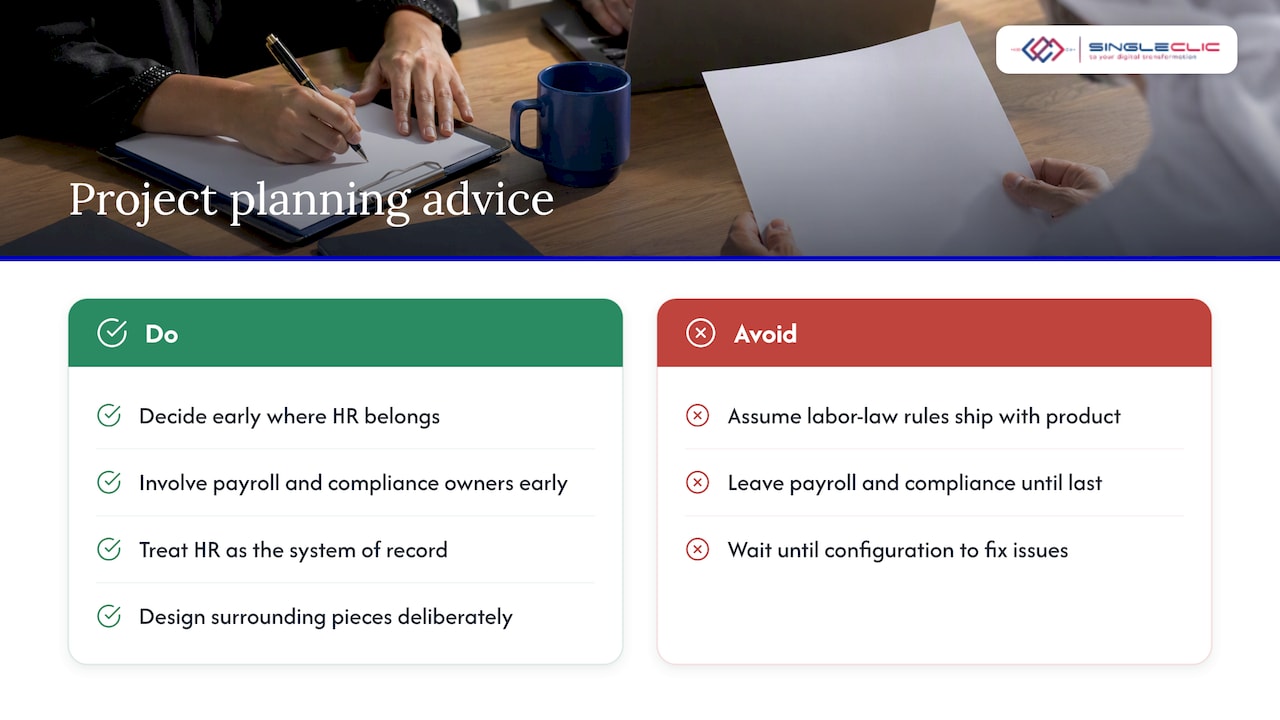
The features are solid. Self-service, leave, benefits and compensation do what they claim, and the Dataverse foundation is a genuine advantage because HR data can feed other applications without being copied around. But no product ships with your labor-law interpretation, your allowance structure or your bank’s file format. Treat the application as the system of record and design the surrounding pieces deliberately.
Our advice to CIOs and HR leaders is to decide early whether HR belongs inside Finance and Operations or beside it, and to involve payroll and compliance owners in the first workshop rather than the last. The cheapest fix is always the one made before configuration starts.
— Tamer Badr
How Singleclic helps
We are a Microsoft Dynamics 365 integrator serving organizations in the UAE, Saudi Arabia and Egypt, with more than 70 consultants and engineers and over 10 years of delivery in the region. For an HR project, our work typically falls into four parts:
- Consultancy and architecture: helping you choose between standalone and embedded HR, and defining the Dataverse integration pattern. See our Dynamics 365 services.
- Implementation and customization: configuring leave, benefits and compensation to your policies, and extending where standard features stop.
- Integration: connecting HR to payroll, banks, finance and legacy systems.
- Workflow and approvals: using Cortex, our Arabic-enabled, on-premise low-code and BPM platform, to connect approvals, ERP, CRM, data and legacy systems into one flow. It supports full Arabic UI, unlimited users and on-premise deployment for banks and government bodies. Learn more about our business process automation services.
If you are evaluating Dynamics 365 Human Resources for a UAE or Saudi organization, talk to our team about a scoping session. We will map your HR processes and statutory outputs against the standard features and tell you plainly where extra work is needed.
You may also want the broader context in our leader’s guide to Microsoft Dynamics 365.
FAQ
What are the main features of Dynamics 365 Human Resources?
The main features are personnel management, employee and manager self-service, leave and absence, benefits management, compensation management and training. They sit on Dataverse, so the data can connect to other Microsoft applications. The exact set available to you depends on the release and on which features you have enabled.
Does Dynamics 365 Human Resources handle UAE payroll and WPS?
Not completely out of the box. The application provides a Payroll API for connecting to external payroll systems, but UAE-specific outputs such as WPS files usually need a localized add-on or an integrated payroll provider. Confirm the current WPS requirements with your payroll provider before configuration.
Should we run HR standalone or inside Finance and Operations?
Choose the embedded model if tight financial integration, such as ledger posting for payroll and accruals, is the priority. Choose standalone if you have several entities that need separated operations with central control through Dataverse. Your existing architecture should drive the decision.
How does Dynamics 365 Human Resources integrate with other systems?
Dataverse is the preferred integration interface. Virtual tables give real-time access without copying data, and the Data Integrator handles batch synchronization into native Dataverse tables. A dedicated Payroll API covers payroll providers.
Can employees use it without HR involvement?
Yes, for routine requests. The self-service workspace lets employees view company information and handle requests such as time off, and managers get their own view. HR keeps control through the policies and approval rules you configure.
Sources
- Microsoft Dynamics 365 Human Resources documentation
- Employee self service overview
- Create a leave and absence plan
- Benefits management overview
- Manage features in Human Resources
- Choose an integration technology
- Configure Dataverse virtual tables
- Configure integration with Dataverse tables
- Payroll integration API introduction
- UAE introduces enhanced Wage Protection System, effective 1 June 2026 (EY)
SEO details. SEO title: Dynamics 365 Human Resources features: what UAE leaders get. Slug: dynamics-365-human-resources-features. Keyword: dynamics 365 human resources features. Secondary keywords: Dynamics 365 HR module, D365 HR self-service, Dynamics 365 payroll integration, HR automation UAE. Pillar cluster: Microsoft Dynamics 365 implementation in MENA. Article type: feature guide with use cases.