For SWIFT integration Dynamics 365 projects, we recommend SWIFT cloud connectivity through Alliance Cloud or Alliance Connect Virtual, with Azure Logic Apps as the middleware and Dynamics 365 Electronic Reporting handling ISO 20022 files. Business Connect suits embedded or lower-volume needs. For production treasury, follow the SWIFT Customer Security Programme controls and deploy vSRX in high availability. Your first step: confirm your bank’s ISO 20022 version.
TL;DR:
- Request the bank’s exact ISO 20022 schema version and sample pain and camt files, because regional variants and remittance tags can require ER mapping extensions.
- Start with payment initiation, payment status, and account reporting; add treasury or trade messages only when a named finance process needs them.
- Test rejected payments, malformed files, duplicate submissions, and late notifications, then interrupt network paths and fail over vSRX to verify safe recovery.
- Give each alert an owner and runbook: retry timeouts automatically, send missing remittance data to finance, and route certificate failures to security.
- Track standards changes and certificate expiry, version ER configurations, and rerun bank supplied regression files before promoting updates to production.
Table of Contents
- Which SWIFT connectivity options fit a Dynamics 365 project?
- Reference architecture: SWIFT on Azure connected to Dynamics 365
- Middleware and message formats: Azure Logic Apps plus Dynamics 365 ER and ISO 20022
- Implementation checklist and common pitfalls to avoid
- Which SWIFT message types matter beyond MT and ISO 20022 formats?
- How does a SWIFT message move through a Dynamics 365 environment?
- How do you test a SWIFT integration with Dynamics 365?
- How do you monitor and handle errors after go-live?
- What does ongoing maintenance of SWIFT interfaces involve?
- What compliance rules apply to SWIFT transactions in KSA, UAE and Egypt?
- Regional priorities and governance for MENA implementations
- How we help with Dynamics 365 SWIFT integration
- FAQ
- Sources
Which SWIFT connectivity options fit a Dynamics 365 project?
Several SWIFT channels come up in ERP projects. They differ in who runs the infrastructure and how much volume they are built for, so the right pick depends on your risk and scale profile.
- Alliance Cloud is a managed channel that lets enterprise systems exchange secure financial messages with more than 11,500 financial institutions across 200+ countries, and it lowers infrastructure and maintenance overhead compared with an on-premises setup.
- Alliance Connect Virtual can be hosted in Azure and is commonly deployed with a vSRX appliance in a high-availability pair. It suits regulated or high-volume treasury setups that need resilience and want to avoid owning physical SWIFT hardware.
- Business Connect is an embedded option that gives applications access to SWIFT messaging and API services with minimal infrastructure and maintenance. It fits SaaS scenarios and lower-scale corporate integrations.
Selection comes down to a few questions. How many messages do you send, and what recovery targets does your treasury team expect? Which security obligations apply to your organization under the SWIFT Customer Security Programme? How much operational overhead can your IT team absorb?
If you run high volumes with strict resilience needs, Alliance Connect Virtual on Azure is usually the natural fit. If you are a smaller team that wants fast onboarding, Business Connect keeps certificate and token handling light. Alliance Cloud sits between the two when you want a managed channel without building the network layer yourself.
Reference architecture: SWIFT on Azure connected to Dynamics 365
The pattern is straightforward. The SWIFT network connects to Alliance Connect Virtual running as vSRX nodes in Azure, which sit inside a secured virtual network next to your integration services. Dynamics 365 Finance talks to that layer through the middleware, never directly to SWIFT.
Microsoft documents this deployment in its Alliance Connect Virtual on Azure architecture guidance, which describes vSRX in a high-availability configuration built to meet SWIFT CSP requirements while keeping treasury operations resilient. The core components we include in a typical build:
- vSRX high-availability pair for the SWIFT-facing connectivity layer.
- Azure Key Vault for keys and certificates, so secrets never sit in configuration files.
- Azure Policy to enforce CSP-aligned controls across the subscription.
- Azure Monitor for telemetry from the network and integration layers.
- ExpressRoute or dual VPN for resilient private connectivity between your sites, the bank network and Azure.
SWIFT’s own documentation lists bronze, silver and gold connectivity tiers, along with API and file connectors and the SWIFT Integration Layer. Pick the tier by message volume and the service levels your treasury team needs. A lower tier is fine for modest volumes with tolerant recovery windows, while gold-level resilience belongs with payment runs the business cannot afford to delay.
Moving from on-premises SWIFT infrastructure to Alliance Cloud or Azure-hosted virtual connectivity lowers total cost of ownership and reduces the security and maintenance burden, according to SWIFT’s Alliance Cloud material.
Operational controls complete the design: monitoring, patching schedules, annual CSP attestation, and a disaster recovery plan you actually rehearse. Strong authentication matters here too. Hardware security keys for Azure sign-ins are one option, as this guide on enforcing MFA for Azure logins explains (it is in Greek).
Middleware and message formats: Azure Logic Apps plus Dynamics 365 ER and ISO 20022
Dynamics 365 does not speak to the SWIFT network natively, so you need a translation layer. Azure Logic Apps does that job. Custom architectures commonly use it to transform and route SWIFT messages, whether MT or XML, between Dynamics 365 and banking gateways, using mTLS and OAuth 2.0 for secure, real-time orchestration. Microsoft’s own reference architecture for Finance also routes inbound and outbound integrations through Logic Apps for transformation and routing.
On the Dynamics side, Electronic Reporting (ER) is the configurable tool for building and maintaining regulatory formats. It supports model and format versioning, format designers and distribution of configurations through Dataverse. For payments, ER uses Payment model mappings, and Microsoft’s ISO 20022 documentation covers the pain initiation, payment status and debit and credit notification formats.
| Format | Role in the flow | Where it is handled |
|---|---|---|
| pain initiation | Outbound customer credit transfer initiation | ER export format from the Payment model |
| payment status | Inbound payment status report | ER import format |
| debit and credit notification | Inbound debit and credit notification | ER import format |
A typical flow runs like this: receive and validate the message, transform it in Logic Apps to the ERP-ready shape, let the ER mapping produce the file or post the result to processed payments, and let Finance reconcile.
Pro Tip: Ask your bank for sample pain and camt files early, then test them against your ER format before building any workflow around them.
Some banks require region-specific tags or extensions. In those cases, many projects bring in a partner or ISV banking app rather than stretching the standard formats.
Implementation checklist and common pitfalls to avoid
Work in this order and most surprises disappear:
- Confirm the ISO 20022 version your bank expects and collect sample files.
- Start RMA onboarding with your bank and choose the connectivity option and the ExpressRoute or VPN plan.
- Deploy vSRX in high availability, then configure Key Vault and Azure Policy to match SWIFT CSP guidance.
- In Dynamics 365, set up bank accounts with IBAN and SWIFT codes, import the ER format configurations, and set the Payment model mappings.
- Enable advanced bank reconciliation if you plan to use it.
- Run end-to-end validation, reconciliation tests and failover drills, and switch on monitoring and alerting before go-live.
The most expensive pitfall is trusting out-of-the-box ER mappings. Teams often discover late that the bank’s schema version differs or that invoice-level remittance data needs extra XML tags, which leads to manual reconciliation. Microsoft’s guidance on advanced bank reconciliation import shows how ER import is configured, and the lesson is to plan mapping extensions early rather than after the first failed file.
Pro Tip: Version every ER configuration you extend, so a bank schema update becomes a controlled change rather than an emergency.
Which SWIFT message types matter beyond MT and ISO 20022 formats?
Most Dynamics 365 projects start with MT and ISO 20022 payment files, but the picture is wider. Think in terms of message families and what each one does for finance.
Payment initiation and status messages carry instructions out and confirmations back. Cash management and account reporting messages deliver statements and intraday notifications, which feed bank reconciliation. Foreign exchange and treasury confirmations matter if your treasury team trades currencies. Trade finance messages cover letters of credit and guarantees for organizations that import or export heavily.
SWIFT also offers API-based services alongside classic messaging, which is why the connectivity layer supports both file and API connectors. For Dynamics 365, the practical question is simpler than the catalog: which messages does your finance process need to send or receive? Start with payment initiation, status and account reporting, since these map directly onto ER formats and bank reconciliation. Add treasury or trade messages only when a business owner can name the process they improve.
Keep the scope honest. A message type without a Dynamics 365 process behind it adds mapping work and monitoring burden with no return. We usually inventory message types with the treasury team in a short workshop and tie each to an ERP document, such as a vendor payment journal or a bank statement.
How does a SWIFT message move through a Dynamics 365 environment?
Follow one outbound payment from start to finish. A vendor invoice is approved in Dynamics 365 Finance and included in a payment proposal. The ER Payment model mapping generates a pain initiation file. A Logic Apps workflow picks the file up, validates it, applies any needed transformation and hands it to the SWIFT connectivity layer, where Alliance Cloud, Alliance Connect Virtual or Business Connect delivers it to the bank.
The return path matters just as much. The bank sends back a payment status report, and later a debit and credit notification when funds move. Logic Apps receives these, validates them and passes them to ER import formats. Dynamics 365 then updates payment status and, where configured, reconciles the bank transactions against open items.
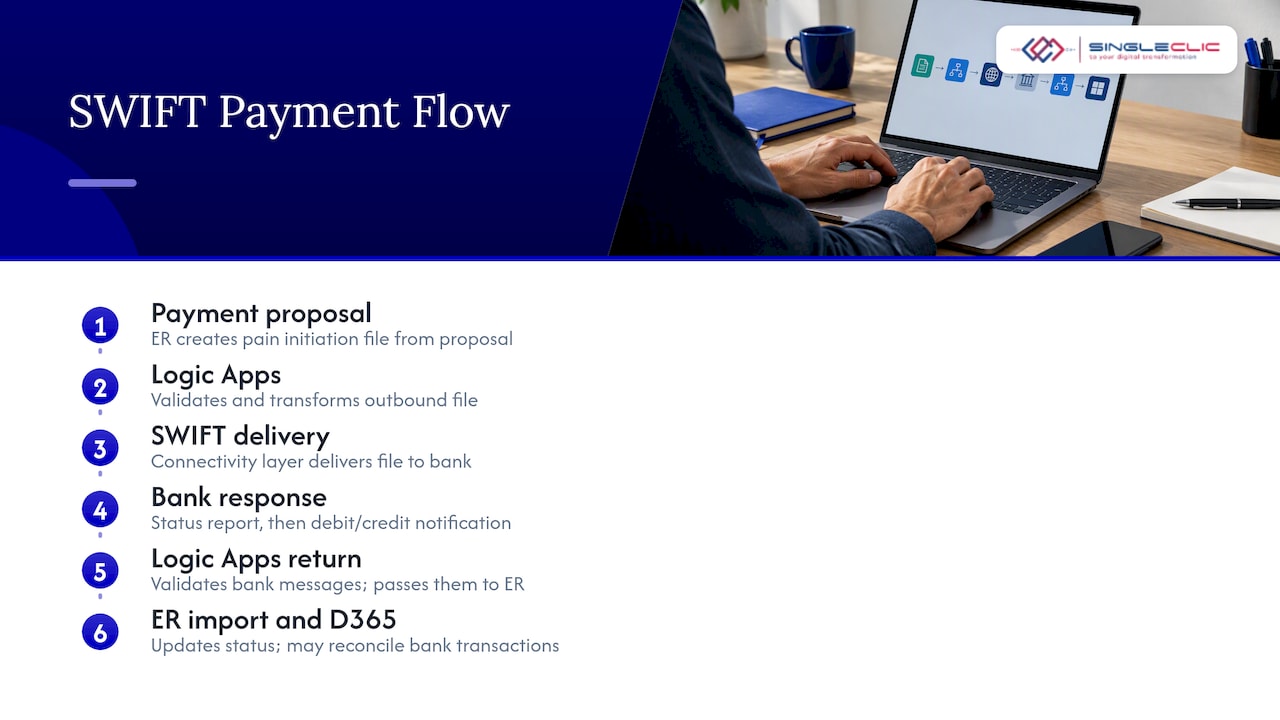
A few design rules help keep this flow healthy. Give every message a correlation ID that travels from the ERP document to the bank acknowledgment, so support teams can trace any payment. Keep the middleware stateless where possible and store state in a durable place, so retries do not create duplicates. Separate validation from transformation, so a rejected message tells you whether the problem is format or content.
Cortex, our low-code and BPM platform, can sit beside this flow for approvals and exception queues, connecting people, ERP, CRM and legacy systems without custom code.
How do you test a SWIFT integration with Dynamics 365?
Testing happens in layers, and skipping one layer shows up as a production incident.
Start with format testing. Validate generated pain initiation files against the schema version your bank specifies, and run bank-supplied sample files through your ER import formats. Next comes component testing of the Logic Apps workflows, using recorded sample messages to check transformation, error branches and retries.
Then run end-to-end tests in the bank’s test environment. Send a payment from Dynamics 365, confirm the status report returns, and watch the reconciliation complete. Include negative cases on purpose: a rejected payment, a malformed file, a duplicate submission and a late debit and credit notification.
Resilience testing is the layer teams skip most often. Fail over the vSRX pair, interrupt the ExpressRoute or VPN path, and confirm messages queue and recover without loss or duplication. Finally, run user acceptance with the treasury and accounts payable teams, who know what a correct reconciliation looks like.
For tooling, the Logic Apps run history, Azure Monitor and the Dynamics 365 payment journals give you most of what you need. Keep a regression pack of sample files per bank, and rerun it whenever an ER configuration or the bank’s schema changes.
How do you monitor and handle errors after go-live?
Once the integration is live, monitoring is what protects your payment runs. Build alerting around the places failures appear, including the connectivity layer, the middleware and the ERP.
At the connectivity layer, use Azure Monitor to watch the vSRX pair and the network paths, and alert on failover events and degraded links. In the middleware, Logic Apps run history shows failed runs, and you can route failures into an alert and a retry queue. In Dynamics 365, watch for payment files that fail to import and for statements that do not reconcile.
Classify errors so the right person responds. Transient errors, such as a timeout, should retry automatically with a limit. Data errors, such as a missing remittance tag, go to a finance queue with the message attached. Security or certificate errors go straight to IT and the security officer.
Every alert needs an owner and a runbook. “Payment file rejected by bank” should lead to a documented set of steps, not a debate. We often build the exception queue as a low-code workflow in Cortex, so treasury staff can review, correct and resubmit messages without opening a ticket for each one.
Review alert noise monthly. An alert people ignore is worse than none.
What does ongoing maintenance of SWIFT interfaces involve?
SWIFT interfaces are living systems. Bank requirements change, standards evolve and certificates expire, so maintenance deserves a calendar rather than good intentions.
Track the SWIFT standards release cycle and your bank’s announcements, and schedule a review ahead of each change. When an ISO 20022 version changes, update the ER format configuration in a development environment first, run your regression pack, and only then promote it. Versioned ER configurations make rollback straightforward.
Keep a certificate and credential register in Azure Key Vault terms: what expires, who renews it and when. Patch the vSRX appliances and the Azure components on a defined cadence, and rehearse failover after major changes. Dynamics 365 updates can affect ER and payment behavior, so include the integration in your release validation for every service update.
Document the interface. A short, current document covering message flows, mappings, owners and runbooks saves days when a team member leaves. Pair it with a yearly CSP attestation review, so security evidence is gathered continuously rather than in a scramble.
Finally, measure the interface: failed messages, retry counts and time to resolve exceptions. Those numbers tell you where to invest next.
What compliance rules apply to SWIFT transactions in KSA, UAE and Egypt?
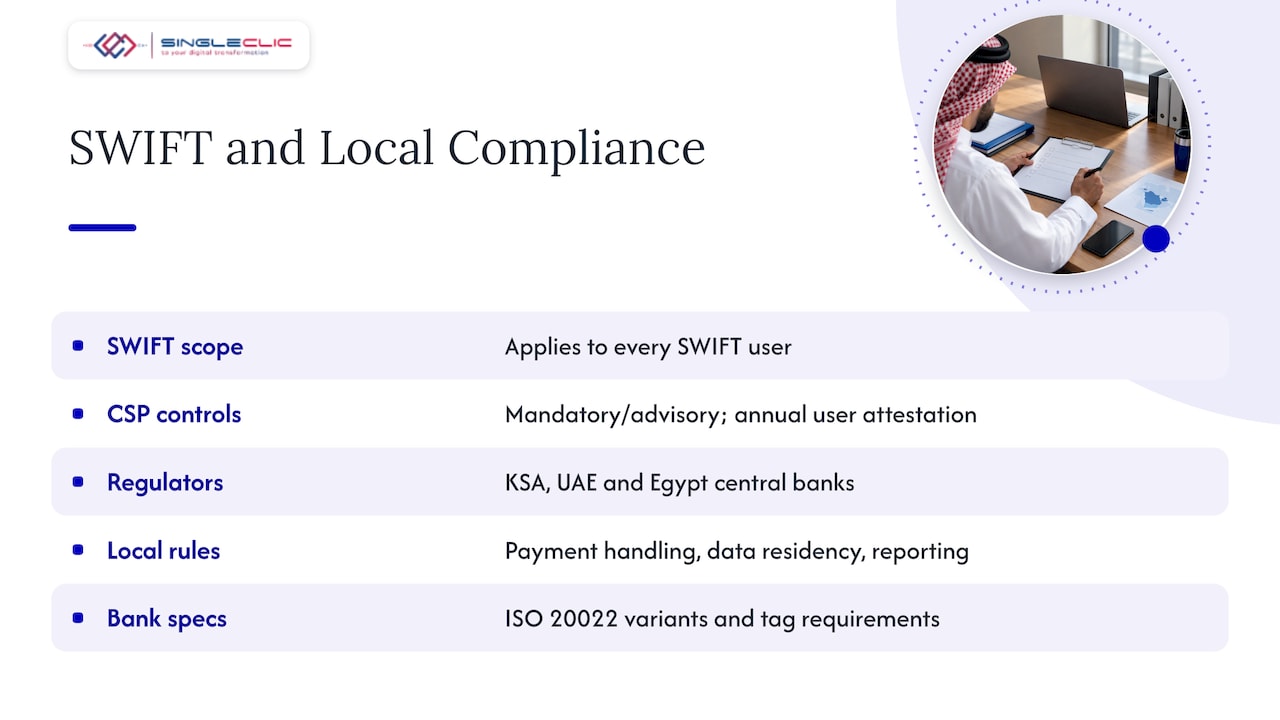
Compliance has two layers: SWIFT’s own security framework and your local financial regulators. We do not give legal advice, and you should confirm current rules with your bank and your compliance officer, but the structure is consistent across the region.
The SWIFT Customer Security Programme applies to every SWIFT user, wherever they operate. It sets mandatory and advisory controls for the secure environment, and users attest to their compliance each year. That is why the Azure design includes Key Vault, Azure Policy and monitoring from the start.
Local requirements sit on top. Central banks in Saudi Arabia, the UAE and Egypt each set expectations for payment handling, data residency and reporting, and banks pass these requirements on to corporate customers through onboarding and file specifications. Banks in the region also tend to publish their own ISO 20022 schema variants and tag requirements, which is exactly where ER mapping extensions come in.
Practical steps help. Ask each bank for its connectivity and file specifications in writing. Check where message data is stored and processed before choosing Azure regions. Keep audit trails from Dynamics 365 and the middleware, so you can show who approved and sent each payment. Involve compliance early, not at go-live.
For more on the Dynamics 365 side of bank connectivity, see our article on ER files versus Open Finance APIs, and our page on compliance and scalability for fintech in KSA.
Regional priorities and governance for MENA implementations
In our experience, SWIFT projects fail on governance more often than on technology. The connectivity choice gets debated for weeks, while ownership of the ISO 20022 version, the bank relationship and the CSP attestation stays vague. My advice is to settle those first, and to treat the bank as a design partner, not a vendor you meet at testing.
For regulated sectors, I would prioritize CSP compliance and high-availability design over feature breadth. For cloud-first teams, Alliance Connect Virtual on Azure is the option I favor for resilience. Expect regional bank schema variants and budget mapping work for them. Finally, give operations a low-code exception workflow, such as one built on Cortex, so day-to-day handling does not depend on developers.
How we help with Dynamics 365 SWIFT integration

Connecting your bank to Dynamics 365 should not stall your treasury team. We provide Dynamics 365 integration, implementation and customization, along with Azure deployment and SWIFT readiness assessments for banking and regulated clients. Our engagement starts with technical discovery and a mapping workshop, then a pilot connector that proves the end-to-end flow before you commit to full rollout. Request an assessment through our Dynamics 365 team, and we will build a project plan around your bank, your volumes and your compliance obligations.
FAQ
Which SWIFT option works best with Dynamics 365?
It depends on volume and resilience needs. Alliance Connect Virtual on Azure suits regulated, high-volume treasury, while Business Connect fits embedded or lower-volume cases. Alliance Cloud offers a managed channel with less infrastructure to run, as described on SWIFT’s Alliance Cloud page.
Does Dynamics 365 connect to SWIFT directly?
No. You need a connectivity layer and middleware between them. Azure Logic Apps typically transforms and routes the messages, and Electronic Reporting handles the ISO 20022 formats on the Dynamics side, as Microsoft’s ER overview explains.
Which ISO 20022 formats does Dynamics 365 Finance support?
Electronic Reporting handles the formats for payment initiation, payment status and debit and credit notifications, according to Microsoft’s ISO 20022 documentation. Your bank may require extra tags, so check its specification before you build.
What is the most common SWIFT integration mistake?
Relying on out-of-the-box ER mappings without checking the bank’s schema version or remittance tag needs. Plan mapping extensions early to avoid manual reconciliation later.
Do I need to host SWIFT connectivity in Azure?
No, but it is a strong cloud-first option. Alliance Connect Virtual can run in Azure with vSRX in high availability, and Microsoft documents the pattern in its Azure architecture guidance.
Sources
- Alliance Cloud | Swift
- SWIFT Alliance Connect Virtual on Azure – Microsoft for Financial Services | Microsoft Learn