TL;DR:
- Microsoft Dynamics with Copilot embeds AI directly into applications, enabling proactive, AI-driven business actions. It connects real-time signals from Microsoft 365 to Dynamics data, reducing switching and improving efficiency while ensuring data security through human approval processes. Organizations that deploy a unified environment and proper governance can achieve measurable improvements in sales, service speed, and operational decision-making.
Microsoft Dynamics with Copilot is defined as the direct embedding of Microsoft’s AI Copilot into Dynamics 365 applications, enabling users to run multi-step workflows, generate real-time insights, and act on CRM and ERP data without leaving Teams or Outlook. This is not a chatbot layered on top of your system. It is a fundamental shift from passive record-keeping to proactive business action, powered by the Work IQ intelligence layer and the Copilot Cowork plugin architecture. For business leaders in Saudi Arabia, the UAE, and Egypt, this integration means your sales, service, and operations teams spend less time switching between systems and more time closing deals, resolving cases, and making decisions that move the business forward.
How does Copilot integrate with Microsoft Dynamics 365 applications?
The integration works through a plugin architecture called Copilot Cowork, which is generally available for Dynamics 365 Sales and Customer Service as of june 2026. These plugins connect Dynamics 365 data directly to Microsoft 365 Copilot, so users can query CRM records, draft follow-up emails, and update opportunity stages from within Teams or Outlook. The result is a single interface that replaces the constant app-switching that fragments most enterprise workdays.

The intelligence behind these actions comes from Work IQ, a layer that connects Microsoft 365 signals with Dynamics operational data. Work IQ reads your emails, calendar meetings, and chat threads, then cross-references that context with your CRM pipeline and customer history. The AI can then surface a deal risk before your next call or flag a service case that has gone quiet too long.
Here is how the integration works in practice, step by step:
- Plugin activation. Your IT admin enables the Dynamics 365 Sales or Customer Service plugin through the Microsoft 365 admin center. Access is scoped by role, so only the right users see the right data.
- Context grounding. Work IQ reads signals from Teams, Outlook, and calendar data, then grounds Copilot’s responses in your actual Dynamics 365 records. No hallucinated data. No fabricated figures.
- User command. A sales manager types a natural-language prompt in Teams: “Summarize the last three interactions with this account and draft a follow-up email.” Copilot retrieves the CRM data and drafts the message.
- Human approval gate. Before any record update commits to Dynamics 365, the user reviews and approves the proposed change. The AI proposes; the human decides.
- Record update. Once approved, the action writes back to Dynamics 365 with a full audit trail, preserving data integrity and compliance.
Pro Tip: Set up your Dataverse environment as a single unified instance before enabling Copilot plugins. Fragmented environments produce fragmented AI outputs. One environment means one source of truth, and that is what grounds accurate AI responses.
What are the key business benefits of using Dynamics with Copilot in the MENA region?
The business case for AI in Dynamics is measurable, not theoretical. 66% of AI users report more time for high-value work, and 58% report producing outputs that were previously unattainable. That means your teams are not just working faster. They are doing work that was not possible before.
For sales teams specifically, the numbers are direct. Sales teams using Copilot report a 20% increase in deals closed and a 9.4% higher revenue per seller. That is not a marginal efficiency gain. It is a structural improvement in how sellers spend their time and how often they win.
The benefits extend across the organization:
- Reduced context switching. Users can perform tasks across apps without leaving Teams or Outlook, cutting the cognitive cost of jumping between CRM, email, and calendar.
- Faster customer service resolution. The Service Agent integration handles case summarization, prioritization, and resolution drafting directly within Microsoft 365 Copilot, reducing average handle time.
- Predictive deal intelligence. Work IQ surfaces deal risks and next-best actions before a seller even opens the CRM record, turning reactive selling into proactive pipeline management.
- Compliance-ready automation. Every AI-proposed action passes through a human approval gate, which means your data governance standards stay intact even as automation scales.
- Accessible AI for CRM adoption. Teams in Saudi Arabia and the UAE that have historically resisted CRM adoption find natural-language interfaces far easier to use than form-based data entry.
The shift from passive record-keeping to proactive action is what Microsoft calls “agentic CRM.” It means your Dynamics 365 system no longer waits for users to log data. It surfaces insights and drafts actions on their behalf.
What practical steps should MENA businesses follow to implement Dynamics with Copilot?
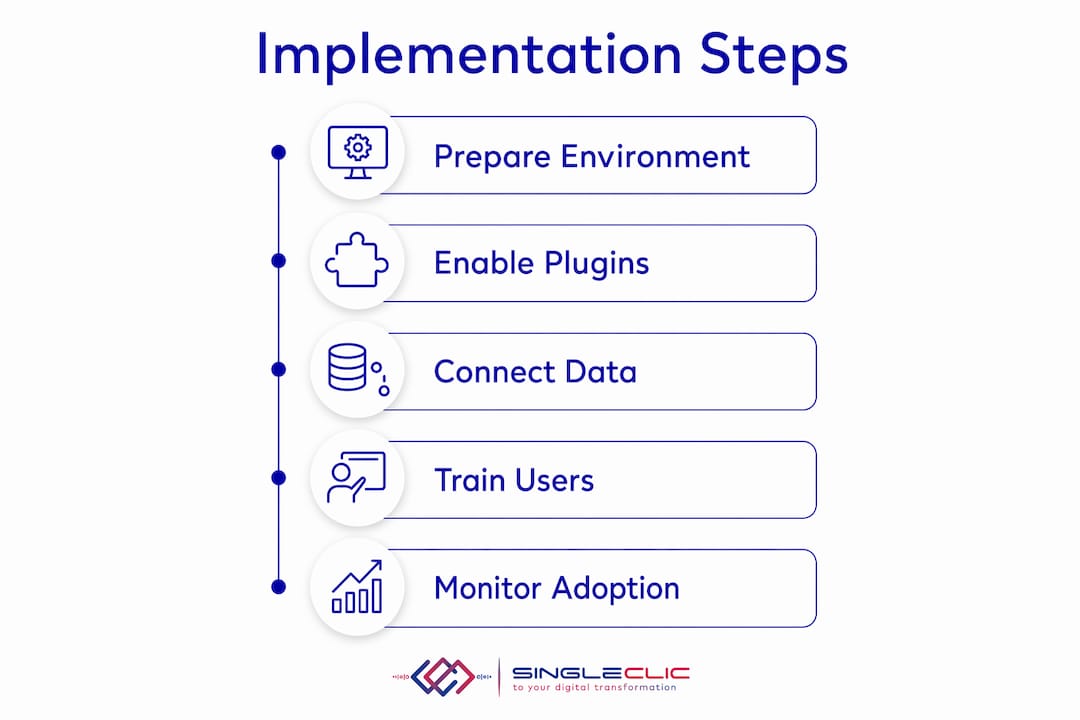
Implementation is not a single switch. It requires the right licenses, the right environment setup, and a governance model that your teams will actually follow. Start with these foundations:
- Confirm your license stack. You need Microsoft 365 Copilot licenses alongside your Dynamics 365 Sales or Customer Service licenses. Power Apps licenses are required if you plan to extend Copilot into custom workflows.
- Unify your Dataverse environment. A single Dataverse instance is the most critical technical prerequisite. Split environments produce split context, and split context produces unreliable AI outputs.
- Enable plugins via the admin center. Admins manage Copilot plugins centrally through the Microsoft 365 admin center, controlling which users access which Dynamics data through Copilot.
- Define human approval workflows. Before go-live, map which AI-proposed actions require manager sign-off and which can be approved by the individual user. This is your governance backbone.
- Run a pilot with a focused team. Start with your highest-volume sales or service team. Measure time saved, deal velocity, and user satisfaction before rolling out organization-wide.
- Invest in change management. The technology works. The adoption risk is human. Run structured training sessions that show users exactly what Copilot can and cannot do inside their daily workflows.
Pro Tip: Avoid the most common AI adoption mistake: deploying disconnected, isolated features rather than integrated agents sharing a common intelligence layer. Success requires shared data, analytics, and orchestration across all your AI agents from day one.
The role of AI in ERP systems follows the same principle. Isolated AI features produce isolated results. Connected intelligence produces compounding returns.
How does the AI governance and security model in Dynamics with Copilot protect data?
The governance model is built into the architecture, not bolted on afterward. Copilot’s system of action design means the AI proposes changes but never executes them autonomously. Every update to a Dynamics 365 record requires explicit human approval before it commits. This is the core design principle that separates enterprise-grade AI from consumer chatbots.
“Copilot’s system of action architecture uniquely allows AI to propose but not autonomously execute changes in Dynamics 365, preserving data trustworthiness via human approval gating. This is the design choice that makes enterprise AI adoption viable at scale.”
The security model enforces your existing permission structure. If a user cannot access a specific account record in Dynamics 365, Copilot cannot access it either. The AI does not bypass your role-based access controls. It operates within them.
Key governance features include:
- Model Context Protocol (MCP) plugins that control exactly which data queries Copilot can execute, preventing unauthorized data retrieval.
- Audit trails on every AI-assisted action, giving compliance teams full visibility into what Copilot proposed and what the user approved.
- Refusal to fabricate. When Copilot cannot find the data to answer a question, it says so. It does not generate plausible-sounding but incorrect information.
- Enterprise-grade security standards inherited from Microsoft 365 and Azure, including data residency controls relevant to organizations operating under Saudi Arabia’s PDPL or the UAE’s data protection frameworks.
For organizations in banking, healthcare, or government, this governance architecture is the reason AI adoption becomes viable. The predictive AI in CRM conversation always returns to trust, and trust requires transparency in how AI acts on your data.
Which business scenarios show the real power of Dynamics with Copilot?
The most concrete way to understand this integration is to see it in specific workflows. The table below maps business functions to the AI-driven actions Copilot enables inside Dynamics 365.
| Business function | AI-driven action with Copilot |
|---|---|
| Sales meeting preparation | Copilot summarizes account history, open opportunities, and recent email threads before the call |
| Deal risk analysis | Work IQ flags deals with no recent activity or negative sentiment signals from email |
| Follow-up drafting | Copilot drafts a personalized follow-up email based on meeting notes and CRM context |
| Customer service triage | Service Agent prioritizes cases by urgency and drafts resolution responses within Copilot |
| Cross-app workflow | A user commands Copilot in Teams to update a CRM record after a call, without opening Dynamics 365 |
Beyond the table, the cross-app workflow scenario deserves more detail. A sales manager finishes a Teams call with a key account. Without leaving Teams, they ask Copilot to log the call outcome, update the opportunity stage, and schedule a follow-up task. Copilot drafts all three actions, the manager reviews and approves, and the CRM record is updated in seconds. What previously required three separate app sessions now takes one prompt and one click.
For customer service teams, the Service Agent integration handles case summarization, knowledge base retrieval, and resolution drafting directly within Microsoft 365 Copilot. A service agent handling 50 cases a day no longer reads through full case histories manually. Copilot surfaces the relevant context in seconds.
Key takeaways
Dynamics with Copilot turns Microsoft Dynamics 365 from a data repository into a system of action, where AI proposes and humans approve, producing measurable gains in sales velocity, service speed, and operational efficiency.
| Point | Details |
|---|---|
| Agentic CRM is the core shift | Copilot moves Dynamics 365 from passive record-keeping to proactive, AI-driven business action. |
| Human approval gates protect data | Every AI-proposed change requires user approval before committing, preserving compliance and trust. |
| Work IQ grounds AI in real context | The intelligence layer connects Microsoft 365 signals with Dynamics data for accurate, context-aware outputs. |
| Unified Dataverse is a prerequisite | A single Dataverse environment is required for reliable AI grounding and consistent Copilot performance. |
| Sales results are measurable | Teams using Copilot report a 20% increase in deals closed and 9.4% higher revenue per seller. |
What I have learned from watching MENA businesses adopt AI in Dynamics
The organizations that get the most from Dynamics with Copilot are not the ones that deploy the most features. They are the ones that deploy the right architecture from the start. I have seen enterprises in the Gulf rush to enable every AI plugin available, only to find that their fragmented Dataverse environments produce unreliable outputs that erode user trust within weeks.
The Work IQ intelligence layer is where the real ROI lives. When your email, calendar, and CRM data all feed into a single context layer, Copilot stops being a novelty and starts being a genuine productivity multiplier. That connection is what separates a useful AI tool from an expensive experiment.
My advice to any MENA business leader evaluating this integration: do not measure success by the number of AI features you activate. Measure it by the number of decisions your teams make faster, and the number of deals they close without ever opening a second application. Governance is not a constraint on AI adoption. It is the condition that makes adoption sustainable.
— Tamer Badr
How Singleclic helps MENA businesses deploy Dynamics 365 with AI Copilot
Singleclic has spent over 10 years implementing Microsoft Dynamics 365 across Saudi Arabia, the UAE, and Egypt, working with organizations like Emirates Health Services, QNB, and Emaar Misr. That depth of regional experience means Singleclic understands the data environments, compliance requirements, and change management challenges that determine whether a Copilot deployment succeeds or stalls.
Singleclic’s Dynamics 365 practice covers the full implementation lifecycle, from Dataverse environment design and Copilot plugin configuration to governance model setup and user adoption programs. For organizations that need AI to work within strict data residency or approval frameworks, Singleclic also builds custom workflows using its Cortex low-code platform, connecting Dynamics 365 approvals, ERP data, and legacy systems into a single governed process. Explore Singleclic’s Dynamics 365 connected ERP and CRM guide to see how the platform supports AI-driven operations at scale, or review the customized Dynamics 365 solutions built for operational excellence across the region.
FAQ
What is Dynamics with Copilot?
Dynamics with Copilot is the integration of Microsoft’s AI Copilot directly into Dynamics 365 Sales, Customer Service, and other applications, enabling users to run multi-step workflows and access CRM data from within Teams and Outlook.
Does Copilot automatically update Dynamics 365 records?
No. Copilot proposes changes but requires human approval before any record update commits to Dynamics 365, preserving data integrity and compliance at every step.
What licenses do you need to use Copilot in Dynamics 365?
You need Microsoft 365 Copilot licenses combined with the relevant Dynamics 365 application licenses, such as Dynamics 365 Sales or Customer Service, plus Power Apps licenses for custom workflow extensions.
How does Work IQ improve Copilot’s accuracy in Dynamics 365?
Work IQ connects signals from Microsoft 365 apps, including email, meetings, and chat, with Dynamics operational data, grounding Copilot’s responses in real business context rather than generic AI outputs.
Is Dynamics with Copilot suitable for regulated industries in the MENA region?
Yes. The governance model enforces existing role-based access controls, maintains full audit trails, and supports data residency requirements relevant to frameworks like Saudi Arabia’s PDPL and UAE data protection regulations.