Odoo handles multiple legal entities inside one database, sharing master data like products and partners while keeping financial transactions strictly separated per company. Getting there safely takes three moves: enable companies and build each entity with its own currency and fiscal localization, assign users with the correct Allowed Companies, and configure intercompany rules with journals you’ve tested in staging before anyone touches production.
TL;DR:
- Ensuring consistent account coding and testing intercompany rules in a staging environment prevent costly month-end consolidations and document loops.
- Assigning the correct Allowed Companies and Default Company settings for users reduces accidental cross-company postings and access issues.
- Deciding whether to share partners, products, and pricelists across entities or keep them separate early avoids future manual adjustments and consolidation errors.
- Proper configuration of intercompany journals, accounts, and stock routes, along with thorough testing, is essential to automate transactions reliably.
- Engaging experienced implementation partners helps address localization, account standardization, and testing challenges that generic guides do not cover.
Table of Contents
- Setting up your Odoo multi company configuration from scratch
- How do Allowed Companies affect user access?
- Which records should be shared across companies?
- How do you configure intercompany transactions in Odoo?
- How does financial consolidation work across multiple companies?
- What are the most common Odoo multi-company mistakes?
- When should you bring in a certified Odoo partner?
- What actually matters in a multi-company Odoo rollout
- How Singleclic supports Odoo multi-company projects
- Where to go for official documentation
- Sources
- FAQ
Setting up your Odoo multi company configuration from scratch
Before you create a single company record, decide on your chart of accounts template. Retrofitting account codes after three entities are live is far more painful than standardizing them on day one.
Here’s the sequence that avoids rework:
- Enable multi-company mode. Go to Settings → General Settings, turn on Companies, and confirm the company selector now appears in the top right of the interface.
- Create each company record. Fill in the legal name, currency, country, and fiscal localization package. If one entity reports to a parent company, set that hierarchy here rather than trying to bolt it on later.
- Set accounting defaults per entity. Assign a chart of accounts template, fiscal year dates, bank journals, and invoice number sequences for each company individually. Odoo does not assume they share these.
- Run a preflight check. Verify account codes follow one shared numbering pattern, confirm the right localization package is installed for each country, and take a backup or staging snapshot before going further.
According to Odoo’s own documentation, companies are created and edited under Settings → Users & Companies → Companies, and this screen is where the multi-company relationship is genuinely defined, not just the branding.
Pro Tip: Write down your account numbering scheme on paper before creating your second company. Every consolidation headache we’ve seen in the field traces back to entity A calling an account “6100 – Rent” while entity B calls the same expense “6300 – Rent.”
How do Allowed Companies affect user access?
Every user in an Odoo multi-company system has two separate settings that control what they see and where new records land, and confusing the two causes most of the access complaints IT teams field in the first month.
- Allowed Companies determines which companies a user can switch between using the company selector.
- Default Company determines which entity is active when that user logs in, and therefore which company gets stamped on any record they create.
- A user with only one allowed company never sees the selector at all. Give access to a second entity only when the job actually requires it.
- Record rules and security groups can restrict cross-company visibility further, useful when finance staff at one subsidiary should never see another entity’s vendor bills.
Odoo determines document ownership by whichever company is active at the moment a record is saved, not by the user’s department or role. That single detail explains most of the “why did this invoice land in the wrong company” tickets.
Pro Tip: Create a restricted test user with access to only one company before go-live, then try to pull up the other entity’s sales orders through search filters and reports. If anything leaks through, tighten the record rule before real users touch the system.
Which records should be shared across companies?
Odoo shares certain models across all companies by default, including contacts and products, unless you explicitly restrict them with the Company field. That default behavior is convenient for a group of related businesses, but risky if your companies are meant to operate independently.
- Partners are shared globally unless you set a specific Company on the contact record, which is why an unrelated subsidiary sometimes shows up in a customer’s transaction history.
- Products follow the same rule. Decide early whether both entities sell the same catalog or need separate product lists with entity-specific pricing.
- Pricelists enforce company-specific pricing on top of shared products, so you can keep one catalog while charging different rates per entity.
- Inventory and warehouses are company-specific by design, and intercompany stock routes are what move goods between them.
- For intercompany sale orders to auto-generate a matching purchase order, both companies need the same product visible in their respective catalogs. Skip this and the automation simply fails silently.
Keep your product codes and account mappings consistent across entities from the start. It is the single cheapest decision that pays off during consolidation later.
How do you configure intercompany transactions in Odoo?
Intercompany rules are what let a sales order in one entity automatically spawn a matching purchase order in another, and they live under Accounting or general settings depending on your Odoo version. Getting the rule right on paper matters less than testing it against a real transaction before anyone relies on it.
- Locate the intercompany rules screen and create a rule pairing a source company with a destination company.
- Choose auto-validate or draft. Intercompany rules can auto-generate matching documents such as a purchase order from a sales order, or an invoice from a bill, and either confirm automatically or wait in draft for manual review.
- Set up intercompany receivable and payable accounts, plus dedicated intercompany journals, so balances between the two entities are traceable and don’t get mixed into regular trade accounts.
- Map intercompany stock routes so a physical transfer between warehouses generates the matching delivery and receipt documents on both sides.
- Run a test script. Create a sample sales order in Company A, confirm the matching purchase order and bill appear correctly in Company B, then reconcile the intercompany journals to make sure both sides balance to zero.
Pro Tip: Leave every new intercompany rule in draft mode for the first two or three weeks of live use. Auto-validate is tempting, but it turns a wrong active company mistake into a real accounting entry before anyone notices.
How does financial consolidation work across multiple companies?
Odoo’s Consolidation module maps each subsidiary’s chart of accounts to a group-level consolidated chart, and the mapping step is where most consolidation projects either succeed cleanly or turn into a monthly spreadsheet exercise.
- Build a consolidation chart under Accounting → Consolidation and map each subsidiary account to its corresponding group account.
- Define elimination rules for intercompany receivables, payables, revenue, and cost, so a sale between two of your own entities does not inflate group revenue.
- If entities report in different currencies, set a single group consolidation currency and confirm exchange rate sources are consistent across all consolidated periods.
- Schedule consolidated reports and reconciliation tasks on a recurring basis rather than running them manually each month end.
Consistent account coding across entities is what makes this whole process automatable instead of manual, which is exactly why that decision belongs at the very start of your Odoo multi-company configuration, not after month three.
What are the most common Odoo multi-company mistakes?
Three mistakes account for most of the emergency support calls tied to multi-company Odoo deployments, and all three are avoidable with a proper staging test before go-live.
- Circular intercompany rules. Two rules referencing each other can generate documents in an endless loop, flooding both companies with duplicate purchase orders and invoices.
- Wrong active company. A user creates a record while the wrong entity is active in the selector, and it silently posts to the wrong books.
- Inconsistent account codes. Different numbering between entities turns consolidation mapping into manual guesswork every single period.
- Sequence collisions. Check invoice numbering per company individually. Two entities sharing one sequence produces gaps and duplicate numbers that confuse auditors.
- Undersized infrastructure. Larger multi-company deployments with heavy intercompany volume need proper server sizing and database indexing, or nightly consolidation jobs start running into business hours.
Pro Tip: Test every intercompany rule permutation in a staging copy of your database first. Odoo lets you generate a batch of test transactions and watch for circular document creation without risking a single real ledger entry.
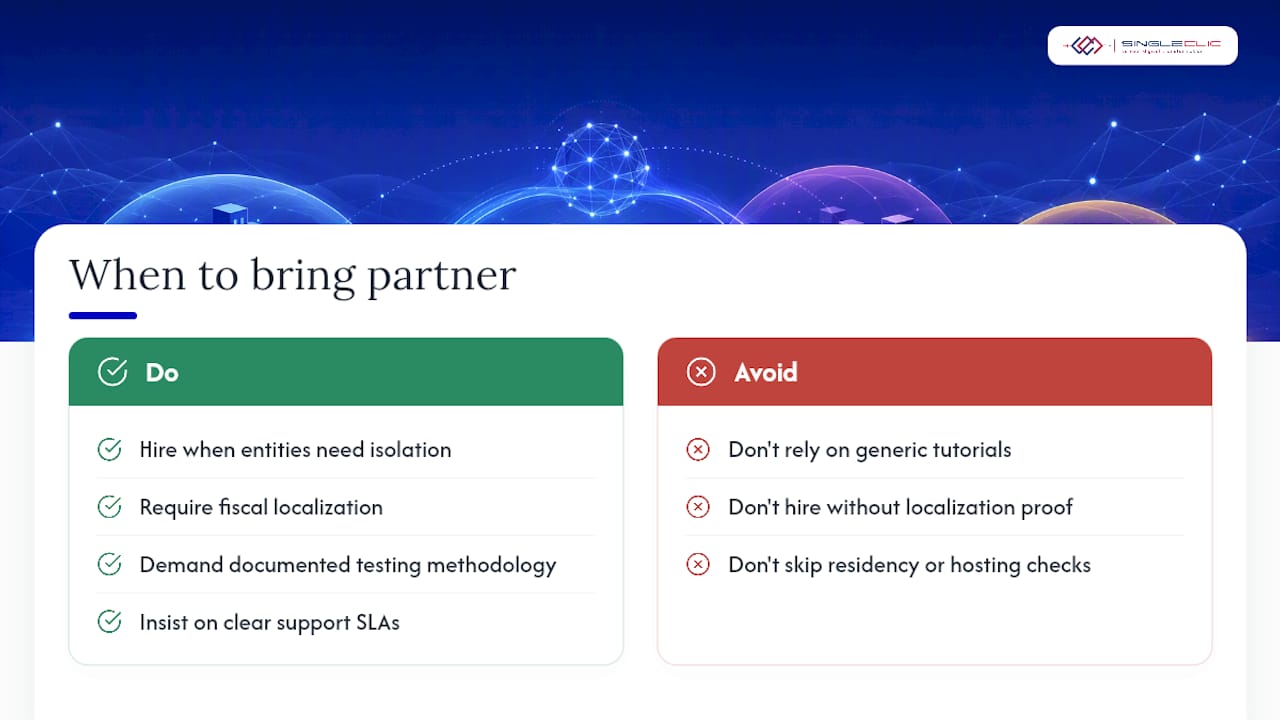
When should you bring in a certified Odoo partner?
A single database works well when your entities share a group structure and similar reporting needs. Separate Odoo instances make more sense when legal, data residency, or performance requirements force full isolation, which comes up often for regulated organizations operating across Saudi Arabia and the UAE.
Regional deployments add layers that generic tutorials rarely cover: fiscal localization packages that match local tax authorities, on-premise hosting requirements for banks and government bodies, and Arabic UI/UX expectations that not every implementation team plans for from day one.
Before hiring anyone for an Odoo multi-company system setup, check for demonstrated Odoo implementation experience, real localization capability for your target markets, a documented testing methodology, and clear support service level agreements. Singleclic holds Odoo Silver Partner status with regional delivery experience across MENA, and pairs that with Cortex, its low-code platform for automating approval chains and workflow logic once your core Odoo entities are live.
What actually matters in a multi-company Odoo rollout
Most guides on this topic treat multi-company as a settings toggle. It isn’t. The toggle takes thirty seconds. The account coding decision you make before you flip it is what determines whether your consolidation process takes an afternoon or three days every single month for the life of the deployment.
The conventional advice tells you to “test thoroughly,” which is true and also useless without specifics. What actually matters is testing the exact failure modes that show up in real deployments: a circular intercompany rule generating documents into a loop, a user creating a record under the wrong active company, an invoice sequence collision nobody notices until an auditor asks about it. Generic user acceptance testing rarely catches these because they only appear under real transaction volume.
If you take one thing from this, prioritize the account coding template and the draft mode setting on intercompany rules over everything else. Everything downstream, consolidation, reporting, audit readiness, depends on those two decisions being right before your first real transaction hits the ledger.
— Tamer Badr
How Singleclic supports Odoo multi-company projects
Singleclic is the alternative to a do-it-yourself Odoo rollout for organizations running more than one legal entity. Where generic tutorials stop at “enable the setting,” Singleclic’s Odoo implementation team handles the parts that actually break deployments: account code standardization, intercompany rule testing, and fiscal localization for markets across the region.

A typical engagement moves through discovery of your entity structure and reporting needs, a staging build where every intercompany rule gets tested against real transaction scenarios, a documented test plan covering the exact gotchas outlined above, and hands-on go-live support so nothing silently breaks in week one. For organizations weighing Odoo against a platform like Microsoft Dynamics 365, Singleclic scopes both fairly based on your entity count, localization needs, and reporting complexity. If reconciliation automation across entities is also on your radar, automated bank reconciliation approaches from our partner network pair well with a clean intercompany journal setup.
Reach out to Singleclic’s Odoo implementation team to request a scoping call and get a straight answer on what your specific multi-company structure will actually require.
Where to go for official documentation
- Odoo’s developer howto on company-dependent fields helps teams customizing record rules at the code level.
- Odoo’s slide walkthrough on multi-company basics offers a quick visual reference for admins new to the module.
- Singleclic’s implementation failure guide covers broader go-live risks worth reviewing alongside this checklist.
Sources
FAQ
How do I implement intercompany transactions in Odoo?
Create an intercompany rule pairing a source and destination company, choose auto-validate or draft mode, then set up intercompany journals and matching receivable/payable accounts before testing with a sample sales order.
What are the disadvantages of Odoo?
Odoo’s flexibility means multi-company configuration requires careful planning around account coding, user access, and intercompany rules; skipping that planning leads to circular document generation, wrong-company postings, and messy consolidation.
Is Odoo fully free?
Odoo’s Community edition is free and open source, but multi-company accounting, intercompany automation, and consolidation reporting generally require Odoo Enterprise or professional implementation support to configure correctly.
Should I use one Odoo database or separate instances for multiple companies?
One database works well for related entities sharing group reporting needs; separate instances make sense when legal, data residency, or performance requirements demand full isolation, which is common for regulated organizations in the Gulf region.
How do I test an Odoo multi-company setup before going live?
Run your intercompany rules and company assignments in a staging copy of your database, such as one hosted on Odoo.sh, and validate with sample transactions before touching production data.
Recommended
- Odoo for Regulated Industries: Optimize Processes with Confidence and Compliance
- Odoo ERP, Accelerated: Singleclic’s Blueprint for Integrated, Data‑Driven Operations
- The Executive ERP Implementation Checklist: 12 Phases to De‑Risk Dynamics 365 and Odoo Deployments
- ERP Implementation Steps That Deliver: A Field-Tested Playbook with Dynamics 365 and Odoo