TL;DR:
- Migrating from AX 2012 to Dynamics 365 requires a full cloud reimplementation and thorough data and process preparation.
- A phased approach, including customizations audit, data cleansing, and change management, minimizes risks and ensures success.
AX 2012 to Dynamics 365 migration is defined as a full cloud reimplementation project, not a direct in-place upgrade. Microsoft ended mainstream support for AX 2012 R3 in october 2021 and extended support ended in january 2023, leaving organizations on unsupported infrastructure with growing compliance and security exposure. The shift moves you from an on-premises architecture to a cloud-native SaaS platform running on Microsoft Azure. That change touches licensing models, customization frameworks, data structures, and every business process your team relies on daily. This guide gives IT managers and decision-makers a clear, practical roadmap for planning and executing that transition successfully.
What are the prerequisites for AX 2012 to Dynamics 365 migration?
Strong preparation separates projects that finish on time from those that spiral into costly overruns. Before a single line of data moves, your team needs to complete five readiness steps.

Customization and integration audit
AX 2012 customizations do not transfer automatically to Dynamics 365. Every modification must be reviewed and categorized: rebuild it using the Dynamics 365 extension model, replace it with a native platform feature, or decommission it entirely. Overlayering, the method most AX 2012 developers used to modify base code, is no longer supported. This audit often reveals that a significant portion of custom code duplicates functionality that Dynamics 365 now delivers out of the box.
Licensing review
Dynamics 365 Finance and Operations uses a subscription model billed per user per month. Your current AX 2012 license does not carry over. Map your user roles to the correct Dynamics 365 license tiers before budgeting, since licensing costs vary considerably between full users, activity users, and team members.
Microsoft Lifecycle Services setup
Microsoft Lifecycle Services (LCS) is the required project management and tooling environment for every Dynamics 365 implementation. LCS provides the data migration framework, environment provisioning, code deployment pipelines, and project methodology templates. Getting your LCS project configured early gives your team a single source of truth for the entire migration.
Architecture and deployment decisions
Dynamics 365 Finance and Operations runs exclusively in the cloud on Azure. If your organization operates in Saudi Arabia or the UAE and has data residency requirements, confirm the available Azure regions and their compliance certifications before finalizing your architecture plan.
Data readiness assessment
Run a preliminary data quality check on your AX 2012 database. Identify duplicate records, orphaned transactions, and fields that have no equivalent in the Dynamics 365 data model. Fixing data problems before migration costs far less than fixing them after go-live.
| Readiness area | Key action |
|---|---|
| Customizations | Audit and categorize every modification |
| Licensing | Map roles to Dynamics 365 subscription tiers |
| LCS environment | Configure project workspace and tooling |
| Architecture | Confirm Azure region and compliance requirements |
| Data quality | Profile and cleanse source data before extraction |
Pro Tip: Run your customization audit in parallel with your data quality assessment. Both take longer than expected, and starting them simultaneously saves four to six weeks on your overall timeline.
What is the step-by-step approach to migrating from AX 2012?
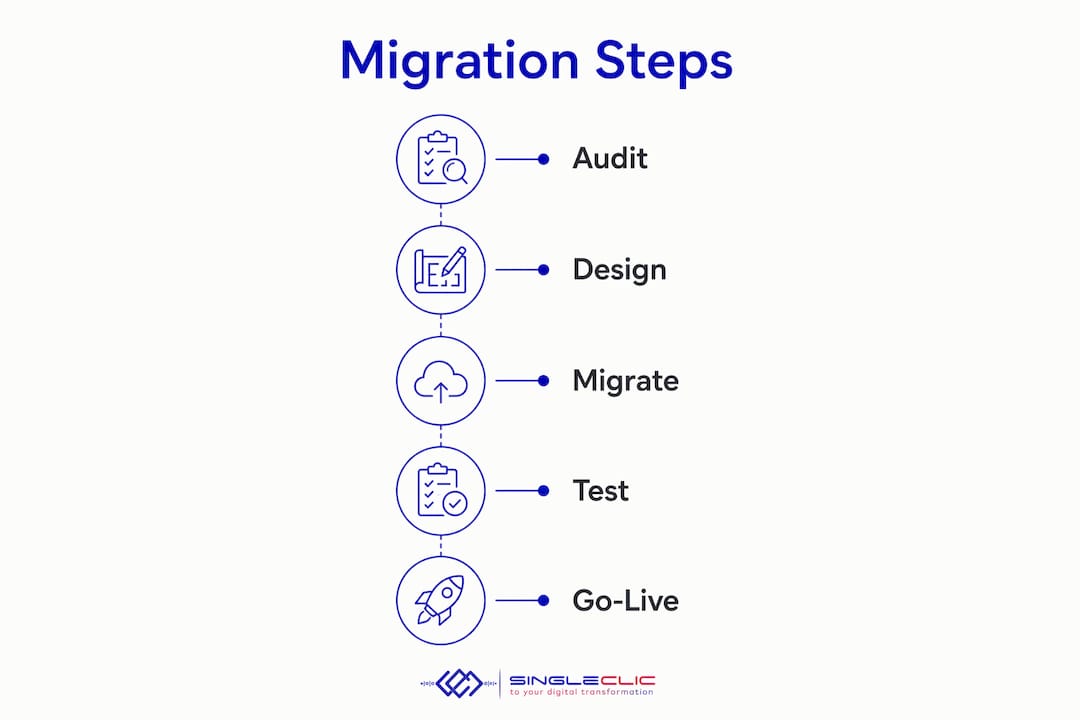
Dynamics 365 implementation timelines range from 6 to 18 months depending on scope, with mid-market projects averaging 10 to 12 months. A disciplined phased approach reduces cost overruns by 25%. The following roadmap reflects that structure.
-
Discovery and scope definition. Document every business process currently running in AX 2012. Identify which processes you will replicate, which you will redesign, and which you will retire. This step produces the functional specification that drives the entire project.
-
Solution design and gap analysis. Map your documented processes against standard Dynamics 365 Finance and Operations capabilities. Every gap becomes a decision point: configure a native feature, build an extension, or accept a process change. Gaps that require custom extensions go into a development backlog.
-
Environment setup in LCS. Provision your development, test, and production environments through LCS. Establish your code branching strategy and deployment pipeline at this stage, not mid-project.
-
Customization redevelopment. Rebuild approved extensions using the Dynamics 365 extension framework. Extensions sit on top of the base application without modifying it, which means Microsoft updates do not break your custom code. This is the single most important architectural difference from AX 2012 development.
-
Data migration: pilot load. Extract a representative sample of master data from AX 2012, map it to Dynamics 365 data entities, cleanse it, and load it into your test environment. Reconcile the results against your source system. GL reconciliation and opening balance accuracy are non-negotiable. Financial records must match to the exact penny to meet audit and tax requirements.
-
Data migration: full pre-cutover load. Run a complete data load into the staging environment. This load tests your migration scripts at full volume and surfaces performance issues before they affect production.
-
Testing layers. Execute unit testing on individual configurations, integration testing across connected systems, user acceptance testing (UAT) with business process owners, and performance testing under realistic transaction volumes. UAT is where most projects discover process gaps that were missed in design.
-
Change management and training. Target 80%+ user training completion before cutover. Neglecting user adoption leads to poor ROI and operational disruption. Training should cover role-specific workflows, not generic system navigation. Pair training with updated process documentation so users have a reference after go-live.
-
Cutover planning and delta load. Define your cutover window, typically a weekend or a period of low transaction volume. Run a final delta data load to capture transactions that occurred after the pre-cutover load. Freeze AX 2012 transactions at a defined point to prevent data drift.
-
Go-live and hypercare. Activate the production environment and monitor closely. Hypercare support typically lasts 4 to 8 weeks and involves dedicated consultants resolving issues in real time. Plan for elevated support capacity during this window.
Pro Tip: Build a cutover runbook that lists every task, the responsible person, the estimated duration, and a go/no-go decision point. A runbook turns a chaotic cutover weekend into a managed sequence of steps.
The phased ERP implementation approach described above applies equally whether you are migrating a single legal entity or a multi-country operation. Scope each phase tightly and resist the urge to add requirements mid-project.
What common challenges occur during AX 2012 migration, and how do you avoid them?
The most expensive mistakes in AX to Dynamics 365 projects share a common root: teams underestimate the scope because they expect an upgrade, not a reimplementation.
“Transitioning from AX 2012 to Dynamics 365 is a business transformation requiring reevaluation of processes, not just an IT upgrade. Organizations that treat it as a simple system swap consistently encounter budget overruns, delayed go-lives, and poor adoption.”
The challenges that cause the most damage fall into five categories:
-
Scope underestimation. Treating the project as an upgrade rather than a reimplementation leads teams to allocate insufficient budget, time, and resources. Correct this at the project kickoff by explicitly framing it as a greenfield implementation combined with data migration.
-
Poor data quality. Importing poor-quality data compromises system performance and reporting accuracy from day one. Dedicate a full workstream to data cleansing before migration begins, not during it.
-
Neglected change management. Many projects focus heavily on system configuration and ignore the people side. Users who do not understand the new system revert to spreadsheets and workarounds, eroding the value of the entire investment. Assign a dedicated change management lead from the start.
-
Big-bang go-live. Launching all modules and all users simultaneously carries the highest risk. Phased go-live approaches reduce risk by enabling issue containment and system stabilization before full deployment. Consider going live with finance first, then supply chain, then manufacturing.
-
Unplanned third-party integrations. AX 2012 often connects to warehouse management systems, payroll platforms, and customer portals through custom integrations. Each of these must be rebuilt or replaced using Dynamics 365 APIs. Catalog every integration in the discovery phase and assign a dedicated workstream to each one.
You can find a detailed breakdown of cloud migration pitfalls that apply directly to this type of transition, including integration failures and data governance gaps.
How do you measure success after migrating to Dynamics 365?
Post-migration success requires defined criteria before go-live, not after. Without clear benchmarks, teams have no way to distinguish a successful deployment from one that is quietly underperforming.
Set your success criteria across three dimensions:
- Data integrity. All master data records reconcile between AX 2012 and Dynamics 365. Opening balances match to the penny. No orphaned transactions exist in the new system.
- User adoption. Track active logins, transaction volumes, and support ticket rates by module. A healthy adoption curve shows rising usage and falling ticket volume over the first 90 days.
- Business process performance. Measure cycle times for key processes such as purchase order approval, invoice processing, and month-end close. Compare post-migration baselines against AX 2012 benchmarks.
Dynamics 365 operates on a twice-yearly mandatory update cycle. Failure to plan for these updates causes panic and service disruption post-migration. Build a regression testing schedule into your annual calendar so each update wave is treated as a managed event, not a surprise. Assign a team member to monitor Microsoft’s release notes and assess the impact of each update on your custom extensions.
The platform’s AI-driven analytics capabilities, including AI-enabled business insights and embedded Power BI reporting, deliver value that AX 2012 simply cannot match. Plan a post-go-live optimization phase at the 90-day mark to activate these features and train users on them.
Key takeaways
Successful AX 2012 to Dynamics 365 migration requires treating the project as a full cloud reimplementation, not an upgrade, with disciplined data preparation, phased go-live, and structured change management.
| Point | Details |
|---|---|
| No direct upgrade path exists | Plan for a full reimplementation combined with data migration from the start. |
| Customizations require a full audit | Every AX 2012 modification must be rebuilt, replaced, or retired using the extension model. |
| Data quality determines go-live success | Cleanse and reconcile all data before migration; poor data corrupts reporting from day one. |
| Phased go-live reduces risk | Launch by module or business unit to contain issues before full deployment. |
| Post-migration management is ongoing | Plan regression testing for twice-yearly Microsoft updates and track adoption metrics for 90 days. |
What I have learned from AX 2012 migrations that most guides skip
I have worked through enough of these projects to know where the real risk lives, and it is rarely in the technology.
The organizations that struggle most are the ones where the IT team owns the project alone. When finance, operations, and supply chain leaders are not actively involved from discovery through UAT, the system gets configured for how IT thinks the business works, not how it actually works. That gap shows up at go-live, and it is painful to fix under pressure.
The second pattern I see consistently is teams that rush the data migration workstream to protect the go-live date. Data migration is not a task you can compress. The data model differences between AX 2012 and Dynamics 365 are significant enough that a single poorly mapped entity can corrupt months of reporting. Give data migration its own workstream, its own timeline, and its own dedicated resource.
The third thing most guides understate is the value of executive sponsorship. Not nominal sponsorship where a C-level signs off on the budget, but active sponsorship where a senior leader attends steering committee meetings, removes organizational blockers, and communicates the project’s importance to the business. Projects with that kind of sponsorship finish. Projects without it drift.
The proven implementation playbook that Singleclic uses across Saudi Arabia, UAE, and Egypt is built on exactly these lessons. The technology is the easy part. The discipline is what delivers results.
— Tamer Badr
How Singleclic accelerates your Dynamics 365 transition
Singleclic brings over 10 years of enterprise ERP delivery across KSA, UAE, and Egypt, with 70+ consultants who have executed complex Dynamics 365 Finance and Operations implementations for clients including QNB, AlBaraka, and Emirates Health Services.
For organizations moving off AX 2012, Singleclic provides end-to-end support: customization audits, data migration design, LCS environment setup, phased go-live management, and post-migration hypercare. Cortex, Singleclic’s Arabic-enabled low-code platform, connects Dynamics 365 to legacy systems, approval workflows, and third-party integrations without custom development overhead. Read the full breakdown of Dynamics 365 ERP and CRM capabilities to understand what the platform delivers after migration. Contact Singleclic to schedule a migration readiness assessment for your organization.
FAQ
What is the difference between an AX 2012 upgrade and a Dynamics 365 migration?
There is no direct in-place upgrade from AX 2012 to Dynamics 365. The process is a full reimplementation combined with data migration to a cloud-based SaaS platform.
How long does an AX 2012 to Dynamics 365 migration take?
Mid-market projects average 10 to 12 months, while larger or more complex implementations can take up to 18 months depending on the number of legal entities, integrations, and customizations involved.
Can AX 2012 customizations be moved to Dynamics 365?
Customizations do not transfer automatically. Each one must be audited and either rebuilt using the Dynamics 365 extension model, replaced with a native feature, or decommissioned.
What happens to AX 2012 data during migration?
Data must be extracted, cleansed, mapped to Dynamics 365 data entities, and reconciled before loading. Financial records must match to the exact penny to satisfy audit and tax requirements.
Why is a phased go-live recommended over a big-bang launch?
Phased go-live limits the blast radius of any issues that surface after deployment. It allows teams to stabilize one module or business unit before activating the next, which reduces operational disruption significantly.
Recommended
- What Is Microsoft Dynamics 365? A Leader’s Guide to Connected ERP, CRM, and Intelligent Automation | Singleclic
- Microsoft Dynamics: Transforming Enterprise Operations
- SAP S/4HANA vs Dynamics 365 and Odoo: A Pragmatic ERP Roadmap for 2026 | Singleclic
- Dynamics 365 Implementation, Done Right: A Proven Playbook to Unlock ROI Fast | Singleclic