For most UAE and Saudi enterprises, the answer is a governed low-code platform that business users can work in without writing code. No-code is a fast way to build simple, self-contained tools, but approvals, ERP and CRM connections, legacy systems and audit requirements are where enterprise value sits. Those need a platform that business teams and IT share. This guide shows where the line falls, how to decide, and what to check before you commit. It is written for CEOs, CIOs, CTOs, HR and supply chain leaders who must pick an approach, not build the app themselves. Our own platform, Cortex, is built on this view: Arabic-enabled, on-premise and designed so processes are built without writing code.
TL;DR
- No-code means building apps through visual tools only. Low-code is visual building plus the option of code where the process demands it.
- Pick no-code for simple, single-team tools. Pick low-code for processes that cross departments, systems and approval chains.
- Integration depth, governance and deployment location matter more than build speed for regulated UAE and Saudi organizations.
- Many enterprises do not choose one: business users build the front-line workflows, IT sets the guardrails on one platform.
- Decide on the process you need to run for the next five years, not the first app you want to ship.
Table of Contents
- What low-code and no-code mean
- How they differ in practice
- Why leaders in the region are moving to low-code
- Where each approach fits
- Scalability, security and governance
- How to choose: six questions for your leadership team
- Common mistakes to avoid
- Our perspective
- How Singleclic helps
- Talk to us about your first process
- Article details
- FAQ
- Sources
What low-code and no-code mean
Both approaches replace hand-written code with visual building blocks: forms, drag-and-drop workflow designers, data models and ready-made connectors. The difference is how much room remains for code.
No-code tools let a person with no programming background assemble an application entirely through a graphical interface. The platform decides what is possible. If a requirement falls outside the building blocks, you adapt the requirement.
Low-code tools use the same visual approach but let a developer add scripts, custom logic or integrations where a requirement is unusual. Most of the application is assembled visually, and the exceptions are handled with code. Our own explainer, low-code development for IT and business leaders, covers the fundamentals in more depth.
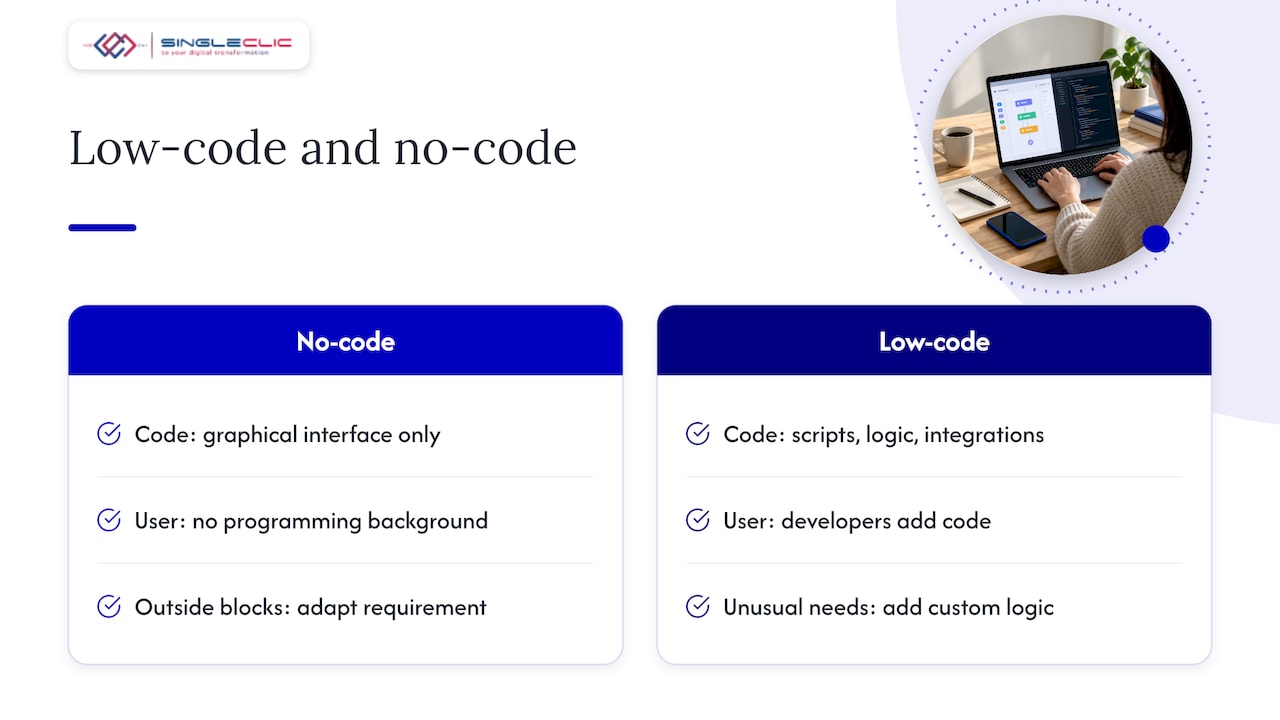
The two are not rivals so much as points on one scale. At one end is a tool anyone in HR can use in an afternoon. At the other is a platform where a team of developers builds core processes, with business analysts doing most of the configuration. Many modern platforms let people work anywhere along that scale, which is why the label matters less than what the platform can actually do.
How they differ in practice
| Question | No-code | Low-code |
|---|---|---|
| Who builds | Business users, often with no technical background | Business analysts and IT developers together, with business users contributing |
| Coding skills needed | None | Little for most work, some for custom logic |
| Customization | Limited to what the tool offers | Extendable when requirements are unusual |
| Integrations | Standard connectors to common apps | Deeper links to ERP, CRM, legacy and bespoke systems |
| Speed to first app | Very fast | Fast, with slightly more setup |
| Typical scope | A single team’s form, tracker or simple approval | Cross-department processes, regulated workflows, core operations |
| Governance | Depends on the tool; often light | Roles, audit trails and environments designed for IT oversight |
| Best fit | Small, contained problems | Enterprise processes that must last and scale |
Three of those rows deserve a closer look.
Integration depth
An approval that only moves a document between two people can live almost anywhere. An approval that must check a budget in your ERP, update a customer record in your CRM, and post to a legacy finance system cannot. The deeper the connection, the more you need a platform built for integration. If your core systems are Microsoft Dynamics 365 or Odoo, see how we approach ERP and CRM integration.
Customization
Every organization has at least one rule that no template anticipated: a Hijri-calendar deadline, a delegation-of-authority matrix that changes by grade, a procurement route specific to a government entity. Low-code is designed to absorb those rules without forcing you to rewrite the process around the tool.
Speed
No-code wins the first week. Low-code wins the first year, because the app you build in week one rarely stays simple. When a process grows, a platform that already handles integrations and permissions saves a rebuild.
Why leaders in the region are moving to low-code
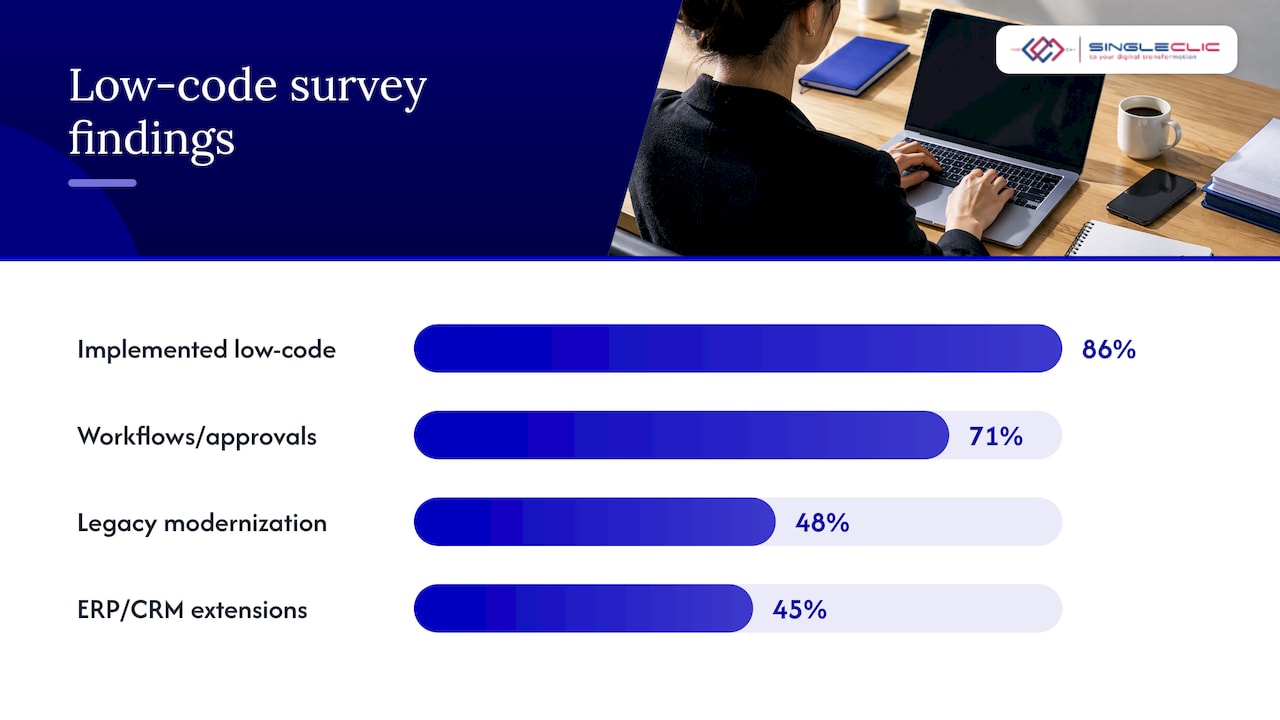
The shift is already well under way. A 2025 survey of CIOs, reported by UAE News 24/7, found that 86% had implemented a low-code platform. The most common uses were internal workflows and approvals (71%), legacy system modernization (48%) and extending ERP and CRM functionality (45%). Those are not hobby apps. They are the processes that run an enterprise.
Analyst projections point the same way. Gartner, as cited by CDOTrends, projected that by 2025 about 70% of new applications built by organizations would use low-code or no-code technologies, up from under 25% in 2020, and that by 2026 about 80% of low-code tool users would sit outside traditional IT departments. The same piece notes that citizen-development adoption in the Middle East and Africa has trailed North America, Europe and Southeast Asia, partly because of a preference for traditional development and a thin ecosystem of citizen developers. For a regional leader, that is a chance to build the capability deliberately, with governance from the start, rather than inherit scattered tools later.
If you want to understand who those “citizen developers” are and how to enable them, read our guide to how business users build apps without coding.
Where each approach fits
Good fits for no-code
- A department tracker for training sessions, equipment requests or visitor logs.
- A simple intake form that routes to one reviewer.
- A prototype used to test an idea before a wider rollout.
- A dashboard over a single data source.
These share a pattern: one team, one data set, low consequence if the tool is replaced later.
Good fits for low-code
- Approval workflows that cross finance, HR, procurement and legal, with delegation rules and escalations.
- ERP and CRM extensions: adding a process your core system does not natively support, without modifying the core.
- Legacy modernization: putting a modern interface and workflow over an older system you cannot replace yet. See our practical guide for UAE enterprises.
- Regulated processes in banking, healthcare and government, where every step needs an audit trail.
- Customer and citizen-facing portals that need Arabic and English interfaces and right-to-left layout.
A worked example: leave and expense approvals
Imagine an HR manager at a 1,500-person UAE group. The brief: employees request leave and expenses, managers approve, finance posts the result, and HR sees balances in real time.
A no-code tool can produce the request form and a two-step approval in a day. The problems appear next. Leave balances live in the HRMS. Expenses must be coded against cost centers in the ERP. Managers change, so delegation must follow the org chart. Internal audit wants to know who approved what and when. Each of those is an integration or a governance feature, and together they define the project. A low-code platform handles them in one place, so the HR manager’s team owns the process design while IT owns the connections and permissions.
Scalability, security and governance
This is the part executives should weigh most, because it determines whether the first app becomes an asset or a liability.
Scalability
Ask how the platform behaves when ten apps become two hundred, and when a hundred users become tens of thousands. Check whether pricing is tied to users, because per-user pricing can penalize broad adoption. Cortex supports unlimited users, which suits organizations that want every employee able to submit and approve inside one environment.
Security and data location
Where your data sits is not a technical footnote for regulated firms. Morgan Lewis’s 2026 analysis of cloud and ICT outsourcing in the UAE explains that UAE bank outsourcing arrangements fall under the Central Bank’s Outsourcing Regulation for Banks and require risk-management controls, and that banks retain ownership of shared data. It also notes that sensitive customer data of banks must not be stored outside the UAE without Central Bank approval and customer consent, in the cases the rules cover.
For a bank, a government body or a healthcare provider, that makes deployment location a selection criterion. Cortex is an on-premise platform, so processes and their data can run inside your own infrastructure. Confirm the exact requirements that apply to your sector with your compliance and legal teams.
Governance
Without governance, citizen development produces shadow IT: dozens of apps nobody owns, built on personal accounts, with no record of who can see what. A sound governance model has five parts:
- Ownership: every app has a named business owner and a technical owner.
- Roles and permissions: access follows job function and is reviewed regularly.
- Environments: development, testing and production are separated.
- Audit trail: every approval and data change is recorded.
- Change control: updates are reviewed before they reach users.
Low-code platforms built for enterprises put these controls in the platform itself, rather than leaving them to each builder.
Maintenance and vendor dependence
Any platform creates some dependence, so ask three things up front. Can you export your process definitions and data? Can you change a live workflow without taking the system down? Who maintains connectors when your ERP is upgraded? Cortex allows workflow changes at runtime without downtime, which matters for processes that cannot pause, such as patient intake or payment approvals.
How to choose: six questions for your leadership team
- How many systems does the process touch? One system points to no-code. Three or more points to low-code.
- Who is affected if it fails? Internal convenience tools tolerate risk. Customer, patient or regulatory processes do not.
- Where must the data live? If it must stay in your infrastructure, rule out any option that cannot deploy on-premise.
- Will the process change often? Frequent change favors a platform with runtime changes and version control.
- Do users need Arabic? Full Arabic UI and right-to-left support should be native, not a bolt-on.
- Who will own it in three years? Pick a platform your IT team can govern and your business teams can use.
If most answers land on the low-code side, start there. If you need a quick win to build confidence, build it on the same platform so it can grow rather than be rebuilt.
Common mistakes to avoid
- Choosing by demo. A polished demo of a single form says little about how the tool handles your ERP.
- Letting each department buy its own tool. You end up with overlapping licenses and no shared security model.
- Treating low-code as an IT-only project. The best results come when process owners design and IT governs.
- Skipping the process redesign. Automating a broken approval chain makes it faster, not better. Our business process automation guide for C-level leaders walks through how to map the process first.
- Ignoring AI readiness. A platform that already holds clean, connected workflows is a far better base for AI agents than a collection of disconnected apps.
Our perspective
Leaders ask us whether to go low-code or no-code, and I usually answer with a question: what happens to this process in year three? If it is a tracker for one team, almost any visual tool will do. But the processes that matter to a CEO or a CIO, such as approvals, procurement, onboarding and case handling, touch the ERP, the CRM and often an older system nobody wants to retire.
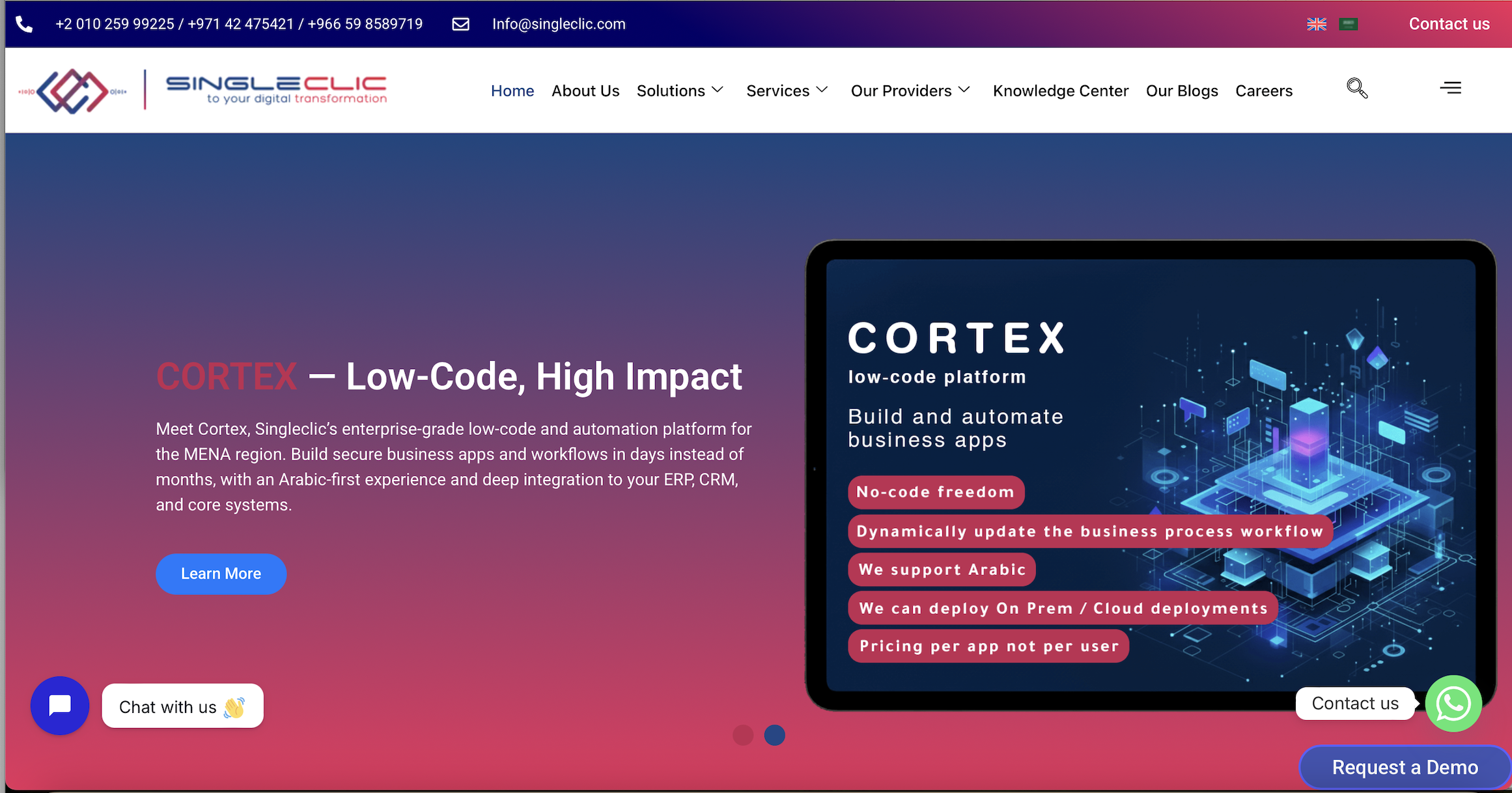
That is why we built Cortex as an Arabic-enabled, on-premise low-code platform for MENA enterprises. Business teams design and change their own workflows without writing code, and the platform connects them to the systems underneath. Banks and government entities can keep deployment inside their own walls, and workflows can be changed at runtime without downtime.
My advice is to stop treating this as a tool contest. Choose one governed platform, give business users room to build, and let IT keep control of integration and security. That is how an organization moves from digitalization to real optimization.
Tamer Badr
How Singleclic helps
We work with organizations across Saudi Arabia, the UAE and Egypt on ERP, CRM, workflow automation and AI, with more than 10 years of regional delivery, 70+ consultants and engineers, and 100+ enterprise clients across healthcare, banking, real estate, telecom and government.
- Cortex low-code platform: design, build and evolve complex business processes without writing code, with full Arabic UI/UX, unlimited users, on-premise deployment and deep integrations with enterprise systems. Read more about Cortex as an Arabic-first platform for enterprise automation.
- ERP and CRM: Microsoft Dynamics 365 and Odoo implementation, customization and integration, so your workflows and your systems of record work as one. See our Dynamics 365 implementation guide for UAE leaders.
- Business process automation: workflow design on IBM BAW and other open BPM tools, covered in our business process automation solutions.
- AI and data analytics: AI-powered business applications and analytics on top of the processes you have automated.
For a deeper look at the UAE market, see our low-code application development guide for the UAE. Our own comparison page, low-code vs no-code: which one should you use, gives a shorter decision view.
Talk to us about your first process
If you are deciding where to start, bring us one process that crosses at least two departments. We will help you map it, choose the right platform approach and build it on a foundation that can carry your next fifty. Explore Singleclic’s low-code and automation services or see Cortex on our home page.
Article details
- SEO title: Low-code vs no-code: which one fits your enterprise?
- Slug: low-code-vs-no-code
- Primary keyword: low-code vs no-code
- Secondary keywords: low-code or no-code, no-code vs low-code, low-code versus no-code, citizen development, Cortex low-code, workflow automation
- Pillar cluster: Low-code and business process automation, Cortex low-code platform
- Use cases: approval workflows, ERP and CRM extension, legacy modernization, regulated processes, Arabic customer portals
FAQ
Is low-code better than no-code?
Neither is better in every case. No-code suits simple, single-team tools. Low-code suits processes that connect to ERP, CRM and legacy systems, need audit trails or must run in regulated environments. Most enterprises find their important processes fall into the second group.
Can business users really build apps without developers?
Yes, for many workflows, forms and approvals, especially on a platform with ready components. Gartner, as cited by CDOTrends, expected about 80% of low-code tool users to sit outside traditional IT departments by 2026. IT still plays a role in integrations, security and governance.
Can low-code and no-code be used together?
Yes, and that is the common pattern. Business users build and adjust everyday workflows visually, while IT handles connections to core systems and sets permissions. Running both on one governed platform avoids scattered tools and keeps a single audit trail.
Is low-code safe for banks and government entities in the UAE and Saudi Arabia?
It can be, provided the platform supports your deployment and data-location needs. UAE banks, for example, face Central Bank outsourcing rules on risk controls and on where sensitive customer data may be stored. An on-premise platform such as Cortex lets you keep data in your own infrastructure. Check specifics with your compliance team.
What should we automate first?
Start with a process that is frequent, rule-based and crosses two or more departments, such as leave and expense approvals, purchase requests or vendor onboarding. The 2025 CIO survey reported by UAE News 24/7 found internal workflows and approvals were the top low-code use case, at 71%.
Sources
- Kissflow-reported CIO survey on low-code adoption, UAE News 24/7, September 2025
- Unlocking the future of low-code/no-code: trends and predictions, CDOTrends, January 2025
- Cloud and ICT outsourcings (UAE), Morgan Lewis, May 2026