Process mining in Dynamics 365 means rebuilding how work really flows from the event data your ERP already records, then using that evidence to find delays, rework and deviations. Microsoft delivers it through Power Automate Process Mining, connected to Dynamics 365 data in Dataverse. It diagnoses. It does not fix anything by itself, so the value comes from what you do after the map appears.
This guide is for CIOs, CTOs, supply chain heads and operations owners in the UAE and Saudi Arabia who want to know what the capability does, what data it needs, what to check on licensing, and how to run a first pilot that produces a decision rather than a pretty diagram.
TL;DR
- Process mining reads event logs (case ID, activity, timestamp) from your system of record and shows the process as it actually runs, including every variant and bottleneck.
- In Dynamics 365, Microsoft ships a warehouse template for Supply Chain Management. Other processes, such as purchase-to-pay or order-to-cash, need an event log you define yourself.
- Start with one high-value process and a limited history window. A focused pilot beats loading everything.
- Check licensing and governance before production, especially if the analysis spans several apps, Dataverse, Power BI or non-Dynamics systems.
- Mining finds the problem. Redesigned workflows, automation and KPI ownership solve it.
Table of Contents
- What process mining does that a dashboard cannot
- How it connects to Dynamics 365
- Licensing: check before you scale
- A six-step pilot plan
- Reading the results: what to look for
- Process mining, workflow automation and BPM: how they fit
- Our perspective
- How Singleclic helps
- Common mistakes
- SEO details
- FAQ
- Talk to us about a pilot
- Sources
What process mining does that a dashboard cannot
A standard ERP report tells you how many purchase orders were approved last month. Process mining tells you which route each order took to get there, how long it waited at each step, and how many went back for rework.
According to Microsoft’s overview, process mining reconstructs real processes from event logs and audit trails. It supports visualization, process comparison, root-cause analysis and KPI monitoring, and it follows three classic modes:
- Discovery: build the process map from the data alone.
- Conformance checking: compare the real process with the intended one and flag deviations.
- Enhancement: use the findings to improve the process and measure the change.
Typical outputs are process variants, bottlenecks, delays, rework loops and deviations, each with KPI views. This matters because workshops capture how people believe work happens. Event data captures what happened. In a group with several legal entities or branches, the gap between the two is often where the cost sits.
How it connects to Dynamics 365
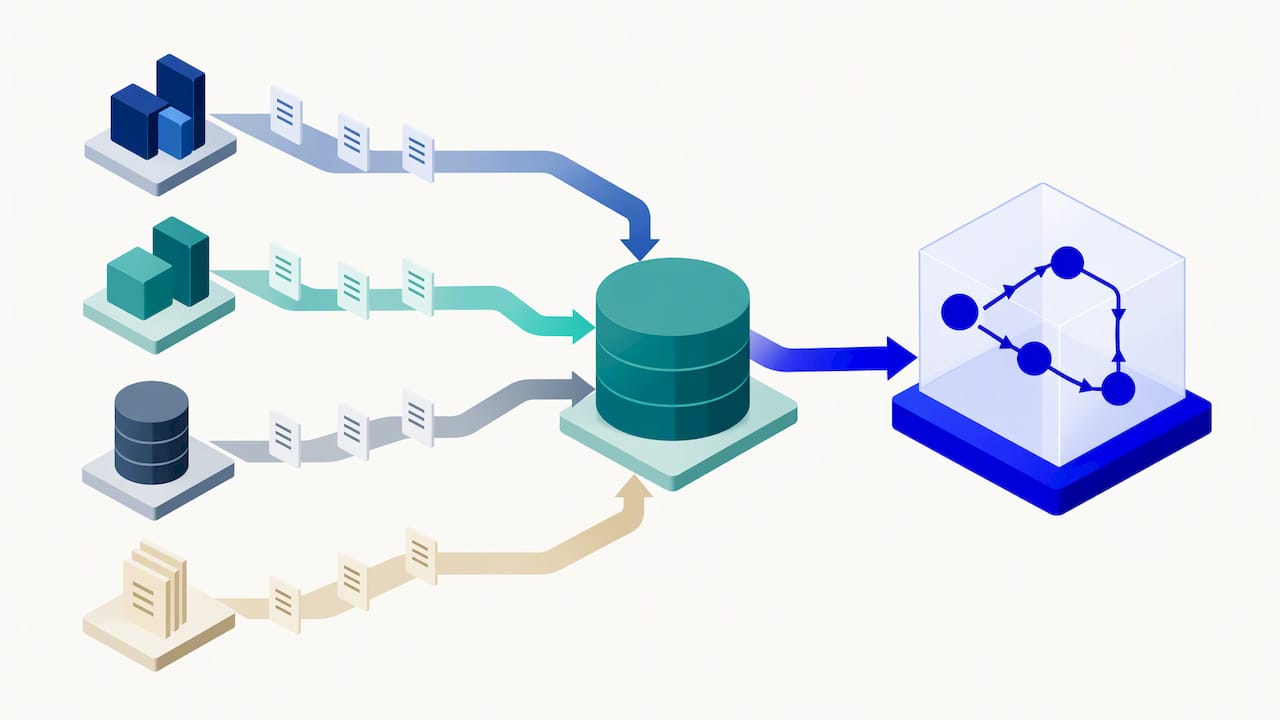
The capability is part of Power Automate, and it reads data from Dataverse or other sources through data flows. Dynamics 365 apps store their transactions in or alongside Dataverse, which is why the pairing is natural.
The warehouse template: a worked example
The clearest Dynamics 365 example is the warehouse material movement analysis template for Supply Chain Management. Its design shows how to think about event logs in general:
- Each closed warehouse work record is a case.
- Each pick or put work line is an event.
- The activity can be a warehouse location, a location profile or a zone.
That mapping turns a forklift route into a process map. You can see which zones create waiting time, where goods are moved twice, and which work templates produce the longest paths.
The documented prerequisites are Supply Chain Management version 10.0.35 or later, a linked Dataverse environment and suitable warehouse and system roles. Microsoft recommends loading less than 25 months of data and keeping the process under 4 million events. The initial deployment loads 200 cases so you reach the visualization quickly, and analysis is exposed through both Power BI and Power Automate Process Mining.
Those limits are a hint about method. A distribution centre in Jebel Ali with years of high-volume picking history should not load everything. Pick one site, one recent window and one question.
Other Dynamics 365 processes
For processes without a template, you build the event log yourself. Microsoft’s data preparation guidance says each record needs three things: a case ID, an activity name and a timestamp. Activity logs may carry start and end timestamps. Resource, organizational, case-level and financial attributes are optional, but they enable filtering, root-cause analysis and cost views.
In practice, you define the process grain first. Common choices in Dynamics 365:
| Process | Case (grain) | Typical events |
|---|---|---|
| Procure to pay | Purchase order | Requisition created, approved, PO confirmed, goods received, invoice posted, payment |
| Order to cash | Sales order | Quote, order confirmed, picked, shipped, invoiced, paid |
| Warehouse | Warehouse work | Pick line, put line (Microsoft template) |
| Service | Service case | Created, assigned, escalated, resolved, closed |
Then you map status changes and transactions to ordered events. A map built on inconsistent case IDs or sloppy timestamps will show variants that do not exist, which is worse than having no map.
Licensing: check before you scale
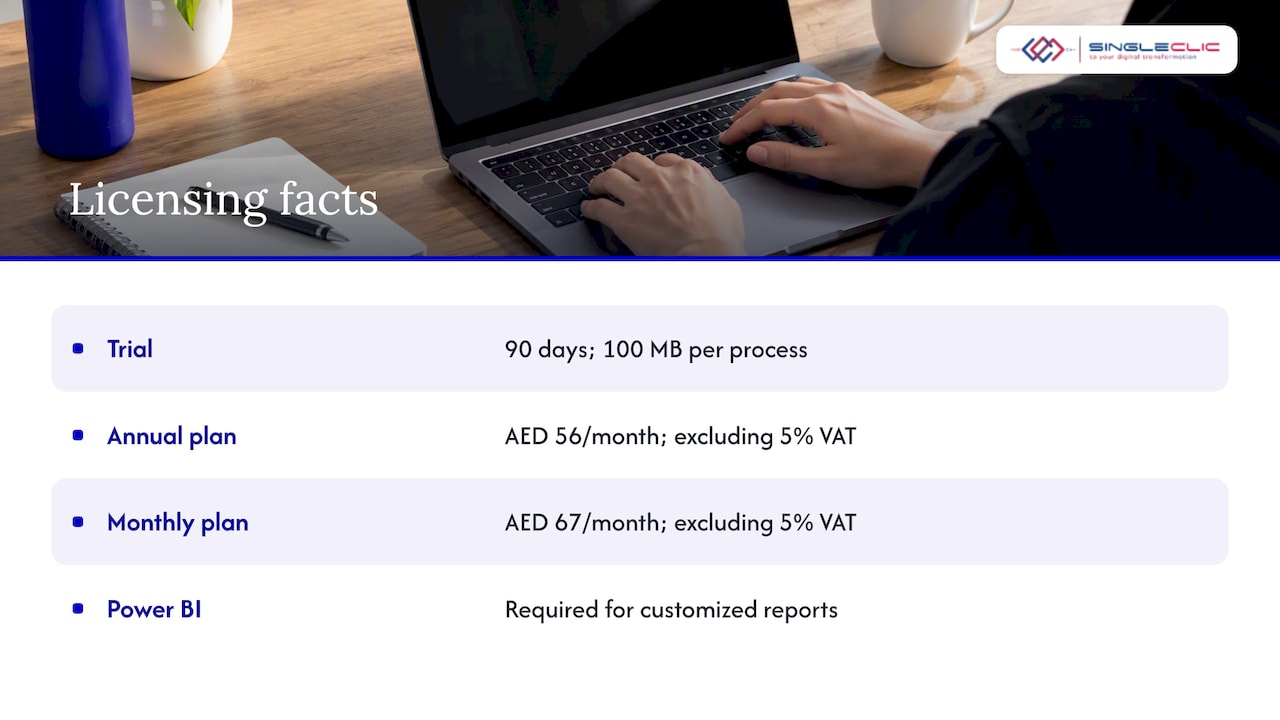
This is the part demonstrations skip. Process mining is licensed as part of Power Automate. Microsoft lists a 90-day trial with limited capacity of 100 MB per process, and paid licenses beyond that. A Power BI license is required if you customize Power BI reports.
For UAE buyers, one telecom marketplace listing shows how channel pricing looks. The e& UAE listing published Power Automate per-user pricing of AED 56 per month on an annual plan and AED 67 per month on a monthly plan, excluding 5% VAT, and says the per-user plan includes process mining and Process Advisor. Treat these as one channel’s published figures. Terms vary by tenant, region and contract, so confirm with your Microsoft licensing partner.
The Dynamics 365 question is subtler. Under managed environment licensing, qualifying Dynamics 365 Enterprise licenses (including Finance, Supply Chain Management, Project Operations, Human Resources, Sales Enterprise and Customer Service Enterprise) carry some entitlements. But rights depend on how the app or flow is used, and capabilities included with Dynamics 365 licenses must stay within the context of the licensed application.
So a licensing review belongs before production, particularly when the analysis spans multiple apps, Dataverse, Power BI, premium connectors or non-Dynamics systems. Involve IT architecture, procurement, security and the business owner, not only the process analyst.
A six-step pilot plan
This is the sequence we use with clients, built on Microsoft’s documented approach.
- Choose one process with a measurable pain. Late supplier payments, slow approvals, repeated warehouse moves, long case resolution. Name the KPI up front.
- Confirm prerequisites. Dynamics 365 version, linked Dataverse environment, user roles and licenses.
- Define the case, activities and history window. Select the legal entity and a recent period. Keep it well inside Microsoft’s volume guidance.
- Validate the event data. Check for missing timestamps, duplicated case IDs, and statuses that were changed in bulk rather than step by step.
- Analyze. Look at variants, waiting time between steps, rework loops and exceptions. Compare the real flow against the policy flow.
- Implement and monitor. Redesign the workflow, fix configuration or master data, automate the repetitive steps, and keep the KPI view refreshing.
For steps 3 and 4, the governance point matters. In regulated UAE and Saudi organizations, involve security, data governance and process owners before exporting ERP event data. Event logs often contain user names and transaction details, and some entities will require them to stay within a defined environment.
Reading the results: what to look for
A first map is usually messy. Three questions cut through it:
- Which variants account for most cases? If 80% follow three paths and the other 20% follow 200, the long tail is where exceptions and workarounds live.
- Where is the waiting time? Time between events is often larger than time spent in them. Approval queues are the usual culprit.
- Where do cases loop back? Rework is a signal of bad master data, unclear rules or a form that lets incomplete data through. Our guide on fixing master data first in Dynamics 365 Supply Chain covers the upstream causes.
When the fix is a slow or inconsistent approval path, see our walkthrough of Dynamics 365 approval workflows for MENA administrators, including the on-premise option.
Process mining, workflow automation and BPM: how they fit
Readers often ask about process monitoring in BPM. The distinction is simple:
| Capability | Question it answers | Output |
|---|---|---|
| Process mining | What actually happened? | Maps, variants, bottlenecks from past event data |
| Business process management (BPM) | How should work run, and who owns it? | Modeled, executable workflows with live monitoring |
| Workflow automation | Can the system do this step itself? | Approvals, routing and tasks run without manual hand-offs |
Microsoft states that process mining does not replace workflow automation or ERP configuration. The three work as a loop: mine to find the problem, model and automate the better process, monitor the KPIs, and mine again to confirm the change held. Our piece on how to analyze business processes for scalable automation covers the analysis side, and the business process automation guide for C-level leaders covers the decision side.
What about Odoo?
If you run Odoo, the principle is the same: any system of record that stores a case ID, an activity and a timestamp can feed a process mining tool. The difference is the extraction work. With Dynamics 365 there is a documented Microsoft path through Dataverse and, for warehouse, a ready template. With Odoo you plan the extraction and the data model yourself, or use a specialist process intelligence tool. Whichever ERP you choose, the same event-log discipline applies. For the platform comparison, see how Microsoft Dynamics 365 and Odoo accelerate enterprise process transformation.
Our perspective
We implement Dynamics 365, Odoo and IBM BAW for organizations in the UAE, Saudi Arabia and Egypt, and the same pattern appears in most projects. Teams invest heavily in configuring the ERP, then discover that the process people use differs from the process they designed. Approvals are bypassed by email, statuses are updated in batches at month-end, and exceptions become the normal path.
Process mining is the cheapest way we know to replace opinion with evidence. But we are careful about three things. First, data quality: if case IDs and timestamps are unreliable, fix that before analysis. Second, scope: one process, one entity, one question. Third, follow-through: every finding needs an owner and a redesigned workflow, otherwise the map becomes a slide that nobody acts on.
This is also where our low-code platform Cortex fits. Once mining shows where a process breaks, Cortex lets teams redesign approvals and workflows in Arabic or English, connect them to ERP, CRM and legacy systems, and change them at runtime without downtime. For banks and government bodies, it can be deployed on-premise.
Process mining tells you where the process leaks. The real work is closing the leak with a workflow people actually follow, and then proving it with the same data.
— Tamer Badr
How Singleclic helps
We support the full path from diagnosis to a running, monitored process:
- Dynamics 365 implementation, integration and consultancy: readiness checks on versions, Dataverse environments and roles, and event-log design for finance, supply chain and service processes. See our Dynamics 365 services.
- Business process automation and BPM: redesigning the process the data exposes, using IBM BAW or Cortex. Our business process automation services cover the build and the monitoring.
- Data analytics and Power BI: KPI views that leadership can read. Compare approaches in Power BI for executive decision-making.
- Low-code delivery: faster rework of approvals and forms, as described in enterprise modernization with low-code.
We do not publish prices for these services. Scope depends on the process, the number of entities and the systems involved, so we start with a short assessment.
Common mistakes
- Mining everything at once. Microsoft’s own template limits exist for performance. Start narrow.
- Treating the license as a checkbox. Entitlement depends on usage context. Review it early.
- Ignoring the human side. A deviation may be a workaround for a real constraint. Ask the process owner before declaring it a violation.
- Stopping at discovery. Without redesign, ownership and KPI monitoring, the next quarter looks the same.
- Skipping governance. Agree what data can leave the ERP and where it is processed.
SEO details
- SEO title: Process mining in Dynamics 365: a practical guide for UAE teams
- Slug: process-mining-dynamics-365
- Keyword: process mining dynamics 365
- Secondary keywords: process mining Odoo, process monitoring BPM, Power Automate process mining, Dynamics 365 supply chain analytics
- Pillar cluster: Business process automation and BPM, with ERP/CRM automation and Cortex low-code as supporting clusters
- Use cases: warehouse material movement, procure to pay, order to cash, service case handling, approval bottlenecks
FAQ
What is process mining in Dynamics 365?
It is the analysis of event data from Dynamics 365 to show how a process really runs. Microsoft delivers it through Power Automate Process Mining, using a case ID, activity and timestamp for each event. The output is a map of variants, delays and rework you can measure.
Does Dynamics 365 include process mining out of the box?
Not as a standalone feature of the ERP. Process mining is licensed as part of Power Automate, and Supply Chain Management offers a warehouse template that connects to it. Whether your Dynamics 365 license covers a given use depends on the usage context, so get a licensing review first.
What data do I need to start?
At minimum, a case ID, an activity name and a timestamp for every event. Resource, organization and financial attributes are optional but improve root-cause and cost analysis. Define the process grain first, such as purchase order or warehouse work, then map status changes to events.
How is process mining different from process monitoring in BPM?
Mining analyzes past event data to discover how work ran. BPM monitoring tracks live, modeled processes against targets. Used together, mining shows what to redesign and BPM monitoring confirms the redesigned process performs.
Can I do process mining if I use Odoo?
Yes, provided your Odoo data can supply a case ID, activity and timestamp for the process you study. Expect to plan the extraction yourself or use a dedicated process intelligence tool. Our team can scope that alongside the ERP review.
Talk to us about a pilot
If you want to find out where one of your processes is losing time, we can scope a focused pilot with you: one process, one entity, one KPI. Contact Singleclic to book an assessment.
Sources
- Overview of process mining in Power Automate, Microsoft Learn
- Analyze warehouse material movement through process mining, Microsoft Learn
- Prepare processes and data, Microsoft Learn
- Overview of process mining and task mining, Microsoft Learn
- Licensing requirements for managed environments, Microsoft Learn
- Power Automate listing, e& UAE marketplace