Enterprise single sign-on for Odoo means your staff sign in to Odoo with the same corporate identity they use for email and every other business system, and IT controls access from one directory. Odoo supports this through OAuth 2.0 sign-in, OpenID Connect through a community module, and SAML or LDAP through add-ons or custom work. The right choice depends on your identity provider, your hosting model and how strictly you must prove who had access to what.
This guide is for CIOs, CTOs and IT managers in the UAE and Saudi Arabia who run Odoo, or are about to. It covers the protocols, a realistic rollout plan, the provisioning gap that most SSO projects miss, and the costs and compliance questions that come up in board meetings.
TL;DR
- Enterprise single sign-on for Odoo is built on OAuth 2.0, OpenID Connect or SAML, connected to Microsoft Entra ID, Google Workspace, Keycloak or another identity provider.
- SSO controls the login. It does not create or remove users. For offboarding you also need SCIM provisioning or a scripted equivalent.
- Custom modules and external API access need the Odoo Enterprise Custom plan, so budget for licensing before you design the integration.
- In regulated UAE sectors such as healthcare, authentication against a central identity system is already written into policy.
- Treat SSO as a security project with an owner, a test plan and a break-glass account, not as a configuration checkbox.
Table of Contents
- Article details
- What enterprise single sign-on means for an Odoo deployment
- The protocols: OAuth 2.0, OpenID Connect, SAML and LDAP
- Setting up Microsoft Entra ID or Google sign-in
- Login is not provisioning: why SCIM matters
- Licensing and cost: what the plan has to include
- UAE compliance: what regulators expect from authentication
- Use cases by role and sector
- A rollout plan that avoids lockouts
- Common mistakes
- How Singleclic helps
- Our perspective: identity is a process, not a plugin
- Where to start
- FAQ
- Sources
Article details
- SEO title: Enterprise single sign-on for Odoo: a UAE guide
- Slug: enterprise-single-sign-on-odoo
- Primary keyword: enterprise single sign-on odoo
- Secondary keywords: Odoo SSO, Odoo SAML, Odoo OpenID Connect, Odoo Microsoft Entra ID login, Odoo SCIM provisioning
- Pillar cluster: Odoo ERP and CRM, system integration and security
What enterprise single sign-on means for an Odoo deployment
Single sign-on lets a user authenticate once with a central identity provider (IdP). Every connected application, Odoo included, trusts that identity instead of keeping its own password. The “enterprise” part is about control: the IdP enforces your password policy, multi-factor authentication, conditional access rules and session lifetime, and it gives auditors one place to look.
Without it, Odoo keeps a separate password store. That creates three problems:
- Staff reuse weak passwords for yet another system.
- Leavers keep working credentials until someone remembers to disable the Odoo account.
- Security teams cannot enforce MFA consistently, because Odoo sits outside the identity policy.
A central identity also helps with the other half of the user base. Procurement and supplier portals, for example, mix internal staff, who can be managed through corporate identity and SSO, with external users who cannot. JAGGAER’s analysis of procurement platforms makes that distinction, and it applies equally to Odoo portals for customers, vendors and contractors. Plan the staff and external populations separately.
The protocols: OAuth 2.0, OpenID Connect, SAML and LDAP
Most failed SSO projects start with the wrong protocol for the identity provider. This is how the options compare for Odoo.
| Option | Best for | Typical identity provider | Watch out for |
|---|---|---|---|
| OAuth 2.0 sign-in (standard Odoo feature) | Fast rollout for internal users | Microsoft Entra ID, Google Workspace | Claims mapping and the user matching rule (email versus a stable ID) |
| OpenID Connect | Cleaner, standards-based login with a modern IdP | Keycloak, Entra ID, Okta-type services | Needs a community or third-party module; use the authorization code flow |
| SAML 2.0 | Organizations whose IdP and security policy are SAML-first | ADFS, Entra ID, Ping-type services | Usually an add-on or custom development, certificate rotation |
| LDAP | On-premise Active Directory with no cloud IdP | Active Directory | Passwords are still checked by Odoo against the directory, so no MFA at the IdP |
Two points deserve emphasis.
First, the community Authentication OpenID Connect module supports the authorization code flow and the implicit flow, and its own documentation notes that the implicit flow is not recommended because it exposes access tokens to the browser. Choose the authorization code flow.
Second, LDAP is not true single sign-on. Users type a directory password into the Odoo login page, so you inherit a phishing surface and cannot apply IdP-level MFA. If your goal is a security uplift, move to OAuth, OpenID Connect or SAML.
Setting up Microsoft Entra ID or Google sign-in
For most UAE enterprises on Microsoft 365, Entra ID is the natural identity provider. The pattern for the standard OAuth route is the same across providers:
- Register the application in your IdP and set the redirect URI to your Odoo base URL plus the OAuth sign-in path.
- Create the client secret and note the tenant, client ID and endpoints.
- Enable OAuth authentication in Odoo settings and create the provider record with the authorization URL, validation URL and scope.
- Map the user by a stable identifier. Matching by email alone is fragile when people change names or aliases.
- Test with a pilot group and keep an internal admin login with a password as a break-glass account, stored in your privileged access vault.
- Enforce the policy in the IdP: MFA, device compliance, location rules.
The errors teams most often report are a mismatched redirect URI, a missing system parameter for the authorization header, wrong token versions, and an “access denied” message when the signed-in account does not exist in Odoo yet. That last one is not a bug. It is the provisioning gap, covered below.
On multi-company databases, check that the identity maps to the right companies and groups after the first login. If you run several legal entities in one Odoo database, our guide to a production-safe Odoo multi-company setup explains the access-rights side that SSO does not solve for you.
Login is not provisioning: why SCIM matters
SSO answers one question: is this person who they claim to be? It does not decide whether that person should still have an Odoo account, which groups they belong in, or which company they can see.
That is the job of SCIM, the System for Cross-domain Identity Management. As the miniOrange description of Odoo SCIM provisioning explains, SCIM automates creating, updating and deleting Odoo user accounts when something changes in the central directory. This is what makes offboarding reliable at scale: the day HR disables an employee, the Odoo account disappears with it.
If you do not use SCIM, you have two alternatives:
- Just-in-time creation at first login. Simple, but it never removes anyone, and it grants default rights only.
- Scheduled sync scripts built on the Odoo external API, driven by group membership in the directory. Flexible, but you own the code. Our guide to stable Odoo API integrations covers the architecture choices, and securing the credentials those scripts use deserves the same care as the login itself. A practical read on securing API keys in integrations covers rotation and scoping that apply directly here.
Whichever you pick, make group-to-role mapping explicit. A finance controller and a warehouse clerk should arrive in Odoo with different rights because of directory group membership, not because someone clicked through a form.
Licensing and cost: what the plan has to include
A frequent surprise is that the plan decides what you can build. Custom modules, and therefore most third-party SSO and SCIM add-ons, require a deployment where you can install them. External API access, which a provisioning script depends on, also sits with the higher plan.
According to OEC.sh’s October 2026 pricing comparison, the Odoo Enterprise Custom plan starts at $49.00 per user per month at the promotional rate or $61.00 per user per month at the standard rate in the US and Americas tier, billed annually. The same page lists the Standard plan without custom modules or Studio. Pricing in the UAE can differ, so confirm the figure with Odoo or your implementation partner before you put it in a business case.
The SSO project itself is usually small next to licensing. The larger budget items are identity design, testing across roles, and change management. For a wider view of how these costs fit together, see our ERP implementation cost guide and the CRM equivalent.
UAE compliance: what regulators expect from authentication
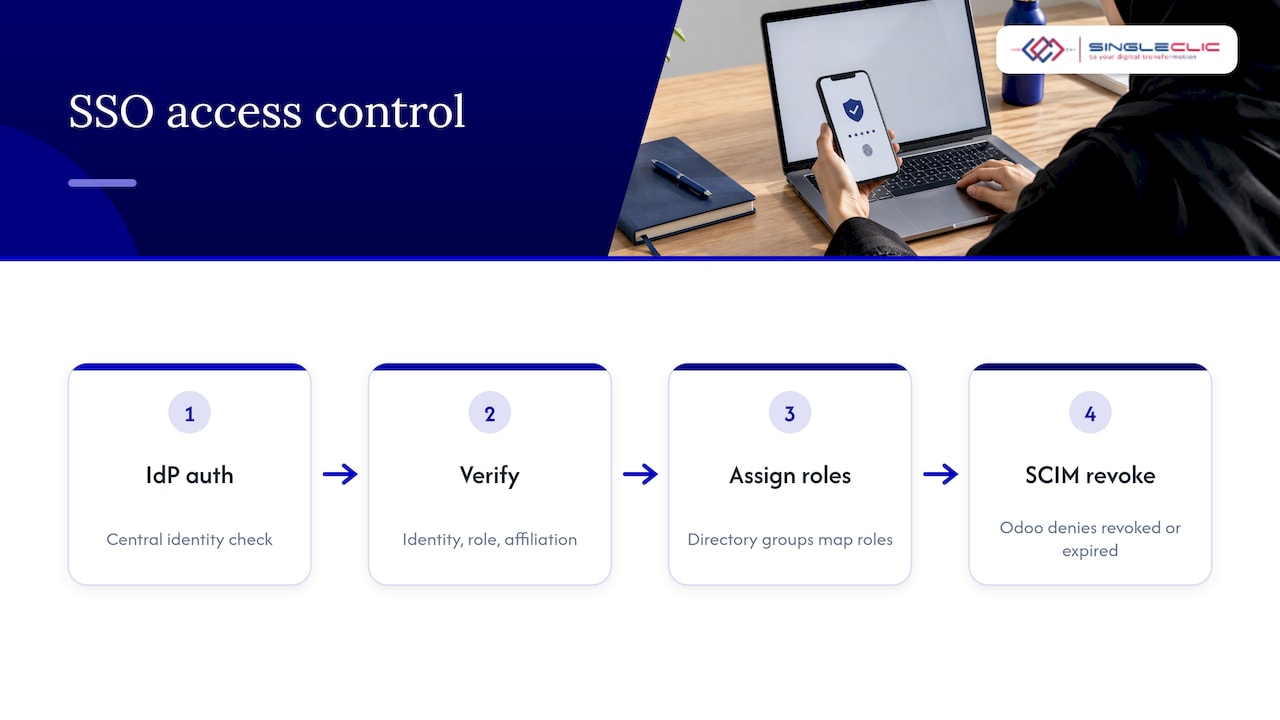
Single sign-on is not a legal requirement for Odoo as such, but regulated UAE sectors expect central, verifiable authentication. The Dubai Health Authority’s NABIDH authentication and authorization policy states that users shall be authenticated against an identity access management system, and that identity, role and affiliation are verified at logon, with access denied if any has been revoked or has expired.
That wording maps well onto an SSO plus SCIM design. The IdP is the identity access management system, role comes from directory groups, and revocation flows to Odoo automatically. If you operate in healthcare, banking or government, read the policy that applies to your licence directly, and ask your compliance team which controls your regulator audits. For a broader view of the Odoo side, see Odoo for regulated industries and our data security practices for IT teams in the UAE and KSA.
A note on UAE-specific identity: if your Odoo portal serves residents and citizens, UAE PASS may be the identity they expect. Our UAE PASS integration guide covers the callback handling developers need to get right.
Use cases by role and sector
- Real estate and construction groups: project managers, site engineers and finance staff sign in with their corporate identity. Subcontractors use a separate external identity with limited portal rights.
- Healthcare providers: clinical administrators and billing teams authenticate against the central directory, so a departed locum loses access the same day.
- Banks and financial institutions: SSO with conditional access and MFA, plus on-premise deployments where data residency rules apply.
- Government entities: integration with an on-premise identity provider, with no dependency on public cloud login services.
- HR and supply chain teams: approvals in Odoo are tied to named, authenticated people, which makes sign-off trails defensible.
- Mobile workforces: field staff using Odoo on phones need the same identity controls. Our enterprise mobility guide for UAE and Saudi leaders explains the device side.
A rollout plan that avoids lockouts
- Inventory identities. List internal users, portal users, service accounts and integrations. Service accounts rarely belong in SSO; they need scoped API keys.
- Clean the directory. Duplicate emails and stale accounts become login failures on day one.
- Choose the protocol using the table above, and decide whether provisioning is SCIM, just-in-time or scripted.
- Build in a staging database copied from production, with the IdP test tenant.
- Pilot with one department, including at least one person with each Odoo role.
- Keep the break-glass account and test it quarterly.
- Cut over by group, and disable local passwords for users only once SSO is proven for them.
- Monitor and review. Check failed logins, token expiry behavior and certificate renewal dates (for SAML) on a calendar owned by a named person.
Common mistakes
- Matching users by display name or a changeable email alias.
- Leaving local passwords active, so SSO becomes optional in practice.
- Forgetting portal users, who often outnumber staff.
- Running the implicit flow because a tutorial did.
- Treating SSO as the end of access control, when role design inside Odoo still decides what each person can do.
How Singleclic helps
We are an Odoo Silver Partner and a Microsoft Dynamics 365 integrator, with consultants across the UAE, Saudi Arabia and Egypt. For SSO work, that means we can look at the whole picture instead of one login screen:
- Odoo implementation and customization, including the module and plan decisions SSO depends on. See our overview of Odoo as a modular ERP and CRM and how we approach integrated, data-driven Odoo operations.
- System integration between Odoo, your directory, HR systems and other applications, so identity changes flow through.
- Workflow and approvals tied to authenticated roles, built on our process automation practice.
- Mixed estates, where Odoo sits next to Dynamics 365 and both need the same identity policy.
Our perspective: identity is a process, not a plugin
We see the same pattern in enterprise projects. The login works in the first week, and then the real questions arrive: who approves a new joiner’s access, who removes it, what happens to a contractor whose sponsor leaves, and how do you prove it to an auditor?
Those are workflow questions. Our view is that SSO should be designed together with the joiner, mover and leaver process, with approvals recorded and the directory as the single source of truth. That is why we pair identity work with business process automation and, where an organization needs Arabic interfaces and on-premise control, with Cortex, our low-code and BPM platform that connects approvals, ERP, CRM, data, legacy systems and workflows.
We would also say plainly: do not start with the tool. Start with the list of roles, the regulator’s expectations and the offboarding rule. The protocol choice follows from those in an afternoon.
Access control that depends on someone remembering to switch off an account is not a control. Put the leaver process in the workflow and let the directory drive Odoo.
— Tamer Badr
Where to start
If you are planning SSO for Odoo, or you run Odoo beside Dynamics 365 and want one identity policy across both, our team can scope it with you. Explore our ERP, CRM and automation services or talk to us about Cortex for process-driven access workflows on-premise. We do not publish prices for these services, so we scope them against your user count, identity provider and sector requirements.
FAQ
What does enterprise SSO mean?
It means employees authenticate once through a central identity provider, and every approved business application trusts that login. IT then enforces MFA, session rules and access revocation in one place. For Odoo, this replaces separate passwords with your corporate identity.
Does Odoo support SAML or only OAuth?
Odoo ships with OAuth 2.0 sign-in, which works with providers such as Microsoft Entra ID and Google. OpenID Connect is available through a community module, and SAML generally comes through add-ons or custom development. Pick the protocol your identity provider and security policy favor.
Do I need SCIM as well as SSO?
If you have more than a few dozen users, or a regulator that audits leaver controls, yes, or an equivalent scripted process. SSO only handles the login. SCIM creates, updates and removes Odoo accounts when the directory changes.
How much does Odoo Enterprise cost per year?
OEC.sh lists the Custom plan at $49.00 per user per month at a promotional rate or $61.00 at the standard rate for the US tier, billed annually. That is roughly $588 to $732 per user per year, before implementation. Confirm UAE pricing with Odoo or your partner.
Is Odoo open source?
Odoo has a Community edition that is open source and an Enterprise edition with additional features and support. Many SSO modules, such as the OpenID Connect module from the Odoo Community Association, are community-maintained, so review their maintenance status before production use.
Sources
- OEC.sh: Odoo pricing in the United States
- JAGGAER: supplier network security and MFA in procurement
- miniOrange: Odoo SCIM user provisioning
- Odoo Community Association: Authentication OpenID Connect
- Dubai Health Authority: NABIDH authentication and authorization policy
- Demivolt: securing API keys for integrations