Dynamics 365 Supply Chain Management is Microsoft’s cloud ERP module for planning, warehousing, procurement, and manufacturing, built to give enterprises real-time inventory visibility and AI-driven forecasting. It suits multi-site manufacturers, distributors, and regulated industries carrying complex compliance or traceability requirements. Companies that adopt it typically see fewer stockouts, shorter planning cycles, and tighter coordination between warehouse floor and finance office.
TL;DR:
- Ensuring master data accuracy, especially inventory dimensions and reservation hierarchies, is critical before activating advanced WMS features to prevent costly failures.
- Connecting D365 SCM modules effectively requires a phased approach, starting with inventory management stabilization and data cleanup to support AI-driven forecasting and planning.
- Rapid ROI from demand forecasting and replenishment depends on clean historical data, as AI models like Planning Optimization recalibrate stock levels dynamically based on actual patterns.
- Third-party logistics integration with D365 relies on real-time data synchronization to avoid phantom stock discrepancies and ensure accurate inventory visibility.
- The success of AI adoption hinges on thorough data governance and readiness, avoiding overinvestment in features like Copilot before foundational data quality is established.
Table of Contents
- Dynamics 365 supply chain modules that matter most
- What d365 supply chain planning delivers in measurable results
- Rolling out d365 warehouse management without the common failures
- D365 supply chain licensing and release timing
- How Singleclic implements D365 supply chain projects across MENA
- Supply chain optimization techniques specific to Dynamics 365
- Integration with third-party logistics (3PL) providers
- Compliance and regulatory features in supply chain
- Case studies or industry-specific use cases
- Key Microsoft documentation, release plan, and training modules
- What most buyers get wrong about AI readiness
- Getting your Dynamics 365 supply chain project right from the start
- Sources
Dynamics 365 supply chain modules that matter most
Every Dynamics 365 supply chain deployment rests on a handful of connected modules, and understanding how they fit together matters more than memorizing feature lists. Microsoft organizes the platform around warehouse management, demand planning, procurement and sourcing, manufacturing, asset management, and the Inventory Visibility service, according to the 2026 release wave 1 documentation. None of these operate in isolation. A stockout in the warehouse feeds directly into demand planning, which in turn triggers a procurement action or a manufacturing order.
Here’s how the core pieces break down for an enterprise buyer evaluating fit:
- Inventory visibility: the Inventory Visibility service runs as a scalable microservice that centralizes on-hand data across channels and exposes REST APIs, so a retailer can show accurate stock counts on an e-commerce site without hammering the transactional database.
- Warehouse management (WMS): location directives, work and wave templates, mobile execution, reservation hierarchies, containerization, and label generation govern how goods move physically. Microsoft’s warehouse management overview documents the full process chain from receiving to shipping.
- Demand and supply planning: D365 demand planning uses AI models and Planning Optimization to generate statistical forecasts, while Copilot planning agents surface exceptions and recommend order adjustments instead of forcing planners to comb through spreadsheets.
- Procurement and supplier collaboration: RFQ automation, a supplier portal, and a Supplier Communication Agent handle routine outreach, freeing category managers to focus on negotiation and risk assessment, a direction Microsoft has invested in heavily according to its product overview.
- Manufacturing and asset management: shop-floor control supports discrete, process, and mixed-mode manufacturing, with predictive maintenance reducing unplanned equipment downtime.
- Transportation management: rate shopping, load planning, and freight settlement connect to carrier systems and third-party logistics networks.
- Product information management: a single source of product attributes, variants, and units of measure keeps catalog data consistent across sales, warehouse, and finance.
The pattern worth noticing: Microsoft keeps layering Copilot into every one of these modules rather than treating AI as a bolt-on feature. That is a deliberate roadmap choice, not marketing language, and it shapes how you should evaluate the platform against anything you are running today.
What d365 supply chain planning delivers in measurable results
Modules only matter if they change outcomes. When D365 SCM connects to Dynamics 365 Finance and Power BI, supply chain data stops living in a separate silo from cash flow and margin analysis, and executives can see the two side by side instead of reconciling spreadsheets after the fact. That single change tends to surface problems weeks earlier than a disconnected system would.
Enterprises that implement the platform well typically report a familiar set of shifts:
- Fewer stockouts and improved fill rates, driven by tighter integration between inventory visibility and demand planning
- Shorter MRP cycles, since Planning Optimization processes large data sets faster than legacy batch jobs
- Lower carrying costs, because planners react to real signals instead of static reorder points
- Reduced planning labor, as Copilot agents flag exceptions instead of requiring manual review of every line
Real-time demand forecasting and replenishment is where the AI investment pays off fastest. A planner reviewing hundreds of SKUs manually cannot catch every anomaly; a Copilot agent surfacing the twenty that actually need attention can. The same logic applies to supplier response times: automated RFQ follow-ups and a supplier portal shrink the back-and-forth that used to eat days off a sourcing cycle.
Advanced WMS produces the clearest return in scenarios with serialized inventory or recall traceability, think pharmaceuticals, food distribution, or medical devices, where a batch number has to be traceable from supplier to shelf within minutes, not days.
Pro Tip: Before you calculate ROI on advanced WMS, run a recall simulation in a sandbox environment. If you can’t trace a lot number end to end in under five minutes, your reservation hierarchy needs work before go-live, not after.
Rolling out d365 warehouse management without the common failures
Enterprises that succeed with Dynamics 365 Supply Chain Management almost always follow a phased sequence rather than a big-bang activation. Partner and implementer experience consistently points to starting narrow and expanding once the foundation holds.
- Stabilize inventory management first. Get basic on-hand accuracy and transaction flows correct before layering on anything advanced.
- Clean up master data. Site, warehouse, location, and license plate dimensions, along with FEFO (first-expired-first-out) settings, need to be correct before you touch warehouse execution. Misconfigured reservation hierarchies are one of the most common root causes of WMS failures, and they are painful to fix once you’re live.
- Activate advanced WMS. Location directives, wave templates, and mobile execution go live only after the data underneath them is trustworthy.
- Turn on planning and Copilot agents. AI-driven forecasting works best against clean historical data, so sequence it last, not first.
Integration strategy deserves equal attention. Whether you’re connecting D365 Finance, Power Platform, an external ERP, or running warehouse management only mode against a third-party system, you need a dev, test, and production environment strategy that lets you validate changes before they touch live inventory.
Change management is not optional overhead. Mobile device policy, warehouse worker training, and clear governance over who can alter reservation settings all determine whether go-live sticks or unravels in week two.
Pro Tip: The single most common pitfall is treating master data cleanup as a technical afterthought. Assign a business owner to inventory dimensions before the project kicks off, not after the first failed cycle count.
D365 supply chain licensing and release timing
Microsoft licenses Dynamics 365 Supply Chain Management in tiers, with premium levels adding capabilities like advanced demand planning and Copilot usage credits. Licensing structures shift periodically, so verify current terms with a Microsoft partner before budgeting rather than relying on last year’s price sheet.
Timing your project against Microsoft’s release cadence matters more than most procurement teams realize. The 2026 release wave brings expanded Copilot and planning capabilities, and Microsoft’s release notes track the 10.x version history that determines when specific features actually become available in your environment.
Before committing to a full rollout:
- Scope a pilot around one warehouse or product line rather than the entire network
- Test configuration changes in a sandbox before promoting to production
- Size environments based on transaction volume, not headcount alone
How Singleclic implements D365 supply chain projects across MENA
Singleclic has spent 10+ years delivering Microsoft Dynamics 365 and Odoo projects, with 70+ consultants supporting 100+ enterprise clients across construction, healthcare, banking, and government sectors in Saudi Arabia, the UAE, and Egypt. Our teams pair D365 SCM with Cortex, Singleclic’s Arabic-enabled low-code platform, plus Power BI and Copilot integrations, to connect approvals, legacy systems, and workflows that off-the-shelf configuration alone cannot reach.
Supply chain optimization techniques specific to Dynamics 365
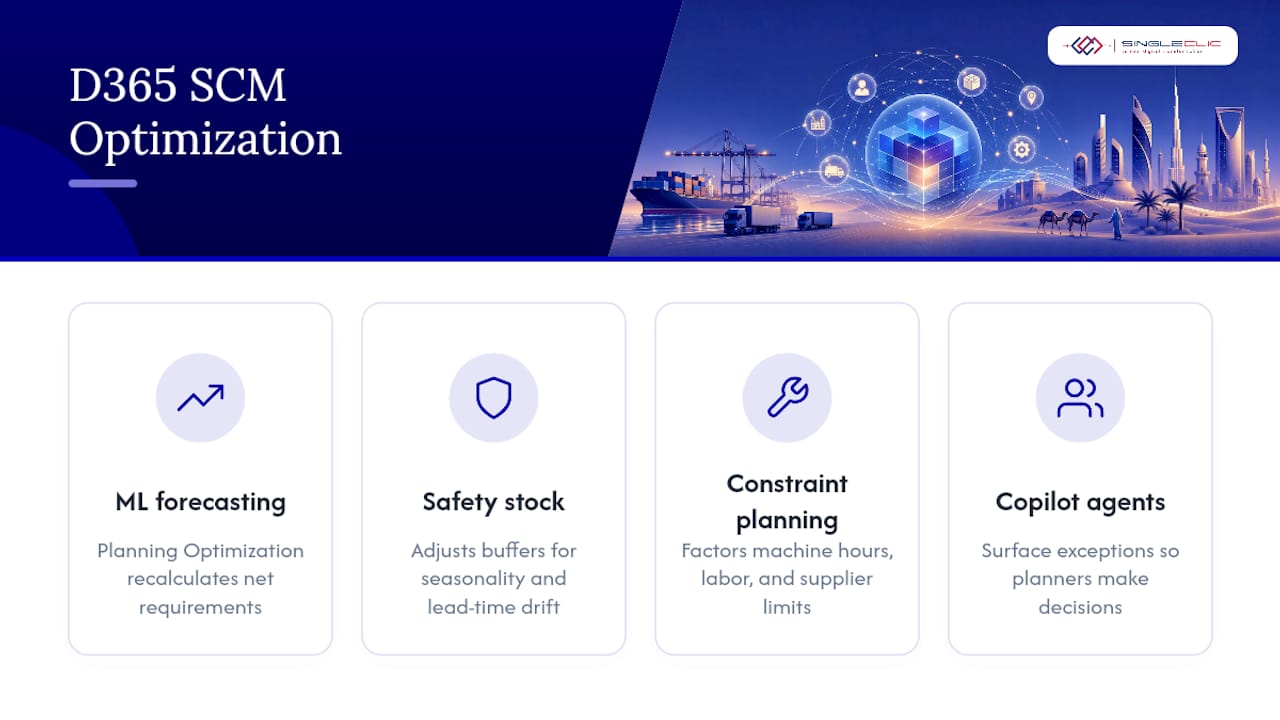
Optimization inside D365 SCM works differently than in legacy MRP systems because it leans on machine learning models trained against your own transaction history, not fixed formulas. Planning Optimization, Microsoft’s in-memory forecasting engine, recalculates net requirements far faster than the batch-based MRP runs that dominate older ERP platforms, which matters when a distributor needs to replan thousands of SKUs overnight rather than over a weekend.
Safety stock calculations benefit the most from this shift. Instead of a static buffer set once a year, the engine adjusts recommendations as seasonality and lead time variability change, catching drift before it becomes a stockout.
Constraint-based planning is the other technique worth understanding. Rather than assuming infinite capacity, D365 SCM can factor in machine hours, warehouse labor, and supplier lead times simultaneously, producing a plan that’s actually executable instead of theoretically optimal. Combine that with Copilot planning agents surfacing exceptions instead of raw data dumps, and planners spend their time on judgment calls rather than data wrangling.
For MENA enterprises running multi-site operations across borders, the practical optimization lever is often simpler: consolidating disparate spreadsheet-based planning into one Dynamics 365 supply chain instance so intercompany transfers and cross-site demand signals stop getting lost in translation between systems.
Integration with third-party logistics (3PL) providers
Most large enterprises don’t run their own trucks, and D365 SCM was built with that reality in mind. Transportation management integrates with carrier and 3PL systems through standard EDI and API connections, letting a shipment booked in D365 trigger a pickup request at a logistics partner without manual re-entry.
The practical challenge sits in data synchronization, not connectivity. A 3PL warehouse tracking its own inventory needs to reconcile against your D365 on-hand figures constantly, and any lag between the two creates the kind of phantom stock discrepancies that erode trust in the numbers. This is exactly the scenario warehouse management only mode addresses when a 3PL runs its own execution system: D365 handles planning and finance while the partner’s warehouse system executes, provided the master-data sync and eventing model between them is built correctly from day one.
Rate shopping across multiple carriers, automated freight settlement, and load consolidation round out the transportation piece. For enterprises shipping across the Gulf region or into multiple MENA markets, the ability to compare carrier rates and transit times inside the same system that’s tracking inventory removes a reconciliation step that used to happen in someone’s inbox.
Compliance and regulatory features in supply chain
Regulated industries, pharmaceuticals, food and beverage, and healthcare distribution in particular, need more than accurate counts. They need a defensible audit trail. D365 SCM supports lot and serial tracking, expiration date management, and FEFO enforcement natively inside the warehouse module, so a batch recall can trace forward and backward through the supply chain without a manual reconstruction project.
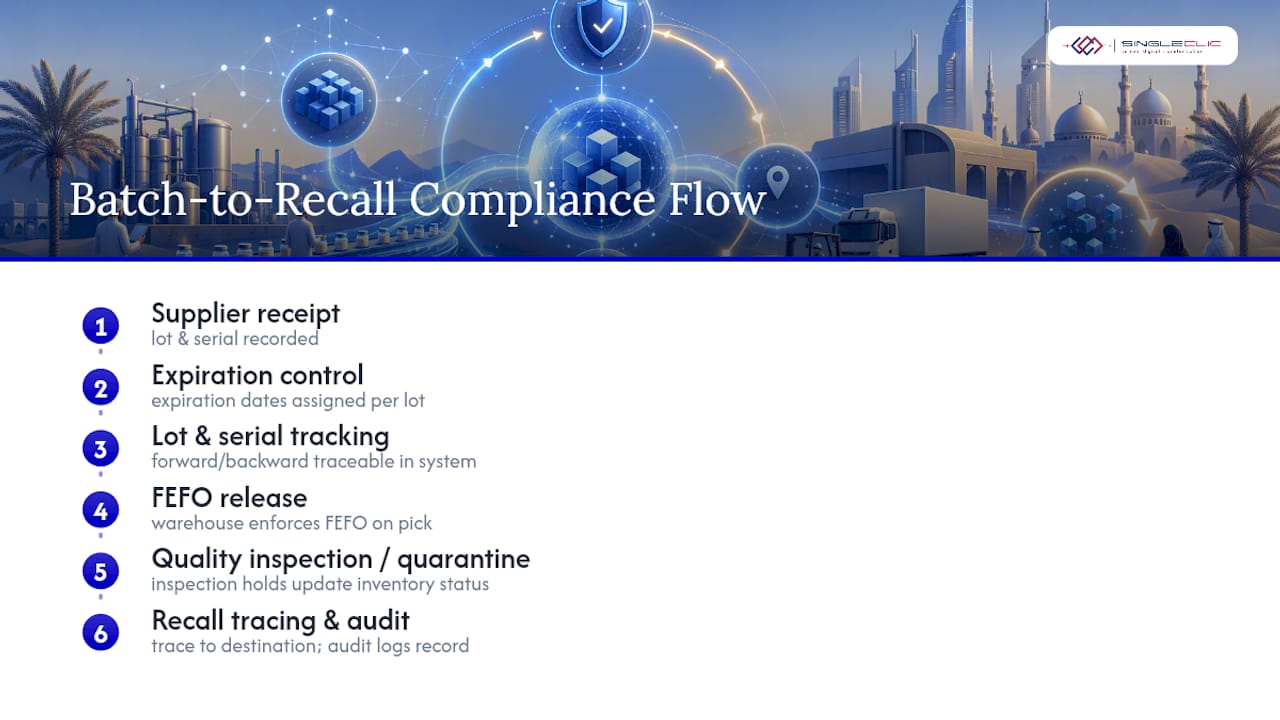
Quality management workflows tie inspection holds directly to inventory status, meaning a lot flagged for quarantine cannot ship accidentally because a warehouse worker didn’t see a sticky note. That link between quality and inventory status is one of the more underappreciated compliance features in the platform, and it’s precisely the kind of control that regulators expect during an audit.
For enterprises operating across UAE and Saudi Arabia, where data residency and industry-specific reporting requirements vary by sector, the underlying architecture supports the kind of granular access control and audit logging that compliance teams need, though specific regulatory obligations should always be confirmed against current government guidance rather than assumed from the software alone.
Case studies or industry-specific use cases
Manufacturing enterprises running mixed-mode production, some lines discrete, others process-based, use D365 SCM’s shop-floor control to manage both without maintaining two separate systems. A single planning engine handling both production types eliminates the reconciliation headaches that come from bolting a process manufacturing add-on onto a discrete-only ERP.
Healthcare distributors and hospital supply networks lean heavily on the Inventory Visibility service to maintain accurate stock counts across multiple facilities, critical when a shortage of a specific medical consumable needs to be spotted and resolved before it affects patient care rather than after.
Construction and real estate firms, sectors Singleclic works in extensively across the region, use the procurement and asset management modules together to track equipment across job sites while managing supplier relationships for materials that fluctuate in price and availability. Retail and distribution businesses running omnichannel operations depend on the same Inventory Visibility APIs to keep online and in-store stock counts synchronized, avoiding the overselling problem that erodes customer trust faster than almost anything else in e-commerce.
Key Microsoft documentation, release plan, and training modules
For deeper technical verification, start with Microsoft’s own resources:
- Dynamics 365 Supply Chain Management product overview
- 2026 release wave 1 plan
- Get started with inventory management training module
What most buyers get wrong about AI readiness
The conventional pitch on Dynamics 365 supply chain treats Copilot as the headline feature, and that framing misleads buyers. AI planning agents are only as good as the data feeding them, and most enterprises underestimate how much master data cleanup stands between where they are and where Copilot can actually add value. I’ve seen the pattern repeat across MENA implementations: leadership gets excited about forecasting AI, then the project stalls on inventory dimensions and reservation hierarchies nobody wanted to prioritize.
The reader’s real first move isn’t picking a licensing tier or reading release notes. It’s auditing whether your site, warehouse, and location data can support a phased WMS rollout without rework. Everything downstream, planning accuracy, Copilot usefulness, transportation efficiency, depends on that foundation holding. Enterprises that skip this step don’t fail immediately; they fail six months in in a way that’s expensive to unwind. Get the boring part right first, and the AI capabilities Microsoft keeps shipping actually deliver on their promise instead of amplifying bad data faster.
— Tamer Badr
Getting your Dynamics 365 supply chain project right from the start
Singleclic implements Dynamics 365 Supply Chain Management for manufacturers, distributors, and regulated enterprises across Saudi Arabia, the UAE, and Egypt, and the advantage isn’t just familiarity with the software. It’s what we add on top: Cortex, our Arabic-enabled low-code platform, connects D365 SCM to legacy systems, approval workflows, and Power BI dashboards that off-the-shelf configuration alone won’t reach, and our teams have already worked through the master-data and phased-rollout pitfalls that trip up first-time implementations.

If you’re evaluating whether your organization is ready for a phased WMS rollout or want a second opinion on your current planning setup, our Dynamics 365 leader’s guide walks through how we scope pilots and sandbox testing before committing to a full deployment. Reach out to Singleclic to schedule an evaluation of your current supply chain setup and see where a phased rollout could start.
Sources
- Overview of Dynamics 365 Supply Chain Management 2026 release wave 1 | Microsoft Learn
- Dynamics 365 Supply Chain Management | Microsoft Dynamics 365
- Warehouse management overview – Supply Chain Management | Dynamics 365 | Microsoft Learn
- Inventory Visibility Add-in overview – Supply Chain Management | Dynamics 365 | Microsoft Learn